Freedom251 › Coding Education Platforms

CodeCombat
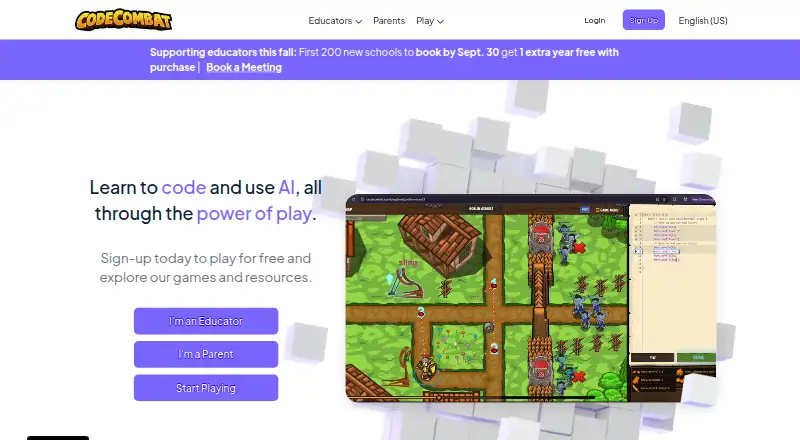
What CodeCombat is
CodeCombat is a web-based learning game where students practice programming by writing typed code as they play. It supports Python and JavaScript and uses project-based learning to cover computer science topics. The FAQ recommends it for students aged 9 and up, and says teachers can use its curriculum without prior computer science experience. Teachers can create classes, invite students, assign course content, and track progress, completion time, and class statistics in the Teacher Dashboard. Students can try the Introduction to Computer Science course without licenses; it takes about 1–3 hours, with no student limit for trying it. Premium adds levels, heroes, pets, bonus gems, game creation and sharing, and tools for building websites and interactive apps. Premium subscribers receive an allocation of 10 AI hints per day, though hint rates may change. CodeCombat lists Premium at $9.99 a month. It also offers customized school and district solutions. The service was founded in 2013 and says more than 20 million players have started their programming journey through CodeCombat and Ozaria.
Who it suits
CodeCombat suits students aged 9 and up who want to learn programming through a game, and teachers looking for a curriculum and classroom progress tools. Schools and districts can seek a customized solution.
What it does well
- Learn by writing typed code in a game.
- Supports Python and JavaScript.
- Teachers can track class progress and completion time.
- Introductory course can be tried without student licenses.
- Premium includes game and website creation tools.
What to know first
- iPads and Android tablets are not supported.
- Best performance calls for a computer with at least 4 GB RAM.
- Premium AI hints are limited to 10 per day.
- Premium is listed at $9.99 a month.
Limits
The free classroom Introduction to Computer Science course takes about 1–3 hours. Premium provides 10 AI hints per day, and iPads and Android tablets are unsupported.
Plans
| Plan | Billed and limits | Price |
|---|---|---|
| CodeCombat Premium | $9.99/month, as reported by a CodeCombat forum user in July 2025 · premium levels · exclusive heroes · pets · game creation · websites and apps · 10 AI hints per day | $9.99 a month |
As codecombat.com lists them, read 5 Oct 2026. The maker's own page has the final word.
Getting started
- Open CodeCombat in a modern browser
- Use a computer with at least 4GB RAM
- Start the Introduction to Computer Science classroom course
- Create a teacher account and class
- Invite students after enrollment
- Assign course content from the Teacher Dashboard
Verdict
CodeCombat combines code-based gameplay with teacher tools and a license-free introductory course. Check the computer requirements and tablet limitations, and consider whether the listed Premium features suit your needs.
Questions
Is CodeCombat free?
Yes. It has a free plan, and classrooms can try the Introduction to Computer Science course without student licenses.
How much is CodeCombat Premium?
CodeCombat Premium is listed at $9.99 a month.
Which programming languages does it teach?
The FAQ lists Python and JavaScript.
What devices support CodeCombat?
It is web-based and runs best on a computer with at least 4GB RAM and a modern browser such as Chrome, Safari, or Firefox. iPads and Android tablets are not currently supported.
What do teachers get?
Teacher accounts can create classes, invite students, monitor progress, view completion time and class statistics, and assign course work.
What does Premium add?
Premium includes additional levels, exclusive heroes, pets, bonus gems, game creation and sharing, website and interactive app tools, and 10 AI hints per day.
Facts from CodeCombat's own pages
- AI hints
- Premium subscribers receive 10 AI hints per day, which can evaluate code and explain how to fix errors without giving the full solution. · codecombat.com, 5 Oct 2026
- Audience
- The FAQ recommends CodeCombat for students aged 9 and up and says teachers can use its curriculum without prior computer science experience. · discourse.codecombat.com, 5 Oct 2026
- Audience and scale
- The about page says more than 20 million players have started their programming journey through CodeCombat and Ozaria. · codecombat.com, 5 Oct 2026
- Classroom trial
- The Introduction to Computer Science course is available without student licenses and takes about 1–3 hours; the FAQ says there is no student limit for trying it. · discourse.codecombat.com, 5 Oct 2026
- Data hosting
- The privacy notice identifies AWS as hosting CodeCombat servers and MongoDB Atlas as hosting encrypted databases in CodeCombat’s AWS virtual private cloud. · codecombat.com, 5 Oct 2026
- Device limits
- The FAQ says CodeCombat does not currently support iPads or Android tablets and recommends computers with at least 4 GB of RAM and a modern browser. · discourse.codecombat.com, 5 Oct 2026
- Founded
- 2013 · codecombat.com, 28 Sept 2026
- Headquarters
- San Francisco, California, United States · codecombat.com, 28 Sept 2026
- Integrations
- The privacy notice lists Clever for automatic rostering and single sign-on, and Ed.link for rostering, single sign-on, and LTI/LMS integration. · codecombat.com, 5 Oct 2026
- Languages
- The FAQ says CodeCombat supports Python and JavaScript. · discourse.codecombat.com, 5 Oct 2026
- Learning approach
- The company says learners use typed code to learn programming. · codecombat.com, 5 Oct 2026
- Mission
- CodeCombat says its mission is to make computer science accessible to every student on Earth. · codecombat.com, 5 Oct 2026
- Premium benefits
- Premium includes extra levels, exclusive heroes, game creation, and tools to build websites and interactive apps. · codecombat.com, 5 Oct 2026
- Premium features
- Premium includes additional levels, exclusive heroes, pets, bonus gems, and game creation and sharing. · codecombat.com, 5 Oct 2026
- School pricing
- CodeCombat says it customizes school and district solutions to the customer’s use case, context, and budget. · discourse.codecombat.com, 5 Oct 2026
- Security
- CodeCombat says it uses SSL, encryption, de-identification, pseudonymization, access controls, regular testing, and minimal data collection and retention. · codecombat.com, 5 Oct 2026
- Student privacy
- CodeCombat says it is compliant with SOPIPA and AB 1584 and describes practices including no targeted advertising to students and deletion of school student data at a school or district’s request. · codecombat.com, 5 Oct 2026
- Support
- Premium includes support to help debug code, and the site lists a support email for questions about student data and privacy. · codecombat.com, 5 Oct 2026
- Tablet support
- The getting started guide says iPads and Android tablets are not currently supported. · files.codecombat.com, 5 Oct 2026
- Teacher dashboard
- The Teacher Dashboard shows student progress, completion time, and class statistics, and lets teachers assign course work. · discourse.codecombat.com, 5 Oct 2026
- Teacher tools
- Teacher accounts can create classes, invite students, monitor progress, and assign course content after students enroll. · files.codecombat.com, 5 Oct 2026
- Technical requirements
- The getting started guide says CodeCombat runs best on a computer with at least 4GB RAM and a modern browser such as Chrome, Safari, or Firefox. · files.codecombat.com, 5 Oct 2026
- What it does
- CodeCombat teaches programming through a game in which learners write code. · codecombat.com, 5 Oct 2026
Where CodeCombat stands on Freedom251
- Coding Education Platforms#4 of 49
- Coding Learning Software#9 of 42
- Educational Games#9 of 31