Freedom251 › Currency Exchange Software

Cobase Bank Connector
What Cobase Bank Connector is
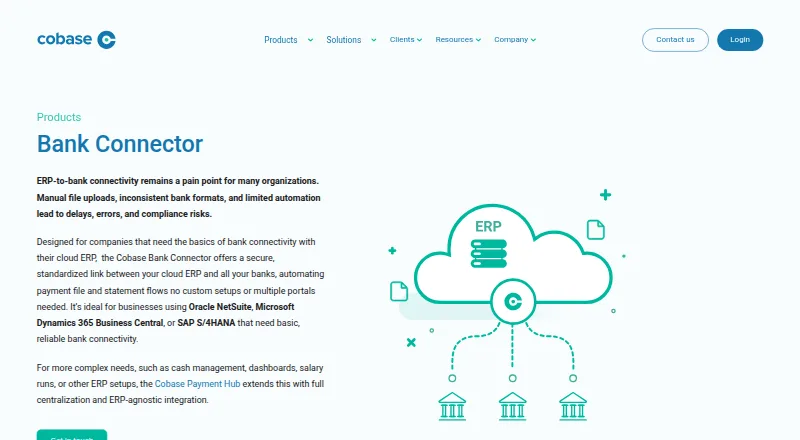
Cobase Bank Connector links a cloud ERP with banks so businesses can handle payment files and bank statements through a standardized connection. It is intended for organizations using Oracle NetSuite, Microsoft Dynamics 365 Business Central, or SAP S/4HANA that need basic bank connectivity. The connector takes payment files from an ERP, checks and converts them to bank requirements, then prepares them for execution. It also brings daily CAMT.053 bank statements into the ERP for reconciliation. Centralized user rights and approvals support payment workflows, with one approval token and a central audit trail. Payment progress, from pending or approved to executed or rejected, is tracked in real time and synchronized to the ERP.
Supported formats include MT101, PAIN.001, MT940, CAMT.053, BAI2, and CSV, among others. Connections can use SWIFT, Host-to-Host SFTP, EBICS, or APIs, and the product supports balances, transactions, statements, payment files, multiple entities, direct bank feeds, ERP integrations, scenario planning, and both data import methods. Cobase describes MFA, role-based access, encryption in transit and at rest, and Azure data centers in the Netherlands and Ireland. Its stated certifications include ISO 27001, SOC 2 Type 2, and ISAE 3402 Type 2. Pricing is available on request and depends on bank connections, account volume, modules, and ERP integrations.
Who it suits
This suits finance teams using NetSuite, Dynamics 365 Business Central, or SAP S/4HANA that need basic bank connectivity and automated payment and statement flows. Businesses seeking cash management, dashboards, salary runs, or support for other ERP setups may need Cobase Payment Hub instead.
What it does well
- Imports daily CAMT.053 statements into an ERP for reconciliation.
- Validates and formats ERP payment files for bank requirements.
- Tracks payment statuses in real time and syncs them to the ERP.
- Supports SWIFT, Host-to-Host SFTP, EBICS, and API connections.
- Centralizes approvals, user rights, and an audit trail.
- Supports multiple entities and direct bank feeds.
What to know first
- There is no free plan.
- Pricing is available only on request.
- The connector is scoped to basic bank connectivity; broader needs go to Payment Hub.
Plans
| Plan | Billed and limits | Price |
|---|---|---|
| Cobase Bank Connector | Pricing depends on bank connections, account volume, modules in use, and ERP integrations. | On request |
As cobase.com lists them, read 28 Sept 2026. The maker's own page has the final word.
Getting started
- Visit the Cobase Bank Connector website.
- Contact Cobase to request pricing based on bank connections, account volume, modules, and ERP integrations.
- Arrange implementation support to configure bank connections, payment templates, and approval workflows.
- Connect the ERP and banks using SWIFT, Host-to-Host SFTP, EBICS, or APIs.
Verdict
Choose Cobase Bank Connector if your business uses one of its named ERPs and needs automated bank connectivity for payment files and statements. It combines ERP synchronization with centralized approvals and payment tracking. Consider Cobase Payment Hub if you need cash management, dashboards, salary runs, or other ERP setups.
Questions
How much does Cobase Bank Connector cost?
Pricing is available on request. It depends on bank connections, account volume, modules in use, and ERP integrations.
Is there a free plan?
No. The product is listed as paid, with pricing on request.
Which ERPs is it suited to?
Cobase describes it as suited to businesses using Oracle NetSuite, Microsoft Dynamics 365 Business Central, or SAP S/4HANA for basic bank connectivity.
Which connection methods and formats does it support?
Connections include SWIFT, Host-to-Host SFTP, EBICS, and APIs. Formats include MT101, PAIN.001, MT940, CAMT.053, BAI2, and CSV, among others.
What does it do with statements and payment statuses?
It imports daily CAMT.053 statements into an ERP for reconciliation. It tracks statuses including pending, approved, executed, and rejected in real time and syncs them to the ERP.
Who makes Cobase Bank Connector?
Cobase identifies itself as a technology provider for banking, payments, and treasury operations, supporting clients in over 90 countries.
Facts from Cobase Bank Connector's own pages
- Approvals and users
- Approvals and user rights are centralized, approvals use a single token, and actions are recorded in a central audit trail. · cobase.com, 28 Sept 2026
- Best fit
- Cobase describes Bank Connector as suited to businesses using Oracle NetSuite, Microsoft Dynamics 365 Business Central, or SAP S/4HANA that need basic bank connectivity. · cobase.com, 28 Sept 2026
- Company
- Cobase identifies itself as a technology provider for banking, payments, and treasury operations and says it supports clients in over 90 countries. · cobase.com, 28 Sept 2026
- File formats
- The product supports format conversion for MT101, PAIN.001, MT940, CAMT.053, BAI2, and CSV, among other formats. · cobase.com, 28 Sept 2026
- Headquarters
- Amsterdam, Netherlands · cobase.com, 28 Sept 2026
- Implementation support
- Cobase says its professional implementation support helps configure bank connections, payment templates, and approval workflows. · cobase.com, 28 Sept 2026
- Payment files
- It receives payment files from an ERP, validates and formats them for bank requirements, and prepares them for execution. · cobase.com, 28 Sept 2026
- Payment tracking
- Payment statuses including pending, approved, executed, and rejected are tracked in real time and synced back to the ERP. · cobase.com, 28 Sept 2026
- Product scope
- Cobase says more complex needs such as cash management, dashboards, salary runs, or other ERP setups are addressed by its Payment Hub. · cobase.com, 28 Sept 2026
- Purpose
- Bank Connector provides a secure, standardized link between a cloud ERP and banks to automate payment file and bank statement flows. · cobase.com, 28 Sept 2026
- Security certifications
- Cobase states it is externally certified under ISO 27001, SOC 2 Type 2, and ISAE 3402 Type 2 standards. · cobase.com, 28 Sept 2026
- Security controls
- Cobase describes MFA, role-based access control, encryption at rest and in transit, and EU-based Microsoft Azure data centers in the Netherlands and Ireland. · cobase.com, 28 Sept 2026
- Statements
- It automates daily bank statement imports into an ERP in CAMT.053 format for reconciliation. · cobase.com, 28 Sept 2026
Where Cobase Bank Connector stands on Freedom251
- Currency Exchange Software#1 of 9
- Payment Hub Software#4 of 23
- Bank Connectivity Software#24 of 71