Freedom251 › Local Kubernetes Tools

Clusterfudge
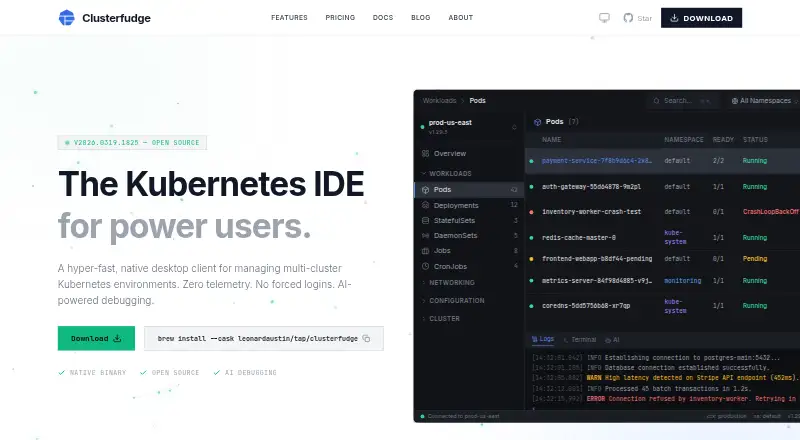
What Clusterfudge is
Clusterfudge is a native desktop client for managing multiple Kubernetes clusters from one app. It connects to several kubeconfig contexts at once and detects EKS, GKE, AKS, K3s, and OpenShift. The app supports more than 27 Kubernetes resource types, including custom resources, with real-time watch updates. Its tools include pod checks against Kubernetes Pod Security Standards, with remediation advice, plus multi-tab terminal sessions and searchable log streaming with severity highlighting. Helm lifecycle management uses an embedded Go SDK, so a separate Helm CLI is not required. For debugging, it can run Claude Code, Gemini CLI, or ChatGPT Codex locally; it redacts secrets, passwords, tokens, and API keys before sending context to the chosen AI tool. The maker says the app has no telemetry, analytics, or tracking, and makes no external network calls unless requested. Clusterfudge is open source under the MIT license and free forever, with no account required. It runs on macOS 12+ and Linux.
Who it suits
Clusterfudge suits people managing several Kubernetes environments who want resource management, terminal and log tools, and local AI debugging in one desktop app. Linux users need libgtk-3 and libwebkit2gtk-4.1.
What it does well
- Connects to multiple kubeconfig contexts simultaneously.
- Supports 27+ resource types and custom resources.
- Runs selected AI debugging CLI locally.
- Includes an embedded Helm SDK.
- Free forever under the MIT license.
What to know first
- Runs only on macOS and Linux.
- Linux requires libgtk-3 and libwebkit2gtk-4.1.
- Requires 4 GB RAM and 50 MB disk space.
Limits
The free Clusterfudge plan is free forever under the MIT License and lists all 27+ resource types, AI debugging, embedded Helm SDK, security scanner, multi-cluster support, terminal and logs, and zero telemetry. Its platform and system requirements include macOS 12+ or Linux, a 64-bit x86_64 or ARM64 processor, 4 GB RAM, and 50 MB disk space; Linux additionally requires libgtk-3 and libwebkit2gtk-4.1.
Plans
| Plan | Billed and limits | Price |
|---|---|---|
| Clusterfudge | Free forever — MIT License · All 27+ resource types · AI-powered debugging · Embedded Helm SDK · Security scanner · Multi-cluster support · Integrated terminal & logs · Zero telemetry · No account required | Free |
As clusterfudge.dev lists them, read 8 Oct 2026. The maker's own page has the final word.
Getting started
- Download Clusterfudge for macOS 12+ or Linux from its website.
- Check that the computer has a 64-bit x86_64 or ARM64 processor, 4 GB RAM, and 50 MB disk space.
- On Linux, install the required libgtk-3 and libwebkit2gtk-4.1 dependencies.
- Connect the kubeconfig contexts you want to manage.
- Optionally select Claude Code, Gemini CLI, or ChatGPT Codex for local AI debugging.
Verdict
Clusterfudge brings multi-cluster management, security checks, terminal tools, and locally run AI debugging together in a free, open-source desktop client. Check the listed system requirements before choosing it.
Questions
How much does Clusterfudge cost?
The Clusterfudge plan costs nothing and is billed free forever under the MIT License.
Is Clusterfudge open source?
Yes. It is open source under the MIT license.
Which platforms does it support?
It runs on macOS 12+ and Linux. Linux requires libgtk-3 and libwebkit2gtk-4.1.
Does it require an account?
No account is required.
Which AI debugging tools can it use?
It supports Claude Code, Gemini CLI, and ChatGPT Codex, and runs the chosen AI CLI locally.
What are the minimum system requirements?
The download page lists a 64-bit x86_64 or ARM64 processor, 4 GB RAM, and 50 MB disk space, as well as macOS 12+ or Linux.
Facts from Clusterfudge's own pages
- AI data handling
- Before passing context to the AI tool, the app automatically redacts secrets, passwords, tokens, and API keys. · clusterfudge.dev, 8 Oct 2026
- AI debugging
- AI debugging supports Claude Code, Gemini CLI, and ChatGPT Codex, and runs the chosen AI CLI locally. · clusterfudge.dev, 8 Oct 2026
- Audit trail
- Sensitive actions are logged to a file-backed audit trail that auto-prunes after 90 days. · clusterfudge.dev, 8 Oct 2026
- Cluster support
- It connects to multiple kubeconfig contexts simultaneously and detects EKS, GKE, AKS, K3s, and OpenShift. · clusterfudge.dev, 8 Oct 2026
- Helm
- Helm lifecycle management uses an embedded Go SDK and does not require a Helm CLI dependency. · clusterfudge.dev, 8 Oct 2026
- Linux dependency
- The Linux download requires libgtk-3 and libwebkit2gtk-4.1. · clusterfudge.dev, 8 Oct 2026
- Open source
- The product is open source under the MIT license. · clusterfudge.dev, 8 Oct 2026
- Privacy
- The maker says the app makes no external network calls unless explicitly requested and has no telemetry, analytics, or tracking. · clusterfudge.dev, 8 Oct 2026
- Product
- Clusterfudge is a native desktop client for managing multi-cluster Kubernetes environments. · clusterfudge.dev, 8 Oct 2026
- Resource management
- It supports 27+ Kubernetes resource types and custom resources with real-time watch updates. · clusterfudge.dev, 8 Oct 2026
- Security
- The app scans pods against Kubernetes Pod Security Standards and provides remediation advice. · clusterfudge.dev, 8 Oct 2026
- System requirements
- The download page lists macOS 12+ or Linux with WebKit2GTK 4.1, a 64-bit x86_64 or ARM64 processor, 4 GB RAM, and 50 MB disk space as minimum requirements. · clusterfudge.dev, 8 Oct 2026
- Terminal and logs
- The app provides multi-tab PTY sessions and log streaming with search and severity highlighting. · clusterfudge.dev, 8 Oct 2026
Where Clusterfudge stands on Freedom251
- Local Kubernetes Tools#5 of 23