Freedom251 › Boot Manager Software
Clover Bootloader
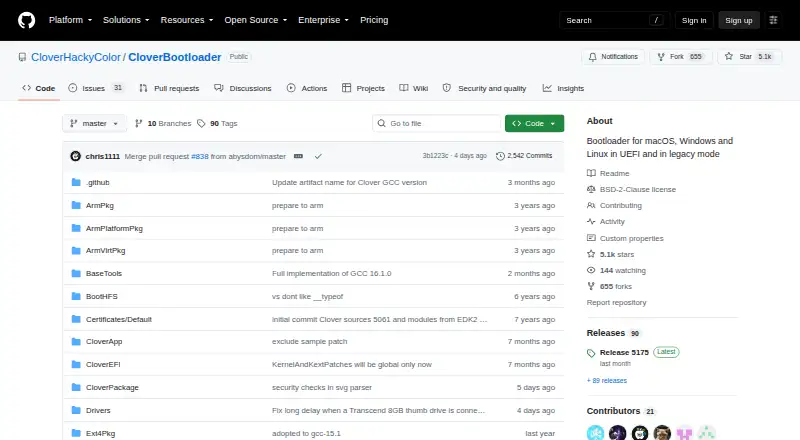
What Clover Bootloader is
Clover Bootloader starts macOS, Windows, and Linux systems in UEFI or legacy modes. It can use a computer's UEFI firmware directly or use CloverEFI to emulate UEFI, and the project supports Macs and PCs with UEFI or BIOS firmware. Its graphical interface allows themes, icons, fonts, background images, animations, and mouse pointers. Users can create custom boot entries and add support for other operating systems. For diagnostics, the interface can save preboot logs, screenshots, and original OEM ACPI tables. Settings are stored in an XML config.plist file in EFI/CLOVER. When Secure Boot is enabled in firmware, its Secure setting restricts startup to signed binaries. The project is free under the BSD 2-Clause License, which permits redistribution and use in source and binary forms. The repository lists version 5175 as its latest release, with six assets. Build instructions provide procedures for macOS and Ubuntu 19.10, and the README points users to AppleLife, InsanelyMac, and macos86.it forums for support.
Who it suits
Clover Bootloader is for users configuring boot options on Macs or PCs with UEFI or BIOS firmware. It can also suit users who need custom boot entries or a themed boot interface.
What it does well
- Supports macOS, Windows, and Linux.
- Works with UEFI and BIOS firmware.
- Allows custom boot entries and operating-system support.
- GUI can save logs, screenshots, and ACPI tables.
- BSD 2-Clause license permits source and binary redistribution.
What to know first
- Build instructions cover macOS and Ubuntu 19.10.
- Latest listed release is version 5175.
Plans
| Plan | Billed and limits | Price |
|---|---|---|
| Open source | BSD 2-Clause license · source and binary redistribution permitted | Free |
As github.com lists them, read 1 Oct 2026. The maker's own page has the final word.
Getting started
- Open the project at https://github.com/CloverHackyColor/CloverBootloader.
- Review the README and the release assets.
- Configure Clover through config.plist in the EFI/CLOVER folder.
- Use the interface to set boot entries and menu appearance.
- Consult AppleLife, InsanelyMac or macos86.it for project support.
Overview
Clover Bootloader is a bootloader for people who want to shape a multiboot setup across Macs and PCs. Its configuration and diagnostic tools offer room to tailor and investigate boot behavior, but they make it a better fit for technically confident users than for anyone seeking a minimal selector.
Key features
Clover can start through UEFI firmware directly or use CloverEFI to emulate UEFI, supporting machines with either UEFI or BIOS firmware. This gives users flexibility across hardware, while requiring them to choose the boot route that fits their system.
Custom boot entries let users add operating systems to the menu. The GUI can also be styled with themes, icons, fonts, background images, animations and mouse pointers; a separate CloverThemes manager and theme repository support that work. This depth suits people who want a personalized menu, but it adds choices that users seeking only a basic boot selector may not need.
The interface can save preboot logs, screenshots and original OEM ACPI tables, giving users material to inspect when diagnosing boot or firmware issues. Configuration lives in an XML config.plist file in EFI/CLOVER, so users need to be comfortable managing that file. Clover uses OpenCorePkg components for kext injection and patching through OpenCore libraries. Its Secure setting restricts booting to signed binaries when Secure Boot is enabled in firmware.
Pricing
Clover is free. Its Open source plan costs nothing and uses the BSD 2-Clause License, which permits redistribution and use in source and binary forms. That makes it a practical choice for users who want a bootloader without a purchase cost; the license also allows reuse of the software under its terms.
Platforms
Clover supports macOS, Windows and Linux on Macs and PCs with UEFI or BIOS firmware. Build instructions cover macOS and Ubuntu 19.10, which is useful for developers building from source on those systems. UEFI and BIOS support plus multiboot capability give it broad hardware and operating-system scope, but do not remove the need to configure the boot path and entries for a particular setup.
Who it's for
Clover is best for technically capable users managing multiple operating systems who value control over boot entries, interface appearance and diagnostic output. It is less suited to people who want a simple, low-configuration boot menu or prefer support through a single centralized channel: the project points users to AppleLife, InsanelyMac and macos86.it forums.
Pros and cons
- Broad firmware reach: Direct UEFI boot and CloverEFI emulation support UEFI and BIOS systems.
- Highly configurable menu: Custom entries and extensive visual controls suit users who want to tailor multiboot choices.
- Useful diagnostic output: Saving logs, screenshots and OEM ACPI tables can help users investigate boot issues.
- Configuration demands technical comfort: Settings are maintained in an XML file within the EFI/CLOVER folder.
- Community-based support: Help is directed to several forums rather than a single support channel.
Alternatives
Boot-US is worth considering for users who want a freemium option with a free tier for private PCs and public schools, or a paid 1-PC plan at $24.50, paid once.
Launchpad is a free alternative oriented toward open-source projects, with API, Linux, self-hosted and web platforms.
rEFInd is another free choice for EFI-based computers, with binaries for x86, x86-64 and ARM64 and support across Linux, macOS and Windows.
Super Grub2 Disk is a free alternative for users comparing bootloader tools across Linux, macOS and Windows.
SYSLINUX is a free option for Linux and Windows users under GNU GPL version 2 or later.
Visor Boot Manager is free and BSD-2-Clause licensed, with self-building from source for UEFI x86_64 or AArch64.
Boot-Repair is a free, Linux-only option for readers whose needs are limited to that platform.
Easy2Boot may suit readers comparing another free option; its menu system uses open-source components and plain-text scripts, while its download also includes the maker's closed-source Windows utilities.
See the Boot Manager Software directory for more options.
Verdict
Choose Clover if you need a configurable multiboot bootloader across UEFI and BIOS systems and are comfortable maintaining an XML configuration. Its strongest case is the combination of firmware flexibility, menu customization and diagnostic output at no cost. Look elsewhere if you want a simpler setup or a more centralized support route.
Verdict
Clover provides boot-mode support and extensive boot-menu customization across macOS, Windows, and Linux. Its configuration uses an XML file, and the project points users to community forums for support.
Questions
Is Clover Bootloader free?
Yes. It is released under the BSD 2-Clause License, which permits source and binary redistribution.
Which operating systems can it boot?
It is a bootloader for macOS, Windows and Linux, and users can add support for other operating systems.
Does it support both UEFI and BIOS?
Yes. The project supports Macs and PCs with UEFI or BIOS firmware, as well as UEFI and legacy modes.
How is Clover configured?
Its settings are stored in an XML config.plist file in the EFI/CLOVER folder.
Can the boot menu be customized?
Yes. The GUI supports themes, icons, fonts, background images, animations and mouse pointers. Users can also create custom boot entries.
Where can users find support?
The README points to AppleLife, InsanelyMac and macos86.it support forums.
Facts from Clover Bootloader's own pages
- Boot customization
- Users can create custom boot entries and add support for other operating systems. · github.com, 1 Oct 2026
- Build platforms
- The build instructions provide procedures for macOS and Ubuntu 19.10. · github.com, 1 Oct 2026
- Configuration
- Clover uses an XML config.plist file stored in the EFI/CLOVER folder. · github.com, 1 Oct 2026
- Diagnostics
- The GUI can save preboot logs, screenshots and original OEM ACPI tables. · github.com, 1 Oct 2026
- Firmware modes
- It can boot through UEFI firmware directly or through CloverEFI UEFI firmware emulation. · github.com, 1 Oct 2026
- Graphical interface
- Its GUI supports themes, icons, fonts, background images, animations and mouse pointers. · github.com, 1 Oct 2026
- Hardware support
- The project supports Macs and PCs with UEFI or BIOS firmware. · github.com, 1 Oct 2026
- Latest release
- The releases page lists version 5175 as the latest release and shows six assets. · github.com, 1 Oct 2026
- License
- The repository is released under the BSD 2-Clause License, which permits redistribution and use in source and binary forms. · github.com, 1 Oct 2026
- OpenCore integration
- Clover uses parts of OpenCorePkg for kext injection and patching through OpenCore libraries. · github.com, 1 Oct 2026
- Purpose
- CloverBootloader is a bootloader for macOS, Windows and Linux in UEFI and legacy modes. · github.com, 1 Oct 2026
- Security option
- Its Secure setting restricts booting to signed binaries when Secure Boot is enabled in firmware. · github.com, 1 Oct 2026
- Support
- The project README points users to AppleLife, InsanelyMac and macos86.it support forums. · github.com, 1 Oct 2026
- Theme integration
- The README links to a separate CloverThemes theme manager and theme repository. · github.com, 1 Oct 2026
Where Clover Bootloader stands on Freedom251
- Boot Manager Software#3 of 29