
CloudKit
What CloudKit is
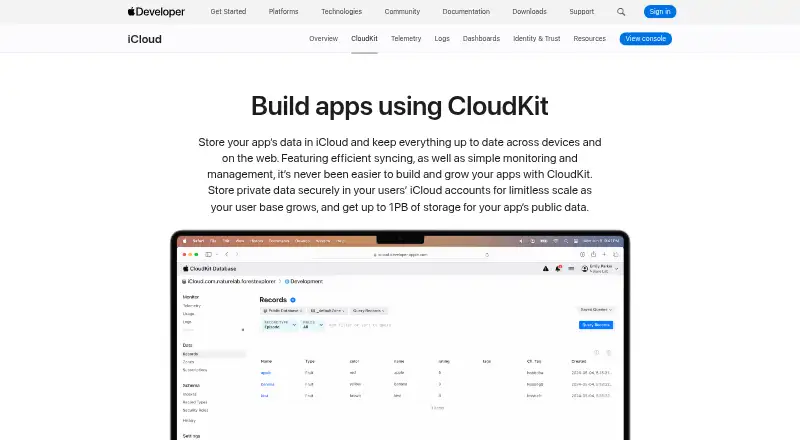
CloudKit is Apple’s service for developers building apps that store structured app and user data in iCloud. It organizes data into containers, each of which can use public, private, and shared databases, and supports bidirectional syncing across devices and the web. Automatic syncing is available across iOS, iPadOS, macOS, tvOS, watchOS, visionOS, and the web. Developers can work with Swift, Objective-C, and JavaScript, using APIs for iOS, macOS, and web apps; CloudKit JS can also add CloudKit support to web apps. Apple Developer Program membership includes up to 1PB of free storage for each app. CloudKit Console provides tools to manage containers and schemas, inspect test data, and review telemetry, logs, and alerts. Developers can configure private database fields for encryption in storage and in transit to their application. Separate sandbox and production environments support development, while production schema changes must remain forward-compatible. Automation supports integration tests from Xcode or a CI system, and CKTool JS can be embedded in developer tools. CloudKit has a free plan and paid pricing from $99/yr. Incoming traffic is controlled by limits that may change over time. Offline mode is not supported, and conflict resolution is customizable.
Who it suits
CloudKit suits developers building apps that store structured app or user data in iCloud and need syncing across Apple platforms or the web. It is relevant to teams using Swift, Objective-C, or JavaScript and working with public, private, or shared databases.
What it does well
- Supports bidirectional syncing across Apple platforms and the web.
- Includes up to 1PB free storage per app with Apple Developer Program membership.
- Offers public, private, and shared databases.
- Provides sandbox and production environments.
- Supports integration tests from Xcode or a CI system.
What to know first
- Offline mode is not supported.
- Incoming traffic is subject to limits and controls that can change over time.
- Production schema changes must be forward-compatible.
Limits
Apple Developer Program membership includes up to 1PB of free storage for each app. Incoming traffic is controlled by limits that may change over time, and production schemas can only be modified in a forward-compatible manner.
Plans
| Plan | Billed and limits | Price |
|---|---|---|
| CloudKit | Up to 1PB of free storage for each app | Free |
As developer.apple.com lists them, read 7 Oct 2026. The maker's own page has the final word.
Getting started
- Visit Apple’s CloudKit website.
- Choose the API or platform route for your app: iOS, macOS, or web.
- Use Swift, Objective-C, or JavaScript with CloudKit.
- Manage containers and schemas in CloudKit Console.
- Use the sandbox environment for development and the production environment for production.
Verdict
Choose CloudKit if you are building an app around structured iCloud data and want syncing across Apple platforms or the web. Consider another option if offline mode is required or changing production schemas without forward compatibility is important.
Questions
Does CloudKit have a free plan?
Yes. Apple Developer Program membership includes up to 1PB of free storage for each app. Paid pricing starts from $99/yr.
Which platforms does CloudKit support?
The listed platforms are API, iOS, macOS, and web. Automatic syncing is also supported across iPadOS, tvOS, watchOS, and visionOS.
Which programming languages are supported?
CloudKit lists Swift, Objective-C, and JavaScript.
Is CloudKit open source?
The listed facts do not identify CloudKit as open source.
Who makes CloudKit?
CloudKit is an Apple service.
Does CloudKit work offline?
No. Offline mode is listed as unsupported.
Facts from CloudKit's own pages
- Access controls
- CloudKit uses role-based access control for public databases, with World, Authenticated, and Creator roles. · developer.apple.com, 7 Oct 2026
- Console
- CloudKit Console lets developers manage containers and schemas, inspect test data, and view telemetry, logs, and alerts. · developer.apple.com, 7 Oct 2026
- Data model
- CloudKit organizes app data into containers with public, private, and shared databases. · developer.apple.com, 7 Oct 2026
- Development environments
- CloudKit provides separate sandbox development and production environments, and production schemas can only be modified in a forward-compatible manner. · developer.apple.com, 7 Oct 2026
- Integrations
- CloudKit automation supports integration tests from Xcode or a CI system, and CKTool JS can be embedded in developer tools. · developer.apple.com, 7 Oct 2026
- Limit
- CloudKit throttles incoming traffic using limits and controls that can change over time. · developer.apple.com, 7 Oct 2026
- Privacy
- Apple says developers can develop, analyze, and debug apps without exposing users’ personally identifiable data. · developer.apple.com, 7 Oct 2026
- Security
- Developers can configure fields in private CloudKit databases to be encrypted in storage and in transit to their application. · developer.apple.com, 7 Oct 2026
- Storage
- Apple says Apple Developer Program membership includes up to 1PB of free storage for each app. · developer.apple.com, 7 Oct 2026
- Syncing
- Automatic syncing is supported across iOS, iPadOS, macOS, tvOS, watchOS, visionOS, and the web. · developer.apple.com, 7 Oct 2026
- Web support
- Apple lists CloudKit syncing across the web and provides CloudKit JS for adding CloudKit support to web apps. · developer.apple.com, 7 Oct 2026
- What it does
- CloudKit stores app data in iCloud and keeps it up to date across devices and on the web. · developer.apple.com, 7 Oct 2026
- Who it is for
- CloudKit is for developers building apps that store structured app and user data in iCloud. · developer.apple.com, 7 Oct 2026
Where CloudKit stands on Freedom251
- Mobile Databases#4 of 26
- Backend as a Service (BaaS) Software#5 of 20