Freedom251 › Tag Management Software

Cloudflare Zaraz
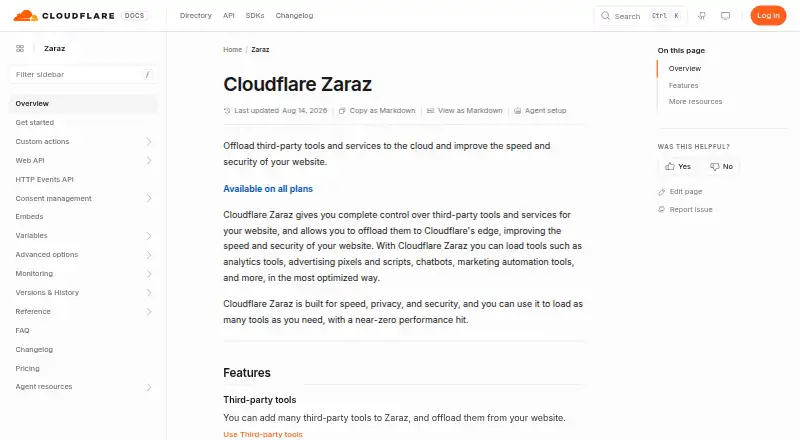
What Cloudflare Zaraz is
Cloudflare Zaraz helps website owners manage third-party tools and run them through Cloudflare’s edge, with the stated aim of improving website speed and security. Supported categories include analytics, advertising, marketing automation, recruiting, embeds, and customer data platforms. Other tools can be connected using Custom HTML, Custom Image, or HTTP Request. Its client-side Web API can send events and data for triggers that launch tools when needed. A configurable consent modal can load tools according to purposes users have agreed to; users remain responsible for assigning tools to purposes where needed for GDPR compliance. The free plan includes 1,000,000 Zaraz Events per Cloudflare account each month. Additional usage costs $5 per month for each extra 1,000,000 events, and all features and tools are available on all accounts. If paid usage billing is not enabled, Zaraz is disabled until the next billing cycle when monthly events exceed 1,000,000. Zaraz can serve its script on a domain not proxied through Cloudflare if a separate proxied domain or subdomain is created for it. Custom Managed Components run as Cloudflare Workers in the user’s account, but do not support several listed manager methods.
Who it suits
Zaraz suits website owners using analytics, advertising pixels, chatbots, marketing automation, or other supported third-party tools. It is also relevant to teams that want consent-based tool loading or event-triggered launches.
What it does well
- Supports analytics, advertising, marketing automation, and more
- Web API sends events and data for triggers
- Consent modal can load tools by agreed purposes
- Free plan includes 1,000,000 monthly events per account
What to know first
- Usage above 1,000,000 events requires paid billing to avoid suspension
- Users must assign tools to purposes for GDPR needs
- Logpush to external storage is Enterprise-only
- Custom Managed Components lack support for listed manager methods
Limits
Zaraz Free includes 1,000,000 events per Cloudflare account each month. Without paid usage billing, Zaraz is disabled until the next billing cycle if the account exceeds that amount. Custom Managed Components do not support manager.registerEmbed, manager.registerWidget, manager.proxy, or manager.serve.
Plans
| Plan | Billed and limits | Price |
|---|---|---|
| Zaraz Free | Monthly allocation · 1,000,000 Zaraz Events per Cloudflare account each month | Free |
| Zaraz Paid | $5 per month for each additional 1,000,000 Zaraz Events · Additional event usage; all features and tools are available on all accounts | $5 a month |
As developers.cloudflare.com lists them, read 30 Sept 2026. The maker's own page has the final word.
Getting started
- Open the Cloudflare Zaraz website.
- Use a website or Cloudflare-proxied domain.
- For a domain not proxied through Cloudflare, create a separate proxied domain or subdomain to serve the script.
- Choose supported tools or configure a custom integration.
- Configure tool purposes in the consent modal when needed.
- Use the Web API to send events and data for triggers.
Cloudflare Zaraz manages third-party website tools from Cloudflare’s edge, with the aim of improving speed and security. It best suits site owners coordinating analytics, advertising, chatbots or marketing automation around events and consent. Its free monthly event allocation makes it accessible to start, while growth brings usage charges or a service pause.
Overview
Zaraz brings supported tools for analytics, advertising, marketing automation, recruiting, embeds and customer data platforms into one management layer. That makes it a practical choice for websites carrying several kinds of third-party scripts, especially where controlling when they run matters. It is not an analytics reporting product: its value is in managing and triggering tools, rather than analyzing results.
Moving tools to Cloudflare’s edge is intended to improve website speed and security. Zaraz can serve domains that are not proxied through Cloudflare, but doing so requires a separate proxied domain or subdomain for its script. That adds setup overhead for sites not already using a proxied domain.
Key features
- Tool integrations: Supported categories cover common marketing and measurement needs. Custom HTML, Custom Image and HTTP Request integrations extend the options for other tools, but custom configurations put more implementation responsibility on the site owner.
- Event triggers: The client-side Web API sends events and data that can create triggers and launch tools when needed. This is useful when tools should respond to specific site activity rather than run indiscriminately.
- Consent management: A configurable modal can load tools only for purposes users have agreed to. Site owners must assign tools to purposes when needed for GDPR compliance, so the modal does not remove the need to make and maintain those choices.
- Custom components: Custom Managed Components become Cloudflare Workers in the user's account. They do not support manager.registerEmbed, manager.registerWidget, manager.proxy or manager.serve, which can rule out component approaches that rely on those methods.
- Server-side tagging and history: Zaraz supports server-side tagging and version history, useful for teams that need those capabilities alongside event-triggered tool management.
Pricing
Zaraz Free: free, billed Monthly allocation, with 1,000,000 Zaraz Events per Cloudflare account each month. This is a substantial starting allowance for a site that wants to manage tools without usage charges. The cap is account-wide, not per site: without paid usage billing, exceeding it disables Zaraz until the next billing cycle.
Zaraz Paid: $5 a month, billed $5 per month for each additional 1,000,000 Zaraz Events. It adds event usage, and all features and tools are available on all accounts. This suits sites that outgrow the free allocation and want service to continue with additional usage billed. The event-based price means costs rise with traffic and tool activity; the free tier is less suitable when a service pause at the cap is unacceptable.
The pricing model is freemium. The free tier gives the same feature and tool availability described for all accounts, while paid usage is the distinction for accounts needing events beyond the monthly allocation.
Platforms
Zaraz supports websites and Cloudflare-proxied domains, with API and web platform coverage. Sites outside Cloudflare’s proxy can still use it by creating a separate proxied domain or subdomain to serve the script.
Who it's for
Zaraz is a strong fit for website owners managing multiple analytics tools, advertising pixels and scripts, chatbots or marketing automation, particularly when event-based activation and consent controls matter. The free allocation is suitable for trying that approach or operating within the monthly cap. Sites that need predictable uninterrupted operation beyond the cap should enable paid usage billing; teams whose components depend on unsupported manager methods should look elsewhere.
Pros and cons
- Pro: One edge-based management layer covers several tool categories, reducing the need to manage each third-party script separately.
- Pro: Event triggers and a configurable consent modal give site owners control over when tools launch and which agreed purposes allow them to load.
- Pro: The free plan includes 1,000,000 events per account each month, and paid usage is charged in additional million-event increments.
- Con: Exceeding the free allocation without paid usage billing disables Zaraz until the next cycle, which creates a meaningful service-continuity risk for growing sites.
- Con: GDPR purpose assignment remains the site owner's responsibility, and custom components lack support for four manager methods.
- Con: Serving Zaraz on a non-proxied domain requires a separate proxied domain or subdomain.
- Con: Sending event logs to external storage through Logpush is Enterprise-only, limiting that route to customers on that tier.
Alternatives
Tag Management Software is the broader category to explore when comparing tools beyond Zaraz.
- Stape is worth comparing for readers seeking a freemium option with a free trial and support across Android, API, extension, iOS and web; its Pay as you go plan is $8 a month, billed $100 yearly, for Meta CAPI Gateway and one pixel.
- Addingwell offers a free plan with 100,000 requests, a premium private network, one-region infrastructure and Tag Health. Its paid Pay as you go plan is €90 a month, making it a distinct option for readers who prioritize those included services.
- DataCops may suit readers who want a free Basic plan with 2,000 sessions and 500 free signup verifications, or a Business plan at $49 a month.
- Matomo is a better fit when the priority is analytics, including a free, self-hosted Community plan with unlimited users and hits and forum support, rather than Zaraz’s tool management.
- TAGGRS is an option for web users comparing request-based plans: its Free plan allows up to 10,000 requests, while Basic costs $25 a month for 750,000 requests.
- Tealium AudienceStream CDP may suit readers seeking a paid audience platform with event-based pricing, no per-seat fees and no per-integration charges.
- CHEQ Manage is another paid alternative to consider.
- Commanders Act Tag Management is another paid alternative, with platform coverage including web, mobile, extension and self-hosted deployments.
Verdict
Choose Cloudflare Zaraz if you manage third-party tools on a website and want event-triggered launches, consent controls and an edge-based setup, with a free million-event monthly allowance to start. Its broad tool coverage and usage-based path beyond that allowance are persuasive, but the account-level cap, consent-purpose responsibility and custom component gaps deserve attention. Look elsewhere if your priority is analytics reporting, your component requirements depend on unsupported methods, or you cannot accept a service pause without paid usage billing.
Verdict
Zaraz offers event-triggered tool management and consent controls, with a monthly event allocation and usage-based charges beyond it. Without paid usage billing, exceeding the allocation disables it until the next billing cycle.
Questions
Is Cloudflare Zaraz free?
Yes. Zaraz Free provides 1,000,000 events per Cloudflare account each month.
How much does additional usage cost?
Zaraz Paid costs $5 per month for each additional 1,000,000 events. All features and tools are available on all accounts.
What platforms does Zaraz support?
It supports API and web use, including websites and Cloudflare-proxied domains.
Can Zaraz serve a script on a domain that is not proxied through Cloudflare?
Yes. A separate proxied domain or subdomain can be created to serve the script.
How does Zaraz handle consent?
Its consent modal can be configured to load tools only for purposes users have agreed to. Users are responsible for assigning tools to purposes when needed for GDPR compliance.
Where can users get support?
The documentation directs comments, questions, and bug reports to its Discord channel and points users to the Cloudflare support forum.
Facts from Cloudflare Zaraz's own pages
- Consent management
- Zaraz provides a consent modal that can be configured to load tools only for purposes users have agreed to. · developers.cloudflare.com, 30 Sept 2026
- Consent setup responsibility
- Cloudflare says users are responsible for assigning tools to purposes when needed for GDPR compliance. · developers.cloudflare.com, 30 Sept 2026
- Custom component limitation
- Custom Managed Components do not support the methods manager.registerEmbed, manager.registerWidget, manager.proxy, or manager.serve. · developers.cloudflare.com, 30 Sept 2026
- Custom components
- Custom Managed Components are converted into Cloudflare Workers running in the user's account. · developers.cloudflare.com, 30 Sept 2026
- Custom integrations
- For other tools, Zaraz lists Custom HTML, Custom Image, and HTTP Request as custom integrations. · developers.cloudflare.com, 30 Sept 2026
- Logpush
- Sending Zaraz event logs to an external storage service through Logpush is marked Enterprise-only in the settings documentation. · developers.cloudflare.com, 30 Sept 2026
- Purpose
- Zaraz lets website owners manage third-party tools and offload them to Cloudflare’s edge to improve website speed and security. · developers.cloudflare.com, 30 Sept 2026
- Site requirements
- Zaraz can be loaded on domains not proxied through Cloudflare if the user creates a separate proxied domain or subdomain to serve its script. · developers.cloudflare.com, 30 Sept 2026
- Support
- The Zaraz documentation directs users with comments, questions, or bug reports to its Discord channel and points users to the Cloudflare support forum. · developers.cloudflare.com, 30 Sept 2026
- Supported tools
- The supported tools include analytics, advertising, marketing automation, recruiting, embeds, and customer data platforms. · developers.cloudflare.com, 30 Sept 2026
- Target use
- The documentation describes Zaraz for websites that use analytics tools, advertising pixels and scripts, chatbots, or marketing automation tools. · developers.cloudflare.com, 30 Sept 2026
- Usage limit
- Without enabling paid usage billing, Zaraz is disabled until the next billing cycle if an account exceeds 1,000,000 events in a month. · developers.cloudflare.com, 30 Sept 2026
- Web API
- Its client-side Web API can send events and data that can be used to create triggers and launch tools when needed. · developers.cloudflare.com, 30 Sept 2026
Where Cloudflare Zaraz stands on Freedom251
- Tag Management Software#2 of 16