Clio Draft
What Clio Draft is
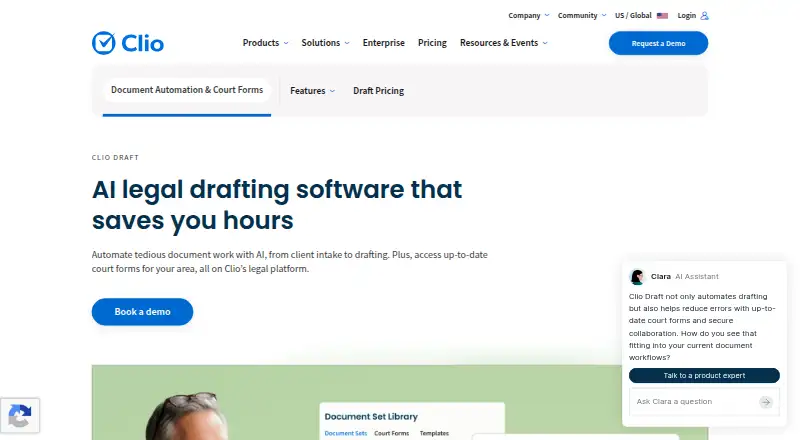
Clio Draft is a web-based tool for automating legal document work, from collecting client details to preparing documents. Its AI can convert existing Microsoft Word files into reusable fillable templates, and users can populate multiple documents for a case or group related forms into reusable sets. Online questionnaires collect client information, connect answers to templates and can adapt to client responses. The product includes thousands of fillable PDF court forms for all 50 U.S. states, including state, county and federal immigration forms. Built-in e-signatures let clients sign on any device; Clio describes the signing feature as federally compliant. When connected with Clio Manage, client and matter details can flow into Draft templates. Documents can be viewed and edited in a browser, then downloaded as PDF or Word files. Clio says documents stored in the cloud are encrypted, automatically backed up and protected with two-factor authentication. Pricing is available by request rather than as a listed numeric amount. Clio says pricing includes onboarding and live training, with phone, email and chat support available 24/5.
Who it suits
Clio Draft suits legal teams that prepare recurring documents, collect client information through questionnaires or need state court forms. Its integration with Clio Manage may suit users of that product who want client and matter details to flow into templates.
What it does well
- AI turns Word documents into reusable fillable templates.
- Questionnaires can adapt to client responses.
- Thousands of court forms cover all 50 U.S. states.
- Documents export as PDF or Word files.
- Pricing includes onboarding and live training.
What to know first
- Pricing is available only by request.
- Clio Manage is needed for the stated flow of client and matter details.
- Support is listed as available 24/5.
Plans
| Plan | Billed and limits | Price |
|---|---|---|
| Clio Draft | AI-powered Word templates · court forms · questionnaires · document sets · e-signatures · Clio Manage integration | On request |
As clio.com lists them, read 30 Sept 2026. The maker's own page has the final word.
Getting started
- Visit the Clio Draft website.
- Contact Clio for pricing.
- Use the web platform to access Draft.
- Arrange the included onboarding and live training.
Clio Draft is a browser-based tool for automating legal document work, from gathering client details to preparing and signing documents. It best suits firms with repeatable drafting workflows, particularly those already using Clio Manage. Its templates, questionnaires and U.S. court-form library make a substantial workflow; custom pricing may make alternatives more practical for firms with tighter budgets.
Overview
Draft brings intake, document generation and signatures into one workflow. Firms can turn existing Word documents into fillable templates, use client responses to populate them, and produce related documents together. That is most useful where similar matters recur and staff otherwise re-enter the same information. Clio Manage integration can reduce that retyping further, but firms outside Clio’s practice-management product do not get that particular advantage.
Key features
Templates, questionnaires and document sets
AI converts existing Microsoft Word documents into reusable templates, while a questionnaire builder collects client information and maps it to those templates. Questionnaires can adapt to client responses, supporting a more tailored intake before drafting. Conditional logic and a clause library add structure to the workflow. Users can populate multiple documents for the same case at once and bundle related forms into reusable sets. This combination is a strong fit for recurring, document-heavy processes, though it is less compelling for teams that rarely reuse forms.
Court forms and signatures
The library includes thousands of fillable PDF court forms for all 50 U.S. states, including state, county and federal immigration forms. That breadth is a clear advantage for U.S. practices handling those filings; it is not the same selling point for firms whose work does not involve U.S. courts. Built-in e-signatures let clients sign on any device, and Clio describes the tool as federally compliant.
Access, integration and security
Documents can be viewed and edited in a browser, then downloaded as PDF or Word files. Microsoft Word export preserves a familiar handoff for teams that continue editing outside the browser. Clio Manage client and matter details flow into Draft templates, reducing duplicate entry for firms using both products. Clio says cloud documents are encrypted, automatically backed up and protected with two-factor authentication; its Trust Centre lists GDPR, HIPAA, SOC 1 Type 2, SOC 2 Type 2 and TX-RAMP compliance materials.
Pricing
Clio Draft is a paid product with custom pricing; Clio directs prospective customers to get in touch rather than publishing a numeric price. The Draft plan includes AI-powered Word templates, court forms, questionnaires, document sets, e-signatures and Clio Manage integration. This support may help firms adopting a new document workflow, but the lack of a public price makes direct budget comparisons difficult.
Platforms
Draft is web-based: documents are available from a browser and can be downloaded in PDF or Word format. The listed platform is web, so teams seeking a separately listed desktop or mobile app should consider whether browser access meets their needs.
Who it's for
Clio Draft is best suited to legal practices that repeatedly prepare related documents, gather client information through structured questionnaires, or need a broad U.S. court-form library. Its integration is especially useful for firms already using Clio Manage. Firms with occasional drafting needs, no use for U.S. forms, or a requirement for a published price may be better served by a different model.
Pros and cons
- Pros: Converts existing Word files into reusable templates, giving firms a way to build on documents they already use.
- Pros: Links adaptive questionnaires to templates and can generate related documents together, reducing repeated information entry across a case.
- Pros: Thousands of fillable forms cover all 50 U.S. states, with county and federal immigration forms included.
- Pros: Clio Manage integration carries client and matter details into templates; onboarding, live training and 24/5 support are included.
- Cons: Custom pricing requires a sales conversation and makes cost comparison less straightforward.
- Cons: The court-form library's geographic emphasis is less useful to firms whose work does not involve U.S. courts.
- Cons: The integration advantage is smaller for practices that do not use Clio Manage.
Alternatives
Docassemble is worth considering for firms seeking free, self-hosted legal document assembly; the software has no fee, though hosting typically costs $10–$40 per month or more depending on performance, availability and support needs. Legito offers a free plan with document lifecycle management, customizable workflows and approvals, and electronic signatures, plus a Starter plan at €6.90 a month; it may suit teams looking for a lower-cost entry point.
InterActive Legal is an alternative for practices focused on elder law, special needs planning or firearms-trust drafting. Quillogic offers a pay-per-use option with no contracts or subscription fees, which may suit buyers who prefer usage-based billing. Checkbox may suit teams that want pricing and scope set through an order, with fees varying by authorized user type.
Contract Express is another paid web and Windows option for document automation. EstateScribe is another paid web-based option. WealthCounsel may suit trusts-and-estates practices seeking a professional plan that includes Wealth Docx Complete, Business Docx, Wealth Tracx and Gun Docx; membership pricing depends on firm user count and selection.
For broader comparisons, see Legal Document Automation Software, Document Automation Software and AI Contract Generators.
Verdict
Choose Clio Draft if your firm has recurring legal document work, can make use of its adaptive questionnaire and court-form workflow, and especially if Clio Manage is already part of your practice. Its strongest case is the connected path from client details to reusable documents and signatures. Look elsewhere if you need transparent pricing, do not benefit from Clio integration, or work outside the U.S. court-form use case.
Verdict
Clio Draft brings templates, questionnaires, court forms and e-signatures into a browser-based legal document workflow. Teams need to contact Clio for pricing.
Questions
How much does Clio Draft cost?
Pricing is available on request; the pricing page directs prospective customers to get in touch.
What does the Clio Draft plan include?
The listed plan includes AI-powered Word templates, court forms, questionnaires, document sets, e-signatures, and Clio Manage integration.
What platforms does Clio Draft support?
The listed platform is web. Documents can be viewed and edited in a browser.
Does Clio Draft include e-signatures?
Yes. Built-in e-signatures let clients sign documents on any device; Clio describes the feature as federally compliant.
What support comes with Clio Draft?
Pricing includes onboarding and live training, along with phone, email, and chat support described as available 24/5.
Facts from Clio Draft's own pages
- Access and exports
- Documents can be viewed and edited from any browser, then downloaded in PDF or Word format. · clio.com, 30 Sept 2026
- AI templates
- Its AI converts existing Microsoft Word documents into reusable fillable templates. · clio.com, 30 Sept 2026
- Clio Manage integration
- Client and matter details flow from Clio Manage into Clio Draft templates to reduce retyping. · clio.com, 30 Sept 2026
- Compliance
- Clio’s Trust Centre lists GDPR, HIPAA, SOC 1 Type 2, SOC 2 Type 2, and TX-RAMP compliance materials. · trust.clio.com, 30 Sept 2026
- Court forms
- Clio Draft offers thousands of fillable PDF court forms for all 50 U.S. states, including state, county, and federal immigration forms. · clio.com, 30 Sept 2026
- Document sets
- Users can populate multiple documents for the same case at once and bundle related forms into reusable document sets. · clio.com, 30 Sept 2026
- E-signatures
- Built-in e-signatures let clients sign documents on any device, and Clio describes the tool as federally compliant. · clio.com, 30 Sept 2026
- Founded
- 2008 · clio.com, 28 Sept 2026
- Headquarters
- Greater Vancouver, British Columbia, Canada · clio.com, 28 Sept 2026
- Maker
- Clio was co-founded in 2008 by Jack Newton and Rian Gauvreau and is headquartered in Vancouver, Canada. · clio.com, 30 Sept 2026
- Pricing availability
- The Draft pricing page displays a “Get in touch” call to action rather than a numeric price. · clio.com, 30 Sept 2026
- Purpose
- Clio Draft automates legal document work with AI, from gathering client information to drafting documents. · clio.com, 30 Sept 2026
- Questionnaires
- AI-powered online questionnaires collect client details, map to document templates, and can adapt to client responses. · clio.com, 30 Sept 2026
- Security
- Clio says Draft documents are stored in the cloud with encryption, automatic backups, and two-factor authentication. · clio.com, 30 Sept 2026
- Support
- Clio Draft pricing includes hands-on onboarding and live training, plus phone, email, and chat support described as available 24/5. · clio.com, 30 Sept 2026
Where Clio Draft stands on Freedom251
- Legal Automation#10 of 24
- Legal Document Automation Software#13 of 31
- Document Automation Software#23 of 33
- AI Contract Generators#17 of 24