Freedom251 › Clipboard Manager Software
CLCL
What CLCL is
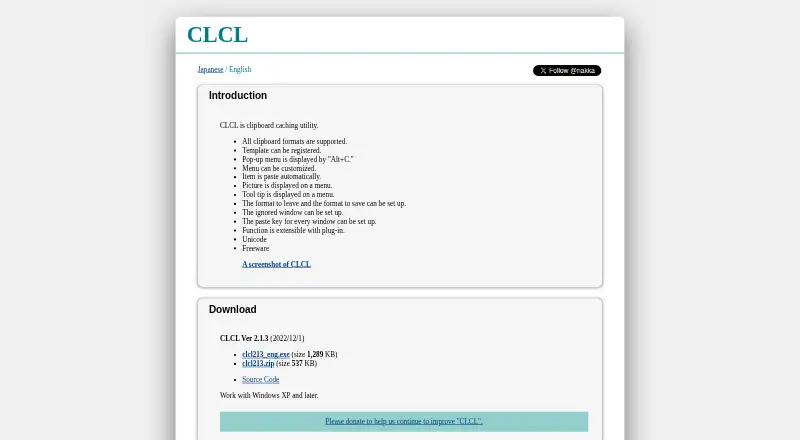
CLCL is a clipboard caching utility for Windows that helps you retrieve and reuse items you have copied. Open its customizable pop-up menu with Alt+C, then select a history entry or registered item to paste it into the active editor. For text you use often, you can register templates and access them from the same menu. CLCL lets you choose which clipboard formats to retain or save and which windows to ignore. You can also configure the paste key separately for each window. The menu can display pictures and tooltips, and the maker says CLCL supports all clipboard formats and Unicode. Plug-ins can extend its functions: listed examples include tools for text conversion and clipboard clearing, as well as support for formats such as RTF and Windows metafiles. The maker describes CLCL as freeware that works with Windows XP and later. Its download page links to source code on GitHub and lists version 2.1.3, dated 2022/12/1, with an executable and ZIP archive. The maker's download directory also lists a clcl220.zip file dated 2026-08-21. The product page identifies Ohno Tomoaki in its 1996–2022 copyright notice.
Who it suits
CLCL suits Windows users who want to revisit copied items and reuse frequently entered text. Its format controls, per-window paste keys, and plug-ins may appeal to people who want to adjust clipboard behavior to different applications.
What it does well
- Opens clipboard history and registered items with Alt+C.
- Allows reusable text templates and automatic pasting from the menu.
- Users can choose retained formats and windows to ignore.
- Paste keys can be configured separately for each window.
- Plug-ins can add tools and support additional formats.
What to know first
- CLCL is listed for Windows only.
- The English product page says it works with Windows XP and later.
Plans
| Plan | Billed and limits | Price |
|---|---|---|
| Freeware | Freeware; works with Windows XP and later | Free |
As nakka.com lists them, read 11 Oct 2026. The maker's own page has the final word.
Getting started
- Open the CLCL English product page.
- Download the executable or ZIP archive listed on the download page.
- Run CLCL on Windows XP or later.
- Open the pop-up menu with Alt+C and select an item to paste.
- Register frequently used text as templates and adjust format, window, or per-window paste-key settings as needed.
Verdict
Pick CLCL if you use Windows and want clipboard history, reusable text templates, and configurable pasting at no cost. Its fit is limited to Windows, so people using another platform will need a different utility.
Questions
How much does CLCL cost?
CLCL is freeware, listed as free.
Which operating systems does CLCL support?
The English page says CLCL works with Windows XP and later.
How do I open the clipboard menu?
Press Alt+C to display its customizable pop-up menu. Selecting a history or registered item pastes it into the active editor.
Can CLCL save reusable text?
Yes. Users can register templates for frequently used text.
Does CLCL support rich text and plug-ins?
The listed capabilities include rich text support. Plug-ins can extend CLCL with tools and additional clipboard formats, including RTF and Windows metafiles.
Who makes CLCL?
The product page identifies Ohno Tomoaki in its 1996–2022 copyright notice.
Facts from CLCL's own pages
- Access
- A pop-up menu is displayed with Alt+C, and a menu item can be pasted automatically. · nakka.com, 11 Oct 2026
- Clipboard controls
- Users can configure which formats to retain or save and specify windows to ignore. · nakka.com, 11 Oct 2026
- Clipboard formats
- The maker says CLCL supports all clipboard formats. · nakka.com, 11 Oct 2026
- Clipboard menu
- A customizable pop-up menu can be opened with Alt+C. · nakka.com, 11 Oct 2026
- Customization
- The menu can be customized, and pictures and tooltips can be displayed on it. · nakka.com, 11 Oct 2026
- Download listing
- The maker's download directory lists a clcl220.zip file dated 2026-08-21. · nakka.com, 11 Oct 2026
- Extensibility
- CLCL functions can be extended with plug-ins, including tools for text conversion and clipboard clearing, and formats for RTF and Windows metafiles. · nakka.com, 11 Oct 2026
- Extensions
- The maker says CLCL can be extended with plug-ins, including tools and format plug-ins. · nakka.com, 11 Oct 2026
- Freeware
- The maker describes CLCL as freeware. · nakka.com, 11 Oct 2026
- History controls
- Users can choose which formats to retain or save and which windows to ignore. · nakka.com, 11 Oct 2026
- Latest listed version
- The download page lists CLCL Ver 2.1.3 dated 2022/12/1, with an executable and ZIP archive. · nakka.com, 11 Oct 2026
- Maker and copyright
- The page identifies Ohno Tomoaki in its 1996–2022 copyright notice. · nakka.com, 11 Oct 2026
- Pasting
- Selecting a history item or registered item from the menu pastes it automatically into the active editor. · nakka.com, 11 Oct 2026
- Per-window paste keys
- The paste key can be configured for each window. · nakka.com, 11 Oct 2026
- Per-window settings
- The paste key can be configured for each window. · nakka.com, 11 Oct 2026
- Platform requirement
- The English page says CLCL works with Windows XP and later. · nakka.com, 11 Oct 2026
- Purpose
- CLCL is a clipboard caching utility. · nakka.com, 11 Oct 2026
- Security and support
- The opened maker pages provide no security or compliance statement and no stated support terms. · nakka.com, 11 Oct 2026
- Source code
- The download page links to the CLCL source code on GitHub. · nakka.com, 11 Oct 2026
- Templates
- Users can register templates. · nakka.com, 11 Oct 2026
- Unicode
- The maker lists Unicode support. · nakka.com, 11 Oct 2026
- What it does
- CLCL is a clipboard caching utility. · nakka.com, 11 Oct 2026
Where CLCL stands on Freedom251
- Clipboard Manager Software#5 of 39
- Clipboard Managers#17 of 40