Freedom251 › AI Computer Use Agents

Clawd Cursor
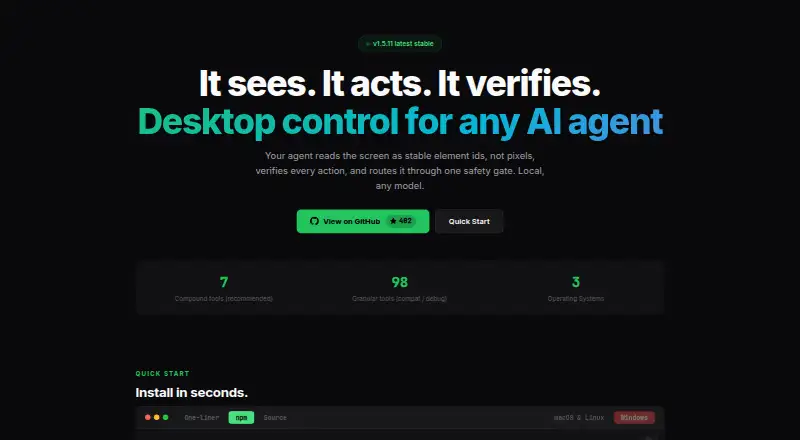
What Clawd Cursor is
Clawd Cursor is free software that lets AI agents control desktop apps for GUI tasks where a native API or CLI is unavailable. It builds a confidence-scored screen map from accessibility data and OCR, assigning stable element IDs and using screenshots only when needed. Agents can click and type, and actions can be checked against an expected result; each tool call passes through one safety layer. The maker describes it as local, localhost-only by default, and without telemetry. It offers seven recommended compound tools and 98 granular tools for compatibility and debugging. Listed MCP hosts include Claude Code, Cursor, Windsurf, OpenClaw, and Zed; agents connect through stdio MCP or an HTTP MCP daemon. The maker says it works with any model. Clawd Cursor supports Windows x64 and ARM64, macOS 12 or later, and Linux X11 or Wayland. It is MIT licensed. Installation requires Node.js 20 or later, and desktop control requires one-time consent. On macOS, Accessibility permission is required; Screen Recording is optional for vision fallback.
Who it suits
It suits developers who want agents to handle desktop tasks locally when a native API or CLI is unavailable. It is available for Windows, macOS, and Linux users, subject to its installation and permission requirements.
What it does well
- Local operation is localhost-only by default, without telemetry.
- Screen maps combine accessibility data and OCR.
- Actions can be checked against expected outcomes.
- Works with Windows, macOS, and Linux.
- Free and MIT licensed.
What to know first
- Requires Node.js 20 or later.
- Desktop control requires one-time consent.
- macOS requires Accessibility permission.
Plans
| Plan | Billed and limits | Price |
|---|---|---|
| Clawd Cursor | Open source · MIT | Free |
As clawdcursor.com lists them, read 29 Sept 2026. The maker's own page has the final word.
Getting started
- Install Node.js 20 or later.
- Install Clawd Cursor on Windows, macOS 12 or later, or Linux X11/Wayland.
- Grant one-time consent for desktop control.
- On macOS, grant Accessibility permission; grant Screen Recording only if using vision fallback.
- Connect an agent through stdio MCP or the HTTP MCP daemon at 127.0.0.1:3847/mcp.
- Use it with a listed MCP host or another model.
Clawd Cursor is a local bridge that lets AI agents operate desktop software through a mapped screen, controlled actions, and outcome checks. It suits developers who need GUI automation after an app’s API or command line ends. Choose it for privacy-conscious, model-flexible desktop control; look elsewhere if you need a hosted, ready-made computer-use service.
Overview
Clawd Cursor targets the awkward “last mile” of automation: tasks in graphical applications that expose no native integration. An agent can inspect the desktop, click controls, type text, and verify that the intended result occurred. That makes it relevant for workflow builders and technical users connecting agents to legacy or specialist software, but less compelling when a reliable API or CLI already exists.
Operation is local by default. The maker describes localhost-only behavior and no telemetry, while the project is MIT licensed. Agents connect through stdio MCP or an HTTP MCP daemon at 127.0.0.1:3847/mcp. Keeping the control path on the machine is a meaningful privacy advantage, although setup still involves operating-system consent and permissions.
Key features
Screen mapping instead of blind coordinates
Accessibility data and OCR are combined into a confidence-scored map, with stable IDs for interface elements. Agents can therefore address identified controls rather than relying solely on changing screen coordinates. Screenshots are reserved for cases where the map needs a vision fallback. Confidence scoring is useful context for automation decisions, but it also signals that screen interpretation can require caution.
Checked actions and a broad tool surface
Every tool call passes through one safety layer, and an action can be checked against an expected outcome. That gives workflows a way to detect a failed click or an unexpected state instead of silently continuing. Seven recommended compound tools cover common paths, while 98 granular tools support compatibility and debugging. The larger surface favors developers tuning integrations; newcomers may find it more involved than a small set of task commands.
MCP and model flexibility
Named MCP hosts include Claude Code, Cursor, Windsurf, OpenClaw, and Zed. The maker says the software works with any model, and the daemon can also use a configured built-in LLM. That avoids tying the controller to one provider, provided the user can configure the chosen host and model.
Pricing
Clawd Cursor costs free on its single “Clawd Cursor” plan. It is open source under the MIT license, with no paid tier, trial period, seat charge, or recurring renewal described. This is a strong fit for individuals and teams comfortable running software themselves. The trade-off is that the free plan is the entire offering: there is no commercial tier promising hosted operation, support, or expanded quotas.
Platforms
Supported systems are Windows x64 and ARM64, macOS 12 or later, and Linux with X11 or Wayland. The project is self-hosted and local rather than a browser-only service. Node.js 20 or later is required. Desktop control needs one-time consent; macOS additionally requires Accessibility permission, while Screen Recording is optional for vision fallback. Those requirements are manageable for developers but add friction to managed or locked-down machines.
Who it's for
Clawd Cursor is aimed at developers building MCP-based agent workflows, especially where a desktop application has no usable API or CLI. It is also a sensible choice for users who want local execution, no telemetry, and the freedom to select a model or host. It is not the natural pick for someone seeking a polished hosted assistant, mobile-first access, or automation that avoids installing Node.js and granting desktop permissions.
Pros and cons
Pros
- Local-first operation: localhost defaults and no telemetry keep the control path on the user’s machine.
- Structured screen targeting: OCR, accessibility data, confidence scores, and stable IDs are more informative than coordinate-only control.
- Safety checks: a single tool layer and expected-outcome verification can catch incorrect state changes.
- Open and model-agnostic: MIT licensing, broad MCP-host support, and any-model compatibility reduce vendor lock-in.
- No software fee: the complete plan is free, with Windows, macOS, and Linux support.
Cons
- Technical setup: Node.js 20+, MCP configuration, consent, and platform permissions make deployment more demanding than a hosted app.
- GUI dependence: it is intentionally a fallback for graphical tasks, so direct APIs and CLIs remain preferable when available.
- Large integration surface: 98 granular tools help debugging but can require more configuration and maintenance.
- No hosted tier: users wanting managed infrastructure or paid support have no higher plan to move to.
Alternatives
AI Computer Use Agents is the broader category guide for comparing computer-use products. Pick Claude Code instead if you want a paid product with web, desktop, and mobile platforms alongside a free plan and a $17-per-month Pro option. Computer Use OOTB is another free, open-source choice for Windows and macOS that can use API-based or locally running models under Apache-2.0.
Gemini fits readers seeking a freemium, cross-platform assistant with features such as Deep Research, Gemini Live, Canvas, and Gems. QuickDesk is a free MIT-licensed option with no feature restrictions or connection limits. Screenbox is a free AGPL-3.0 self-hosted alternative. agent-cu is free, MIT licensed, local, and has zero per-action cost. Lapu AI offers a free core tier and a €16-per-month Premium plan for more usage and workflow scheduling. open-computer-use is a free MIT-licensed local option for macOS, Windows, and Linux.
Verdict
Choose Clawd Cursor when you need an open-source, local MCP bridge that can understand desktop screens and verify GUI actions across Windows, macOS, or Linux. Its privacy posture, model flexibility, and safety layer are the main reasons to choose it. Look elsewhere if you prefer managed hosting, a simpler consumer setup, or direct integrations that avoid the permissions and Node.js requirements of desktop control.
Verdict
Clawd Cursor focuses on local agent control of GUI tasks, with screen mapping and action checks. Check the Node.js and permission requirements before setting it up.
Questions
How much does Clawd Cursor cost?
Clawd Cursor is free. Its plan is free and includes open-source MIT licensing.
Which operating systems does it support?
It supports Windows x64/ARM64, macOS 12 or later, and Linux X11 or Wayland.
Which MCP hosts are listed?
The listed hosts are Claude Code, Cursor, Windsurf, OpenClaw, and Zed.
Does it work with any model?
Its maker says it works with any model. The daemon can also use a configured built-in LLM.
What permissions does desktop control require?
Desktop control requires one-time consent. On macOS, Accessibility permission is required; Screen Recording is optional for vision fallback.
What license does Clawd Cursor use?
Clawd Cursor is MIT licensed.
Facts from Clawd Cursor's own pages
- Connection modes
- Agents can connect through stdio MCP or an HTTP MCP daemon on 127.0.0.1:3847/mcp. · clawdcursor.com, 29 Sept 2026
- Installation requirement
- The GitHub README says Node.js 20 or later is required. · github.com, 29 Sept 2026
- Integrations
- The site lists Claude Code, Cursor, Windsurf, OpenClaw, and Zed as MCP hosts. · clawdcursor.com, 29 Sept 2026
- Intended use
- The README describes it as a last-mile option for GUI tasks where a native API or CLI is unavailable. · github.com, 29 Sept 2026
- License
- The site identifies Clawd Cursor as MIT licensed. · clawdcursor.com, 29 Sept 2026
- Local operation
- The maker describes it as local, localhost-only by default, and without telemetry. · clawdcursor.com, 29 Sept 2026
- Model support
- The maker says it works with any model; the daemon can also use a configured built-in LLM. · clawdcursor.com, 29 Sept 2026
- Operating systems
- It supports Windows x64/ARM64, macOS 12 or later, and Linux X11/Wayland. · clawdcursor.com, 29 Sept 2026
- Permissions
- Desktop control requires one-time consent; macOS also requires Accessibility permission, while Screen Recording is optional for vision fallback. · github.com, 29 Sept 2026
- Safety
- Every tool call passes through one safety layer, and actions can be checked against an expected outcome. · clawdcursor.com, 29 Sept 2026
- Screen reading
- It combines accessibility data and OCR into a confidence-scored map with stable element IDs, using screenshots only when needed. · clawdcursor.com, 29 Sept 2026
- Tools
- It offers 7 recommended compound tools and 98 granular tools for compatibility and debugging. · clawdcursor.com, 29 Sept 2026
- What it does
- Clawd Cursor gives AI agents local control of desktop apps through a screen map, actions such as clicks and typing, and action verification. · clawdcursor.com, 29 Sept 2026
Where Clawd Cursor stands on Freedom251
- AI Computer Use Agents#2 of 24