Freedom251 › Nintendo Switch Emulators

Citron NEO
What Citron NEO is
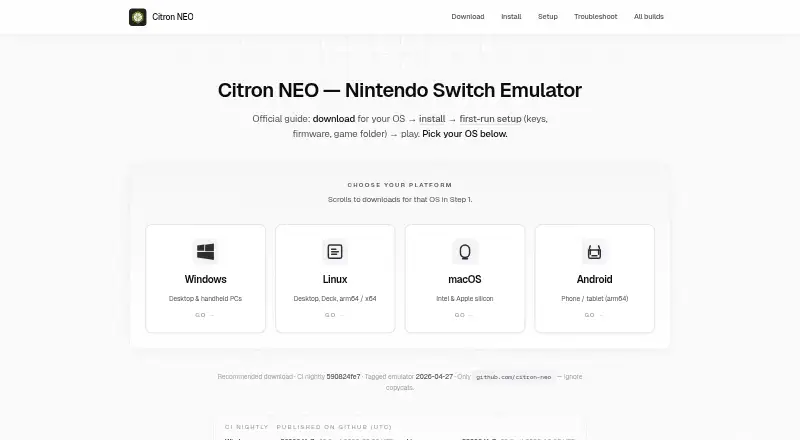
Citron NEO is a community-maintained, open-source Nintendo Switch emulator with builds for Windows, Linux, macOS, and Android. Its website is an installation and setup guide that links to GitHub downloads rather than hosting emulator files. To run commercial games, users need keys, firmware, and game files obtained from hardware and software they are entitled to use; the guides cover adding keys, installing firmware, and choosing game folders. Citron focuses on Vulkan graphics, and the guides recommend current graphics drivers. At least 8 GiB of RAM is recommended for many titles. Tagged releases include changelog text, while frequently updated CI nightlies can fix or break individual games, so compatibility and per-game fixes may differ between builds. Windows guidance targets x64 PCs and handhelds; Linux downloads include x64 and ARM64 builds, with an AppImage suggested for typical PCs and Steam Deck. macOS packages support Intel and Apple silicon. Android builds are APKs and require Vulkan support. Some builds include a GameBanana browser for finding and installing mods from game properties.
Who it suits
Citron NEO may suit people seeking a community-maintained Switch emulator for one of its listed platforms. Users should be comfortable setting up keys, firmware, and game files they are entitled to use, and checking build-specific compatibility.
What it does well
- Builds are provided for four operating systems.
- Linux downloads include x64 and ARM64 builds.
- macOS downloads support Intel and Apple silicon.
- Some builds include a GameBanana mod browser.
- Tagged releases include changelog text.
What to know first
- Commercial games require separately obtained keys and firmware.
- Android builds require Vulkan support.
- Nightly builds can fix or break specific games.
- At least 8 GiB of RAM is recommended for many titles.
Limits
Running commercial games requires keys, firmware, and game files obtained from hardware and software the user is entitled to use. Android builds require Vulkan support, and the guide recommends at least 8 GiB of RAM for many titles.
Getting started
- Open the community install guide at https://www.citronneo.org/.
- Choose the guide for Windows, Linux, macOS, or Android.
- Download a release or nightly from the linked GitHub source; check published release checksums.
- Add keys, install firmware, and select game folders using materials you are entitled to use.
- Use current graphics drivers; the guide recommends at least 8 GiB of RAM for many titles.
Overview
Citron NEO is a community-maintained, open-source Nintendo Switch emulator for desktop and Android. It suits users comfortable managing emulator builds and their own game assets; its chief trade-off is that a newer build can change how an individual game behaves.
The companion site is a setup guide, not a download host: it directs users to GitHub for tagged releases and CI nightlies. Commercial games require keys, firmware and game files obtained from hardware and software users are entitled to use. Citron’s setup guidance covers adding keys, installing firmware and selecting game folders.
Citron offers Vulkan graphics, resolution scaling, motion controls and online multiplayer. It is one option in the Nintendo Switch emulators category, but it is a better fit for people willing to follow build changes than for those who want game compatibility to remain consistent across updates.
Key features
Build choices and compatibility
Tagged releases come with changelog text, while CI nightlies update frequently and may fix or break particular games between builds. Tagged builds give users a version record to consult; nightlies offer a faster-moving option, but bring more uncertainty for a specific title. Checking the release notes for the build in use is useful when compatibility or a game-specific fix matters.
Graphics and mods
Citron focuses on Vulkan and recommends current graphics drivers. That makes driver upkeep part of setup, especially when diagnosing graphics issues. Some builds include a GameBanana browser for finding and installing mods through game properties, though the feature is not present in every build.
Downloads and safety
Downloads are published on GitHub, and the guide identifies github.com/citron-neo as the official source. It recommends checking release checksums when GitHub publishes them and warns against third-party APK mirrors or installers bundled with keys or firmware. The guide itself does not host emulator binaries, so users must follow through to GitHub for downloads.
Pricing
Citron NEO is free, with a free plan. There are no paid tiers to weigh against feature limits; the main costs are the setup effort and the need to supply eligible keys, firmware and game files for commercial games.
Platforms
Citron supports Windows, Linux, macOS and Android. Windows guidance targets x64 PCs and handhelds and recommends a CI nightly. Linux builds cover x64 and ARM64; the guide recommends an AppImage for typical PCs and Steam Deck. macOS packages support Intel and Apple silicon as a .dmg.
Android builds are APKs, with a separate Snapdragon 8 Elite variant when listed. Vulkan support is required on Android. The download guidance recommends at least 8 GiB of RAM for many titles, so lower-memory devices may be a poor fit for those games.
Who it's for
Citron is a sensible choice for users seeking a free, open-source emulator with builds for both desktop systems and Android, and who can handle setup and changing compatibility. Its GitHub source, release notes and community channels give technically inclined users ways to follow changes and seek help.
It is less suited to anyone who wants a fixed, predictable game-by-game experience or expects commercial games to work without supplying their own keys, firmware and files. Citron’s project is community-maintained and explicitly not a corporate successor to Yuzu or the former citron-emu.org project.
Pros and cons
- Pros: Free and open source, with Windows, Linux, macOS and Android builds.
- Pros: Vulkan, resolution scaling, motion controls and online multiplayer cover several useful emulator capabilities.
- Pros: Tagged releases include changelog text, and some builds offer a GameBanana browser for mods.
- Cons: CI nightlies can fix or break individual games between builds, so version choice can affect compatibility.
- Cons: Commercial-game setup depends on users supplying keys, firmware and files they are entitled to use.
- Cons: Android requires Vulkan, while the guide recommends at least 8 GiB of RAM for many titles.
Alternatives
Eden is another free, open-source Nintendo Switch emulator, with listed support for Android, Linux, macOS, web and Windows; consider it if web support matters.
Nuzu is a free option for Android, Linux, macOS and Windows if you want to compare another emulator across the same listed platforms.
Ryubing is free for Linux, macOS and Windows, making it a desktop-only alternative to consider if Android support is not needed.
Ryujinx Classic is a free, MIT-licensed emulator for Linux, macOS and Windows; choose it if that license and desktop platform mix suit your preference.
NeXium is free and open source for Android, Linux and Windows, with builds and features not paywalled; it is worth comparing if those platforms are sufficient.
Ruzu is a free, open-source emulator with desktop packages for Windows, macOS and Linux, an option for users who do not need Android.
Pineapple Pictures is a freemium alternative for Windows, macOS and Linux.
Hyjinx is another free alternative.
Verdict
Citron NEO is best for users who want a free, community-maintained Switch emulator across desktop and mobile platforms and are prepared to manage their own setup. Its platform breadth and Vulkan support are compelling; the main reason to look elsewhere is build-to-build variation that can affect individual games.
Verdict
Citron NEO offers community-maintained builds across desktop and mobile platforms, with Vulkan graphics and setup guidance. Build changes can affect individual games, and commercial-game setup depends on keys, firmware, and files users are entitled to use.
Questions
Is Citron NEO free?
Yes. Its pricing model is free, and it has a free plan.
Which platforms does it support?
Citron NEO has builds for Windows, Linux, macOS, and Android.
Is Citron NEO open source?
Yes. It is an open-source project maintained by the citron-neo community on GitHub.
What graphics API does it use?
Citron NEO focuses on Vulkan. Android builds require Vulkan support.
Where can I download it?
The community guide links to tagged releases and nightly builds on github.com/citron-neo. The guide site does not host emulator binaries.
What does it require to run commercial games?
You need keys, firmware, and game files obtained from hardware and software you are entitled to use.
Facts from Citron NEO's own pages
- Android
- Android builds are provided as APKs, including a separate Snapdragon 8 Elite variant when listed; the FAQ says Vulkan support is required. · citronneo.org, 29 Sept 2026
- Build channels
- Tagged releases include changelog text, while CI nightlies update frequently and may fix or break specific games between builds. · citronneo.org, 29 Sept 2026
- Build variability
- The site says CI nightlies update frequently and may fix or break specific games between builds. · citronneo.org, 30 Sept 2026
- Community support
- The site points users to GitHub issues and source code, and to Discord for day-to-day discussion. · citronneo.org, 30 Sept 2026
- Downloads
- Tagged releases and continuous nightly builds are published for Windows, Linux, macOS, and Android. · citronneo.org, 30 Sept 2026
- Download safety
- The site identifies github.com/citron-neo as the official download source and warns against third-party APK mirrors and installers bundled with keys or firmware. · citronneo.org, 30 Sept 2026
- Game compatibility
- Compatibility and per-game fixes can change between builds, so the site directs users to check release notes for their build. · citronneo.org, 30 Sept 2026
- Graphics
- Citron focuses on Vulkan, and the troubleshooting guide recommends current graphics drivers. · citronneo.org, 30 Sept 2026
- Linux
- Linux downloads include x64 and ARM64 builds, with an AppImage recommended for typical PCs and Steam Deck. · citronneo.org, 29 Sept 2026
- macOS
- The macOS download guide supports Intel and Apple silicon and offers a .dmg package. · citronneo.org, 29 Sept 2026
- Mods
- Some builds include a GameBanana browser in game properties for searching, downloading, and installing mods. · citronneo.org, 30 Sept 2026
- Not a corporate successor
- Citron NEO describes itself as a community project and says it is not a corporate successor to Yuzu or the former citron-emu.org project. · citronneo.org, 29 Sept 2026
- Privacy
- The guide site uses Google Analytics 4 for aggregate traffic information and says it does not ask for keys, firmware, or ROM paths. · citronneo.org, 30 Sept 2026
- Product
- Citron NEO is an open-source Nintendo Switch emulator maintained by the citron-neo community on GitHub. · citronneo.org, 30 Sept 2026
- Security guidance
- The security guide recommends downloading only from github.com/citron-neo and checking release checksums when GitHub publishes them. · citronneo.org, 29 Sept 2026
- Setup needs
- To run commercial games, Citron needs keys, firmware, and game files obtained from hardware and software you are entitled to use. · citronneo.org, 29 Sept 2026
- Setup requirements
- Setup guides users through adding keys, installing firmware, and selecting game folders; the site says to use material from hardware they own. · citronneo.org, 30 Sept 2026
- Support
- Users can ask for help or report issues through Discord or GitHub issues, including their asset filename, OS, GPU, and driver version. · citronneo.org, 29 Sept 2026
- System requirements
- The download page recommends at least 8 GiB of RAM for many titles. · citronneo.org, 30 Sept 2026
- Website role
- The website is a community install and setup guide that links GitHub downloads and does not host emulator binaries. · citronneo.org, 30 Sept 2026
- What it is
- Citron NEO is an open-source Nintendo Switch emulator maintained by the citron-neo community on GitHub. · citronneo.org, 29 Sept 2026
- Windows
- The Windows download guide targets x64 PCs and handhelds and recommends a CI nightly build. · citronneo.org, 29 Sept 2026
Where Citron NEO stands on Freedom251
- Nintendo Switch Emulators#7 of 20