Freedom251 › Study Planner Apps
Cinch
by Cinch
What Cinch is
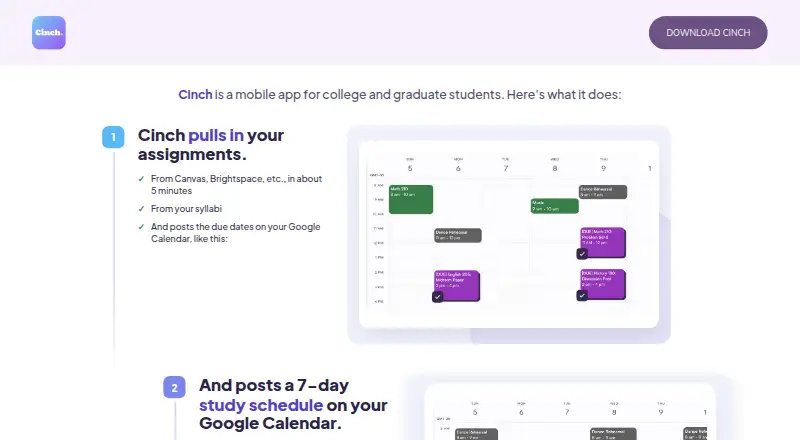
Cinch is a mobile study planner for college and graduate students that organizes assignments and study time in Google Calendar. It can import coursework from Canvas, Moodle, Blackboard, Brightspace, Google Classroom, and syllabi, then place due-date markers on the calendar. Cinch creates a seven-day plan with study blocks arranged around classes and other events already in Google Calendar. When a block is missed, takes longer, or finishes late, the schedule can be adjusted. Students can review imported assignments and add new ones at any time. Study blocks and due-date markers are standard calendar events that users can move, edit, shorten, or delete. Cinch reads existing events to plan around them and says it does not modify or delete those events. A Google Calendar account is required. The app offers a free trial but no free plan, with Premium subscriptions at $3.99 a month or $24.99 a year. It is available on Android and iOS.
Who it suits
Cinch is designed for college and graduate students who manage coursework in Google Calendar. It is suited to students wanting imported assignments and automatically adjusted study blocks.
What it does well
- Imports assignments from major learning platforms and syllabi
- Builds seven-day study schedules around calendar commitments
- Automatically reschedules missed study blocks
- Users can move, edit, or delete study events
- Offers monthly and annual Premium plans
What to know first
- No free plan is listed
- Requires a Google Calendar account
- Premium costs 3.99 USD monthly or 24.99 USD yearly
- Designed for college and graduate students
Plans
| Plan | Billed and limits | Price |
|---|---|---|
| Annual Premium Subscription | Annual Premium Subscription · Premium subscription | $24.99 a year |
| Monthly Premium | Monthly Premium · Premium subscription | $3.99 a month |
As cinchplanner.com lists them, read 9 Oct 2026. The maker's own page has the final word.
Verdict
Cinch turns imported coursework into editable Google Calendar study blocks and adjusts plans when schedules change. Students should account for the required Google account and paid Premium subscriptions after the free trial.
Facts from Cinch's own pages
- Assignment import
- Cinch imports assignments from Canvas, Moodle, Blackboard, Brightspace, or Google Classroom and syllabi. · apps.apple.com, 9 Oct 2026
- Assignment imports
- Cinch imports assignments from Canvas, Brightspace, and syllabi, and posts their due dates to Google Calendar. · cinchplanner.com, 9 Oct 2026
- Assignment review
- Students can review imported assignments and add assignments at any time. · cinchplanner.com, 9 Oct 2026
- Audience
- Cinch is designed for college and graduate students and says it does not knowingly collect information from children under 13. · cinchplanner.com, 9 Oct 2026
- Audience and region
- The App Store listing describes Cinch as intended for college and university students in the US and Canada and requires a Google Calendar account. · apps.apple.com, 9 Oct 2026
- Calendar events
- Study blocks and due date markers are standard Google Calendar events that users can move, edit, or delete themselves. · cinchplanner.com, 9 Oct 2026
- Calendar integration
- Cinch uses Google Calendar's calendar.events OAuth scope to read existing events and create study blocks and due date markers; it says it does not modify or delete existing events. · cinchplanner.com, 9 Oct 2026
- Calendar sync
- Yes · cinchplanner.com, 20 Sept 2026
- Data deletion
- The maker says account deletion permanently removes the user's personal, calendar, assignment, and preference data. · cinchplanner.com, 9 Oct 2026
- Data use
- Cinch says it does not sell, rent, or share personal information or Google Calendar data with third parties, and does not use calendar data for advertising or unrelated purposes. · cinchplanner.com, 9 Oct 2026
- Deletion
- Users can delete their account in app settings, which permanently removes their personal information, calendar data, assignments, and study preferences from Cinch's systems. · cinchplanner.com, 9 Oct 2026
- Free plan
- No · cinchplanner.com, 20 Sept 2026
- Headquarters
- Pittsfield, Massachusetts, United States · cinchplanner.com, 28 Sept 2026
- Infrastructure
- Cinch's backend is hosted on Google Cloud Run. · cinchplanner.com, 9 Oct 2026
- Privacy compliance
- The maker says its use and transfer of Google API data adheres to the Google API Services User Data Policy, including Limited Use requirements. · cinchplanner.com, 9 Oct 2026
- Product
- Cinch is a mobile app for college and graduate students that organizes assignments and study time in Google Calendar. · cinchplanner.com, 9 Oct 2026
- Purpose
- Cinch is a mobile study planner for college and graduate students. · cinchplanner.com, 9 Oct 2026
- Rescheduling
- Cinch automatically reschedules missed study blocks. · apps.apple.com, 9 Oct 2026
- Schedule changes
- Cinch adjusts study blocks when a student misses a block, needs more time, or finishes late. · cinchplanner.com, 9 Oct 2026
- Security
- Cinch says device-to-server and server-to-Google communications use TLS/HTTPS, JWTs handle sessions, and Google OAuth tokens are encrypted in its database rather than stored in plain text. · cinchplanner.com, 9 Oct 2026
- Study schedule
- Cinch creates a 7-day study schedule with time blocked for each assignment around other calendar commitments. · cinchplanner.com, 9 Oct 2026
- Study scheduling
- Cinch builds study blocks around classes and other events already on Google Calendar. · apps.apple.com, 9 Oct 2026
- Support
- The App Store listing provides [email protected] for questions. · apps.apple.com, 9 Oct 2026
- User control
- Users can review imported assignments, add assignments, and move, shorten, or delete study blocks. · apps.apple.com, 9 Oct 2026
Where Cinch stands on Freedom251
- Study Planner Apps#30 of 38
- Daily Planner Apps#133 of 137