Freedom251 › Kitchen Display System Software

Cibus KDS
What Cibus KDS is
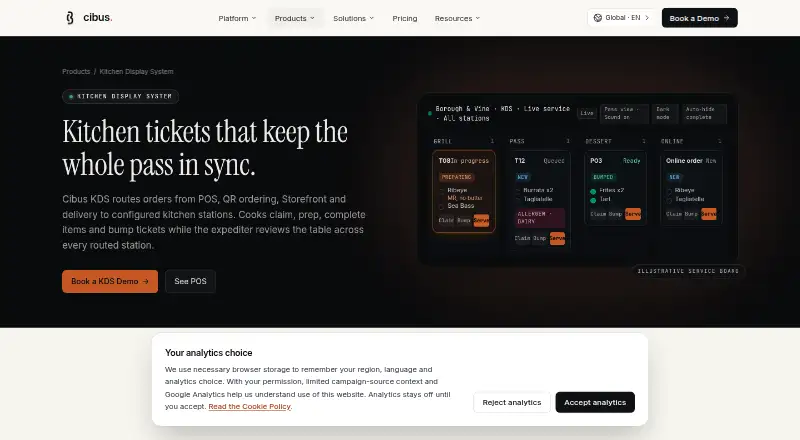
Cibus KDS routes orders from POS, QR ordering, Storefront and delivery channels to configured kitchen stations. Items can go to stations such as Grill, Salad, Bar, Pastry or Pizza, while an expediter checks readiness across stations. Cooks can claim tickets, mark individual items ready, bump tickets and mark orders served. Ticket cards can show configured modifiers, allergen notes and internal instructions. Prep timers, ticket age and priority sorting, configurable overdue sound alerts and station load views help staff monitor queues. Kitchen screens can be configured for station, layout, card size, font scale, theme, sound, auto-hide, screen lock and printer defaults. Authorised staff can reprint current or historical tickets; managers can review completed-ticket history and configured workflow timestamps. Cibus KDS connects with Cibus POS, QR Order & Pay, Storefront, Staff Mobile App, Admin Dashboard and Payments & Receipts. It is available on Android, iOS and the web. Cibus prepares a quote after discovery based on product mix, locations, payment setup, hardware and support. The platform's listed audiences include independent restaurants, cafés, bakeries, takeaways, casual and fine dining venues, and multi-location groups.
Who it suits
Cibus KDS may suit restaurants and food-service venues that route orders to distinct kitchen stations and track ticket readiness. Its listed audiences include independent venues and multi-location restaurant groups.
What it does well
- Routes orders to configured kitchen stations.
- Tickets can show modifiers and allergen notes.
- Timers and alerts help monitor queues.
- Managers can review completed-ticket history.
- Available on Android, iOS and the web.
What to know first
- Pricing is by quote after discovery.
- No standard onboarding duration is published before discovery.
- Quote factors include hardware and support.
Plans
| Plan | Billed and limits | Price |
|---|---|---|
| Run Service | Quote after discovery · POS · QR Order & Pay · Kitchen Display System · Payments & Receipts · Staff Mobile App · Admin Dashboard | On request |
As cibus.ai lists them, read 4 Oct 2026. The maker's own page has the final word.
Getting started
- Visit the Cibus KDS product website.
- Contact Cibus for a quote based on your product mix, locations, payment setup, hardware and support needs.
- Discuss onboarding, training and support coverage for the proposed rollout.
- Configure kitchen screens for stations, layouts, ticket cards and device settings.
Verdict
Cibus KDS supports station routing, ticket status updates and queue monitoring, with connections to other listed Cibus products. Buyers should expect discovery before pricing and confirm rollout, onboarding and support details in the proposed plan.
Questions
What platforms does Cibus KDS support?
It is available on Android, iOS and the web.
How much does Cibus KDS cost?
Cibus publishes no fixed public price. It prepares a quote after discovery based on product mix, locations, payment setup, hardware and support.
Which Cibus products connect with KDS?
It connects with Cibus POS, QR Order & Pay, Storefront, Staff Mobile App, Admin Dashboard and Payments & Receipts.
Can kitchen staff reprint tickets?
Authorised kitchen staff can reprint current or historical tickets. Managers can review completed-ticket history and configured workflow timestamps.
How is card information handled?
Cibus says card entry and processing are handled through Stripe, and its application records do not store raw card numbers.
Facts from Cibus KDS's own pages
- Card data
- Cibus says card entry and processing are handled through Stripe and its application records do not store raw card numbers. · cibus.ai, 4 Oct 2026
- Connected products
- KDS connects with Cibus POS, QR Order & Pay, Storefront, Staff Mobile App, Admin Dashboard and Payments & Receipts. · cibus.ai, 4 Oct 2026
- Device settings
- Kitchen screens can be configured for station, layout, card size, font scale, theme, sound, auto-hide, screen lock and printer defaults. · cibus.ai, 4 Oct 2026
- Headquarters
- Stockport, United Kingdom · cibus.ai, 28 Sept 2026
- Intended users
- Cibus identifies independent restaurants, cafés, bakeries, takeaways, casual and fine dining venues, and multi-location restaurant groups as audiences for its platform. · cibus.ai, 4 Oct 2026
- Pricing
- Cibus says it publishes no fixed public price and prepares a quote after discovery based on product mix, locations, payment setup, hardware and support. · cibus.ai, 4 Oct 2026
- Printing and history
- Authorised kitchen staff can reprint current or historical tickets, and managers can review completed-ticket history and configured workflow timestamps. · cibus.ai, 4 Oct 2026
- Product
- Cibus KDS routes POS, QR ordering, Storefront and delivery orders to configured kitchen stations. · cibus.ai, 4 Oct 2026
- Security
- Cibus says database row-level security policies scope restaurant data to authorised restaurant access. · cibus.ai, 4 Oct 2026
- Station routing
- Items route to configured stations such as Grill, Salad, Bar, Pastry or Pizza, while the expediter can view table readiness across stations. · cibus.ai, 4 Oct 2026
- Support and onboarding
- Cibus says onboarding, training and support coverage are defined for the proposed rollout, and it does not publish a standard onboarding duration before discovery. · cibus.ai, 4 Oct 2026
- Ticket details
- Configured modifiers, allergen notes and internal instructions can appear on kitchen ticket cards. · cibus.ai, 4 Oct 2026
- Ticket workflow
- Cooks can claim tickets, mark individual items ready, bump tickets and mark orders served. · cibus.ai, 4 Oct 2026
- Timers and alerts
- Prep timers, age and priority sorting, configurable overdue sound alerts and station load views help staff monitor ticket queues. · cibus.ai, 4 Oct 2026
Where Cibus KDS stands on Freedom251
- Kitchen Display System Software#22 of 49