Freedom251 › Task Management Software
Chronos
What Chronos is
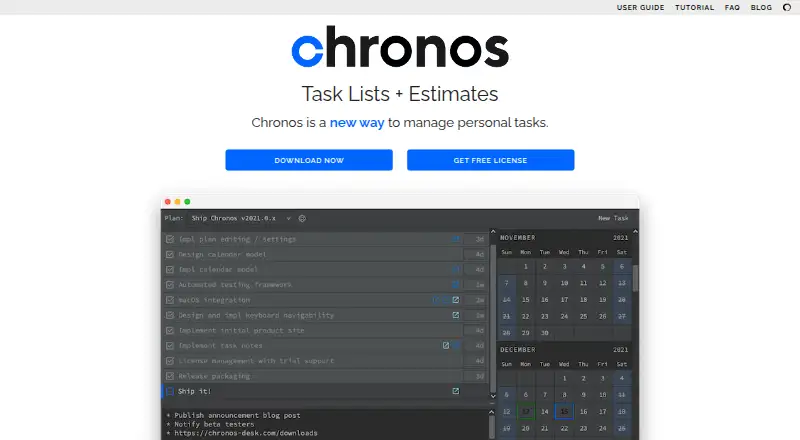
Chronos is a free personal task app for macOS, described by its maker as optimized for creative professionals. It uses estimates to record on-task time and project when tasks and plans may finish. Plans are linear task sequences that you can continually refactor as work or goals change, while the calendar updates projected task days and completion dates. Tasks include estimates, notes, detected links, reordering, and keyboard editing. Notes can connect to Jira tickets, GitHub or VCS pull requests, gists, branches, and commit hashes. Chronos provides native time tracking but no task dependencies or guest access. The maker says application data stays backed up on the local desktop and the app works offline. Workspace backups run every minute and remain for 10 days. Plans can be imported or exported as JSON. The Universal Chronos License is free, perpetual, requires no purchase, and covers personal or commercial work. No mobile app is currently offered.
Who it suits
Chronos suits creative professionals who want estimate-based planning and local, offline task management on macOS. It can also fit users who need links from task notes to development work.
What it does well
- Free perpetual license for personal or commercial work
- Native time tracking records on-task time
- Calendar projects task days and completion dates
- Local backups and offline operation
- JSON plan import and export
What to know first
- Available on macOS only
- No mobile app presently
- No task dependencies
- No guest access
Plans
| Plan | Billed and limits | Price |
|---|---|---|
| Universal Chronos License | Perpetual license; no purchase required · For personal or commercial work | Free |
As chronos-desk.com lists them, read 11 Oct 2026. The maker's own page has the final word.
Verdict
Chronos focuses on estimate-driven personal planning, time tracking, and continuously changeable task sequences. Its macOS-only availability and lack of dependencies or guest access make its fit narrower for collaborative teams.
Facts from Chronos's own pages
- Backups and export
- The workspace is backed up every minute, with backups retained for 10 days, and plans can be exported or imported as JSON. · chronos-desk.com, 11 Oct 2026
- Calendar
- Its calendar updates with task estimates and displays projected task days and plan completion dates. · chronos-desk.com, 11 Oct 2026
- Company
- Chronos is produced by Callosum LLC, a Texas limited liability company. · chronos-desk.com, 11 Oct 2026
- Download availability
- The downloads page lists macOS version 2022.0.1 and says Windows and Linux availability is by notification signup. · chronos-desk.com, 11 Oct 2026
- Integrations
- Task notes can link to Jira tickets, GitHub or VCS pull requests, gists, branches, and commit hashes. · chronos-desk.com, 11 Oct 2026
- Intended users
- The maker describes Chronos as a producer-focused personal task app optimized for creative professionals. · chronos-desk.com, 11 Oct 2026
- Local storage
- The maker says Chronos stores and backs up application data on the local desktop and works offline. · chronos-desk.com, 11 Oct 2026
- Mobile availability
- The FAQ says Chronos does not presently offer a mobile app. · chronos-desk.com, 11 Oct 2026
- Planning model
- Plans are linear sequences of tasks that users continuously refactor as work and goals change. · chronos-desk.com, 11 Oct 2026
- Privacy
- The privacy policy says the company does not sell or give user information to third parties except when strictly necessary. · chronos-desk.com, 11 Oct 2026
- Purpose
- Chronos manages personal tasks using estimates to record on-task time and project task completion dates. · chronos-desk.com, 11 Oct 2026
- Support
- The company lists separate contacts for product or licensing questions and for technical assistance. · chronos-desk.com, 11 Oct 2026
- Task features
- Tasks support estimates, notes, detected links, reordering, and keyboard-based editing. · chronos-desk.com, 11 Oct 2026
Where Chronos stands on Freedom251
- Task Management Software#27 of 59