Freedom251 › PC Optimization Software

Chris Titus Tech WinUtil
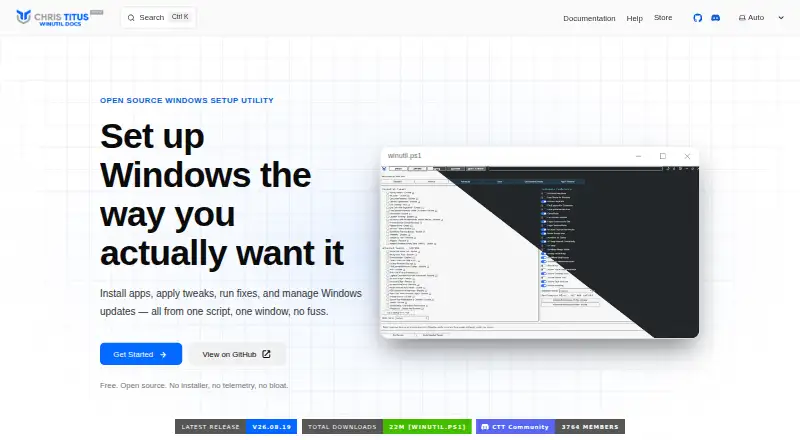
What Chris Titus Tech WinUtil is
Chris Titus Tech WinUtil is a Windows 11 toolkit for installing applications, changing system settings, fixing common issues, managing updates, and opening Windows tools. It runs as a PowerShell script. For application installs, it uses WinGet and Chocolatey to obtain software from official sources. Users can choose preset performance, privacy, and usability tweaks or select changes individually, and nearly every tweak can be reversed from the same panel. Repair options cover network settings, Windows Update, system files, and WinGet; update controls include pausing updates or receiving security updates only. Configuration files and PowerShell parameters allow repeatable setups, batch deployment, and scripted installation across multiple PCs. Win11 Creator can prepare a Windows 11 ISO by removing bloatware, disabling telemetry, and bypassing hardware requirement checks, then export the ISO or write it to USB. The maker describes WinUtil as a local script that does not collect or transmit user data. It is open source and free, with no traditional installer or account requirement. Running it requires Windows 11, PowerShell 5.1 or later, administrator access, internet for app downloads and updates, and .NET Framework 4.5 or later.
Who it suits
WinUtil suits Windows 11 home users, power users, IT professionals, gamers, privacy-conscious users, and developers who want one toolkit for app installation, system changes, repairs, and update controls. Its configuration files and PowerShell parameters are also useful for repeatable setups across multiple PCs.
What it does well
- Installs applications through WinGet and Chocolatey from official sources.
- Presets and individual controls cover performance, privacy, and usability tweaks.
- Nearly every tweak can be reversed from the same panel.
- Repairs network settings, Windows Update, system files, and WinGet.
- Supports scripted setups and batch deployment across multiple PCs.
- Free and open source, with no account requirement.
What to know first
- Supports Windows 11; Windows 10 is not supported.
- Requires PowerShell 5.1 or later and administrator access.
- App downloads and updates require internet access.
- Advanced tweaks may affect functionality or compatibility.
Limits
WinUtil is focused on Windows 11 and does not support Windows 10. The utility requires administrator access, and internet is needed for application downloads and updates.
Plans
| Plan | Billed and limits | Price |
|---|---|---|
| Free WinUtil | PowerShell-based utility · Open source · No traditional installer | Free |
| Windows Toolbox | Offline executable · Program installation · Windows optimization · Custom ISO creation | On request |
| Free | Free · open source · no installer · no telemetry · no account required | Free |
As winutil.christitus.com lists them, read 21 Sept 2026. The maker's own page has the final word.
Getting started
- Open the official WinUtil website.
- Use the official source to run the PowerShell-based utility; it has no traditional installer.
- Confirm the PC runs Windows 11 and has PowerShell 5.1 or later, administrator access, and .NET Framework 4.5 or later.
- Connect to the internet for application downloads and updates.
- Create a restore point before making major changes.
Verdict
Choose WinUtil if you want a free Windows 11 toolkit for installs, system adjustments, repairs, and repeatable PC setups. Look elsewhere if you need Windows 10 support or prefer a traditional installer; the maker also advises creating a restore point before major changes.
Questions
Is Chris Titus Tech WinUtil free?
Yes. The listed Free WinUtil and Free plans each cost nothing.
Is there a free trial?
No. WinUtil is listed as free, with no free trial.
Which Windows versions does it support?
It is focused on Windows 11. Windows 10 is not supported.
Is WinUtil open source?
Yes. The FAQ says its code is publicly available on GitHub and recommends running it only from the official source.
Does WinUtil require an installer or account?
The listed free plans describe it as having no installer and no account requirement. The utility is PowerShell-based.
What does WinUtil require to run?
It requires Windows 11, PowerShell 5.1 or later, administrator access, and .NET Framework 4.5 or later. Internet is needed for app downloads and updates.
Facts from Chris Titus Tech WinUtil's own pages
- Application installs
- It uses WinGet and Chocolatey to install applications from official sources without bundled bloatware. · winutil.christitus.com, 12 Oct 2026
- Audience
- The maker lists home users, power users, IT professionals, gamers, privacy-conscious users, and developers as intended users. · winutil.christitus.com, 12 Oct 2026
- Automation
- Configuration files and PowerShell parameters support repeatable setups, batch deployment, and scripted installations across multiple PCs. · winutil.christitus.com, 12 Oct 2026
- Custom ISO
- Win11 Creator can remove bloatware, disable telemetry, bypass hardware requirement checks, and export a Windows 11 ISO or write it to USB. · winutil.christitus.com, 12 Oct 2026
- Free plan
- Yes · winutil.christitus.com, 21 Sept 2026
- Open source
- The FAQ says the code is publicly available on GitHub and recommends running WinUtil only from the official source. · winutil.christitus.com, 12 Oct 2026
- Privacy
- The maker says WinUtil itself does not collect or transmit user data and describes it as a local PowerShell script. · winutil.christitus.com, 12 Oct 2026
- Purpose
- WinUtil is a PowerShell-based Windows toolkit for installing apps, applying tweaks, fixing issues, managing updates, and accessing Windows tools. · winutil.christitus.com, 12 Oct 2026
- Repairs and updates
- It offers fixes for network settings, Windows Update, system files, and WinGet, plus options to pause updates or receive security updates only. · winutil.christitus.com, 12 Oct 2026
- Requirements
- The listed requirements are Windows 11, PowerShell 5.1 or later, administrator access, internet for app downloads and updates, and .NET Framework 4.5 or later. · winutil.christitus.com, 12 Oct 2026
- Restore-point tools
- Yes · winutil.christitus.com, 21 Sept 2026
- Reversibility
- Nearly every tweak can be reverted from the same panel, and the FAQ describes an Undo Selected Tweaks option. · winutil.christitus.com, 12 Oct 2026
- Risk guidance
- The documentation advises creating a restore point before major changes and cautions that advanced tweaks may break functionality or compatibility. · winutil.christitus.com, 12 Oct 2026
- Support
- Help is available through the documentation, FAQ, known issues, community Discord, GitHub Issues, and YouTube tutorials. · winutil.christitus.com, 12 Oct 2026
- System tweaks
- Users can apply performance, privacy, and usability tweaks with presets or customize individual tweaks. · winutil.christitus.com, 12 Oct 2026
- Windows 10 support
- Windows 10 is not supported; the documentation says WinUtil is focused on Windows 11. · winutil.christitus.com, 12 Oct 2026
- Windows support
- windows 11 · winutil.christitus.com, 21 Sept 2026
Where Chris Titus Tech WinUtil stands on Freedom251
- PC Optimization Software#16 of 97
- PC optimisers#19 of 104