Freedom251 › Financial Modeling Software
Cast
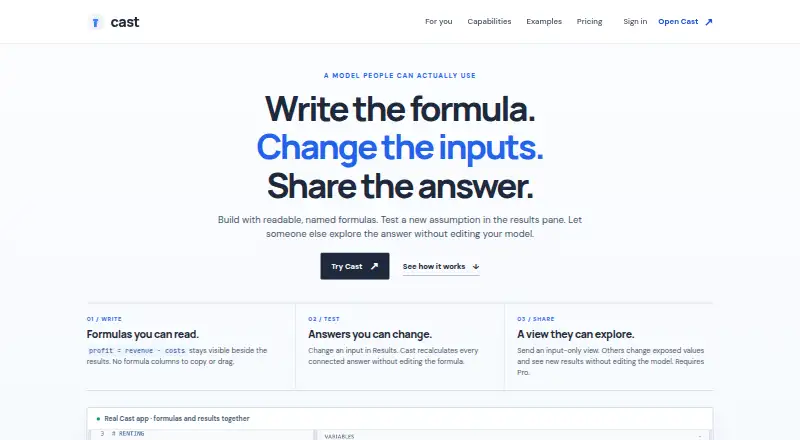
What Cast is
Cast is a web-based modeling tool for private equity, credit, FP&A and other finance teams. It checks covenants and reports each rule as pass or fail, with the margin shown for every case. Color-coded sensitivity grids let users explore assumptions and load a selected cell as a scenario. The platform compares assumptions with NYU Stern Damodaran industry data adjusted for deal EBITDA, and runs Monte Carlo analysis with 10,000 trials, showing P10, P50 and P90 outcomes. Its AI can create models from natural-language descriptions, edit existing models and validate generated code before showing results. Excel exports are .xlsx files with live formulas, sections, scenarios and formatting. Cast connects through OAuth to QuickBooks, Xero and FreshBooks to pull invoices, contacts, transactions and payments; custom connectors can use public REST APIs. Shared stakeholders can adjust inputs in the Results pane without changing formulas. Cast is desktop only and works best on Chrome, Firefox or Safari. The Free plan includes 60 AI credits per month and three saved models; Pro costs $15 a month.
Who it suits
Cast suits finance teams building and reviewing models, exploring scenarios and sharing selected inputs with stakeholders. It is for desktop users who work with the supported browsers.
What it does well
- Covenant checks show pass-or-fail results and margins.
- Sensitivity grids can be turned into scenarios.
- Excel exports retain live formulas and formatting.
- Free plan includes 60 AI credits monthly.
What to know first
- Cast is desktop only.
- Free saved models are limited to three.
- Free share links expire after 7 days.
- No Excel add-in is listed.
Limits
The Free plan includes 60 AI credits per month and allows three saved models. Its share links expire after seven days and show model code. Pro includes 1,000 AI credits per month and unlimited saved models; Teams includes 1,000 AI credits per seat per month.
Plans
| Plan | Billed and limits | Price |
|---|---|---|
| Free | $0 forever · all formulas, forecasts, scenarios, covenants, sensitivity grids, benchmarks, Monte Carlo · Excel export · 60 AI credits/month · 3 saved models · share links expire after 7 days | Free |
| Pro | $15/ month · everything in Free · presentation links hide model code · 1,000 AI credits/month · unlimited saved models · permanent share links · remove Cast branding · priority support | $15 a month |
| Teams | $40/ seat / month · everything in Pro · shared live models · colleague version history · snapshot links · 1,000 AI credits per seat/month | $40 a month |
As cast.is lists them, read 15 Oct 2026. The maker's own page has the final word.
Getting started
- Open https://cast.is/ in a desktop browser; Cast works best in Chrome, Firefox, or Safari.
- Choose the Free, Pro, or Teams plan.
- Create a model with a natural-language description or edit an existing model.
- Connect QuickBooks, Xero, or FreshBooks through OAuth to import accounting records.
- Export a model as an .xlsx file or share it with stakeholders.
Cast is a financial modeling tool for private equity, credit, FP&A, and other finance teams. It suits desktop users who need to test deal assumptions, check covenants, or share interactive models with stakeholders. Its analytical range is a strength, but limited free-plan capacity and no mobile support make it a poor fit for casual or on-the-go modeling.
Overview
Cast brings valuation models, scenario analysis, covenant checks, and accounting imports into one finance workflow. Each covenant rule returns a pass-or-fail result and shows its margin for every case, which helps teams judge how close a scenario comes to breaching a limit. Sensitivity grids are color-coded, and a selected cell can be loaded as a scenario, making it easier to move from exploring an assumption to evaluating its implications.
For context beyond a model’s own assumptions, Cast compares them with NYU Stern Damodaran industry data adjusted to deal EBITDA. Its Monte Carlo analysis runs 10,000 trials and displays P10, P50, and P90 outcomes. Those tools are useful when a team needs to understand a range of plausible outcomes; teams that only need a straightforward forecast may not need this depth.
Key features
Cast’s AI can generate models from natural-language descriptions, edit existing models, and validate generated code before displaying results. That validation is a useful safeguard, but it does not replace finance review of assumptions and outputs. The 60 monthly AI credits on Free also limit how often users can generate or revise models.
.xlsx exports retain live formulas, sections, scenarios, and formatting, which makes Cast more useful to teams that need to continue working with models in Excel. Accounting connections to QuickBooks, Xero, and FreshBooks use OAuth to import invoices, contacts, transactions, and payments. Cast can also build connectors to public REST APIs, including sources for crypto, foreign exchange, commodities, and weather data. External requests pass through a server-side proxy with SSRF protection, HTTPS enforcement, size limits, and timeouts; API keys do not touch the browser.
Shared stakeholders can change inputs in the Results pane without altering formulas. That provides a controlled way to explore a model together, though the plan determines whether share links expire and whether recipients can see model code.
Pricing
| Plan | Price | What it includes |
|---|---|---|
| Free | free | 60 AI credits/month, 3 saved models, and share links that expire after 7 days and show model code |
| Pro | $15 a month | 1,000 AI credits/month, unlimited saved models, permanent share links, and priority support |
| Teams | $40 a month | Shared live models, version history, snapshot links, and 1,000 AI credits/seat/month |
Free is a reasonable way to explore the workflow, but three saved models, a small AI allowance, expiring links, and visible model code are meaningful constraints for ongoing or sensitive work. Pro removes the saved-model cap and makes share links permanent, so it fits individual users who need a dependable working library or recurring collaboration. Teams adds live shared models and version history for groups that need to work together and preserve model changes; its AI allowance is per seat. Cast says subscriptions can be canceled anytime and customers retain ownership of their models. There is no free trial.
Platforms
Cast runs on the web and is desktop-only, working best in Chrome, Firefox, or Safari. That suits office-based finance work but rules it out for users who need native mobile access.
Who it's for
Cast is best for private equity, credit, and FP&A teams that need scenario-driven valuation work, covenant monitoring, or accounting data imports. Its sensitivity and Monte Carlo tools suit analysts comparing outcomes, while Excel export and stakeholder input sharing help teams carry models into familiar workflows. It is less compelling for mobile-first users, occasional modelers who can work within the Free caps, or teams that need only basic forecasts.
Pros and cons
- Pros: Covenant margins alongside pass-or-fail results make scenario risk easier to assess.
- Pros: Sensitivity grids, industry benchmarks, and 10,000-trial Monte Carlo analysis support a broader view of assumptions and outcomes.
- Pros: Live-formula Excel exports, accounting imports, and stakeholder input sharing connect modeling to team workflows.
- Cons: Free is capped at three saved models and 60 AI credits monthly; its links expire after seven days and show model code.
- Cons: Desktop-only access excludes users who need to model on mobile.
Alternatives
For a broader set of options, browse Financial Modeling Software.
- Uniflow is worth considering if mobile access matters: it supports web, iOS, and Android, and its free plan covers one revenue stream, one scenario, and a six-month forecast.
- Adlega offers a free plan with one financial model, core forecasts, MRR and runway, 15 Adlega Tokens monthly, and a read-only share link; consider it if those basics match your needs.
- Financial Modelling Pro may suit users who want a browser-local free project, sector templates, watermarked PDF export, and 20 Sammy messages per month.
- Valutico is an alternative for users seeking a data room or diligence workflow, with free access to create a data room or launch Diligence.
- LivePlan is another option for users seeking business planning software across web, desktop, and mobile platforms.
- Causal is another paid web-based option.
- Cube is a paid option for users seeking a platform with custom roles, unlimited dimensions and users, and unlimited dashboards on its Bronze plan.
- ModelRisk may be a fit for users who specifically need Windows-based modeling software; its ModelRisk Desktop plan is €1,550 a year for a single-computer license.
Verdict
Choose Cast if your finance team needs to examine multiple valuation outcomes, check covenant headroom, and share models without giving up Excel-ready formulas. Its strongest case is the combination of analytical tools and practical finance workflows; look elsewhere if mobile access, a larger free allowance, or a basic forecasting tool is more important.
Verdict
Cast combines scenario analysis, covenant checks, AI-assisted modeling and Excel export for finance workflows. Consider the free plan’s model and link limits, or the paid plans if you need more saved models or permanent share links.
Questions
Is Cast free?
Yes. Its Free plan costs nothing and includes 60 AI credits per month and three saved models.
What do the paid plans cost?
Pro costs $15 a month. Teams costs $40 a month.
Which platforms does Cast support?
Cast supports the web and is desktop-only. It works best in Chrome, Firefox, or Safari.
Can Cast import accounting data?
Yes. It connects to QuickBooks, Xero, and FreshBooks through OAuth to pull invoices, contacts, transactions, and payments.
Can users export models to Excel?
Yes. Cast exports .xlsx files with live formulas, sections, scenarios, and formatting.
Can subscriptions be canceled?
Cast says software subscriptions can be canceled anytime, and models remain owned by the customer.
Facts from Cast's own pages
- AI assistant
- The assistant accepts typed or spoken requests to build or edit models, explain results and suggest data changes. · cast.is, 15 Oct 2026
- AI code checks
- Generated model code must pass Cast's parser and evaluator before it is shown to the user. · cast.is, 15 Oct 2026
- AI modeling
- Cast generates models from natural-language descriptions, edits existing models, and validates AI-generated code before showing results. · cast.is, 1 Oct 2026
- AI research
- AI research organizes hypotheses, evidence and supported, unsupported or mixed verdicts into an investigation record. · cast.is, 15 Oct 2026
- API and SDKs
- The opened Cast pages describe user-created API connectors but do not publish a standalone public API, SDK or developer package. · cast.is, 15 Oct 2026
- Benchmarks
- Cast compares assumptions with NYU Stern Damodaran industry data, size-adjusted to deal EBITDA. · cast.is, 1 Oct 2026
- Charts
- Adding a chart flag to a result creates a line chart for forecast periods. · cast.is, 15 Oct 2026
- Company focus
- Zavient presents itself as a predictive-AI business serving marketplaces, lenders, insurers and revenue teams. · zavient.com, 15 Oct 2026
- Company legal name
- The maker's associated Zavient site identifies the business as Zavient LLC. · zavient.com, 15 Oct 2026
- Company location
- Zavient describes its operating base as the San Francisco Bay Area. · zavient.com, 15 Oct 2026
- Company performance claim
- Zavient's site claims more than $20 million in attributable revenue from prior work. · zavient.com, 15 Oct 2026
- Covenants
- Cast checks covenants and renders each rule as a pass/fail result with margin on every case. · cast.is, 1 Oct 2026
- CSV data
- Users can upload CSV files, edit rows, handle missing values, filter records and preview calculated columns. · cast.is, 15 Oct 2026
- Custom connectors
- Cast can propose connectors from API documentation and pull data with fetch(), although live sources may require the user's API key or account. · cast.is, 15 Oct 2026
- Excel export
- Cast exports XLSX workbooks, retaining supported calculations as live Excel formulas and exporting unsupported functions as values with notes. · cast.is, 15 Oct 2026
- Finance template
- The finance example includes a five-year LBO forecast, debt paydown, IRR, MOIC, a 35-cell sensitivity table, 1,000-run Monte Carlo and covenant checks. · cast.is, 15 Oct 2026
- Forecasting
- Forecasts are created by supplying a starting value and a rule for subsequent periods. · cast.is, 15 Oct 2026
- Formula recalculation
- Changing an input in the Results view recalculates connected answers without changing the formula text. · cast.is, 15 Oct 2026
- Founder background
- Zavient says its builder has MIT mathematics training, a Texas A&M MBA and five years sourcing middle-market private-equity deals. · zavient.com, 15 Oct 2026
- Headquarters
- San Francisco · cast.is, 28 Sept 2026
- Integrations
- Cast connects to QuickBooks, Xero, and FreshBooks through OAuth to pull invoices, contacts, transactions, and payments. · cast.is, 1 Oct 2026
- Licence
- The opened Cast pages do not state an open-source licence or identify Cast as open source. · cast.is, 15 Oct 2026
- Limit: audio controls
- The G2 reviewer found audio-effect and settings customization too limited for granular manipulation. · g2.com, 15 Oct 2026
- Limit: engineering use
- Cast's engineering examples require engineering review because their assumptions are demonstrations rather than certified designs. · cast.is, 15 Oct 2026
Where Cast stands on Freedom251
- Financial Modeling Software#2 of 33