Freedom251 › AI Legal Research Software

CaseRead
What CaseRead is
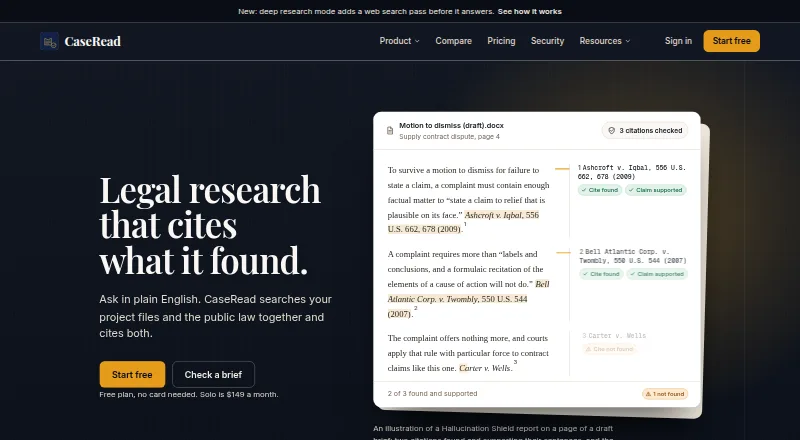
CaseRead is legal research software that searches a firm's project files alongside public law and provides citations to both. Its public-law coverage includes federal statutes and regulations, state law across all 50 states, DC and Puerto Rico, and case law and federal materials. Deep research adds a web-search pass before answering. Hallucination Shield checks that citations exist and support claims, with up to 50 citations per run. Users can edit Word documents in a browser and receive AI revisions as tracked changes.
Listed connectors include Google Drive and OneDrive or SharePoint; the homepage also says confirmed document dates can be sent to Google Calendar. CaseRead says firm document vaults use separate database schemas, are private by default, and are not used to train AI models. It says its database and files are hosted in the United States on AWS via Supabase, with AES-256 encryption at rest and HTTPS on every page. The free plan allows three research messages and two citation checks daily, 25-page document analysis, three projects, 100 MB storage, and one user. Solo costs $71 per seat per month when billed annually, and a seven-day trial is listed.
Who it suits
CaseRead is presented for solo practitioners, small firms, and multi-lawyer firms that need research across matter files and public law. Firms should note the stated account-security and audit limitations.
What it does well
- Searches firm files alongside public law.
- Citations can be checked for existence and support.
- AI Word edits arrive as tracked changes.
- Free plan includes research, citation checks, and document analysis.
What to know first
- No completed SOC 2 audit.
- Customer accounts lack multi-factor sign-in and SSO.
- Solo costs $71 per seat monthly when billed annually.
Plans
| Plan | Billed and limits | Price |
|---|---|---|
| Free | 3 research messages/day · 2 citation checks/day · 25-page document analysis · 3 projects · 100 MB storage · 1 user | Free |
| Team | billed annually at $119 per seat/month · Unlimited research · 300-page analysis · 100 GB storage · unlimited projects · seat count chosen by firm | $119 a month |
| Solo | billed annually at $71 per seat/month · Unlimited research · 100-page analysis · 10 GB storage · 50 projects · 1 seat | $8,971 a month |
| Enterprise | Unlimited seats · unlimited storage · custom data retention · custom SLA and DPA · API access | On request |
As caseread.ai lists them, read 28 Sept 2026. The maker's own page has the final word.
Overview
CaseRead is a legal research and document-workflow tool that searches a firm's project files alongside public law. It is best suited to solo practitioners and firms that want research, citation checks and browser-based Word editing together. Its scope is compelling, but the free tier is tightly capped and customer sign-in lacks MFA and SSO.
Key features
- Research across firm files and public law: CaseRead returns citations to both project files and public authorities, with coverage spanning federal law, all 50 states, DC and Puerto Rico. That breadth can help firms keep internal materials and legal sources in one workflow.
- Deeper answers and citation checks: Deep research adds a web-search pass before answering. Hallucination Shield checks whether citations exist and support the claims, up to 50 citations per run. These are useful checks, not a replacement for a lawyer's review.
- Document work: Users can upload documents for analysis and edit Word files in the browser; AI revisions arrive as tracked changes. Analysis page limits rise by plan, so teams handling lengthy documents need to account for those ceilings.
- Integrations: Plans include Google Drive and OneDrive or SharePoint connectors, and confirmed document dates can be sent to Google Calendar. The Clio connector is marked as coming soon on paid plans; Slack notifications are coming soon for Team and Enterprise.
- Security: CaseRead says firm vaults use separate database schemas, are private by default and are not used to train AI models. Its database and files are hosted in the United States on AWS via Supabase, with AES-256 encryption at rest and HTTPS on every page. However, it has not completed a SOC 2 audit and does not offer MFA or SSO for customer accounts, material shortcomings for firms with strict security requirements.
Pricing
CaseRead offers a free plan, paid plans from $71/user/mo billed annually, and a 7-day trial. The free tier is a practical way to evaluate a small workflow, but three research messages and two citation checks per day, 25-page analysis, three projects, 100 MB of storage and one user make it restrictive for regular matter work.
- Free — free: Includes the stated daily research and citation-check caps, 25-page document analysis, three projects, 100 MB storage and one user. Best for an individual testing fit; the low quotas and storage limit are unlikely to support sustained use.
- Solo — $71 per seat/month, billed annually: Unlimited research, 100-page analysis, 10 GB storage, 50 projects and one seat. This is the clearest upgrade for a solo practitioner who needs ongoing research, but annual billing and the single seat make it a poor fit for shared firm use.
- Team — $119 per seat/month, billed annually: Unlimited research, 300-page analysis, 100 GB storage and unlimited projects, with seat count chosen by the firm. It suits multi-lawyer practices needing shared capacity, though the per-seat annual commitment raises the cost as the team grows.
- Enterprise — custom pricing: Unlimited seats and storage, custom data retention, a custom SLA and DPA, API access, and a dedicated account manager. This is aimed at firms needing tailored terms and support rather than a published seat price.
Team also includes priority support. The paid-plan Clio connector is still coming soon, so firms relying on that integration should not choose a tier on the assumption it is already available.
Platforms
CaseRead is offered on web and through an API. It is not presented as a native desktop or mobile app.
Who it's for
Solo practitioners can use Solo for uncapped research and larger document analysis than the free tier permits. Small and multi-lawyer firms may find Team's configurable seats, larger analysis limit and unlimited projects more suitable. Firms requiring completed SOC 2 auditing, MFA or SSO should look elsewhere until those gaps are addressed.
Pros and cons
- Pro: Research spans firm project files and broad public-law coverage, with citations to both.
- Pro: Browser-based Word editing with tracked AI revisions combines drafting with research and document analysis.
- Pro: Citation checks and private-by-default vaults add useful safeguards to legal workflows.
- Con: Free usage is limited to three research messages and two citation checks daily, with only 100 MB storage.
- Con: Solo and Team pricing is billed annually, and Team costs $119 per seat/month.
- Con: No MFA or SSO for customer accounts, and no completed SOC 2 audit, may rule it out for security-conscious firms.
Alternatives
For a broader comparison, see AI Legal Research Software.
- Align Research is another freemium web option for readers comparing legal research tools.
- Clauselex may suit readers seeking a web-based freemium service with a free daily quick-research allowance and drafting quota.
- Curia is worth considering if a CAD-priced web service with credit-based plans, cited case research and document analysis fits better.
- Legalcode is an API and web alternative with a free tier that states request quotas and coverage across 40 jurisdictions.
- ArkLegal AI is an alternative for readers who prefer Android or iOS access alongside web.
- CaseCraft is an alternative with Android, iOS and web access and one-time credit purchases.
- Judicex is a free alternative for readers seeking desktop, web or self-hosted options.
- ModulawAI is a paid alternative available on web and desktop platforms.
Verdict
CaseRead is a strong fit for solo practitioners and firms that want internal-file and public-law research, citation checks and Word editing in one workflow. Its breadth and tracked revisions are the main reasons to choose it; its annual paid-plan commitment and missing MFA, SSO and completed SOC 2 audit are good reasons to look elsewhere when budget flexibility or account-security controls are decisive.
Verdict
CaseRead brings firm documents and public-law research into one cited workflow, with document editing and citation checks. Its free plan has usage limits, and firms should weigh the stated compliance and sign-in limitations.
Facts from CaseRead's own pages
- Citation verification
- Hallucination Shield checks whether citations exist and support the claims, with up to 50 citations per run. · caseread.ai, 28 Sept 2026
- Coming soon
- The pricing page marks the Clio connector as coming soon on paid plans and Slack notifications as coming soon for Team and Enterprise. · caseread.ai, 28 Sept 2026
- Company
- The About page describes a small team of engineers and legal-tech builders but does not state a headquarters or founding year. · caseread.ai, 28 Sept 2026
- Compliance limit
- CaseRead says it has not completed a SOC 2 audit and does not offer multi-factor sign-in or SSO for customer accounts. · caseread.ai, 28 Sept 2026
- Data hosting
- CaseRead says its database and files are hosted in the United States on AWS via Supabase, with AES-256 encryption at rest and HTTPS on every page. · caseread.ai, 28 Sept 2026
- Deep research
- Deep research adds a web search pass before it answers. · caseread.ai, 28 Sept 2026
- Drafting
- CaseRead can edit Word documents in the browser, with AI revisions delivered as tracked changes. · caseread.ai, 28 Sept 2026
- Integrations
- Plans list Google Drive and OneDrive or SharePoint connectors, and the homepage says confirmed document dates can be sent to Google Calendar. · caseread.ai, 28 Sept 2026
- Intended users
- The maker describes CaseRead as built for solo practitioners, small firms and multi-lawyer firms. · caseread.ai, 28 Sept 2026
- Legal coverage
- Its public-law sources include statutes and regulations for federal law, all 50 states, DC and Puerto Rico, plus case law and federal materials. · caseread.ai, 28 Sept 2026
- Product
- CaseRead searches a firm's project files and public law together and provides citations to both. · caseread.ai, 28 Sept 2026
- Security
- The maker says firm document vaults use separate database schemas, are private by default, and are not used to train AI models. · caseread.ai, 28 Sept 2026
- Support
- Team includes priority support, while Enterprise includes a dedicated account manager. · caseread.ai, 28 Sept 2026
Where CaseRead stands on Freedom251
- AI Legal Research Software#5 of 32