Freedom251 › AI Cartoon Generators
Cartoonize AI
What Cartoonize AI is
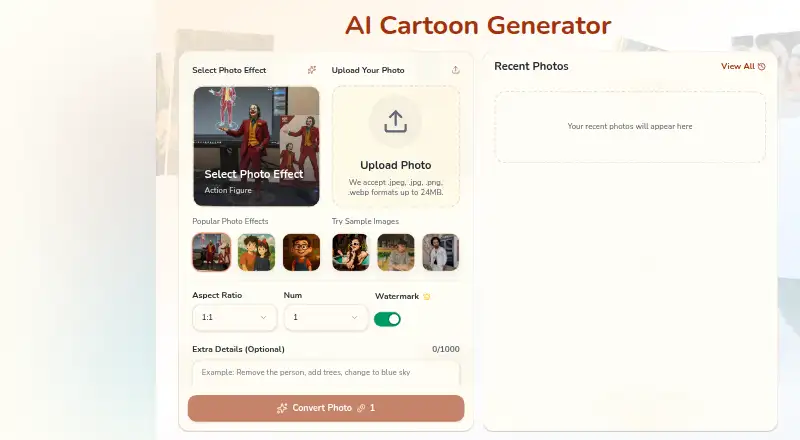
Cartoonize AI turns photos into cartoonized and stylized images while retaining their composition and recognizable features. Its photo effects library lists 38 styles, including anime and manga, comics and cartoons, 3D and CGI, illustration and design, traditional art, vintage and retro, games and pixel art, portraits, and filters. Uploads can be JPEG, JPG, PNG, or WEBP files up to 24 MB and 4096×4096 pixels. Standard transformations take 15–30 seconds, and complex styles can take up to 60 seconds; multiple images can be processed simultaneously. The service is available on the web and through an API. API access requires review of an integration use case and expected volume. Cartoonize AI has a free plan, plus paid subscriptions and one-time Flex credit packs. Paid subscriptions and Flex credits include commercial usage rights; the Free plan does not. Subscription credits reset each billing cycle, while Flex credits do not expire and are used after time-limited credits. The listed monthly plans range from Hobby at $19.90 a month to Pro at $49.90 a month. NSFW or adult content is prohibited on all plans.
Who it suits
Cartoonize AI suits people who want to transform photos into stylized images using a broad range of visual styles. It may also suit users who need commercial usage rights through a paid subscription or Flex credits.
What it does well
- Offers 38 styles across art, cartoon, portrait, and filter categories.
- Accepts JPEG, JPG, PNG, and WEBP uploads up to 24 MB.
- Can process multiple images simultaneously.
- Flex credits do not expire.
- Paid subscriptions and Flex credits include commercial usage rights.
What to know first
- The Free plan does not include commercial usage rights.
- NSFW or adult content is prohibited across all plans.
- API access requires review of an integration use case and expected volume.
Limits
The Free plan does not include commercial usage rights. The Hobby plan lists 200 credits per month, no-watermark exports, 30-day history, and unlimited running jobs; the Basic plan lists 500 credits per month, the full photo effects library, 100-day history, and unlimited running jobs. NSFW or adult content is prohibited on every plan.
Plans
| Plan | Billed and limits | Price |
|---|---|---|
| Hobby (monthly) | Monthly · 200 credits per month · $0.08/image · no-watermark exports · 30-day history · unlimited running jobs | $19.90 a month |
| Basic (monthly) | Monthly · 500 credits per month · $0.05/image · full photo effects library · 100-day history · unlimited running jobs | $29.90 a month |
| Flex credits (250) | One-time payment · 250 credits · $0.16/image · credits never expire | $39.90, paid once |
| Plus (monthly) | Monthly · 650 credits per month · $0.05/image · full photo effects library and priority queue · 100-day history · unlimited running jobs | $39.90 a month |
| Pro (monthly) | Monthly · 800 credits per month · $0.05/image · full photo effects library and priority queue · 100-day history · unlimited running jobs | $49.90 a month |
| Flex credits (550) | One-time payment · 550 credits · $0.13/image · credits never expire | $69.90, paid once |
| Plus (yearly) | Yearly · 650 credits per month · $0.05/image · full photo effects library and priority queue · 100-day history · unlimited running jobs | On request |
| Pro (yearly) | Yearly · 800 credits per month · $0.05/image · full photo effects library and priority queue · 100-day history · unlimited running jobs | On request |
The first 8 of 10 plans, as cartoonize.ai lists them, read 3 Oct 2026. The maker's own page has the final word. Every plan
Getting started
- Visit https://cartoonize.ai/.
- Use the web platform to upload a JPEG, JPG, PNG, or WEBP image within the stated size limits.
- Choose a photo effect style and run the transformation.
- Choose the Free plan, a paid subscription, or a one-time Flex credit pack.
- For API access, submit an integration use case and expected volume for review.
Verdict
Choose Cartoonize AI if you want photo transformations across many styles, with web access and paid options that include commercial usage rights. The Free plan excludes commercial use, and API access requires a review before it is available.
Questions
Is Cartoonize AI free?
Yes. Cartoonize AI has a Free plan. The pricing note also says paid access starts at $15.90/mo (annual).
What does a paid plan cost?
Listed monthly plans are Hobby at $19.90 a month, Basic at $29.90 a month, Plus at $39.90 a month, and Pro at $49.90 a month. Flex credits cost $39.90, paid once for 250 credits or $69.90, paid once for 550 credits.
Which platforms are available?
Cartoonize AI is available on the web and through an API. API access requires review of an integration use case and expected volume.
Can I use the images commercially?
Paid subscriptions and Flex credits include commercial usage rights. The Free plan does not.
Do credits expire?
Subscription credits reset each billing cycle. Flex credits do not expire and are used after time-limited credits.
What files can I upload?
JPEG, JPG, PNG, and WEBP files are accepted, up to 24 MB and 4096×4096 pixels.
Facts from Cartoonize AI's own pages
- API access
- API access requires submitting an integration use case and expected volume for review. · cartoonize.ai, 3 Oct 2026
- Commercial use
- Paid subscriptions and Flex credits include commercial usage rights; the Free plan does not. · cartoonize.ai, 3 Oct 2026
- Content restrictions
- The pricing page says NSFW or adult content is prohibited across all plans. · cartoonize.ai, 3 Oct 2026
- Credit limits
- Subscription credits reset each billing cycle; Flex credits do not expire and are used after time-limited credits. · cartoonize.ai, 3 Oct 2026
- Generation
- The homepage says standard transformations take 15–30 seconds, complex styles can take up to 60 seconds, and multiple images can be processed simultaneously. · cartoonize.ai, 3 Oct 2026
- Image transformation
- The tool applies artistic transformations while preserving image composition and recognizable features. · cartoonize.ai, 3 Oct 2026
- Inputs
- The homepage says uploads can be JPEG, JPG, PNG, or WEBP files up to 24 MB; its FAQ also specifies a maximum of 4096×4096 pixels. · cartoonize.ai, 3 Oct 2026
- Privacy
- The privacy policy says the service collects user-provided name, email, and payment information plus cookie-based usage and preference data, and says it does not share data except as required by law. · cartoonize.ai, 3 Oct 2026
- Purpose
- Cartoonize AI turns photos into cartoonized and stylized images. · cartoonize.ai, 3 Oct 2026
- Refunds
- The refund policy says completed purchases are generally non-refundable except for specified cases such as duplicate or unauthorized charges, undelivered credits, or verified defects that make the service unusable. · cartoonize.ai, 3 Oct 2026
- Styles
- The photo effects page lists 38 styles across categories including anime and manga, comics and cartoons, 3D and CGI, illustration and design, traditional art, vintage and retro, games and pixel, portraits, and filters. · cartoonize.ai, 3 Oct 2026
- Support
- The pricing page directs users to contact support by email for questions or assistance. · cartoonize.ai, 3 Oct 2026
Where Cartoonize AI stands on Freedom251
- AI Cartoon Generators#9 of 26