Freedom251 › Minecraft Map Art Generators
Cartographer
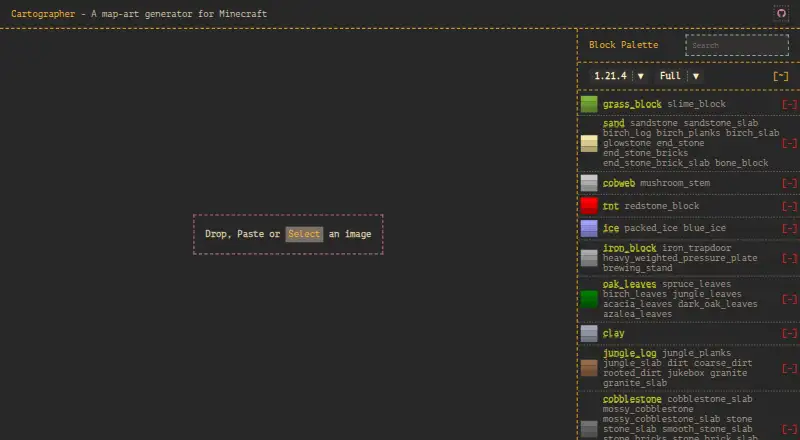
What Cartographer is
Cartographer is a free, open-source web tool for turning an image into Minecraft map art and producing a schematic to guide the build. Image generation takes place in the browser. Before generating, users can inspect a live preview, adjust the crop, and change saturation and brightness. The color palette lets users select multiple blocks and balance their use in the generated build; its homepage interface displays Minecraft version 1.21.4. Several staircasing algorithms are available, along with a material list view.
Cartographer exports schematic, JSON, and NBT formats without requiring third-party conversion tools. It can create Litematica-compatible schematics, including .litematic files. JSON output contains block positions and properties, which can be used to build tools or converters for output formats Cartographer does not support natively. The repository credits Julien Vincent and Nicholas Robinson as authors and displays a GPL-3.0 license. Custom block-palette uploads, manual map-art editing, and handling blocks such as grass or nylium are listed as planned features.
Who it suits
Cartographer suits Minecraft players who want to convert an image into map art and use generated schematics as building blueprints. Its material list, block palette controls, and multiple export formats are useful for planning and preparing that build.
What it does well
- Generates map art from images entirely in the browser.
- Live preview, crop box, saturation, and brightness controls.
- Exports schematic, JSON, and NBT formats.
- Supports Litematica-compatible schematics, including .litematic files.
- Includes staircasing algorithms and a material list view.
What to know first
- Custom block-palette uploads are a planned feature.
- Manual map-art editing is planned, not included.
- Handling blocks such as grass or nylium is planned.
Limits
Custom block-palette uploads, manual editing, and handling blocks such as grass or nylium are listed as planned features.
Getting started
- Open https://cartographer-mc.com/ in a web browser.
- Use the image preview and crop box, and adjust saturation or brightness.
- Select and balance blocks in the palette, then generate the map-art build.
- Review the material list and export in schematic, JSON, or NBT format.
Verdict
Choose Cartographer if you want a free browser-based way to turn images into Minecraft map art and export schematics or other listed formats. Look elsewhere if you need custom palette uploads, manual editing, or support for infection blocks such as grass or nylium now.
Questions
Is Cartographer free?
Yes. It is listed as free and open source.
What can it export?
It lists schematic, JSON, and NBT output. It can also generate Litematica-compatible schematics, including .litematic files.
Does it process images in the browser?
Yes. The project says map-art generation runs entirely in the browser.
Can I control which blocks are used?
Users can select multiple blocks in the color palette and balance them during generation.
Is Cartographer open source?
Yes. The public repository displays a GPL-3.0 license.
Facts from Cartographer's own pages
- Audience
- The project describes generated schematics as blueprints for building map art in Minecraft. · github.com, 4 Oct 2026
- Block palette
- Users can select multiple blocks in the color palette and balance between them when generating the build. · github.com, 4 Oct 2026
- Blueprints
- Generated schematics can be used as blueprints for building map art in Minecraft. · github.com, 8 Oct 2026
- Browser generation
- The project says all map-art generation runs entirely in the browser. · github.com, 4 Oct 2026
- Browser processing
- The project says image generation runs entirely in the browser. · github.com, 8 Oct 2026
- Export formats
- It supports schematic, JSON, and NBT output, including Litematica-compatible schematics. · github.com, 8 Oct 2026
- Extensibility
- JSON export provides block positions and properties for users building tools or translations for output formats Cartographer does not natively support. · github.com, 4 Oct 2026
- Generation options
- The tool includes multiple staircasing algorithms and a material list view. · github.com, 8 Oct 2026
- Image editing
- Features include a live preview, an interactive crop box, and saturation and brightness controls. · github.com, 4 Oct 2026
- Image tools
- The interface includes a live preview, an interactive crop box, and saturation and brightness controls. · github.com, 8 Oct 2026
- JSON output
- The JSON output contains block data that users can use to build tools or format converters for targets Cartographer does not natively support. · github.com, 8 Oct 2026
- Known roadmap limits
- The project lists custom block-palette uploads, manual map-art editing, and handling infection blocks such as grass or nylium as planned features. · github.com, 4 Oct 2026
- License
- The public GitHub repository is licensed under GPL-3.0. · github.com, 8 Oct 2026
- Litematica
- Cartographer supports generating Litematica-compatible schematics, including .litematic files. · github.com, 4 Oct 2026
- Makers
- The repository credits Julien Vincent and Nicholas Robinson as authors. · github.com, 8 Oct 2026
- Materials
- A material list view is included. · github.com, 4 Oct 2026
- Palette controls
- Users can select multiple blocks in the color palette and balance between them during generation. · github.com, 8 Oct 2026
- Planned features
- The project lists custom block palette uploads, manual editing, and handling blocks such as grass or nylium as roadmap features. · github.com, 8 Oct 2026
- Purpose
- Cartographer is a web-based tool for converting images into Minecraft map art. · github.com, 8 Oct 2026
- Staircasing
- The project includes multiple staircasing algorithms. · github.com, 4 Oct 2026
- Supported Minecraft version shown
- The live homepage’s palette interface displays Minecraft version 1.21.4. · cartographer-mc.com, 4 Oct 2026
Where Cartographer stands on Freedom251
- Minecraft Map Art Generators#18 of 20