Freedom251 › AI Icon Generators
CandyIcons
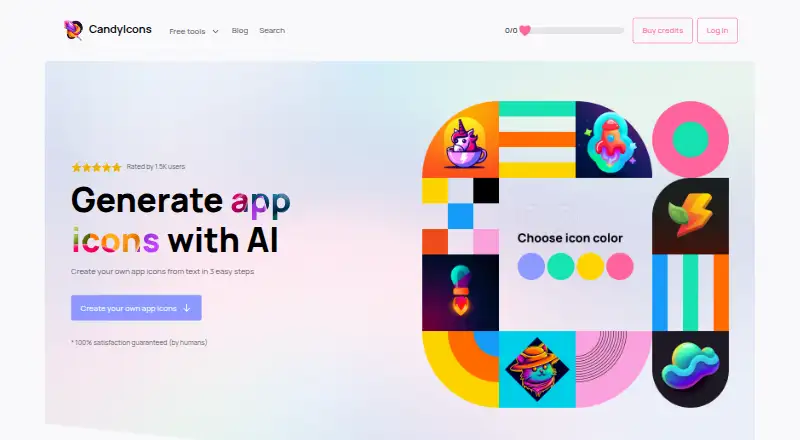
What CandyIcons is
CandyIcons is a web tool for browsing app icons and generating new ones from a description. Users choose colors and styles before generating; the service lists more than 15 premade styles and over 1,000 presets. Generated icons are 1024×1024 PNG files, and SVG export is not supported. The product includes iOS and macOS app icon assets aligned with Apple's design guidelines, along with links to free asset-generation and favicon tools. The free plan includes 15 generations per month. One-time options are Fun size at 15.00 USD once for 15 credits, Regular at 25.00 USD once for 50 credits, and Jumbo at 45.00 USD once for 120 credits. Lifetime costs 49.00 USD once and provides 40 credits per month; each credit generates one image, and purchased credits do not expire. Batch generation and commercial use are supported. The FAQ describes exclusive ownership and unlimited usage rights for purchased or generated icons, including modification and redistribution. Icons are stored on US partner servers, with private access links sent by email.
Who it suits
CandyIcons suits people looking for app icon concepts or ready-made icons, including users who need iOS or macOS assets. It may also suit users seeking commercial-use rights or batch generation, provided PNG output meets their needs.
What it does well
- Free plan includes 15 generations per month.
- Offers more than 15 styles and 1,000 presets.
- Batch generation and commercial use are supported.
- Purchased credits do not expire.
What to know first
- SVG export is not supported.
- Icons are stored on US partner servers.
- Access links are sent by email.
Limits
The free plan includes 15 generations per month. Paid packs provide 15, 50, or 120 credits once; Lifetime provides 40 credits per month, and each credit generates one image.
Plans
| Plan | Billed and limits | Price |
|---|---|---|
| Fun size | 15 credits · 1 credit = 1 generated image | $15, paid once |
| Regular | 50 credits · 1 credit = 1 generated image | $25, paid once |
| Jumbo | 120 credits · 1 credit = 1 generated image | $45, paid once |
| Lifetime | 40 credits per month · 1 credit = 1 generated image | $49, paid once |
As candyicons.com lists them, read 7 Oct 2026. The maker's own page has the final word.
Getting started
- Open candyicons.com.
- Browse the icon library or choose an icon creation option.
- Describe the icon and choose its colors and style.
- Generate icons using the free plan or select a credit plan.
- Receive a private access link by email.
Verdict
CandyIcons combines icon browsing, described-prompt generation, and Apple-platform assets with PNG output. Consider the listed credit plans and lack of SVG export when deciding whether it fits your workflow.
Questions
Is CandyIcons free?
A free plan is available with 15 generations per month. Paid one-time plans start at $15.
What do the paid plans cost?
Fun size is $15 once for 15 credits, Regular is $25 once for 50 credits, and Jumbo is $45 once for 120 credits. Lifetime is $49 once and provides 40 credits per month.
What file formats can I export?
Generated icons are 1024×1024 PNG files. SVG export is not supported.
Can I use icons commercially?
Yes. Commercial use is supported. The FAQ says purchased or generated icons have exclusive ownership and unlimited usage rights, including modification, resale, redistribution, or giving them away.
Do purchased credits expire?
No. Purchased generation credits do not expire and can be used until they run out.
How are icons delivered?
Icons are stored on servers in the United States by third-party partners. Customers receive a private access link by email.
Facts from CandyIcons's own pages
- Apple assets
- The product includes iOS and macOS app icon assets aligned with Apple's design guidelines. · get.candyicons.com, 7 Oct 2026
- Credit expiry
- Purchased generation credits do not expire and can be used until they run out. · candyicons.com, 7 Oct 2026
- Free tools
- The site links to free iOS/macOS asset-generation and favicon-generation tools. · candyicons.com, 7 Oct 2026
- Icon creation
- Users describe an icon, choose its colors and styles, then generate it. · get.candyicons.com, 7 Oct 2026
- Image output
- Generated app icons are high-resolution 1024×1024 PNG files, and SVG is not supported. · get.candyicons.com, 7 Oct 2026
- Payment security
- The FAQ says payments use Paddle and that CandyIcons does not store payment information. · candyicons.com, 7 Oct 2026
- Privacy
- The privacy policy says collected information is retained only as long as necessary and protected using commercially acceptable measures. · candyicons.com, 7 Oct 2026
- Product
- CandyIcons lets users browse a library of app icons or create AI-generated icons in different styles. · get.candyicons.com, 7 Oct 2026
- Satisfaction support
- If generated icons do not meet requirements, CandyIcons says it will manually review them and may add 30% of purchased credits to the license key. · candyicons.com, 7 Oct 2026
- Storage and access
- Icons are stored on servers in the United States by third-party partners, and customers receive a private access link by email. · candyicons.com, 7 Oct 2026
- Styles
- CandyIcons says it offers 15+ premade styles and 1,000+ presets. · get.candyicons.com, 7 Oct 2026
- Support
- Customers can contact [email protected] with questions. · candyicons.com, 7 Oct 2026
- Usage rights
- The FAQ says purchased or generated icons have exclusive ownership and unlimited usage rights, including the right to modify, resell, redistribute, or give them away. · candyicons.com, 7 Oct 2026
Where CandyIcons stands on Freedom251
- AI Icon Generators#5 of 25