Freedom251 › Adaptive Learning Software
Cambridge Aspire
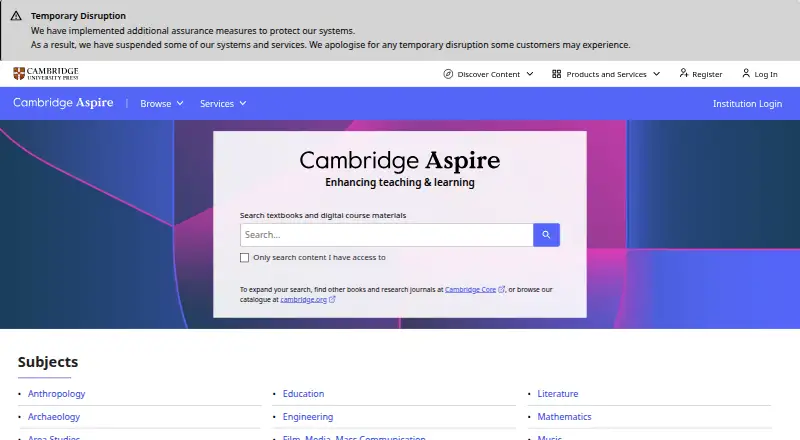
What Cambridge Aspire is
Cambridge Aspire serves instructors and students with academic learning materials, including an institutional collection of more than 1,000 Cambridge eTextbooks. Institutions can provide access through a subscription, while individuals can purchase title-specific access that remains perpetual. The Instructor eTextbook Collection trial lasts three months and costs nothing.
Cambridge Spiral, available on web, desktop and mobile, lets readers download textbooks for offline use and add bookmarks, highlights, annotations and links. Its Annotations tab supports reviewing and managing notes. Instructors’ annotations can be viewed in an eTextbook through custom group mode. Text-to-speech turns eCollection textbook titles into audio, and the eReader permits copying and printing up to 20% of an eTextbook.
Library access can use IP verification, Shibboleth or Athens. Online browser reading in read-only mode is available, but that mode omits annotations, bookmarks and offline reading. The Cambridge Aspire website supports LTI 1.1 links to textbooks or chapters in courses using Blackboard, Moodle, Canvas, DSL or Sakai. Cambridge provides Help Centre FAQs, technical support and regional sales representatives for instructors.
Who it suits
Cambridge Aspire suits institutions and instructors looking to provide students with Cambridge eTextbooks, including access through supported library authentication and LMS links. It also suits individuals who want perpetual access to a specific purchased title.
What it does well
- Institutional collection provides access to over 1,000 Cambridge eTextbooks.
- Cambridge Spiral supports offline reading across web, desktop and mobile.
- Readers can bookmark, highlight, annotate and add links.
- Text-to-speech turns eCollection titles into audio.
- LTI 1.1 links work with Blackboard, Moodle, Canvas, DSL and Sakai.
What to know first
- Institutional access requires a subscription.
- Individual eTextbook pricing is title-specific.
- Read-only online mode excludes notes, bookmarks and offline reading.
- Copying and printing are limited to 20% of an eTextbook.
Limits
The eReader allows copying and printing up to 20% of an eTextbook. Online browser reading in read-only mode does not include annotations, bookmarks or offline reading.
Plans
| Plan | Billed and limits | Price |
|---|---|---|
| Instructor eTextbook Collection trial | three months · subject eTextbook Collection | Free |
| Institutional eTextbook Collection | over 1,000 eTextbooks · institutional subscription · Shibboleth, Athens or Raven access | On request |
| Individual eTextbook | title-specific pricing · perpetual access | On request |
As cambridge.org lists them, read 1 Oct 2026. The maker's own page has the final word.
Getting started
- Visit the Cambridge Aspire website.
- For institutional access, use a subscription with Shibboleth or Athens access.
- Library users can access eTextbooks through IP verification, Shibboleth or Athens.
- Users can start the three-month Instructor eTextbook Collection trial at no cost.
- Individuals can purchase access to a specific eTextbook title.
- Use Cambridge Spiral on web, desktop or mobile to download textbooks for offline reading.
- Link textbooks or chapters in supported LMS courses through LTI 1.1.
Verdict
Choose Cambridge Aspire if your institution needs a large Cambridge eTextbook collection, LMS linking and offline reading tools. Individual readers can buy perpetual access to specific titles. Read-only browser access has fewer reading tools, and the eReader limits copying and printing to 20%.
Questions
Is there a free plan?
No. A three-month Instructor eTextbook Collection trial is available free of charge.
How much does an eTextbook cost?
Individual eTextbook pricing is title-specific. Institutional collection pricing is not given; access is through an institutional subscription.
Which platforms are supported?
Cambridge Spiral is available as a web, desktop and mobile application. Cambridge Aspire supports Android, iOS, macOS, web and Windows.
Can readers use textbooks offline?
Yes. Cambridge Spiral supports downloading and reading textbooks offline. Read-only online browser mode does not include offline reading.
Which LMS platforms are supported?
LTI 1.1 textbook or chapter links are supported for Blackboard, Moodle, Canvas, DSL and Sakai courses.
How can library users authenticate?
Library access may use IP verification, Shibboleth or Athens.
Facts from Cambridge Aspire's own pages
- Annotations
- Cambridge Spiral supports bookmarks, highlights, annotations and links, with an Annotations tab for management and review. · cambridge.org, 1 Oct 2026
- Content scope
- The institutional eTextbook Collection provides access to over 1,000 Cambridge eTextbooks. · cambridge.org, 1 Oct 2026
- Copy limit
- The eReader allows users to copy and print up to 20% of an eTextbook. · cambridge.org, 1 Oct 2026
- Founded
- 1534 · cambridge.org, 28 Sept 2026
- Individual access
- Individually purchased eTextbook access is perpetual. · cambridge.org, 1 Oct 2026
- Instructor annotations
- Instructor annotations can be accessed in an eTextbook through custom group mode. · cambridge.org, 1 Oct 2026
- Library authentication
- Library users may access eTextbooks through IP verification, Shibboleth or Athens, with browser access described as read-only. · cambridge.org, 1 Oct 2026
- LMS integration
- The Cambridge Aspire website supports LTI 1.1 integration for linking textbooks or chapters from LMS courses. · cambridge.org, 1 Oct 2026
- Offline reading
- Cambridge Spiral is available as a web, desktop and mobile application for downloading and reading textbooks offline. · cambridge.org, 1 Oct 2026
- Purpose
- Cambridge Aspire combines academic expertise with learning materials for instructors and students. · cambridge.org, 1 Oct 2026
- Read-only limits
- Individual users reading online in read-only mode do not have annotations, bookmarking or offline reading features. · highereducationhelp.cambridge.org, 1 Oct 2026
- Support
- Cambridge provides Help Centre FAQs, technical support and regional sales representatives for instructors. · cambridge.org, 1 Oct 2026
- Supported LMSs
- Textbook LMS integration includes Blackboard, Moodle, Canvas, DSL and Sakai. · cambridge.org, 1 Oct 2026
- Text to speech
- The text-to-speech tool transforms eCollection textbook titles into audio. · cambridge.org, 1 Oct 2026
Where Cambridge Aspire stands on Freedom251
- Adaptive Learning Software#10 of 30
- Digital Textbook Platforms#14 of 28