CalendarPad
What CalendarPad is
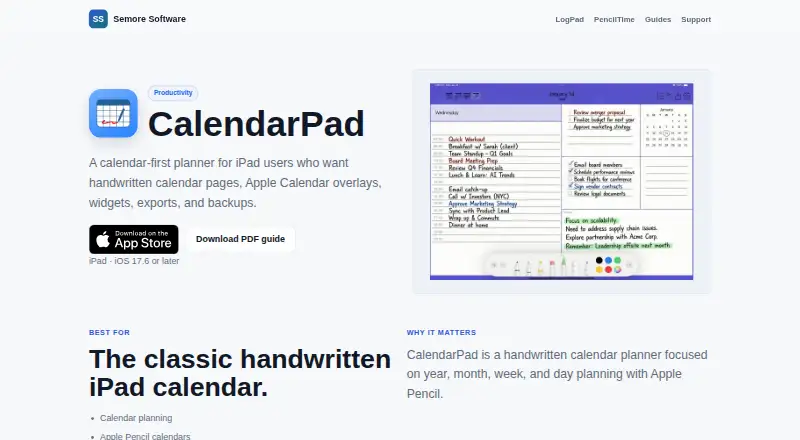
CalendarPad is a handwritten calendar planner for iPad and Apple Pencil, with year, month, week, and day planning views. You can write, draw, and annotate on pages, choosing from multiple layouts. The free plan includes the Month Calendar for current and previous months, plus PDF or PNG export. Calendar access can place selected Apple Calendar events in the Day planner. Home Screen widgets provide Month and Week calendars, while daily schedule widgets refresh for each new day. Pro adds future months, Year, Week, and Day planners, Apple Calendar event display, and backup and restore. Calendar data, templates, and settings can be backed up manually or automatically, locally or in iCloud Drive. The CalendarPad Pro upgrade costs $7.99, paid once, with no subscription. CalendarPad runs on iPadOS 17.6 or later and macOS 14.0 or later on Apple M1 Macs. The App Store disclosure says the developer indicated no data collection, though Apple has not verified that information.
Who it suits
It suits people who plan with Apple Pencil, want printable planner pages, or prefer handwritten planning on iPad. Mac users need an Apple M1 chip or later.
What it does well
- Handwriting, drawing, and annotations
- PDF and PNG page export
- Apple Calendar events in Day planner
- Month and Week Home Screen widgets
- Free plan available
What to know first
- Pro features require an upgrade
- iPad requires iPadOS 17.6 or later
- Mac requires Apple M1 or later
Plans
| Plan | Billed and limits | Price |
|---|---|---|
| Free | Month Calendar for current and previous months · PDF or PNG export | Free |
| Pro | Year, Week, and Day planners · Future months in the Month Calendar · Apple Calendar events in the Day planner · Advanced backup and restore | On request |
| CalendarPad Pro | One-time Pro upgrade; no subscription · Year, Week, and Day planners · Future months · Apple Calendar events in Day planner · Backup and restore | $7.99, paid once |
As semore-software.com lists them, read 12 Oct 2026. The maker's own page has the final word.
Verdict
CalendarPad combines handwritten planning with optional Apple Calendar events, widgets, and exports. Its free plan covers basic month planning, while the 7.99 USD one-time Pro upgrade adds broader views and backups.
Facts from CalendarPad's own pages
- Backups
- Pro includes manual and optional automatic backups of calendar data, templates, and settings, with backup storage locally or in iCloud Drive. · apps.apple.com, 12 Oct 2026
- Calendar integration
- The app can display selected Apple Calendar events in the Day planner when calendar access is enabled. · semore-software.com, 12 Oct 2026
- Calendar sync
- one_way · semore-software.com, 22 Sept 2026
- Export
- Calendar pages can be exported as PDF or PNG for printing or sharing. · semore-software.com, 12 Oct 2026
- Free plan
- Yes · semore-software.com, 22 Sept 2026
- Handwriting
- Users can handwrite, draw, and annotate on calendar pages with Apple Pencil and choose among multiple layouts. · apps.apple.com, 12 Oct 2026
- Intended users
- The maker describes CalendarPad as suited to calendar planning, Apple Pencil calendars, printable planner pages, and simple iPad planning. · semore-software.com, 12 Oct 2026
- Maker
- Semore Software describes itself as making focused Apple apps for notes, planning, and everyday workflows. · semore-software.com, 12 Oct 2026
- Mobile apps
- ios · semore-software.com, 22 Sept 2026
- Privacy
- The App Store privacy disclosure says the developer indicated that the app does not collect data; Apple says this information has not been verified by Apple. · apps.apple.com, 12 Oct 2026
- Product
- CalendarPad is a handwritten calendar planner for iPad and Apple Pencil, organized around year, month, week, and day planning. · semore-software.com, 12 Oct 2026
- Support
- Semore Software directs users to [email protected] and asks them to include the app name, device model, OS version, and a short issue description. · semore-software.com, 12 Oct 2026
- System requirements
- The App Store listing requires iPadOS 17.6 or later on iPad, or macOS 14.0 or later on a Mac with Apple M1 chip or later. · apps.apple.com, 12 Oct 2026
- Widgets
- The app offers Month and Week calendar widgets for the Home Screen, and daily schedule widgets refresh for the new day. · apps.apple.com, 12 Oct 2026
Where CalendarPad stands on Freedom251
- Calendar apps#117 of 194