Freedom251 › App Launcher Software

Butler
What Butler is
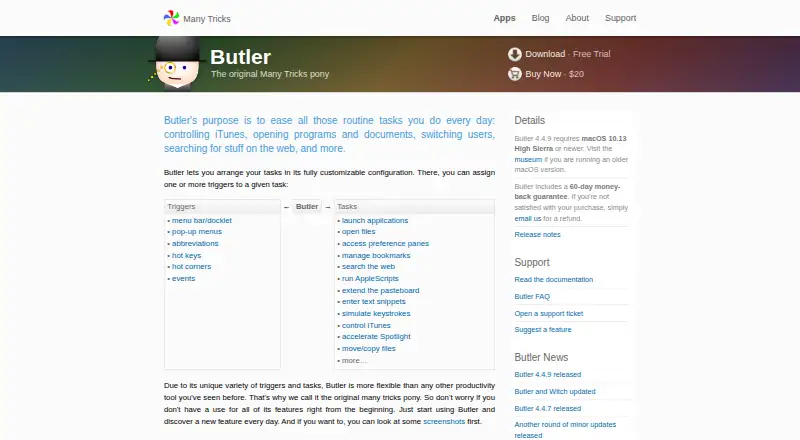
Butler is a macOS utility from Many Tricks for assigning triggers to routine computer tasks. It can launch applications, open files, manage bookmarks, run AppleScripts, insert text snippets, simulate keystrokes, and move or copy files. Tasks can also control music, switch users, or search the web. Triggers include menu bar or docklet items, pop-up menus, abbreviations, hot keys, hot corners, and events, with one or more triggers configurable for each task. Its abbreviations window searches configured items by name or acronym and learns preferred matches from use. AppleScript entries can paste a script’s returned value when run. Butler supports Google Chrome bookmarks and Firefox bookmarks. Folder-content searches require adding the folder to Butler’s configuration and setting its recursion level. Butler 4.4.9 requires macOS 10.13 High Sierra or newer. The paid plan is $20, paid once and includes a 60-day money-back guarantee; a free trial is available.
Who it suits
Butler suits Mac users who want configurable shortcuts for applications, files, scripts, bookmarks, and text entry. It is also useful for recurring file and browser actions.
What it does well
- Many trigger types, including hot keys and events
- Runs AppleScripts and can paste returned values
- Searches configured items by name or acronym
- Supports Chrome and Firefox bookmarks
- Includes workflow and plugin support
What to know first
- macOS only
- Requires macOS 10.13 High Sierra or newer
- Folder searches require configuration and recursion settings
- Paid plan costs $20, paid once
Plans
| Plan | Billed and limits | Price |
|---|---|---|
| Butler | Requires macOS 10.13 High Sierra or newer · 60-day money-back guarantee | $20, paid once |
As manytricks.com lists them, read 11 Oct 2026. The maker's own page has the final word.
Verdict
Butler offers a broad trigger system for automating everyday macOS actions. Its configurable tasks and abbreviation search are central strengths, but newer macOS support is required and there is no free plan.
Facts from Butler's own pages
- Abbreviation search
- The abbreviations window can find configured items by name or acronym, and Butler learns from usage to remember preferred matches. · manytricks.com, 11 Oct 2026
- AppleScript
- AppleScript items can be managed in Butler and configured to paste a script’s returned value when run. · manytricks.com, 11 Oct 2026
- Browser bookmarks
- Release notes state that Butler added support for Google Chrome bookmarks and restored Firefox bookmark support as a visible-by-default feature. · manytricks.com, 11 Oct 2026
- Compatibility
- Butler 4.4.9 requires macOS 10.13 High Sierra or newer; older macOS users are directed to the museum page. · manytricks.com, 11 Oct 2026
- Custom configuration
- Butler lets users assign one or more triggers to a task in a customizable configuration. · manytricks.com, 11 Oct 2026
- File search limit
- To search a folder’s contents through abbreviations, users must add the folder to Butler’s configuration and set its recursion level. · manytricks.com, 11 Oct 2026
- Headquarters
- Beaverton, Oregon, USA · manytricks.com, 28 Sept 2026
- Maker
- Many Tricks identifies Peter Maurer and Rob Griffiths as its people; its About page lists an address in Beaverton, Oregon, and says Griffiths partnered with Maurer in 2010. · manytricks.com, 11 Oct 2026
- Privacy
- Many Tricks says it does not directly collect much personal information and that FastSpring handles purchase transactions and purchase-related data. · manytricks.com, 11 Oct 2026
- Purpose
- Butler helps automate routine tasks such as controlling music, opening programs and documents, switching users, and searching the web. · manytricks.com, 11 Oct 2026
- Support
- Many Tricks links to Butler documentation, a Butler FAQ, support tickets, and feature suggestions. · manytricks.com, 11 Oct 2026
- Tasks
- Tasks include launching applications, opening files, managing bookmarks, running AppleScripts, entering text snippets, simulating keystrokes, and moving or copying files. · manytricks.com, 11 Oct 2026
- Triggers
- Tasks can be triggered through menu bar or docklet items, pop-up menus, abbreviations, hot keys, hot corners, and events. · manytricks.com, 11 Oct 2026
Where Butler stands on Freedom251
- App Launcher Software#35 of 40
- App Launchers#37 of 40
- App launchers#37 of 40