Freedom251 › Business Plan Software
Business Plan Tool
What Business Plan Tool is
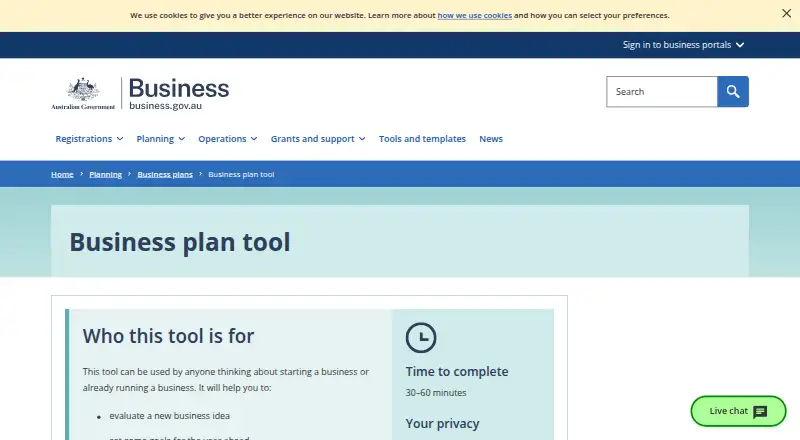
Business Plan Tool is a free web tool for people considering a business or already running one. It guides users through questions about their business to help evaluate an idea, set goals for the year ahead and keep the business on track. After completing the questions, users can email or download their plan; the estimated completion time is 30–60 minutes. The listed plan includes financial projections, section guidance, a template library and DOCX export, but not scenario planning or team collaboration. The site works on smartphones, tablets and desktop devices, provided cookies and JavaScript are enabled and the browser is supported. Information is retained during the session and deleted after three hours of inactivity. If a user ends a session before downloading the plan, they need to start over. The tool offers general guidance rather than advice tailored to an individual business. For people seeking finance, business.gov.au recommends its detailed plan template because some lenders request more detail. The site says it follows the Australian Privacy Principles under the Privacy Act 1988.
Who it suits
The tool suits people considering starting a business and owners who want to set goals or keep their business on track. Those seeking finance may need the more detailed plan template mentioned by business.gov.au.
What it does well
- Free web tool with no listed fee.
- Includes financial projections and section guidance.
- Users can email or download a DOCX plan.
- Works on smartphones, tablets, and desktop devices.
What to know first
- Information is deleted after three hours of inactivity.
- An unfinished session must be restarted if not downloaded.
- Requires cookies, JavaScript, and a supported browser.
- Does not provide tailored advice or team collaboration.
Limits
The free plan produces a simple business plan and excludes scenario planning and team collaboration. Session information is deleted after three hours of inactivity; if the session ends before the plan is downloaded, users must start over.
Plans
| Plan | Billed and limits | Price |
|---|---|---|
| Business Plan Tool | Simple business plan · 30–60 minutes · information deleted after 3 hours of inactivity | Free |
As business.gov.au lists them, read 4 Oct 2026. The maker's own page has the final word.
Getting started
- Open the tool at https://business.gov.au/planning/business-plans/business-plan-tool.
- Use a supported browser with cookies and JavaScript enabled.
- Answer the questions about your business; the site estimates 30–60 minutes.
- Email or download the plan before the session ends.
Business Plan Tool is a free web planner for people starting a business or managing an existing one. It is best for solo founders who want a guided, straightforward plan with basic financial projections. Choose it for a no-cost planning session; look elsewhere if you need collaboration, scenario modelling or lender-level depth.
Overview
The tool turns answers about a business into a simple business plan, helping users assess an idea, set goals for the coming year and keep operations on track. A 30–60 minute completion estimate makes it a focused planning exercise rather than an instant calculator. It provides a useful structure without a subscription, but its scope is intentionally general.
Key features
Guided questions and section guidance lead users through the plan, while financial projections add substance beyond a purely narrative document. The completed plan can be emailed or downloaded as a DOCX file, making it practical to share or continue editing in a word processor. A template library supports the planning workflow.
There is no scenario planning, so comparing optimistic, conservative and other outcomes is outside the tool's remit. There is also no team collaboration; it fits an individual working session, not a group building one plan together. Guidance is general rather than tailored to a particular business, and professional advice is recommended when specific business help is needed.
Session handling is a material constraint. Information is retained during the session and deleted after three hours of inactivity. Ending a session before downloading means starting again, so exporting the DOCX is an important final step. Cookies and JavaScript are required, and unsupported browsers will not run the tool.
Pricing
The Business Plan Tool plan costs free. It includes a simple business plan, financial projections, section guidance, template access and DOCX export, with no free trial because the product is already free. There are no seats, usage quotas or renewal charges stated.
This is the right price for students, first-time founders and existing owners who need a basic working plan without committing to software costs. The trade-off is capability: users needing lender-oriented detail should use the site's detailed business plan template, since some lenders request more information than this simple plan supplies.
Platforms
Business Plan Tool runs on the web and the responsive business.gov.au site is designed for smartphones, tablets and desktop computers. Supported browsers include current and previous Firefox and Chrome on Windows, macOS, Linux, iOS and Android; Edge on Windows, macOS, iOS and Android; Safari on macOS and iOS; and Samsung Internet on Android. Cookies and JavaScript must be enabled. Technical support is available from business.gov.au between 8am and 6pm, Monday to Friday, across Australia. The site says it follows the Australian Privacy Principles under the Privacy Act 1988.
Who it's for
Choose it if you are evaluating an idea, setting annual objectives or organising an existing small business and want a guided solo process with projections and a downloadable document. It is less suitable for teams, businesses that need multiple financial scenarios, or applicants whose lender expects a detailed plan. It also is not a substitute for personalised professional advice.
Pros and cons
- Pro: Completely free, with no paid upgrade or renewal to manage.
- Pro: Guided sections, projections and DOCX export produce a usable planning document in one session.
- Pro: Responsive web access covers phones, tablets and desktops across major browsers.
- Con: Three-hour inactivity deletion can erase unfinished work if the plan is not downloaded.
- Con: No collaboration or scenario planning limits it to individual, straightforward planning.
- Con: General guidance and a simple format may fall short for finance applications requiring extensive detail.
Alternatives
For a broad directory of dedicated planning products, see Business Plan Software. Pick Business in a Box instead if you want cross-platform access plus projects, tasks, templates, storage and starter AI credits in its free tier.
Business Model Fiddle is the better fit for a no-cost community resource focused on business-model work. Choose Business Plan Quick Builder if Excel, PDF and HTML exports or a paid premium tier matter. IdeaBuddy suits early ideation when a free plan with one idea, one collaborator and 10 AI requests is enough.
BizXPlan is worth considering for startup-cost, break-even and viability calculations, including a no-signup free preview. BusinessPlanIQ offers AI assistance and PDF export in its free plan. Exuno Business Studio fits users wanting a live chat-to-PDF workspace and formal letters. Finline is an option for report previews and finance-oriented workflows.
Verdict
Business Plan Tool is a strong starting point for an individual founder or owner who wants a guided, projection-enabled plan at no cost. Its main reason to choose it is the focused workflow and DOCX output; its main reason to look elsewhere is the lack of collaboration, scenario analysis and lender-level detail, combined with session data expiring after inactivity.
Verdict
Business Plan Tool offers a guided, free way to create and download a simple plan, with financial projections and DOCX export. Its session retention, browser requirements and general-guidance scope are important constraints to consider.
Questions
How much does Business Plan Tool cost?
The listed plan is free.
What does the tool provide?
It guides users through questions and produces a business plan that can be emailed or downloaded. The listed plan includes financial projections, section guidance, a template library and DOCX export.
Which devices and browsers can I use?
The site is designed for smartphones, tablets and desktop devices. It lists supported browsers across Windows, macOS, Linux, iOS and Android; cookies and JavaScript are required.
How long does it take, and how long is information kept?
The estimated completion time is 30–60 minutes. Information is deleted after three hours of inactivity, and users who end the session without downloading the plan need to start over.
Does it provide tailored business advice?
No. It provides general guidance, and the site recommends professional advice for business help.
What should I use if I am seeking finance?
Business.gov.au recommends its detailed business plan template for people seeking finance because some lenders ask for more detail.
Facts from Business Plan Tool's own pages
- Advice limits
- The tool provides general guidance rather than tailored advice, and the site recommends seeking professional advice for business help. · business.gov.au, 4 Oct 2026
- Audience
- It is for anyone thinking about starting a business or already running one. · business.gov.au, 4 Oct 2026
- Completion time
- The estimated time to complete the tool is 30–60 minutes. · business.gov.au, 4 Oct 2026
- Detailed plans
- The site recommends its detailed business plan template for users seeking finance because some lenders ask for more detail. · business.gov.au, 4 Oct 2026
- Output
- After answering questions about their business, users can email or download their business plan. · business.gov.au, 4 Oct 2026
- Privacy practices
- business.gov.au says it follows the Australian Privacy Principles under the Privacy Act 1988. · business.gov.au, 4 Oct 2026
- Privacy retention
- The tool stores information during the session and deletes it after 3 hours of inactivity; if a user ends the session without downloading the plan, they need to start over. · business.gov.au, 4 Oct 2026
- Purpose
- The tool helps people evaluate a business idea, set goals for the year ahead and keep a business on track. · business.gov.au, 4 Oct 2026
- Requirements
- The tool requires cookies and JavaScript, and it does not work with unsupported browsers. · business.gov.au, 4 Oct 2026
- Support
- For technical issues, users can contact business.gov.au from 8am to 6pm, Monday to Friday, across Australia. · business.gov.au, 4 Oct 2026
- Supported browsers
- The site lists current and previous versions of Firefox and Chrome on Windows, macOS, Linux, iOS and Android; Edge on Windows, macOS, iOS and Android; Safari on macOS and iOS; and Samsung Internet on Android. · business.gov.au, 4 Oct 2026
- Supported devices
- The business.gov.au site uses responsive design for smartphones, tablets and desktop devices. · business.gov.au, 4 Oct 2026
Where Business Plan Tool stands on Freedom251
- Business Plan Software#7 of 39