Freedom251 › Business Plan Software
Business Model Fiddle
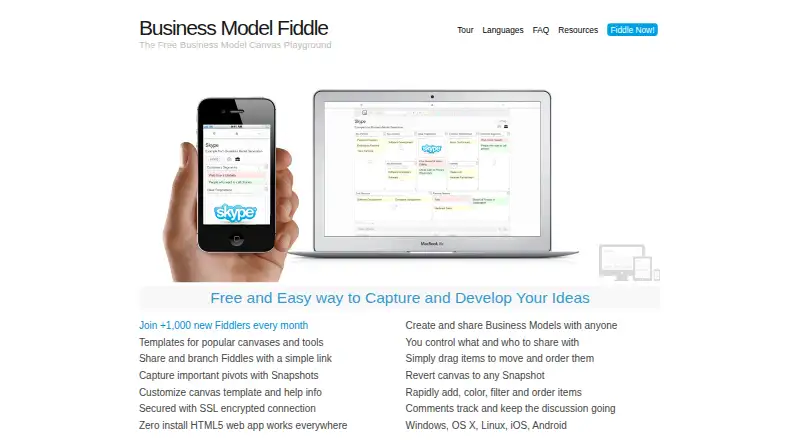
What Business Model Fiddle is
Business Model Fiddle is a free tool for organizing and sharing ideas in structured canvases. Its templates cover the Business Model Canvas, Value Proposition Canvas, Lean Canvas, Product Canvas, Personal Canvas, SWOT Analysis, Empathy Map, and a Simple Kanban Board. Canvas items can hold text, images, or sketches; users can color-code and order them, search, and move them between blocks or the Stack. Snapshots let users review earlier versions, restore one, or delete it. Fiddles can be shared by link with selected access permissions; private Fiddles are restricted to authorized email addresses after sign-in. The current Fiddle stays in the browser when used without an account, but saving and sharing require an account. The service supports English, Portuguese, Spanish, German, and Dutch; some templates are also available in Chinese and Russian, with availability varying by language. It runs on the web and lists Android, iOS, Linux, macOS, and Windows support. The maker recommends current browsers and identifies Chrome as supporting all features, including uploads and drawing.
Who it suits
It suits people developing ideas who want to capture them in canvases and share them with chosen access permissions. An account is needed to save and share Fiddles.
What it does well
- Free plan with no cost.
- Templates cover canvases, SWOT, empathy maps, and Kanban.
- Items support text, images, sketches, and color coding.
- Snapshots can be reviewed, restored, or deleted.
- Supports web, desktop, and mobile platforms.
What to know first
- Saving and sharing require an account.
- Uploads are limited to files no larger than 2 MB.
- Chrome is recommended for full feature support.
Limits
The terms prohibit uploading individual files larger than 2 MB. Without an account, the current Fiddle is stored in the browser, but saving and sharing require an account.
Plans
| Plan | Billed and limits | Price |
|---|---|---|
| Business Model Fiddle | Free community resource · no cost barrier; donations and sponsorship fund it | Free |
As bmfiddle.com lists them, read 7 Oct 2026. The maker's own page has the final word.
Getting started
- Open the web application in a recent browser.
- Start a Fiddle with one of the built-in templates.
- Use it without an account for a current Fiddle stored in the browser.
- Create an account to save and share Fiddles.
- Choose link permissions when sharing, or restrict a private Fiddle to authorized email addresses after sign-in.
Overview
Business Model Fiddle is a canvas-based idea-planning tool for people who want to organize concepts with established frameworks rather than build a full business plan. It is best suited to solo idea development and lightweight visual planning; its breadth of templates and zero price are compelling, while account-dependent saving and sharing make it less convenient for casual use.
Key features
Templates and editing
The template library spans Business Model Canvas, Value Proposition Canvas, Lean Canvas, Product Canvas, Personal Canvas, SWOT Analysis, Empathy Map and a simple Kanban board. That variety makes it useful for switching among business, product and personal planning exercises without committing to a single format. The templates are a good starting structure, but this is not a substitute for financial modeling: financial projections are not included.
Canvas items can hold text, images or sketches, and can be color-coded, ordered, searched, dragged and moved between blocks and the Stack. These controls suit users who want to sort and reshape ideas as they develop. The 2 MB per-file upload ceiling is a practical constraint for image-heavy work. The maker recommends current browsers; Chrome provides full support, including uploads and drawing.
Snapshots and sharing
Snapshots preserve earlier canvas states and can be reviewed, restored or deleted. That makes experimentation less risky when a developing idea takes a different direction. Fiddles can be shared by link with chosen access permissions; private Fiddles are restricted to authorized email addresses after sign-in. Without an account, the current Fiddle stays in the browser, so users who need durable saving or sharing must register.
The application supports English, Portuguese, Spanish, German and Dutch. Templates are also available in Chinese and Russian, although not every template is offered in each language. The maker says it does not access Fiddle data, and its privacy policy says member data remains the member’s exclusive and confidential property. The application does not use tracking or third-party information-collection services, though the website uses Google Analytics; the homepage states that connections are SSL-encrypted.
Pricing
Business Model Fiddle costs nothing, with no free trial because the community resource is free to use. Donations and sponsorship fund it. There are no paid tiers or seat quotas to weigh, and the absence of a price barrier makes it easy to try. The trade-offs are functional: an account is required to save and share, uploads cannot exceed 2 MB per file, and there is no team collaboration or financial projection feature.
Platforms
The service supports web, Android, iOS, Linux, macOS and Windows. The browser guidance matters most for people who rely on uploads or drawing: Chrome is the maker’s stated full-support option.
Who it's for
This is a sensible fit for individuals, students or early-stage founders who want to structure and revise ideas with recognizable canvases, especially when cost matters. It is less suited to teams that need built-in collaboration, or to users whose planning depends on financial projections, large uploads or working without an account to preserve their work.
Pros and cons
- Pros: Eight distinct canvas formats cover business, product, personal and workflow exercises, reducing the need to switch tools for different kinds of early-stage thinking.
- Pros: Snapshots can be restored, and sharing permissions can be chosen, supporting iteration and controlled access.
- Pros: The free community-resource model avoids a subscription decision for users who only need visual idea planning.
- Cons: Browser-only local storage without an account means unsaved work is not a dependable cross-session record; saving and sharing require sign-in.
- Cons: A 2 MB per-file cap can constrain canvases that depend on larger visual assets.
- Cons: No financial projections or team collaboration limits its value for planning that moves beyond individual canvas work.
Alternatives
For a broader comparison, see Business Plan Software.
- Business Plan Quick Builder is a better fit when a free business-plan maker with Excel, PDF and HTML exports matters more than a flexible canvas.
- Business in a Box suits readers seeking a freemium business platform with a free core-access tier and a paid Solo plan for one user.
- IdeaBuddy is worth considering for readers who want a free starting tier with one idea, one collaborator and 10 AI requests, plus a free trial.
- Business Plan Tool is a focused free web option for producing a simple business plan in 30–60 minutes, with information deleted after three hours of inactivity.
- BusinessPlanIQ is the stronger direction for readers seeking AI assistance and PDF export: its free tier allows one plan, while its Professional tier costs 299 ZAR a month and supports three plans with advanced AI.
- Finline is for readers who want to create a full report and preview it online for free, while accepting a watermarked sample PDF and no bank submission on its Free Preview tier.
- Plania offers a free way to explore a business plan and access AI drafting tools, with an AI Agent tier at $10 a month for readers who want that paid option.
- PrometAI is a better match for readers who want AI-assisted business planning: its free Explore tier includes one plan, 25 AI requests per month, two AI images per month, core sections and cloud sync, with USD-only support.
Verdict
Choose Business Model Fiddle if you want a free, adaptable canvas for developing ideas across several established frameworks. Its template range and snapshots support exploratory planning without a subscription. Look elsewhere if you need projections, team collaboration, larger uploads or account-free saving.
Verdict
Business Model Fiddle offers a broad set of structured templates and flexible canvas editing at no cost. Note the account requirement for saving and sharing, and the file-size limit for uploads.
Questions
How much does Business Model Fiddle cost?
The Business Model Fiddle plan is free. It is a free community resource funded by donations and sponsorship.
Is there a free plan or trial?
Yes, there is a free plan. There is no free trial.
Which platforms does it support?
The listed platforms are web, Windows, macOS, Linux, iOS and Android.
Do I need an account?
You can use the current Fiddle without an account, and it is stored in the browser. An account is needed to save and share Fiddles.
Can I share a private Fiddle?
Yes. Sharing can be by link with chosen access permissions; private Fiddles are limited to authorized email addresses after sign-in.
What file upload limit applies?
The terms prohibit uploading individual files larger than 2 MB.
Facts from Business Model Fiddle's own pages
- Audience
- The maker describes the resource as built to help people develop their ideas and careers. · bmfiddle.com, 7 Oct 2026
- Browser support
- The maker recommends the latest web browsers and says Chrome provides full feature support including file uploading and drawing. · bmfiddle.com, 7 Oct 2026
- Data sharing
- The FAQ says the maker does not access Fiddle data, while the privacy policy says member Fiddle data remains the member’s exclusive and confidential property. · bmfiddle.com, 7 Oct 2026
- Editing
- Items can contain text, images, or sketches and can be color coded, ordered, searched, dragged, and moved between blocks and the Stack. · bmfiddle.com, 7 Oct 2026
- Languages
- The application supports English, Portuguese, Spanish, German, and Dutch, and built-in templates are also available in Chinese and Russian, though not every template is available in each language. · bmfiddle.com, 7 Oct 2026
- Limit
- The terms prohibit uploading individual files larger than 2 MB. · bmfiddle.com, 7 Oct 2026
- Local use
- Without an account, the current Fiddle is stored in the browser; an account is needed to save and share Fiddles. · bmfiddle.com, 7 Oct 2026
- Privacy
- The privacy policy says the application does not use tracking or third-party information collection services, though the website uses Google Analytics. · bmfiddle.com, 7 Oct 2026
- Purpose
- Business Model Fiddle is a fast, minimalist tool for capturing and sharing ideas using popular canvases. · bmfiddle.com, 7 Oct 2026
- Security
- The homepage states that the service uses an SSL-encrypted connection. · bmfiddle.com, 7 Oct 2026
- Sharing
- Users can share a Fiddle by link and choose access permissions; private Fiddles are limited to authorized email addresses after sign in. · bmfiddle.com, 7 Oct 2026
- Snapshots
- Users can take canvas snapshots, review them, revert to one, or delete snapshots. · bmfiddle.com, 7 Oct 2026
- Support
- The FAQ invites users to email questions and says to email details if a problem persists. · bmfiddle.com, 7 Oct 2026
- Templates
- Built-in templates include Business Model Canvas, Value Proposition Canvas, Lean Canvas, Product Canvas, Personal Canvas, SWOT Analysis, Empathy Map, and Simple Kanban Board. · bmfiddle.com, 7 Oct 2026
Where Business Model Fiddle stands on Freedom251
- Business Plan Software#2 of 39