Freedom251 › Python Package Managers
build
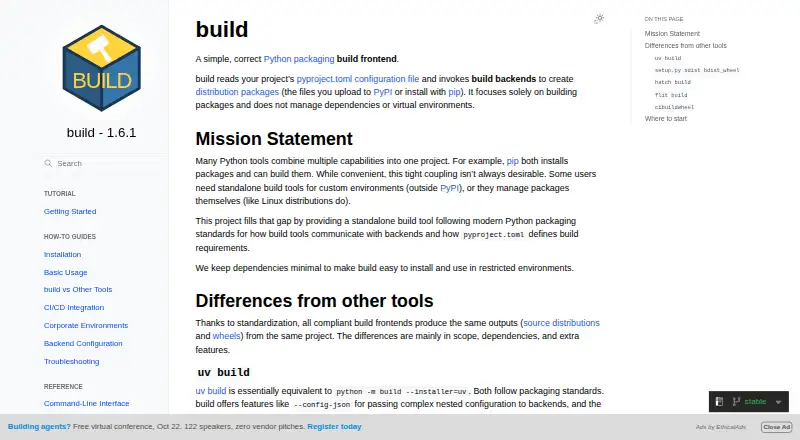
What build is
build is a free, open-source Python packaging frontend that reads pyproject.toml and invokes build backends to create distribution packages. By default, it creates a source distribution and then builds a wheel from it. It uses standardized PEP 517 hooks and supports backends beyond setuptools. Builds use a temporary isolated virtual environment by default, which is removed afterward. Developers can also call its Python API from build tools, CI systems, and automation scripts, and configure backends with repeated -C options or --config-json. Installation options include uv, pipx, pip, and conda-forge; pip is the default installer for isolated builds, with uv also supported. CI examples cover GitHub Actions, GitLab CI, CircleCI, Travis CI, Azure Pipelines, Jenkins, Docker, and tox. Listed compatibility includes Python 3.10 through 3.14 and PyPy 3.10 and 3.11. The tool focuses on building packages: it does not manage dependencies or virtual environments.
Who it suits
It suits Python developers who need to build distribution packages, including in CI or automation workflows, and who manage dependencies and environments separately.
What it does well
- Free and open source.
- Uses standardized PEP 517 hooks.
- Isolates builds in a temporary environment by default.
- Offers a Python API for automation.
- Lists installation options including uv, pipx, pip, and conda-forge.
What to know first
- Does not manage dependencies.
- Does not manage virtual environments.
- Does not publish packages.
Limits
build is free and open source. Its scope stops at package building: dependency management, virtual-environment management, lockfiles, dependency groups, and package publishing are outside the product; the documentation recommends cibuildwheel for native wheels across multiple platforms and Python versions.
Getting started
- Open https://build.pypa.io/
- Install build with uv, pipx, pip, or conda-forge
- Run it from a project containing pyproject.toml
- Configure backend options with -C or --config-json when needed
- Add the documented setup to your CI system
Verdict
build focuses on creating Python distribution packages and supports backends beyond setuptools. It is not a dependency or environment manager.
Questions
Is build free?
Yes. build is free and open source.
Which platforms does build support?
It supports an API plus Linux, macOS, and Windows.
What does build create?
By default it creates a source distribution and builds a wheel from it.
Does build manage dependencies or environments?
No. It focuses on building packages and does not manage dependencies or virtual environments.
Which installers can I use?
Installation documentation covers uv, pipx, pip, and conda-forge. Pip is the default installer for isolated builds, and uv is also supported.
Can build run in CI?
Yes. Examples cover GitHub Actions, GitLab CI, CircleCI, Travis CI, Azure Pipelines, Jenkins, Docker, and tox.
Facts from build's own pages
- Attestations
- The installation guide says attestations are available for releases after 1.2.1 and can be verified with the GitHub CLI. · build.pypa.io, 9 Oct 2026
- Backend compatibility
- It invokes standardized PEP 517 build backend hooks and supports backends beyond setuptools. · build.pypa.io, 9 Oct 2026
- Backend support
- build uses standardized PEP 517 hooks to communicate with build backends. · build.pypa.io, 8 Oct 2026
- Build isolation
- By default, it creates a temporary isolated virtual environment and installs the build backend and its dependencies there. · build.pypa.io, 9 Oct 2026
- CI integrations
- The CI/CD guide includes setup examples for GitHub Actions, GitLab CI, CircleCI, Travis CI, Azure Pipelines, and Jenkins. · build.pypa.io, 8 Oct 2026
- Compatibility
- The guide lists compatibility with Python 3.10 through 3.14 and PyPy 3.10 and 3.11. · build.pypa.io, 9 Oct 2026
- Configurable installers
- pip is the default installer for isolated builds, and uv is also supported as an installer. · build.pypa.io, 8 Oct 2026
- Configuration
- It supports backend configuration through repeated -C options or --config-json for complex settings. · build.pypa.io, 9 Oct 2026
- Install options
- The official guide recommends installation with uv and also documents pip and pipx. · build.pypa.io, 9 Oct 2026
- Integrations
- The CI/CD guide gives examples for GitHub Actions, GitLab CI, CircleCI, Travis CI, Azure Pipelines, Jenkins, Docker, and tox. · build.pypa.io, 9 Oct 2026
- Isolation
- Builds use a temporary isolated virtual environment by default, and the environment is removed after the build. · build.pypa.io, 8 Oct 2026
- Limit
- For native wheels across multiple platforms and Python versions, the guide recommends cibuildwheel, which can call a build frontend such as build. · build.pypa.io, 8 Oct 2026
- Maintainer
- The documentation copyright line names Filipe Laíns. · build.pypa.io, 9 Oct 2026
- Optional extras
- Optional virtualenv and uv extras support alternative isolation and installer setups. · build.pypa.io, 9 Oct 2026
- Outputs
- By default, it builds a source distribution and a wheel in the dist/ directory. · build.pypa.io, 9 Oct 2026
- Private indexes
- It can use private package indexes through pip environment variables, and the guide warns that extra indexes can allow package shadowing. · build.pypa.io, 9 Oct 2026
- Product
- build is a simple Python packaging frontend that reads pyproject.toml and invokes build backends to create distribution packages. · build.pypa.io, 9 Oct 2026
- Purpose
- build is a Python packaging frontend that reads pyproject.toml and invokes build backends to create distribution packages. · build.pypa.io, 8 Oct 2026
- Python API
- The product provides a Python API for programmatic use in build tools, CI systems, and automation scripts. · build.pypa.io, 8 Oct 2026
- Scope
- It focuses on building packages and does not manage dependencies or virtual environments. · build.pypa.io, 9 Oct 2026
- Security
- The installation guide says attestations are available for releases after 1.2.1 and documents verification with the gh CLI. · build.pypa.io, 8 Oct 2026
- Support
- The project documentation links to its GitHub issue tracker for reporting issues. · build.pypa.io, 9 Oct 2026
Where build stands on Freedom251
- Python Package Managers#5 of 27