Freedom251 › Social Media Management Tools

BrightBean Studio
What BrightBean Studio is
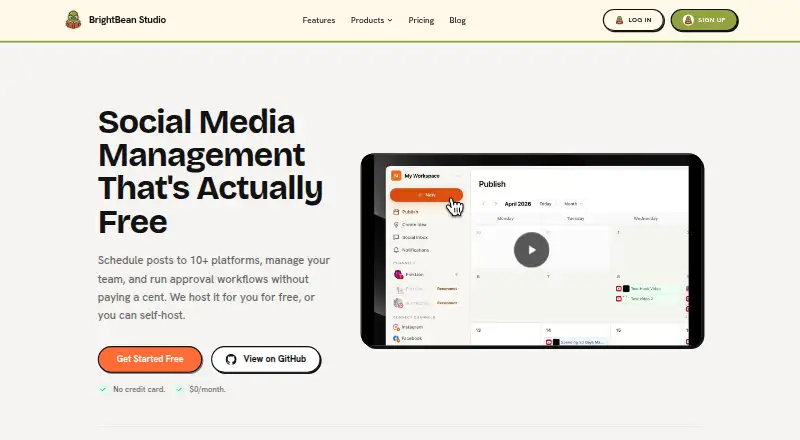
BrightBean Studio is a social media management tool for planning, scheduling, publishing, and analyzing posts across connected networks. Its free plan includes unlimited users and channels, a publishing calendar, approval workflows, and analytics, with no per-seat charges or per-channel limits. The calendar offers month, week, and list views, and can be filtered by channel, tag, or workspace. In the composer, teams can prepare channel-specific captions, preview posts for connected networks, and upload media by dragging and dropping files. A Kanban board helps teams collect and organize content ideas, assign and tag them, then turn a card into a scheduled post. Supported networks include Facebook, Instagram, LinkedIn, TikTok, YouTube, Pinterest, Threads, Bluesky, Google Business Profile, Mastodon, and DEV.to. The social inbox provides another place to manage social interactions. Analytics cover views, watch time, engagement, likes, comments, and shares, with comparisons over 7-, 30-, and 90-day windows. BrightBean Studio is available as a hosted service or can be self-hosted using Docker, Heroku, Render, or Railway. It is AGPL-3.0 licensed, and the maker says self-hosting gives users full control over their data. The maker is based in Thür, Germany.
Who it suits
BrightBean Studio suits teams coordinating publishing across many social networks, particularly when several users need to plan content and review it through approval workflows. It can also suit teams that want to self-host an AGPL-3.0 licensed tool or connect Claude, Cursor, or Codex for drafting and scheduling posts through an installed skill and secret key.
What it does well
- Free forever plan includes unlimited users and channels.
- Calendar has month, week, and list views with filters.
- Approval workflows support content review.
- Analytics include views, watch time, and engagement comparisons.
- Self-hosting options include Docker, Heroku, Render, and Railway.
What to know first
- No free trial is offered.
- Agent integrations require an installed skill and secret key.
Plans
| Plan | Billed and limits | Price |
|---|---|---|
| Free | Free forever; no credit card · Hosted version · Unlimited users · Unlimited channels · Calendar and scheduling · Approval workflows · Analytics | Free |
| Free hosted | $0/month · No per-seat pricing · No per-channel limits · Unlimited users and channels | Free |
As brightbean.xyz lists them, read 21 Sept 2026. The maker's own page has the final word.
Getting started
- Visit https://brightbean.xyz/studio/.
- Choose the hosted version or a self-hosting route such as Docker, Heroku, Render, or Railway.
- Use the Free plan, which is free forever and does not require a credit card.
- Connect social accounts and organize work in the calendar or Kanban board.
- Configure agent integrations with an installed skill and secret key if needed.
Verdict
Choose BrightBean Studio if your team wants free social scheduling, approvals, and analytics across its supported networks without per-seat or per-channel limits. Consider the setup requirements if you want agent-based drafting and scheduling, which use an installed skill and secret key.
Questions
What does BrightBean Studio cost?
The Free plan costs nothing and is billed free forever. The Free hosted plan costs nothing, billed at $0/month.
Is there a free plan or trial?
Yes. The Free plan is free forever and does not require a credit card; there is no free trial.
Which social networks does it support?
It lists Facebook, Instagram, LinkedIn, TikTok, YouTube, Pinterest, Threads, Bluesky, Google Business Profile, Mastodon, and DEV.to.
Can BrightBean Studio be self-hosted?
Yes. Hosting options include Docker, Heroku, Render, and Railway, as well as the hosted version.
Is BrightBean Studio open source?
It is AGPL-3.0 licensed.
Does it integrate with AI coding assistants?
The page says Claude, Cursor, and Codex can draft and schedule posts through an installed skill and secret key.
Facts from BrightBean Studio's own pages
- Agent integrations
- The page says Claude, Cursor, and Codex can draft and schedule posts through an installed skill and secret key. · brightbean.xyz, 12 Oct 2026
- Analytics
- Analytics track views, watch time, engagement, likes, comments, and shares, with 7-, 30-, and 90-day comparison windows. · brightbean.xyz, 12 Oct 2026
- Analytics level
- advanced · brightbean.xyz, 21 Sept 2026
- Approval workflow
- Yes · brightbean.xyz, 21 Sept 2026
- Calendar
- The calendar has month, week, and list views, with filters for channel, tag, or workspace. · brightbean.xyz, 12 Oct 2026
- Content ideas
- A Kanban board lets teams organize ideas, assign and tag cards, and turn an idea into a scheduled post. · brightbean.xyz, 12 Oct 2026
- Free plan
- Yes · brightbean.xyz, 21 Sept 2026
- Headquarters
- Thür, Germany · brightbean.xyz, 23 Sept 2026
- Hosting options
- Users can use the hosted version or self-host with Docker, Heroku, Render, or Railway. · brightbean.xyz, 12 Oct 2026
- License and data
- BrightBean Studio is AGPL-3.0 licensed, and the maker says self-hosting gives users full control over their data. · brightbean.xyz, 12 Oct 2026
- Limits
- The maker states there are no per-seat charges or per-channel limits, and users can connect as many social accounts as they want. · brightbean.xyz, 12 Oct 2026
- Post composition
- The composer supports channel-specific captions, live previews for connected networks, and drag-and-drop media uploads. · brightbean.xyz, 12 Oct 2026
- Purpose
- BrightBean Studio is a social media management tool for scheduling, publishing, and analyzing content across social platforms. · brightbean.xyz, 12 Oct 2026
- Social inbox
- Yes · brightbean.xyz, 21 Sept 2026
- Social integrations
- The page lists Instagram, TikTok, YouTube, LinkedIn, Pinterest, Facebook, Threads, Bluesky, Mastodon, Google Business Profile, and DEV.to. · brightbean.xyz, 12 Oct 2026
- Support
- The maker lists [email protected] as its contact email. · brightbean.xyz, 12 Oct 2026
- Supported networks
- Facebook,Instagram,LinkedIn,TikTok,YouTube,Pinterest,Threads,Bluesky,Google Business Profile,Mastodon,DEV.to · brightbean.xyz, 21 Sept 2026
- Who it is for
- The maker describes Studio as a tool for managing social posts and teams, with approval workflows and unlimited users and channels. · brightbean.xyz, 12 Oct 2026
Where BrightBean Studio stands on Freedom251
- Social Media Management Tools#15 of 145