Freedom251 › Electrical Contractor Software
Breezeworks
by Breezeworks
What Breezeworks is
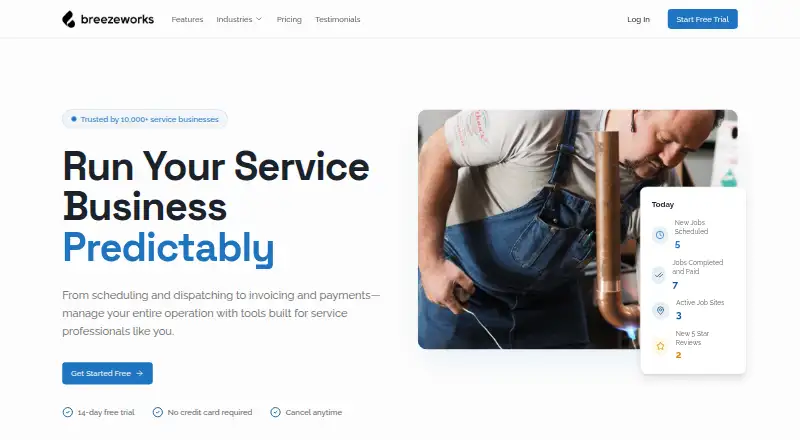
Breezeworks gives service businesses tools to schedule and dispatch jobs, manage customer records, create invoices, and collect payments. Its job calendar syncs between devices and team members, while customer records keep contact details, job history, payment records, and equipment records together. Users can create invoices with a logo, contract terms, and photos of completed work, and take card payments on-site or online through Square or Breezeworks Payments. The product can send customer emails and texts for lead win-back, review requests, and seasonal promotions. Android and iOS apps support scheduling, invoicing, payments, team tracking, messaging, customer history, and job notes; a web version is also available. All plans include Square and Breezeworks Payments processing, QuickBooks integration, and email support. Solo costs $31.99 per month for one user. Team costs $41.99 per month plus $14.99 per user, with team scheduling, permissions, GPS tracking, real-time dispatching, messaging, job mapping, and advanced reporting. Breezeworks was founded in 2012.
Who it suits
Breezeworks suits service professionals, including HVAC, plumbing, electrical, cleaning, landscaping, and handyman businesses. It can fit solo operators or teams needing coordinated scheduling and dispatch.
What it does well
- Calendar syncs across devices and team members.
- Invoices can include logos, terms, and work photos.
- Accepts card payments on-site or online.
- All plans include QuickBooks integration.
What to know first
- No free plan is listed.
- Solo starts at $31.99 per month.
- Team adds $14.99 per user monthly.
Limits
Solo includes one user. Team costs $41.99 a month plus $14.99 per user.
Plans
| Plan | Billed and limits | Price |
|---|---|---|
| Solo | $31.99/month · 1 user included · scheduling · customer management · invoicing · estimates and proposals · mobile and desktop apps · payment processing · automated reminders · AI chat · email and text automations | $31.99 a month |
| Team | $41.99/month + $14.99 per user · Unlimited users · everything in Solo · team scheduling and permissions · GPS tracking · real-time dispatching · team messaging · job mapping · advanced reporting | $41.99 a month |
| Enterprise | Custom · Everything in Team · dedicated account manager · custom integrations · API access · SSO and advanced security · custom onboarding and training · SLA and priority support · volume discounts | On request |
As breezeworks.com lists them, read 30 Sept 2026. The maker's own page has the final word.
Getting started
- Open https://www.breezeworks.com/.
- Start the 14-day free trial.
- Choose Solo or Team based on user and team needs.
- Use the web version or install the Android or iOS app.
- Connect Square or Breezeworks Payments for payment processing.
Breezeworks is a field-service platform for businesses that schedule jobs, manage customer and equipment records, invoice, and take payments. It suits independent contractors and small service teams in trades such as HVAC, plumbing, electrical, cleaning, landscaping, and handyman work. The main decision is whether Solo’s one-user allowance is enough or Team’s per-user pricing justifies its coordination tools.
Overview
Breezeworks brings office administration and field work into one system, with web access plus Android and iOS apps. A shared calendar keeps jobs synchronized across devices and team members, while customer records retain contact information, job history, payment records, and equipment details. That combination is useful when technicians need context before arriving and office staff need a single customer history.
The product was founded in 2012 around smartphone support for field professionals. Its scope goes beyond dispatch: invoices can include branding, contract terms, and completion photos; payments work online or on-site; and automated messages support customer follow-up.
Key features
Scheduling and team operations
Job scheduling is available across the product, but team scheduling and permissions are part of Team. Team also adds GPS tracking, real-time dispatching, team messaging, job mapping, and advanced reporting. Those tools are meaningful for a business sending several people into the field; a solo operator has little reason to pay for them.
Records, billing, and payments
Customer management combines contact, job, payment, and equipment data. Custom invoices can show a logo, contract terms, and photos, helping document completed work rather than sending a bare charge. Square and Breezeworks Payments support card collection online or at the job, and both processing options are included on every plan. QuickBooks integration is also included, which supports a connected accounting workflow.
Automations and mobile work
Automated reminders and targeted email or text campaigns cover lead win-back, review requests, and seasonal promotions. The mobile app handles scheduling, invoicing, payments, real-time team tracking, messaging, customer history, and job notes, so field staff can update jobs without returning to a desktop.
Support and privacy
Support includes email, a help center, and phone assistance at (844) 273-3939 during business hours. Breezeworks says its privacy safeguards may include password protection, encryption, SSL, firewalls, and internal access controls. Its privacy policy also says it may collect location, device, operating-system, activity, and session-duration data, which matters to businesses weighing mobile tracking.
Pricing
Solo — $31.99 per month
Solo is billed at $31.99/month and includes one user, scheduling, customer management, invoicing, estimates and proposals, mobile and desktop apps, payment processing, automated reminders, AI chat, and email and text automations. It is the sensible starting point for an owner-operator. The one-user allowance is the key constraint: businesses needing shared scheduling, permissions, or multiple staff should not treat it as a team plan.
Team — $41.99 per month plus $14.99 per user
Team is billed at $41.99/month plus $14.99 per user and permits unlimited users. It includes everything in Solo, then adds team scheduling and permissions, GPS tracking, real-time dispatching, team messaging, job mapping, and advanced reporting. The recurring per-user charge should be included in growth budgets, but the expanded operational controls fit a multi-technician business far better than Solo.
Enterprise — custom pricing
Enterprise has custom pricing and is aimed at organizations needing a dedicated account manager, custom integrations, API access, SSO and advanced security, custom onboarding and training, and SLA and priority support.
There is no free plan. A 14-day trial lets prospective customers evaluate the paid service before committing.
Platforms
Breezeworks runs on the web and has Android and iOS mobile apps. Mobile coverage includes core office and field actions, including scheduling, invoices, payments, messaging, notes, customer history, and team tracking.
Who it's for
Breezeworks is aimed at service professionals in HVAC, plumbing, electrical, cleaning, landscaping, and handyman businesses. Solo fits a single operator who wants estimates, billing, payment collection, and follow-up in one subscription. Team is better for dispatch-led operations with multiple technicians and a need for permissions, GPS visibility, messaging, and reporting. Enterprise is for larger organizations that require APIs, SSO, tailored integrations, and formal support commitments.
Pros and cons
Pros
- One workflow for field service: scheduling, customer and equipment records, invoicing, payments, and mobile job notes work together.
- Useful payment choice: every plan supports Square or Breezeworks Payments for online and on-site card collection.
- Strong team layer: Team adds dispatching, GPS, mapping, permissions, messaging, and reporting for coordinated crews.
- Customer follow-up built in: reminders and campaigns cover win-back, reviews, and seasonal outreach.
Cons
- Solo is restricted to one user: even a small business with a second operator may need Team.
- Team costs grow per user: the $14.99-per-user charge makes expansion an ongoing budget item.
- No free tier: users must move to a paid plan after the 14-day trial.
- Location data requires consideration: the privacy policy allows collection of app location and usage information.
Alternatives
Choose ServiceM8 instead if a free starting tier matters: its Free plan supports one user and 30 jobs per month, with a 10-cent SMS charge and 10 AI uses per day.
Commusoft is an alternative for businesses comparing job tracking, custom forms, commercial contracts, and scheduling-focused plans.
FieldPulse suits teams seeking seat-based pricing tailored to their needs.
Zuper is an option for organizations considering a $299-per-month Zuper Connect license in the United States and Canada.
Tradify is worth considering when a $47-per-user monthly Lite plan covering job management, scheduling, Google Calendar sync, quoting, and invoicing matches your requirements.
Bella FSM offers paid add-ons and charges $10 per additional user per month.
Fergus is another paid field-service option with quoting, job cards, GPS tracking, timesheets, calendars, and recurring jobs in its Essentials plan.
FieldCommand is an alternative with fixed monthly plans tied to seats and truck counts.
For focused comparisons, see Electrical Contractor Software, Pressure Washing Software, and Field Service Management Software.
Verdict
Breezeworks is a strong choice for a solo service operator or growing field team that wants scheduling, customer history, branded invoicing, payments, and follow-up in one platform. Choose Solo for one-person operations; choose Team when dispatch, GPS, permissions, and crew messaging justify the per-user cost. Look elsewhere if a permanent free plan, a lower-cost multi-user structure, or a different trade-specific workflow is more important than this integrated feature set.
Verdict
Breezeworks brings scheduling, customer records, invoicing, payments, and team coordination together for service businesses. Compare the Solo and Team costs against the number of users and team features you need.
Questions
Does Breezeworks have a free plan?
No. Breezeworks is paid, and a 14-day free trial is listed.
How much does Breezeworks cost?
Solo costs $31.99 a month for one user. Team costs $41.99 a month plus $14.99 per user.
Which platforms does Breezeworks support?
Breezeworks is available on Android, iOS, and the web.
What integrations are included?
All plans include Square and Breezeworks Payments processing, QuickBooks integration, and email support.
What does the Team plan add?
Team adds team scheduling and permissions, GPS tracking, real-time dispatching, messaging, job mapping, and advanced reporting.
Who makes Breezeworks?
The maker is Breezeworks. The company says it was founded in 2012.
Facts from Breezeworks's own pages
- Audience
- The company describes the product as built for service professionals and names HVAC, plumbing, electrical, cleaning, landscaping, and handyman businesses. · breezeworks.com, 30 Sept 2026
- Automations
- The product can send targeted customer emails and texts, including lead win-back, review requests, and seasonal promotions. · breezeworks.com, 30 Sept 2026
- Company history
- Breezeworks says it was founded in 2012 to bring smartphone capabilities to field service professionals. · breezeworks.com, 30 Sept 2026
- Customer records
- Customer management keeps contact details, job history, payment records, and equipment records together. · breezeworks.com, 30 Sept 2026
- Founded
- 2012 · breezeworks.com, 28 Sept 2026
- Free plan
- No · breezeworks.com, 20 Sept 2026
- Integrations
- All plans include Square and Breezeworks Payments processing, QuickBooks integration, and email support. · breezeworks.com, 30 Sept 2026
- Invoicing
- Users can create custom invoices with their logo, contract terms, and photos of completed work. · breezeworks.com, 30 Sept 2026
- Mobile apps
- The mobile app supports appointment scheduling, invoicing, payments, real-time team tracking, messaging, customer history, and job notes. · breezeworks.com, 30 Sept 2026
- Payments
- Users can connect Square or use Breezeworks Payments to collect card payments on-site or online. · breezeworks.com, 30 Sept 2026
- Privacy data
- The privacy policy says the company may collect app location, device, operating system, activity, and session-duration information. · breezeworks.com, 30 Sept 2026
- Purpose
- Breezeworks provides service businesses with tools for scheduling and dispatching jobs, invoicing, and payments. · breezeworks.com, 30 Sept 2026
- Scheduling
- The job calendar syncs between devices and team members, and the product supports scheduling jobs for a team. · breezeworks.com, 30 Sept 2026
- Security
- The privacy policy says Breezeworks uses commercially reasonable precautions that may include password protection, encryption, SSL, firewalls, and internal access restrictions. · breezeworks.com, 30 Sept 2026
- Support
- The contact page lists [email protected], (844) 273-3939 during business hours, and a help center. · breezeworks.com, 30 Sept 2026
Where Breezeworks stands on Freedom251
- Electrical Contractor Software#4 of 28
- Pressure Washing Software#9 of 29
- Field Service Management Software#37 of 95