
BracketView
What BracketView is
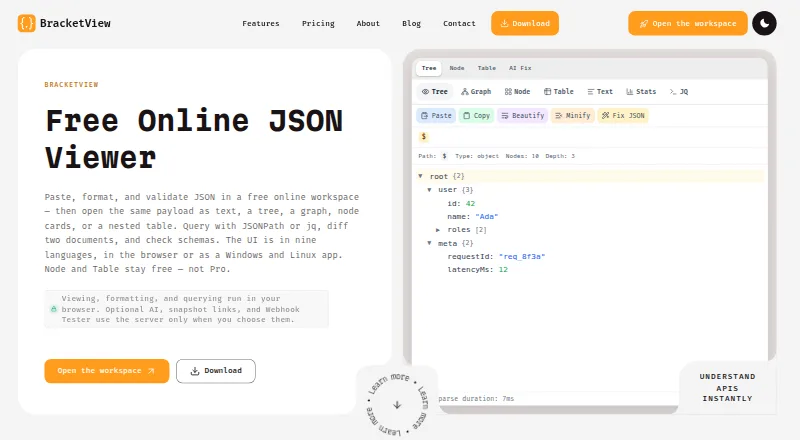
BracketView is a JSON workspace for inspecting and working with JSON in a browser or desktop app. It can format, validate, query, compare, and visualize data in text, tree, graph, node-card, and nested-table views, with Stats and JQ tools. Queries can use JSONPath or jq, which runs in the browser through WebAssembly. Validation supports OpenAPI definitions and custom JSON Schema rules, and the workspace can generate types for TypeScript, Python, Go, Rust, and other languages. Developers can use its Webhook Tester to capture requests from senders such as Stripe, GitHub, and Shopify. Core formatting, validation, comparison, and visualization run in the browser. Optional AI, snapshots, and webhook capture may send or store data on BracketView servers; AI may pass JSON or an excerpt to Groq or Google Gemini. Its Windows and Linux desktop app runs core tools offline without sign-in and can open local files up to 200 MB. Web uploads are limited to 5 MB on Free and 50 MB on Pro. Free is available; paid plans start at $2.25/mo (annual).
Who it suits
BracketView suits developers, API engineers, analysts, and students who inspect JSON responses, webhook payloads, or configuration files. The offline desktop tools may also suit people working with local JSON files.
What it does well
- Multiple views include text, tree, graph, and nested tables.
- Queries support JSONPath and jq.
- Validates OpenAPI definitions and custom JSON Schema rules.
- Desktop core tools work offline without sign-in.
What to know first
- Free web uploads are limited to 5 MB.
- Optional AI, snapshots, and webhook capture may send or store data on its servers.
- Anyone with a public snapshot link can open it until expiry.
- The Windows desktop build is unsigned.
Limits
Free web uploads are limited to 5 MB, with 5 snapshots per month that expire after 10 minutes, 20 AI actions per month, and 3 webhook endpoints with 25 requests each and 2-day retention. Yearly and Monthly plans allow 50 MB uploads, unlimited snapshot links with up to 2-hour expiry, uncapped AI actions, and 25 webhook endpoints with 5,000 captures each and 30-day history.
Plans
| Plan | Billed and limits | Price |
|---|---|---|
| Free | $0 forever · Uploads up to 5 MB · 5 encrypted snapshots/month with 10 min expiry · 20 AI actions/month · 3 webhook endpoints, 25 requests each, 2-day retention | Free |
| Yearly | $3$2.25 / mo; annual bill of $27 · Same Pro benefits as Monthly · 50 MB uploads · Performance Mode · Unlimited snapshot links up to 2 hours · AI without a monthly cap · 25 webhook endpoints, 5,000 captures each, 30-day history | $27 a year |
| Monthly | $3 per month · 50 MB uploads · Performance Mode · Unlimited snapshot links up to 2 hours · AI without a monthly cap · 25 webhook endpoints, 5,000 captures each, 30-day history | $3 a month |
As bracketview.in lists them, read 29 Sept 2026. The maker's own page has the final word.
Getting started
- Visit the BracketView website.
- Use the browser workspace or download the Windows or Linux desktop app.
- On desktop, open a local JSON file up to 200 MB.
- Choose Free, Monthly, or Yearly based on the plan limits you need.
BracketView suits people who regularly move between reading JSON, querying it, and checking it against schemas. Its mix of visual views, validation, comparison, and type generation is a stronger fit for a broad JSON workflow than for a single-purpose formatter.
Overview
BracketView brings several JSON tasks into one browser workspace and desktop app: users can format and inspect data, compare documents, run queries, validate schemas, and generate language types. That makes it useful when work spans API responses, webhook payloads, and configuration files. If the job is only a quick command-line query or a lightweight format, a more focused tool may be a better fit.
Key features
Views and queries
Text, tree, graph, node-card, and nested-table views offer different ways to navigate structured data, while Stats and JQ tools add analysis. JSONPath expressions and jq run in the browser through WebAssembly, keeping common inspection and query work in the same workspace. This range helps when a payload is hard to scan as plain text; users who prefer a terminal-first workflow may not need the visual layer.
Validation, comparison, and types
BracketView compares JSON documents and validates data against OpenAPI definitions or custom JSON Schema rules. It can also generate types for TypeScript, Python, Go, Rust, and other languages. Together, those features make it suited to developers and API engineers checking responses against expected structures, as well as analysts or students who need to inspect and interpret data.
Webhooks and privacy
Webhook Tester can capture requests from services such as Stripe, GitHub, and Shopify, making incoming payloads available for inspection. Core formatting, validation, comparison, and visualization run in the browser. Optional AI, snapshots, and webhook capture may send or store data on BracketView servers; AI features may route JSON or an excerpt through BracketView servers to Groq and/or Google Gemini. Snapshot payloads use AES-256-GCM encryption at rest, but anyone with the public link can open a snapshot until it expires. Avoid optional cloud features for sensitive data unless that handling suits your requirements.
Pricing
BracketView has a free plan and two paid plans. Free is billed at $0 forever. It includes uploads up to 5 MB, five encrypted snapshots per month with a 10-minute expiry, 20 AI actions per month, and three webhook endpoints with 25 requests each and two-day retention. It is a useful way to cover occasional inspection, but the upload cap and small quotas constrain larger files and ongoing webhook work.
Yearly costs $2.25 per month, billed annually at $27. Monthly costs $3 per month. Both paid plans include the same Pro benefits: 50 MB uploads, Performance Mode, unlimited snapshot links with up to two-hour expiry, AI without a monthly cap, and 25 webhook endpoints with 5,000 captures each and 30-day history. Monthly suits readers who want the higher limits without an annual bill; Yearly lowers the monthly rate for those willing to pay $27 upfront. Neither paid plan removes the cloud-handling considerations for optional features.
Platforms
The web version is available on Linux, Windows, and the web. Windows and Linux desktop apps run the core tools offline without sign-in, AI, or cloud features, and open local files up to 200 MB. The Windows download targets Windows 10 or 11 x64 and is unsigned; the Linux build targets x86_64 and requires WebKitGTK 4.1. The desktop app's larger local-file allowance makes it the more suitable option for files above the web plan's 5 MB Free or 50 MB Pro upload limits, provided the operating system requirements fit.
Who it's for
Developers, API engineers, analysts, and students who inspect JSON responses, webhook payloads, or config files are the natural audience. It is especially useful when the same workflow calls for visual navigation, queries, schema checks, and type generation. Readers who need a standalone CLI, or who cannot use server-backed optional features with their data, should consider narrower alternatives.
Pros and cons
- Broad workflow in one workspace: Multiple views, queries, comparison, validation, and type generation serve more than basic formatting.
- Offline desktop core: Windows and Linux apps can handle local files up to 200 MB without sign-in, AI, or cloud features.
- Clear privacy boundary: Core tools run in the browser, but optional AI, snapshots, and webhook capture can involve server transmission or storage.
- Public snapshot access: Encryption at rest does not prevent anyone with a public link from opening a snapshot before expiry.
- Small free web allowance: Free uploads stop at 5 MB, and snapshot, AI, and webhook quotas are capped.
- Platform constraints: The Windows build is unsigned, while Linux requires WebKitGTK 4.1 on x86_64.
Alternatives
Choose jq instead for a free, MIT-licensed command-line tool with standalone binaries for Linux, macOS, and Windows. Dadroit JSON Viewer is another option: its free non-commercial plan opens files up to 50 MB and converts JSON to CSV or XML. Pick jaq instead for a free open-source command-line program and Rust library.
JSON Crack is a free web and extension option. JSON Editor is a free, self-hosted or web JavaScript library for modern browsers. JSONBuddy offers a free single-user perpetual license for personal or educational use. jsonfmt.dev provides free API access, including a key-based tier with 1,000 requests per month. JSONZen is a freemium web and API option with a free plan.
Verdict
BracketView is a strong choice for developers and data-focused users who want visual JSON inspection, queries, schema validation, comparison, and type generation together. The offline desktop core and larger local-file allowance are practical advantages. Look elsewhere if you need a dedicated terminal tool or cannot accept server involvement for optional features.
Browse more options in JSON Tools.
Verdict
BracketView brings JSON inspection, querying, validation, and comparison together with both browser and desktop options. Check the upload limits and data handling for optional features before using them with sensitive JSON.
Questions
Is BracketView free?
Yes. The Free plan costs $0 USD and includes web uploads up to 5 MB, 5 snapshots per month, 20 AI actions per month, and 3 webhook endpoints.
How much do the paid plans cost?
Yearly is $2.25 a month billed annually at $27 USD. Monthly is $3 a month.
Which platforms are available?
The workspace is available on the web, and desktop apps are available for Windows and Linux. The desktop download page specifies Windows 10 or 11 x64 and Linux x86_64 with WebKitGTK 4.1.
Can the desktop app work offline?
Yes. Its core tools run locally offline without sign-in, AI, or cloud, and it opens local files up to 200 MB.
Does BracketView support JSON Schema validation and queries?
It validates against OpenAPI definitions or custom JSON Schema rules and supports JSONPath and jq queries.
What happens to data used by optional AI features?
AI features may send JSON or an excerpt to Groq and/or Google Gemini through BracketView servers.
Facts from BracketView's own pages
- AI data handling
- AI features may send JSON or an excerpt to Groq and/or Google Gemini through BracketView servers. · bracketview.in, 29 Sept 2026
- Desktop
- The Windows and Linux desktop app runs local core tools offline without sign-in, AI, or cloud and opens local files up to 200 MB. · bracketview.in, 29 Sept 2026
- Desktop platform limits
- The download page specifies Windows 10 or 11 x64 and Linux x86_64 with WebKitGTK 4.1, and notes the Windows build is unsigned. · bracketview.in, 29 Sept 2026
- Integrations
- Webhook Tester can capture requests from services such as Stripe, GitHub, and Shopify; the page also names these as examples of webhook senders. · bracketview.in, 29 Sept 2026
- Privacy
- Core formatting, validation, comparison, and visualization run in the browser; optional AI, snapshots, and webhook capture may send or store data on BracketView servers. · bracketview.in, 29 Sept 2026
- Product
- BracketView is a JSON workspace for viewing, formatting, validating, querying, and comparing JSON in a browser or desktop app. · bracketview.in, 29 Sept 2026
- Queries
- Users can query JSON with JSONPath expressions or jq running in the browser via WebAssembly. · bracketview.in, 29 Sept 2026
- Schema and types
- The workspace validates against OpenAPI definitions or custom JSON Schema rules and generates types for TypeScript, Python, Go, Rust, and more. · bracketview.in, 29 Sept 2026
- Snapshot security
- Snapshot payloads are encrypted at rest with AES-256-GCM, but anyone with the public link can open them until expiry. · bracketview.in, 29 Sept 2026
- Support
- The site lists [email protected] for product, billing, privacy, and policy questions. · bracketview.in, 29 Sept 2026
- Use cases
- The maker describes it for developers, API engineers, analysts, and students who inspect JSON responses, webhook payloads, and config files. · bracketview.in, 29 Sept 2026
- Views
- It provides text, tree, graph, node-card, and nested-table views, plus Stats and JQ tools. · bracketview.in, 29 Sept 2026
- Web upload limits
- The web upload limit is 5 MB on Free and 50 MB on Pro. · bracketview.in, 29 Sept 2026
Where BracketView stands on Freedom251
- JSON Tools#4 of 29