Freedom251 › Commodore 64 Emulators
BMC64
What BMC64 is
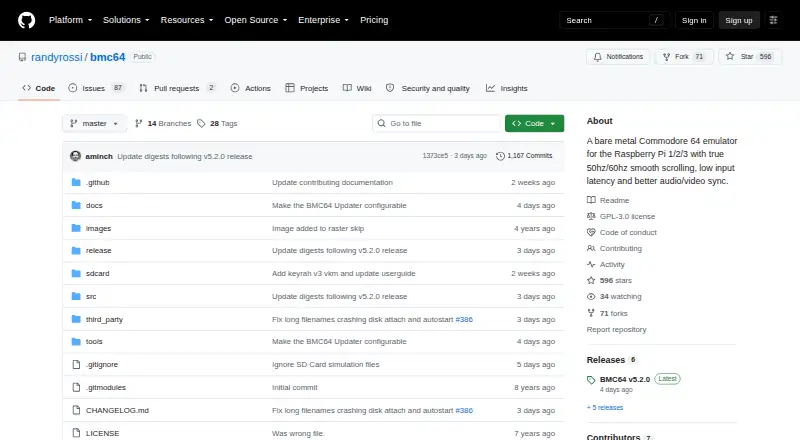
BMC64 is a free bare-metal Commodore 64 emulator for Raspberry Pi. Its bundled release also supports C128, VIC-20, Plus/4 and PET emulation, including C64 PAL and NTSC variants. It uses VICE, with Plus4Emu available for more accurate Plus/4 emulation on Raspberry Pi 3. The project describes frame timing for 50/60 Hz smooth scrolling and low input-to-audio/video latency, and reports a 4.1-second C64 boot over composite. It supports Wi-Fi and Ethernet for uses such as BBS access and C64 OS networking. Compatible input includes USB plug-and-play devices and 8BitDo Retro Keyboards connected by USB or a 2.4 GHz receiver. Installation involves writing a release ZIP or image to a FAT32 SD card. Required ROM files must be supplied from a legal source, including the minimum C64 set needed to start the emulator. An optional local-network web interface for C64 and C128 displays status and manages SD-card files, with optional PIN protection; the web server is off by default. BMC64 supports Pi Zero, Zero 2W, Pi 2 and Pi 3, but not Pi 4 or later.
Who it suits
BMC64 suits people seeking Commodore machine emulation on supported Raspberry Pi boards. Users need to supply the required ROM files and use supported hardware.
What it does well
- Free to use on supported Raspberry Pi boards.
- Emulates C64, C128, VIC-20, Plus/4 and PET.
- Supports Wi-Fi and Ethernet connectivity.
- Optional web interface can be PIN-protected.
What to know first
- Raspberry Pi 4 and later are unsupported.
- Required ROM files must be supplied separately.
- USB Bluetooth gamepads are not directly supported.
- Not all gamepads work.
Limits
The free release supports Raspberry Pi Zero, Zero 2W, Pi 2 and Pi 3; Raspberry Pi 4 and later are unsupported. BMC64 cannot start without the minimum C64 ROM set, which users must supply separately. USB Bluetooth gamepads are not directly supported, and not all gamepads work.
Plans
| Plan | Billed and limits | Price |
|---|---|---|
| BMC64 | Raspberry Pi Zero, Zero 2W, Pi 2 and Pi 3; ROM files must be supplied separately | Free |
As github.com lists them, read 8 Oct 2026. The maker's own page has the final word.
Getting started
- Get a release ZIP or image from the BMC64 website.
- Use a Raspberry Pi Zero, Zero 2W, Pi 2 or Pi 3.
- Write the release ZIP or image to a FAT32 SD card.
- Supply the required ROM files from a legal source, including the minimum C64 ROM set.
- Boot the Raspberry Pi from the prepared card.
Verdict
BMC64 offers several Commodore machine emulations in a free Raspberry Pi project, with networking and an optional local web interface. Confirm board and input-device compatibility, and obtain the required ROM files separately.
Questions
How much does BMC64 cost?
The BMC64 plan is free.
Which systems does it emulate?
The bundled release supports C64, C128, VIC-20, Plus/4 and PET emulation. C64 PAL and NTSC variants are supported.
Which Raspberry Pi boards can run it?
It supports Raspberry Pi Zero, Zero 2W, Pi 2 and Pi 3. Raspberry Pi 4 and later are unsupported.
Does BMC64 include the required ROM files?
No. Users must supply ROM files from a legal source, and the emulator needs the minimum C64 ROM set to start.
How do I install it?
Write a release ZIP or image to a FAT32 SD card for a supported Raspberry Pi.
Does it support gamepads?
USB Bluetooth gamepads are not supported directly, and the project says compatibility varies by gamepad.
Facts from BMC64's own pages
- Boot
- The project reports a 4.1-second C64 boot over composite and says no shutdown sequence is required. · github.com, 8 Oct 2026
- Connectivity
- It supports Wi-Fi and Ethernet for uses such as BBS access and C64 OS networking. · github.com, 8 Oct 2026
- Display and latency
- It times frames to vsync for 50/60 Hz smooth scrolling and advertises low input-to-audio/video latency. · github.com, 8 Oct 2026
- Emulation engines
- It uses VICE, with Plus4Emu offered for more accurate Plus/4 emulation on Raspberry Pi 3. · github.com, 8 Oct 2026
- Gamepad limit
- USB Bluetooth gamepads are not supported directly, and the project says not all gamepads work. · github.com, 8 Oct 2026
- Input devices
- It supports USB plug-and-play and 8BitDo Retro Keyboards over USB or a 2.4 GHz receiver. · github.com, 8 Oct 2026
- Installation
- Installation uses a release ZIP or image written to a FAT32 SD card for a supported Raspberry Pi. · github.com, 8 Oct 2026
- Limits
- It supports Pi Zero, Zero 2W, Pi 2 and Pi 3 devices; Raspberry Pi 4 and later are unsupported. · github.com, 8 Oct 2026
- Other machines
- The bundled release also supports C128, VIC-20, Plus/4 and PET emulation. · github.com, 8 Oct 2026
- Purpose
- BMC64 is a bare-metal Commodore 64 emulator for Raspberry Pi. · github.com, 8 Oct 2026
- ROM requirement
- Users must supply required ROM files from a legal source, and BMC64 cannot start without the minimum C64 ROM set. · github.com, 8 Oct 2026
- Security setting
- The web server is off by default, and the documentation recommends disabling it when it is not in use. · github.com, 8 Oct 2026
- Support
- The project points users to its official Discord community for support and discussion. · github.com, 8 Oct 2026
- Web interface
- An optional local-network web UI for C64 and C128 shows status and manages SD-card files, and can be protected with a PIN. · github.com, 8 Oct 2026
Where BMC64 stands on Freedom251
- Commodore 64 Emulators#5 of 31