Freedom251 › Rich Text Editor Software

Blok
What Blok is
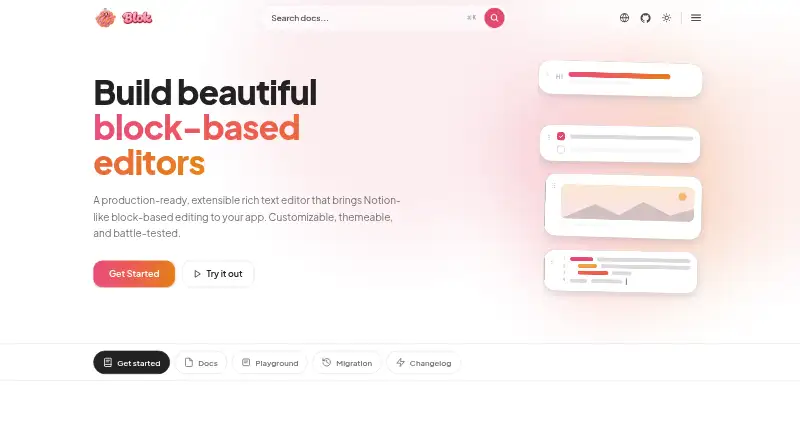
Blok is an open-source, block-based rich text editor for developers adding customizable editing to an application. It saves content as typed JSON blocks that the host app can store and load. Built-in block types include tables, lists, columns, callouts, code, media, embeds, and toggles; developers can also build custom tools that render, edit, and save their own data. The framework-agnostic JavaScript and TypeScript core has React and Vue adapters, an Angular component, and a no-build CDN script. Blok supports 69 locales, with English bundled and 68 others loaded on demand, and is RTL-ready. Its embed block accepts URLs from YouTube, Vimeo, Figma, CodePen, and more than 100 services. Uploads and link previews can use existing storage or services run by the developer or hosted separately. The server service does not store documents, so the application developer remains responsible for saving and loading them. Blok is licensed under Apache 2.0. The tutorial says no block tools are registered by default, so developers must register the types they need, including paragraph blocks.
Who it suits
Blok suits developers who want a customizable block editor within a web application, especially those using JavaScript or TypeScript and its framework adapters. It also fits teams prepared to manage document storage in their own application.
What it does well
- Saves content as typed JSON blocks
- Supports custom block tools
- Includes React, Vue, and Angular options
- Supports 69 locales
- Licensed under Apache 2.0
What to know first
- No block tools are registered by default
- The host app must save and load documents
- Link previews work for roughly 70% of pasted sites
- S3-compatible uploads have not been tested against a real bucket
Limits
Blok registers no block tools by default, so the application must add the block types it needs. Link previews work for roughly 70% of pasted sites; unsupported URLs appear as plain links showing their domain.
Getting started
- Open the Blok website
- Choose the JavaScript or TypeScript core, a React or Vue adapter, an Angular component, or the CDN script
- Register the block types your application needs, including a paragraph block
- Connect uploads and previews to existing storage or a supported backend service
- Implement application-side saving and loading for the JSON documents
Verdict
Blok provides a broad set of editor blocks and integration options for developers building structured editing into an app. Plan for registering needed tools and handling document persistence in the host application.
Questions
Is Blok free to use?
Yes. Blok is free, open source, and licensed under Apache 2.0.
Which platforms and frameworks does Blok support?
It is a web editor with a framework-agnostic JavaScript and TypeScript core, React and Vue adapters, an Angular component, and a no-build CDN script.
Where are documents stored?
The server service does not store documents. The host application must save and load the editor's typed JSON blocks.
Can Blok handle media and embeds?
It handles images, video, audio, and files added by file or URL. Embed blocks support YouTube, Vimeo, Figma, CodePen, and more than 100 services.
How many languages does Blok support?
Blok supports 69 locales, with English bundled and the other 68 loaded on demand. It is also RTL-ready.
Facts from Blok's own pages
- Audience
- Blok is presented as a developer tool for adding a customizable block editor to modern applications. · blokeditor.com, 9 Oct 2026
- Blocks
- The homepage lists built-in tables, lists, columns, callouts, code, media, embeds, and toggles, and says custom blocks can be added. · blokeditor.com, 9 Oct 2026
- Built-in blocks
- The homepage lists built-in block types including tables, lists, columns, callouts, code, media, embeds, and toggles. · blokeditor.com, 9 Oct 2026
- Custom blocks
- Developers can create custom block tools that render, edit, and save their own data. · blokeditor.com, 9 Oct 2026
- Data format
- Blok saves editor content as structured JSON blocks that can be stored and loaded back. · blokeditor.com, 9 Oct 2026
- Deployment
- The documentation describes client-side embeds that match URLs against a built-in registry and resolve them into provider-sanctioned iframe URLs. · blokeditor.com, 9 Oct 2026
- Document storage
- The server service does not store documents; saving and loading documents remains the app developer’s responsibility. · blokeditor.com, 9 Oct 2026
- Frameworks
- Blok provides a framework-agnostic JavaScript and TypeScript core, React and Vue adapters, an Angular component, and a no-build CDN script. · blokeditor.com, 9 Oct 2026
- Framework support
- The homepage offers a framework-agnostic JavaScript/TypeScript core, React and Vue adapters, an Angular component, and a CDN script. · blokeditor.com, 9 Oct 2026
- Integrations
- The embed block supports provider URLs from YouTube, Vimeo, Figma, CodePen, and more than 100 services. · blokeditor.com, 9 Oct 2026
- Internationalization
- Blok supports 69 locales, with English bundled and the other 68 locales loaded on demand. · blokeditor.com, 9 Oct 2026
- License
- The homepage states Blok is licensed under Apache 2.0. · blokeditor.com, 9 Oct 2026
- Limit
- The tutorial says Blok registers no block tools by default, so users must register the block types they need, including the paragraph block. · blokeditor.com, 9 Oct 2026
- Link preview limit
- Link previews work for roughly 70% of pasted sites, and unsupported previews fall back to a plain link showing the domain. · blokeditor.com, 9 Oct 2026
- Localization
- The homepage states that Blok supports 69 locales and is RTL-ready. · blokeditor.com, 9 Oct 2026
- Product
- Blok is an extensible, block-based rich text editor for adding Notion-like editing to an app. · blokeditor.com, 9 Oct 2026
- S3 support status
- The maker says S3-compatible uploads have not been tested against a real bucket and recommends trying them on a throwaway bucket before relying on them. · blokeditor.com, 9 Oct 2026
- Saved format
- The editor saves content as typed JSON blocks that can be stored and loaded back by the host application. · blokeditor.com, 9 Oct 2026
- Security
- The documentation describes an HTML sanitizer intended to prevent cross-site scripting attacks. · blokeditor.com, 9 Oct 2026
- Security guidance
- The server documentation recommends serving uploaded files from a different hostname than the app and says internet-facing deployments should terminate TLS before traffic reaches the service. · blokeditor.com, 9 Oct 2026
- Support
- The homepage invites teams to contact the maker through Telegram or email for setup and customization help. · blokeditor.com, 9 Oct 2026
- Undo and redo
- The homepage lists conflict-free undo and redo as a feature. · blokeditor.com, 9 Oct 2026
- Uploads and previews
- Uploads and link previews can use existing storage, routes in an ASP.NET Core app, a self-run backend service, or a separately hosted service. · blokeditor.com, 9 Oct 2026
Where Blok stands on Freedom251
- Rich Text Editor Software#37 of 37