Freedom251 › Digital Audio Workstations

Bitwig Studio
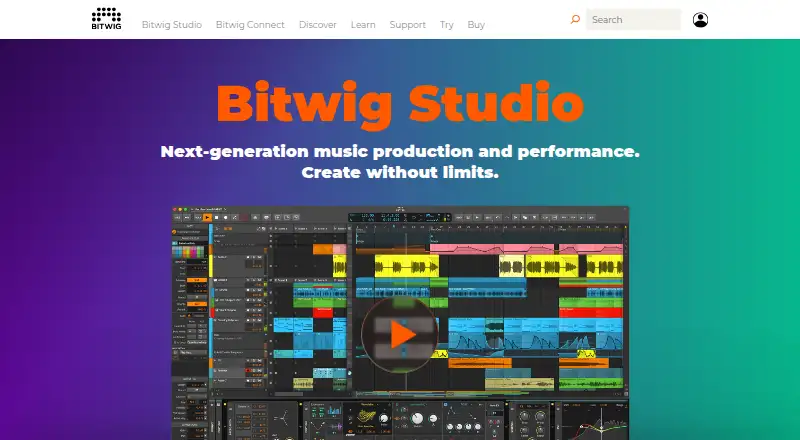
What Bitwig Studio is
Bitwig Studio is a digital audio workstation for recording, arranging, improvising, performing, sound design, and building instruments. Its timeline Arranger supports linear projects, while the Clip Launcher supports non-linear creation and performance. Audio tools cover recording, comping, editing, and time stretching; the available time-stretching algorithms depend on the edition.
For sound design, the Grid provides modular tools for building instruments and audio or note effects. Bitwig Studio includes 43 modulators. Listed editions support unlimited VST and CLAP plug-ins with side-chain support; the feature list also includes plug-in bridging, delay compensation, and crash protection. The software can sequence, sync, and control connected gear through MIDI, CC, CV, Gate, analog and MIDI Clock, and MIDI Timecode. It runs on macOS, Windows, and Linux. The download page lists macOS 12 or later, Windows 10 or 11 (64-bit), and Ubuntu 24.04 or later or a modern Linux distribution with Flatpak. Minimum requirements include 4 GB RAM, a 1280 × 768 display, and 26 GB free disk space for a full content installation. A free, unrestricted 30-day trial is available after signing up and downloading.
Who it suits
Bitwig Studio suits musicians, sound designers, composers, film scorers, and artists who need recording, arrangement, performance, or sound-design tools. Its Clip Launcher and hardware control options also suit people working with non-linear performance workflows or connected gear.
What it does well
- Combines a timeline Arranger and Clip Launcher.
- Includes recording, comping, audio editing, and time stretching.
- The Grid supports modular instrument and effect building.
- Supports unlimited VST and CLAP plug-ins in listed editions.
- Can sequence and control connected gear through MIDI, CV, and Gate.
- Runs on macOS, Windows, and Linux.
What to know first
- There is no free plan.
- The free trial lasts 30 days.
- Essentials has 4/8 audio I/O busses and three time-stretching algorithms.
Limits
The free trial ends after 30 days. Essentials has 4/8 audio I/O busses and three time-stretching algorithms; Producer and Studio have unlimited audio I/O busses and eight algorithms.
Plans
| Plan | Billed and limits | Price |
|---|---|---|
| Essentials | 51 instruments, audio and note FX, and more · Unlimited audio, instrument, and hybrid tracks and scenes · Unlimited VST/CLAP plug-ins with side-chain support · 12 months of free upgrades | $99, paid once |
| Producer | 105 instruments, audio and note FX, and more · Unlimited VST/CLAP plug-ins with full sidechain and multi-out options · Audio comping in the arranger and Clip Launcher · 12 months of free upgrades | $199, paid once |
| Bitwig Studio Producer | EUR 199.- · 105 instruments, audio & note FX, and more · 18 modulators · unlimited audio I/O busses · 8 time-stretching algorithms | $199, paid once |
| Bitwig Studio | EUR 399.- · 188 instruments, audio & note FX, and more · 43 modulators · The Grid · 8 time-stretching algorithms | $399, paid once |
| Bitwig Studio Essentials | EUR 99.- · 51 instruments, audio & note FX, and more · 10 modulators · 4/8 audio I/O busses · 3 time-stretching algorithms | $99, paid once |
As bitwig.com lists them, read 21 Sept 2026. The maker's own page has the final word.
Getting started
- Visit the Bitwig Studio website.
- Sign up and download the software to start the 30-day trial.
- Install it on a supported operating system that meets the listed minimum requirements.
- Choose an edition based on its instruments, modulation tools, audio I/O, and time-stretching algorithms.
- Connect gear or plug-ins as needed.
Verdict
Choose Bitwig Studio if you need a workstation for audio production, performance, and modular sound design across macOS, Windows, or Linux. The trial gives access without limitations for 30 days; compare editions if you need more audio I/O busses or time-stretching algorithms than Essentials provides.
Questions
Is Bitwig Studio free?
There is no free plan, but a free trial without limitations is available for 30 days after signing up and downloading.
What platforms does it support?
It supports macOS, Windows, and Linux. The download page lists macOS 12 or later, Windows 10 or 11 (64-bit), and Ubuntu 24.04 or later or a modern Linux distribution with Flatpak.
How much does Bitwig Studio cost?
The pricing note says from $99. Listed editions include Essentials at 99.00 EUR once and Producer at 199.00 EUR once. The plan listings also show prices of 99.00 USD, 199.00 USD, and $399 a month for Essentials, Producer, and Bitwig Studio, respectively.
What is the difference between Essentials and Producer for audio I/O and time stretching?
Essentials has 4/8 audio I/O busses and three time-stretching algorithms. Producer has unlimited audio I/O busses and eight algorithms.
Does it support third-party plug-ins?
Yes. Listed editions support unlimited VST and CLAP plug-ins with side-chain support. The feature list also specifies bridging, delay compensation, and crash protection.
Who makes Bitwig Studio?
The maker is listed as Bitwig Studio, headquartered in Berlin, Germany, and founded in 2009.
Facts from Bitwig Studio's own pages
- Audio editing
- The software supports recording, comping, audio editing, and time stretching, with algorithms varying by edition. · bitwig.com, 30 Sept 2026
- Editions
- Essentials has 4/8 audio I/O busses and three time-stretching algorithms, while Producer and Studio have unlimited audio I/O busses and eight algorithms. · bitwig.com, 30 Sept 2026
- Founded
- 2009 · bitwig.com, 28 Sept 2026
- Free plan
- No · bitwig.com, 21 Sept 2026
- Hardware integration
- Bitwig Studio can sequence, sync, and control connected gear via MIDI, CC, CV, Gate, analog and MIDI Clock, and MIDI Timecode. · bitwig.com, 30 Sept 2026
- Headquarters
- Berlin, Germany · bitwig.com, 28 Sept 2026
- Intended users
- Bitwig describes its audience as musicians, sound designers, composers, film scorers, and artists from various fields. · bitwig.com, 30 Sept 2026
- MIDI sequencing
- Yes · bitwig.com, 21 Sept 2026
- Modulation and sound design
- The Grid provides modular tools for building instruments and audio and note effects, and Bitwig Studio includes 43 modulators. · bitwig.com, 30 Sept 2026
- Multitrack editing
- Yes · bitwig.com, 21 Sept 2026
- Operating systems
- The download page lists macOS 12 or later, Windows 10 or 11 (64-bit), and Ubuntu 24.04 or later or a modern Linux distribution with Flatpak. · bitwig.com, 30 Sept 2026
- Plug-ins
- All listed editions support unlimited VST and CLAP plug-ins with side-chain support; the feature list also specifies bridging, delay compensation, and crash protection. · bitwig.com, 30 Sept 2026
- Privacy
- Bitwig's privacy policy says activation and update data includes device and software details and is used exclusively to activate the software and provide updates. · bitwig.com, 30 Sept 2026
- Product
- Bitwig Studio is a digital audio workstation for recording, arranging, improvising, performing, sound design, and building instruments. · bitwig.com, 30 Sept 2026
- Security
- Bitwig says its software uses sandboxed plug-ins and that plug-in crash protection is included across the listed editions. · bitwig.com, 30 Sept 2026
- Support
- Bitwig provides a contact form for technical software problems and says submitted information is used to answer inquiries and provide technical support. · bitwig.com, 30 Sept 2026
- Supported platforms
- macOS, Windows, Linux · bitwig.com, 21 Sept 2026
- System requirements
- The download page lists a minimum of 4 GB RAM, 1280 × 768 display resolution, and 26 GB free disk space for full content installation. · bitwig.com, 30 Sept 2026
- Third-party plugins
- Yes · bitwig.com, 21 Sept 2026
- Trial
- Bitwig Studio can be tried free without limitations for 30 days after signing up and downloading. · bitwig.com, 30 Sept 2026
- Workspaces
- It combines a timeline Arranger with the Clip Launcher for linear and non-linear creation and performance workflows. · bitwig.com, 30 Sept 2026
Where Bitwig Studio stands on Freedom251
- Digital Audio Workstations#22 of 39
- Game Music Software#16 of 27
- Audio Editing Software#81 of 131