Freedom251 › PDF Converter Software

BitRecover PDF Converter Wizard
What BitRecover PDF Converter Wizard is
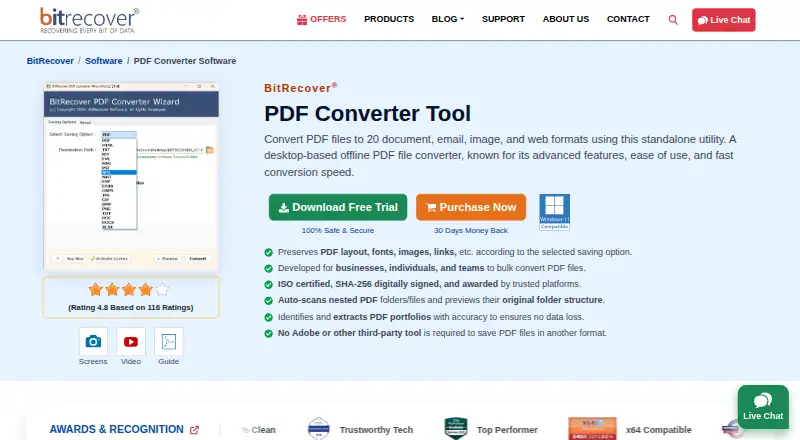
BitRecover PDF Converter Wizard is an offline Windows desktop utility for converting PDFs into document, email, image, and web formats. Its 20 output choices include DOC, DOCX, RTF, TXT, XLSX, EML, MSG, PST, JPG, PNG, TIFF, HTML, EPUB, XPS, and OXPS. Users can select individual files or folders, and the software can scan nested folders for PDFs. It previews the source folder tree and says it preserves that hierarchy in converted output. Depending on the saving option, it says it preserves layout, fonts, images, graphics, and hyperlinks. For PDF-to-PST, MSG, and EML conversions, users can set a custom From address. The tool is standalone and does not require Adobe or another third-party app, plugin, or tool. The free demo converts up to five PDF files to multiple formats. The Pro plan costs $29, paid once and includes all items, unlimited PDF selection, and one license key per device. The maker lists Windows 11, 10, 8, and 7, plus Windows Server 2025, 2022, 2019, and 2016.
Who it suits
The maker identifies business professionals, graphic designers, digital publishers, students, and researchers as potential users. It suits Windows users who need to convert PDFs individually or in batches.
What it does well
- 20 listed output choices
- Can scan nested folders for PDFs
- Preserves folder hierarchy in converted output
- Offline utility does not require cloud uploads
What to know first
- Windows only
- Free demo converts up to five PDF files
- Pro license key is for one device
Limits
The free demo converts up to five PDF files to multiple formats. The Pro plan includes unlimited PDF selection, with one license key per device.
Plans
| Plan | Billed and limits | Price |
|---|---|---|
| Pro | All items · unlimited PDF selection · one license key per device | $29, paid once |
As bitrecover.com lists them, read 11 Oct 2026. The maker's own page has the final word.
Getting started
- Visit https://www.bitrecover.com/pdf/converter/.
- Use the free demo to convert up to five PDF files, or choose the Pro plan for $29, paid once.
- Install on a supported Windows version or Windows Server system.
- Select individual PDFs or folders, including nested-folder scanning if needed.
- Choose an output format and save option for the conversion.
Verdict
BitRecover PDF Converter Wizard offers batch folder handling and a broad set of conversion targets in an offline Windows utility. The demo limit and one-device license are worth checking before purchase.
Questions
How much does the Pro plan cost?
Pro costs $29, paid once and includes all items, unlimited PDF selection, and one license key per device.
Is there a free plan or trial?
A free demo converts up to five PDF files to multiple formats.
Which platforms does it support?
It supports Windows 11, 10, 8, and 7, plus Windows Server 2025, 2022, 2019, and 2016.
What formats can it export to?
Its listed choices include DOC, DOCX, RTF, TXT, XLSX, EML, MSG, PST, JPG, PNG, TIFF, HTML, EPUB, XPS, and OXPS, among 20 options.
Does it require Adobe or another tool?
The maker describes it as standalone and says it does not require Adobe or another third-party tool, plugin, or app.
Who makes the software?
BitRecover says it is a sub-brand of RecoveryTools Inc. and was founded in 2011.
Facts from BitRecover PDF Converter Wizard's own pages
- Batch processing
- Users can select individual files or folders, and the software can scan nested folders for PDFs. · bitrecover.com, 11 Oct 2026
- Company
- BitRecover says it is a sub-brand of RecoveryTools Inc. and was founded in 2011. · bitrecover.com, 11 Oct 2026
- Email conversion option
- For PDF-to-PST, MSG, and EML conversions, users can set a custom From email address in the output. · bitrecover.com, 11 Oct 2026
- Export formats
- The product lists 20 output choices, including DOC, DOCX, RTF, TXT, XLSX, EML, MSG, PST, JPG, PNG, TIFF, HTML, EPUB, XPS, and OXPS. · bitrecover.com, 11 Oct 2026
- Folder structure
- The software previews the original folder tree and says it maintains that hierarchy in the converted output. · bitrecover.com, 11 Oct 2026
- Founded
- 2011 · bitrecover.com, 28 Sept 2026
- Headquarters
- 2885 Sanford Ave SW #35065, Grandville, MI 49418, USA · bitrecover.com, 28 Sept 2026
- Integrations
- The maker describes the tool as standalone and says it does not require Adobe or another third-party tool, plugin, or app. · bitrecover.com, 11 Oct 2026
- Intended users
- The maker identifies business professionals, graphic designers, digital publishers, students, and researchers as suitable users. · bitrecover.com, 11 Oct 2026
- Preservation
- The product says it preserves PDF layout, fonts, images, graphics, and hyperlinks according to the selected saving option. · bitrecover.com, 11 Oct 2026
- Purpose
- BitRecover PDF Converter Wizard is an offline desktop utility for converting PDF files into document, email, image, and web formats. · bitrecover.com, 11 Oct 2026
- Security and processing
- The maker says the offline desktop utility does not require uploading files to cloud servers and is SHA-256 digitally signed with ISO certifications. · bitrecover.com, 11 Oct 2026
- Support
- The product page advertises 24x7 support by phone, email, live chat, and video conferencing when required. · bitrecover.com, 11 Oct 2026
- Trial limit
- The free demo converts up to five PDF files to multiple formats. · bitrecover.com, 11 Oct 2026
- Windows requirements
- The maker lists Windows 11, 10, 8, and 7, plus Windows Server 2025, 2022, 2019, and 2016; it recommends 4 GB RAM and 200 MB free disk space. · bitrecover.com, 11 Oct 2026
Where BitRecover PDF Converter Wizard stands on Freedom251
- PDF Converter Software#8 of 47