Freedom251 › Game Mod Repositories

BeamNG.drive Repository
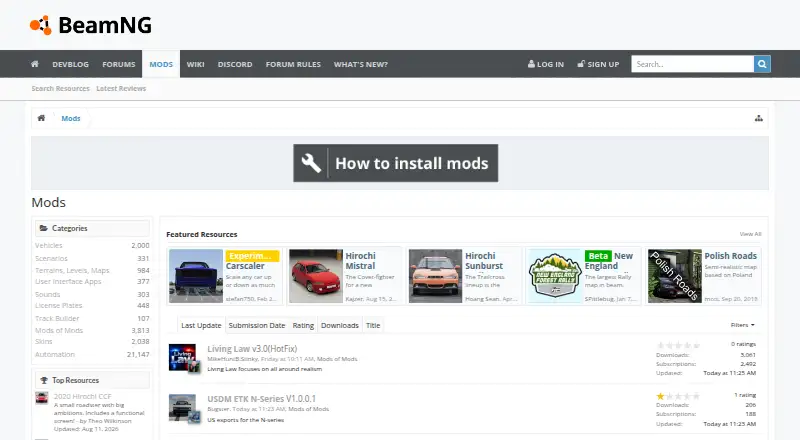
What BeamNG.drive Repository is
BeamNG.drive Repository is a catalog of community modifications for use with BeamNG.drive, available through the web and in-game. Its listings span vehicles, scenarios, terrains and maps, interface apps, sounds, license plates, track-building tools, skins, mods of mods, and Automation. Players can search and filter in the in-game repository and see details such as ratings and dates. Mods can be installed from the game’s repository or through actions on website pages. Subscribing downloads a mod and enables updates when its author changes it. For manual installation, downloaded ZIP archives can be placed in the game’s mods folder without being unpacked. The in-game Mods Manager can update, enable, disable, and manage installed items. The repository is free. BeamNG.drive supports Windows and experimental Linux; other operating systems and compatibility layers are unsupported. BeamNG advises caution with downloads, including avoiding suspicious executable files, and recommends keeping antivirus software current. It also recommends running no more than 20–30 mods at once because conflicts can cause problems.
Who it suits
It suits BeamNG.drive players looking for community-made content to add to the game. It offers both in-game discovery and browser-based downloads, with mod management available in-game.
What it does well
- Free repository for BeamNG.drive mods.
- Search and filter mods in-game.
- Subscriptions enable updates after author changes.
- Manager can enable, disable, and update mods.
- Manual ZIP installation is available.
What to know first
- BeamNG recommends no more than 20–30 mods at once.
- Old mods may be outdated or broken.
- Linux support is experimental.
- Other operating systems and compatibility layers are unsupported.
Limits
The repository is free. BeamNG recommends using no more than 20–30 mods at once because some may conflict; older mods may also be outdated or broken.
Getting started
- Open the repository website or the in-game Repository.
- Search or filter for a mod by category.
- On the website, use Subscribe, View ingame, or Download Now on a mod page.
- Subscribe to download a mod and receive automatic updates when its author changes it.
- For manual installation, place the downloaded ZIP archive in the game's mods folder without extracting it.
- Use the in-game Mods Manager to update, enable, disable, or manage installed mods.
BeamNG.drive Repository is a community-mod catalog for players of BeamNG.drive. It suits players who want to add vehicles, maps and other community creations, with a choice of in-game or browser-based discovery. Its main advantage is flexible installation and management; its reach is limited to one game, and mods can conflict.
Overview
The repository serves BeamNG.drive rather than a range of games. Its catalog spans vehicles, scenarios, terrains and maps, interface apps, sounds, license plates, track-building content, skins, mods of mods and Automation creations. Moderators review submissions before publication and may reject mods that do not meet BeamNG’s quality standard.
Search and category filters in the in-game Repository help players narrow the catalog, while ratings and dates provide useful context. Version history, dependency tracking and community comments add ways to assess a mod before installing it. Those checks do not remove the need to watch for outdated or incompatible mods.
Key features
In-game discovery and management
Players can find and install mods from BeamNG.drive’s Repository, then use the Mods Manager to update, enable or disable them. Keeping discovery and management in-game is convenient for players who prefer not to handle files manually.
Web subscriptions and ZIP downloads
Mod pages on the website offer Subscribe, View ingame and Download Now. Subscribing downloads a mod and enables automatic updates when its author makes changes. For manual installation, the standard mod format is a ZIP archive: place it in the game’s mods folder without extracting it. This gives players an alternative if they do not want to use the Repository or Mods Manager.
Safety and compatibility
BeamNG advises caution with downloads, recommends keeping antivirus software current and warns that EXE files may conceal malicious software. Old mods can be outdated or broken, and conflicts can cause problems; BeamNG recommends running no more than 20–30 mods at once. Players who want to avoid compatibility issues should be selective rather than treating every available mod as a safe addition.
Pricing
The repository is free, with a free plan and no free trial. Players can use the web catalog, in-game Repository and documented manual ZIP installation without a paid repository plan.
Platforms
The repository is available on the web and in-game. BeamNG.drive supports Microsoft Windows, with Linux support described as experimental. Other operating systems, virtual machines, emulators and compatibility layers are unsupported, so Linux users should expect less certainty than Windows users. The game also supports exporting car creations from Automation into BeamNG.drive.
Who it's for
This is the natural choice for BeamNG.drive players seeking community-made additions and a way to manage them within the game. Its categories reach beyond vehicles, making it useful for players looking for new scenarios, maps, sounds or interface apps as well. It is not a general-purpose mod directory for players whose main interest is another game.
Pros and cons
- Pros: In-game discovery and management let players find, install, update and control mods without relying on manual file handling.
- Pros: Web subscriptions enable automatic updates, while ZIP downloads allow manual installation outside the Repository.
- Pros: Moderation, ratings, dates, version history and dependency tracking give players several ways to evaluate and manage mods.
- Cons: The catalog covers one game, so it offers little to players looking for mods across different titles.
- Cons: Mods can be outdated or conflict, and BeamNG’s recommended 20–30-mod ceiling means players may need to limit a large collection.
- Cons: Linux support is experimental, and other operating systems and compatibility layers are unsupported.
Alternatives
For a broader starting point, browse Game Mod Repositories. Players focused on another title may prefer a repository built around it:
- Factorio Mods is a free portal for Factorio, but portal functionality requires a verified purchase and uploading requires a licensed copy and Factorio.com account. Choose it for Factorio rather than BeamNG.drive.
- Farming Simulator ModHub is a free repository for Farming Simulator user-generated content, with creator-owned content. It is the more relevant option for that game.
- CurseForge offers free Minecraft mods and modpacks through its web catalog, with a premium plan described as offering an ad-free experience, instant downloads and premium web access. Choose it for Minecraft content.
- GameBanana is a free web option for players seeking a different mod repository.
- Hive Workshop has free and paid options on the web, including a $5-per-month Hero plan. It is an alternative for players considering another community mod site.
- LCPDFR.com is a free web and Windows option; its Patreon membership costs $4.99 per month and includes no ads, faster downloads, a private forum and early access. Consider it instead when those membership benefits are relevant.
- Thunderstore offers a free web and Windows service with more than 110,000 mods across 300+ games. Its multi-game reach makes it a better fit for browsing mods beyond BeamNG.drive.
- 5Mods is a free web alternative for players seeking another mod directory.
Verdict
BeamNG.drive Repository is a strong fit for BeamNG.drive players who want community mods with in-game discovery, update management and a manual ZIP option. Choose it for that game’s broad range of additions and flexible installation; look elsewhere if you need a multi-game catalog, or keep your collection small and curated to reduce the risk of conflicts.
Verdict
BeamNG.drive Repository provides several ways to find, install, and manage community mods, including manual ZIP installation. Players should account for possible mod conflicts and the game’s stated platform limits.
Questions
Is the BeamNG.drive Repository free?
Yes. It is listed as free and has a free plan.
Can I use the repository in a browser?
Yes. The web repository provides Subscribe, View ingame, and Download Now actions on mod pages.
Which platforms does BeamNG.drive support?
The game supports Microsoft Windows and Linux experimentally. Other operating systems, virtual machines, emulators, and compatibility layers are unsupported.
Can I install mods without the in-game manager?
Yes. You can download a mod as a ZIP archive and place it in the game’s mods folder without extracting it.
Does subscribing update mods automatically?
Yes. Subscribing downloads the mod and enables automatic updates when its author makes changes.
How many mods should I use at once?
BeamNG recommends no more than 20–30, since mods can conflict and cause issues.
Facts from BeamNG.drive Repository's own pages
- Automatic installation
- Mods can be installed through the in-game mod manager or repository website buttons; subscribing downloads a mod and enables automatic updates when its author makes changes. · beamng.com, 3 Oct 2026
- Automatic updates
- Subscribing to a mod enables automatic updates when its author makes changes. · beamng.com, 3 Oct 2026
- Categories
- Repository categories include vehicles, scenarios, terrains and maps, user interface apps, sounds, license plates, track builder, mods of mods, skins, and Automation. · beamng.com, 3 Oct 2026
- Company
- BeamNG GmbH lists its address as Domshof 17, 28195 Bremen, Germany. · beamng.com, 3 Oct 2026
- Compatibility caution
- BeamNG advises that old mods may be outdated or broken and that mods may conflict; it recommends using no more than 20–30 at once. · beamng.com, 3 Oct 2026
- Headquarters
- Bremen, Germany · beamng.com, 28 Sept 2026
- In-game access
- Mods can be found and installed through the in-game Repository and Mod Manager. · beamng.com, 3 Oct 2026
- Integration
- The game supports exporting car creations from Automation into BeamNG.drive. · beamng.com, 3 Oct 2026
- Management
- The in-game Mods Manager can update, enable, disable, and manage installed mods. · beamng.com, 3 Oct 2026
- Manual downloads
- Mods can be downloaded through a browser as ZIP archives and installed manually without the Repository or in-game Mod Manager. · beamng.com, 3 Oct 2026
- Manual installation
- The documented standard mod format is a ZIP archive, which can be placed in the game's mods folder without extracting it. · beamng.com, 3 Oct 2026
- Moderation
- Mods must be reviewed by moderators before becoming public, and BeamNG says it retains the right to approve only mods meeting a certain quality level. · beamng.com, 3 Oct 2026
- Mod management
- The in-game Mods Manager can update, enable, disable, and manage installed mods. · beamng.com, 3 Oct 2026
- Notable limit
- BeamNG recommends using no more than 20–30 mods at the same time because some may conflict and cause issues. · beamng.com, 3 Oct 2026
- Privacy
- BeamNG's website privacy policy identifies BeamNG GmbH as the data controller and describes processing personal data in compliance with applicable data privacy and security laws. · beamng.com, 3 Oct 2026
- Purpose
- The BeamNG.drive Repository lists community mods for the game and is available as a web repository and in-game repository. · beamng.com, 3 Oct 2026
- Repository tools
- The in-game repository lets users search and filter mods by category and view statistics such as ratings and dates. · beamng.com, 3 Oct 2026
- Safety guidance
- BeamNG advises users to exercise caution downloading files, keep antivirus software up to date, and be wary of mod files in formats such as EXE. · beamng.com, 3 Oct 2026
- Security guidance
- BeamNG advises caution when downloading files, recommends up-to-date antivirus software, and warns that EXE files may hide malicious software. · beamng.com, 3 Oct 2026
- Support
- BeamNG lists [email protected] and support.beamng.com for customer support. · beamng.com, 3 Oct 2026
- Support channels
- BeamNG lists its support portal, community forums, official Discord, and documentation as help channels. · beamng.com, 3 Oct 2026
- Supported game platforms
- The game supports Microsoft Windows and experimental Linux; other operating systems and compatibility layers are unsupported. · beamng.com, 3 Oct 2026
- Supported system
- BeamNG.drive is compatible with Microsoft Windows and Linux experimentally; the support page says other operating systems, virtual machines, emulators, and compatibility layers are unsupported. · beamng.com, 3 Oct 2026
- Web access
- The web repository offers Subscribe, View ingame, and Download Now actions on mod pages. · beamng.com, 3 Oct 2026
Where BeamNG.drive Repository stands on Freedom251
- Game Mod Repositories#4 of 24