Freedom251 › AI Speech Coaching Apps

Banter
What Banter is
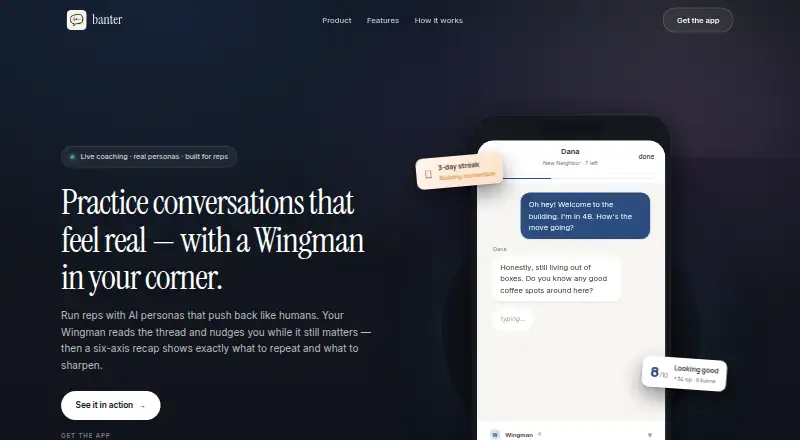
Banter is a social-skills app for practicing conversations with AI personas and receiving coaching from a second AI called Wingman. It offers more than 150 structured scenarios across six categories, including practice for small talk, conflict, networking, and asking for a raise. Users can practice by text or voice, or create a scene and persona in Freestyle mode. Eight AI personas respond in character and are calibrated to the user's energy. Wingman follows each turn with a one-line nudge.
After a session, Banter provides a six-axis recap covering engagement, specificity, rapport, skill, drive, and adaptability. Streak milestones, XP, and saved conversation Moments that can be replayed support continued practice. Banter says speech recognition and text-to-speech run on-device, keeping voice on the phone. Its App Store description says conversations are stored on the device and are not used for training or profile resale. The app runs on iOS and Android, and users can start without an account. The Free plan is listed as free. Banter Pro Monthly costs $9.99 a month and includes unlimited voice plays, ad-free reps, and unlimited AI-generated custom skill paths.
Who it suits
Banter suits people who want to rehearse everyday interactions or challenging conversations through text or voice practice. It is available on iOS and Android, and its no-account start makes it suitable for trying scenarios without first registering.
What it does well
- Offers more than 150 structured scenarios across six categories.
- Supports both text and voice practice.
- Freestyle mode lets users create a scene and persona.
- Wingman gives one-line nudges during conversations.
- Provides a six-axis recap after each session.
- Voice processing runs on-device, according to Banter.
What to know first
- Runs on iOS and Android only.
- Filler-word, pace, and pronunciation feedback are unavailable.
- Interview coaching is unavailable.
Limits
Banter Pro Monthly costs $9.99 a month and adds unlimited voice plays, ad-free reps, and unlimited AI-generated custom skill paths. The listed feedback excludes filler-word, pace, and pronunciation feedback, as well as interview coaching.
Plans
| Plan | Billed and limits | Price |
|---|---|---|
| Free | Free to download; no account required; practice as much as you want | Free |
| Banter Pro Monthly | Monthly · Unlimited voice plays · ad-free reps · unlimited AI-generated custom skill paths | $9.99 a month |
As trybanter.app lists them, read 7 Oct 2026. The maker's own page has the final word.
Getting started
- Download Banter on iOS or Android.
- Start without creating an account.
- Choose a structured scenario or create a scene and persona in Freestyle mode.
- Practice by text or voice.
- Choose Banter Pro Monthly at $9.99 a month for unlimited voice plays, ad-free reps, and unlimited AI-generated custom skill paths.
Overview
Banter is a social-skills practice app for iOS and Android, built around conversations with AI personas and coaching from a second AI called Wingman. It is best suited to people who want to rehearse everyday or challenging interactions, rather than polish speech mechanics such as pace or pronunciation. Its strongest case is guided practice with in-conversation prompts and a structured recap; its free plan is unusually open on practice volume.
Key features
More than 150 scenarios span six categories, covering situations such as small talk, conflict, networking and asking for a raise. That range gives users a starting point for both routine exchanges and higher-pressure conversations, though the app is aimed at social situations rather than dedicated interview coaching.
Practice is available by text or voice. Freestyle mode lets users create a scene and persona, which is useful when a preset scenario does not match the conversation they want to prepare for. The App Store description says eight personas respond in character and adjust to the user's energy.
Wingman provides one-line nudges as a conversation unfolds, then Banter offers a six-axis recap covering engagement, specificity, rapport, skill, drive and adaptability. This pairing makes feedback part of the practice itself, not just a score at the end. Streak milestones, XP and saved conversation Moments that can be replayed add ways to track and revisit practice, though they do not replace the coaching.
Banter says speech recognition and text-to-speech run on-device and voice stays on the phone. Its App Store description also says conversations are stored on the device and are not used for training or profile resale. The maker says no account is required to start. Support is available by email at [email protected].
Pricing
The Free plan costs nothing. It is free to download, requires no account and allows users to practice as much as they want. That makes it a sensible starting point for anyone who wants to explore the scenarios and practice modes without committing to a subscription.
Banter Pro Monthly costs $9.99 a month, billed Monthly. It adds unlimited voice plays, ad-free reps and unlimited AI-generated custom skill paths. Pro is the fit for frequent voice practice or users who want to build custom paths without a stated cap; the free plan gives up those Pro benefits. No annual Pro option is included in these plans.
Platforms
Banter is available on iOS and Android. It does not offer a listed desktop or web platform.
Who it's for
Choose Banter if you want to rehearse social interactions with a responsive persona and get coaching during and after each exchange. It is a better fit for building conversational confidence than for users primarily seeking filler-word, pace or pronunciation feedback: Banter does not offer those feedback modes, and it does not provide interview coaching.
Pros and cons
- Pro: More than 150 scenarios across six categories provide a broad set of situations to practice, from small talk to conflict.
- Pro: Wingman nudges during the exchange, while a six-axis recap gives users specific dimensions to reflect on afterward.
- Pro: The free plan allows as much practice as users want, with no account required to start.
- Pro: On-device voice processing and device-stored conversations address privacy concerns for sensitive practice.
- Con: There is no filler-word, pace or pronunciation feedback, so Banter is not a speech-delivery coach.
- Con: The listed Pro plan is monthly at 9.99 USD; users seeking an annual option have none in the plans presented.
- Con: Banter is limited to iOS and Android, which rules it out for users who want to practice on desktop or web.
Alternatives
For broader speech coaching, compare AI Speech Coaching Apps. Speeko is another freemium option, with a free plan for basic insights and an annual plan at $8.33 a year, billed $8.33/month, including a 7-day free trial and personalized feedback. Wellspoken may suit users who want scored practice sessions: its free plan allows 3 per week, and its Team plan costs $20 a month, billed annually, for 5+ members and 20 Echo AI conversations per member.
Avorate offers free closed-beta access with a personal invite code, 50 credits once and 2 hours of speaking time. Speakeroo offers two free practice sessions per day with AI speech analysis, transcripts, and pace, clarity and filler-word metrics. HiTalker has a free plan with daily coin and session limits, while its Monthly Plan costs $79 a month. Mic Buddy is a freemium option for iOS and macOS with a free plan and no free trial. Orato offers three free AI practice sessions per month, plus filler-word detection, pace and timing feedback, a speech topics library and a Toastmasters speech timer.
Verdict
Banter is a strong choice for people who want repeatable practice for social situations, with prompts in the moment and a useful set of reflection axes afterward. The unlimited-practice free plan lowers the barrier to trying it, and Pro is clear about what it adds. Look elsewhere if your priority is measurable speech mechanics, interview coaching or desktop access.
Verdict
Pick Banter if you want guided practice for social situations, with in-session nudges and a recap afterward. The free plan allows practice without an account; Pro is the option for unlimited voice plays, ad-free reps, and unlimited AI-generated custom skill paths.
Questions
Is Banter free?
Yes. The Free plan is listed as free, and users can practice without an account.
What does Banter Pro cost?
Banter Pro Monthly costs $9.99 a month.
What does Pro add?
It includes unlimited voice plays, ad-free reps, and unlimited AI-generated custom skill paths.
Which phones support Banter?
Banter is available on iOS and Android.
Who develops Banter?
The App Store lists Leo Cui as the developer and seller.
How does Banter handle voice and conversations?
Banter says speech recognition and text-to-speech run on-device and voice stays on the phone. Its App Store description says conversations are stored on-device and are not used for training or profile resale.
Facts from Banter's own pages
- Access
- The maker says the app is available on iOS and Android and requires no account to start. · trybanter.app, 7 Oct 2026
- AI personas
- The App Store description says eight AI personas reply in character, calibrated to the user's energy. · apps.apple.com, 7 Oct 2026
- Coaching
- Wingman reads each turn and provides one-line nudges during the conversation. · apps.apple.com, 7 Oct 2026
- Conversation privacy
- The App Store description says conversations are stored on the device and that chats are not used for training or profile resale. · apps.apple.com, 7 Oct 2026
- Developer
- The App Store lists Leo Cui as the developer and seller. · apps.apple.com, 7 Oct 2026
- Feedback
- After a session, Banter provides a six-axis recap covering engagement, specificity, rapport, skill, drive, and adaptability. · apps.apple.com, 7 Oct 2026
- Practice modes
- Users can practice by text or voice and create a custom scene and persona in Freestyle mode. · trybanter.app, 7 Oct 2026
- Progress features
- Banter includes streak milestones, XP, and saved conversation Moments that users can replay. · apps.apple.com, 7 Oct 2026
- Purpose
- Banter is a social-skills app for practicing conversations with AI personas and receiving coaching from a second AI called Wingman. · apps.apple.com, 7 Oct 2026
- Scenarios
- The app offers more than 150 structured scenarios across six categories. · trybanter.app, 7 Oct 2026
- Support
- The maker's site lists support by email at [email protected]. · trybanter.app, 7 Oct 2026
- Voice privacy
- Banter says speech recognition and text-to-speech run on-device and that voice stays on the phone. · trybanter.app, 7 Oct 2026
- Who it is for
- The maker describes Banter as practice for everyday and challenging social situations, including small talk, conflict, networking, and asking for a raise. · trybanter.app, 7 Oct 2026
Where Banter stands on Freedom251
- AI Speech Coaching Apps#3 of 25