Freedom251 › AI Speech Coaching Apps

Avorate
What Avorate is
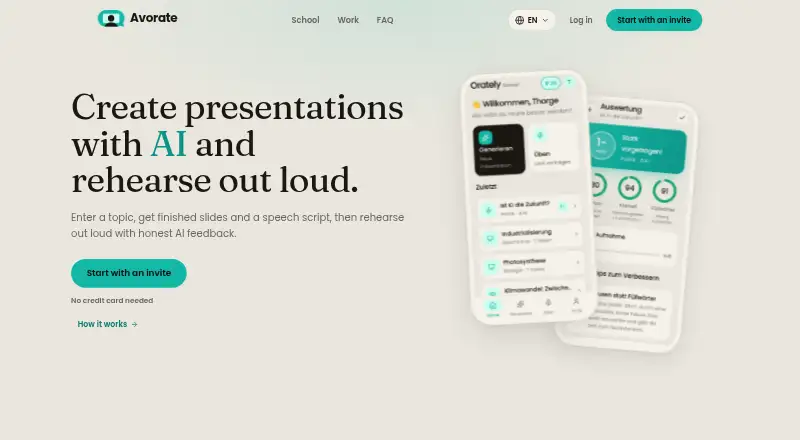
Avorate is a browser-based AI coach for presentations, speeches, and workplace conversations. It researches a topic, prepares slides, and writes a matching speech script. You can edit slide text, reorder or remove slides, add slides, and change their design in the browser, then download the presentation as a PowerPoint file for use in PowerPoint, Keynote, LibreOffice, or Google Slides. Spoken practice produces a grade and feedback on pace, pauses, clarity, and filler words. Work scenarios include interviews, salary conversations, customer objections, complaints, and reporting. In practice, its AI counterpart stays in role and follows up when an answer dodges a question. The interface, presentations, and practice evaluations support English, German, and French. Avorate for School is designed for students in grades 5 to 13 and teachers. It is in a closed, non-commercial beta requiring a personal invite code; full access provides 50 one-time credits and two hours of analysable speaking time. The site says recordings and presentation content are not used to train AI models.
Who it suits
Avorate suits people preparing speeches or presentations, students in grades 5 to 13, and teachers preparing topics. Its work practice scenarios may suit people rehearsing interviews, salary conversations, or customer discussions.
What it does well
- Builds slides and a matching speech script.
- Practice feedback covers pace, pauses, and clarity.
- Supports English, German, and French.
- Presentations can be edited in a browser.
- Recordings are not used to train AI models.
What to know first
- Access requires a personal invite code.
- The service is in a closed private beta.
- Full beta access includes two hours of speaking time.
- Dedicated mobile apps are still in development.
Limits
Closed beta access costs nothing and requires a personal invite code. Full beta access provides 50 credits once and two hours of analysable speaking time; paid services are not available yet.
Plans
| Plan | Billed and limits | Price |
|---|---|---|
| Closed beta access | personal invite code · 50 credits once · 2 hours speaking time | Free |
As avorate.app lists them, read 1 Oct 2026. The maker's own page has the final word.
Getting started
- Visit https://www.avorate.app/en.
- Get a personal invite code for the closed private beta.
- Open web.avorate.app in a browser on a laptop, tablet, or phone.
- Use Avorate to research a topic, create slides, or practise speaking aloud.
- Edit slides in the browser or download the presentation as a PowerPoint file.
Overview
Avorate brings presentation preparation and spoken rehearsal into one service, with a separate set of practice scenarios for school and work. It is a strong match for people who want help building a talk as well as delivering it, but the closed beta makes access the first hurdle.
Key features
Avorate researches a topic, creates slides and writes a corresponding speech script. That can shorten the path from an idea to a rehearsable presentation; speakers who already have their material and only want delivery feedback may find the broader creation workflow unnecessary.
Users practise aloud and receive a grade with feedback on pace, pauses, clarity, filler words and pronunciation. These concrete signals give speakers habits to work on between attempts. They are not a full measure of presentation quality, however, and the feedback does not assess qualities such as confidence or charisma.
Slides remain editable in the browser: users can revise text, change the order, remove or add slides and switch designs. PowerPoint downloads can be opened in PowerPoint, Keynote, LibreOffice or Google Slides, so the generated deck can be refined or continued in familiar software rather than treated as a finished, locked output.
Avorate for School is aimed at students in grades 5 to 13 and teachers preparing topics. Avorate for Work covers interviews, salary discussions, customer objections, complaints, reporting and other workplace scenarios. Its AI counterpart stays in role and follows up when a response avoids the question, making practice more conversational. Work assessments focus on countable speech characteristics; they do not judge job suitability, and there is no manager view. That makes the work mode a rehearsal aid, not a hiring or employee-evaluation tool.
English, German and French are supported for the interface, presentations and practice evaluations. The service runs in a browser on laptops, tablets and phones. Dedicated iPhone and Android apps are described as in development, so mobile use currently means opening the browser service.
Pricing
Closed beta access: free. Access requires a personal invite code; users whose code provides full beta access receive 50 usage credits once and two hours of analysable speaking time. This is a limited allocation rather than an ongoing free allowance. Avorate is in a closed, non-commercial beta with no paid services, so there is no paid plan to move to now. Plus and Pro are future plans, not current options.
Platforms
Avorate runs at web.avorate.app in a browser on laptops, tablets and phones. Although Android and iOS are listed as platforms, dedicated apps are still in development; the browser is the available route for mobile users.
Who it's for
Avorate is best suited to students, teachers and professionals preparing presentations who value having research, slides, a script and delivery feedback together. Its workplace role-play is especially relevant to people rehearsing a difficult conversation or interview. It is less suitable for someone seeking an always-open speaking coach, a mobile app today, or an assessment of confidence and overall job readiness.
Database, file storage and AI assessment run in the EU, with data stored in Frankfurt am Main; applicable third-country transfers use EU standard contractual clauses. Recordings and presentation content are not used to train AI models. Support is available at [email protected].
Pros and cons
- Pros: Topic research, slide creation and speech drafting sit alongside spoken practice, which is useful when starting a presentation from scratch.
- Pros: Editable slides and PowerPoint export leave room to revise the output or continue in common presentation software.
- Pros: Role-based work practice can challenge evasive answers instead of merely prompting a prepared monologue.
- Cons: A personal invite code is required for the closed beta, and the 50 credits and two hours of speaking time are one-time amounts for full-access codes.
- Cons: The speech measures do not cover confidence, charisma or job suitability, and there is no manager view for workplace evaluation.
- Cons: Dedicated iPhone and Android apps are not yet ready, despite browser access on phones.
Alternatives
For a broader set of speech-coaching options, browse AI Speech Coaching Apps.
Choose Speeko if you want a freemium coach available on Android, iOS, macOS and web, with a free basic-insights tier and an annual option priced at $8.33 a year, billed $8.33/month, including a 7-day free trial and personalized feedback.
Wellspoken is a better fit for regular practice within a defined free allowance: its free plan scores three sessions per week, while its Team plan costs $20 a month billed annually for teams of five or more, with 20 Echo AI conversations per member.
Consider Speakeroo for a free-forever plan with two practice sessions per day, full transcripts and pace, clarity and filler-word metrics; it runs on Android, iOS and web.
Banter offers an Android and iOS option with free practice that requires no account and allows unlimited practice, making it a natural alternative when open-ended practice matters more than Avorate's presentation creation.
ClearSpeak is another Android and iOS alternative, with a free plan that has no credit card requirement or expiry.
HiTalker has a free Android and iOS plan with daily coin and session limits for topic speeches and chat practice.
Mic Buddy is an iOS and macOS alternative with unlimited free practice sessions and no free trial.
Orato offers Android and iOS speech practice, including a free plan with three AI sessions per month, filler-word detection and pace and timing feedback.
Verdict
Avorate is worth pursuing for students, educators and professionals who want to move from topic research to a polished, rehearsed presentation in one workflow. Its combination of editable slides, a matching script and scenario practice is the main reason to choose it. Look elsewhere if you need dependable access now, an ongoing free quota or an assessment of broader workplace readiness: the beta requires an invite, its full-access speaking allocation is finite, and its work feedback deliberately stays within measurable speech traits.
Verdict
Avorate combines presentation creation with spoken practice and workplace scenario rehearsal. Access is limited to a closed beta, and its work assessments do not evaluate confidence, charisma, or job suitability.
Questions
How much does Avorate cost?
The listed Closed beta access plan is free. Avorate is in a non-commercial beta and has no paid services yet.
Is there a free plan?
Yes. Closed beta access is free and requires a personal invite code. Full beta access includes 50 one-time credits and two hours of analysable speaking time.
Which devices can I use?
Avorate runs in a browser on laptops, tablets, and phones. Dedicated iPhone and Android apps are described as in development.
Which languages does Avorate support?
English, German, and French are supported for the interface, presentations, and practice evaluations.
Can I edit and export presentations?
Slides can be edited in the browser, including changing text, rearranging or deleting slides, adding slides, and changing the design. Presentations can be downloaded as PowerPoint files.
Does Avorate use recordings to train AI models?
No. Recordings and presentation content are not used to train AI models.
Facts from Avorate's own pages
- AI counterpart
- In work practice, the AI counterpart follows up when an answer dodges the question and stays in role. · avorate.app, 1 Oct 2026
- AI training
- Recordings and presentation content are not used to train AI models. · avorate.app, 1 Oct 2026
- Beta allocation
- Users whose invite code provides full beta access receive a one-time 50 usage credits and two hours of analysable speaking time. · avorate.app, 1 Oct 2026
- Beta status
- Avorate is in a closed, non-commercial private beta that requires a personal invite code and currently has no paid services. · avorate.app, 1 Oct 2026
- Export
- Presentations can be downloaded as PowerPoint files and opened in PowerPoint, Keynote, LibreOffice or Google Slides. · avorate.app, 1 Oct 2026
- Future plans
- The site mentions Plus and Pro plans that would add credits and practice time, but states that paid plans do not exist yet. · avorate.app, 1 Oct 2026
- Headquarters
- Neu Wulmstorf, Germany · avorate.app, 28 Sept 2026
- Integrations
- The stated service providers include Supabase, Cloudflare, Google Vertex AI, Firebase Cloud Messaging, Google Sign-In, Resend, Pexels and Sentry; Stripe and RevenueCat integrations are prepared but disabled. · avorate.app, 1 Oct 2026
- Languages
- Avorate supports English, German and French for its interface, presentations and practice evaluations. · avorate.app, 1 Oct 2026
- Platform
- The service runs in a browser at web.avorate.app on laptops, tablets and phones, while dedicated iPhone and Android apps are described as in development. · avorate.app, 1 Oct 2026
- Practice feedback
- Users present out loud and receive a grade plus feedback on pace, pauses, clarity and filler words. · avorate.app, 1 Oct 2026
- Presentation editing
- Every slide can be edited in the browser, including changing text, reordering, deleting, adding slides and switching design. · avorate.app, 1 Oct 2026
- Product
- Avorate is an AI coach for presentations and speeches that researches a topic, builds slides and writes a matching speech script. · avorate.app, 1 Oct 2026
- School audience
- Avorate for School is designed for students in grades 5 to 13 and teachers preparing topics. · avorate.app, 1 Oct 2026
- Security and hosting
- Database, file storage and AI assessment run in the EU with data stored in Frankfurt am Main, and third-country transfers use EU standard contractual clauses where applicable. · avorate.app, 1 Oct 2026
- Support
- Support is provided through [email protected]. · avorate.app, 1 Oct 2026
- Work limitations
- Work assessments measure countable speech characteristics and do not assess nervousness, confidence, charisma or suitability for a job, and there is no manager view. · avorate.app, 1 Oct 2026
- Work scenarios
- Avorate for Work supports job interviews, salary conversations, customer objections, complaints, reporting and other workplace scenarios. · avorate.app, 1 Oct 2026
Where Avorate stands on Freedom251
- AI Speech Coaching Apps#1 of 25