Freedom251 › Restaurant Menu Engineering Software
Avero
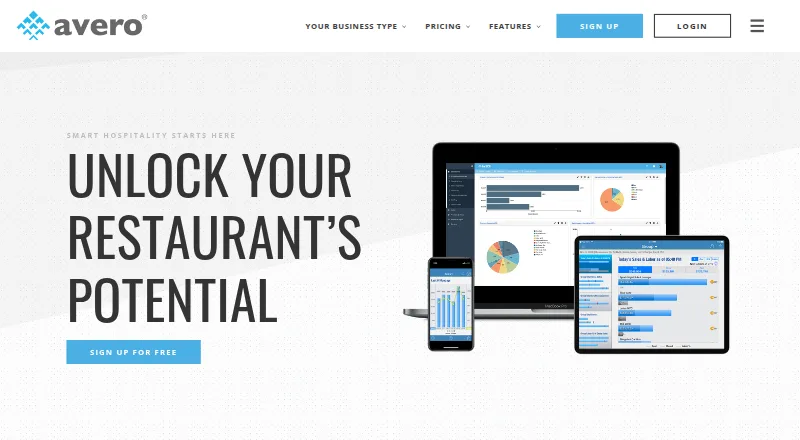
What Avero is
Avero extracts and standardizes point-of-sale data, then presents it as hospitality insights for food and beverage operators. Starter includes a POS-connected logbook, check search, menu mix trends, payment breakdowns, group sales, scheduled email reports, and configurable dashboards. Essentials adds server and bartender performance metrics, individual scorecards, contest management, promotion and void breakdowns, and labor insights. Professional adds overtime tracking, labor by hour, payroll reporting and export, plus hour-by-hour revenue analysis for examining slow periods, table turns, special menus, and promotion uptake. Avero lists more than 40 integrations with POS and time-and-attendance systems, including Aloha, Clover, Square, Toast, and TouchBistro. It offers a RESTful API and standardized POS data for analysis in Excel and other business intelligence tools. The cloud-based service requires no Avero hardware, and the company says its customer success team helps customers get started. Starter is free. Essentials costs $300 a year per location and Professional costs $600 a year per location; both prices increase based on annual sales volume.
Who it suits
Avero suits food and beverage operators, including restaurants, hotel outlets, casinos, nightlife businesses, and larger groups. Its tiered tools address teams looking at POS sales, staff performance, labor, and revenue patterns.
What it does well
- Starter includes scheduled email reports and configurable dashboards.
- Essentials adds server, bartender, and labor insights.
- Professional includes overtime tracking and payroll reporting.
- Lists more than 40 POS and time-and-attendance integrations.
- Standardized POS data can be analyzed in Excel.
What to know first
- Essentials and Professional prices increase with annual sales volume.
- Avero says data protection depends on the POS machine being PCI compliant.
- Safari is not supported.
Limits
Starter is free and lists unlimited users and usage, but server and bartender performance metrics and labor insights are included in Essentials. Overtime tracking, payroll reporting and export, and hour-by-hour revenue analysis are included in Professional. Essentials and Professional are priced per location, with prices increasing based on annual sales volume.
Plans
| Plan | Billed and limits | Price |
|---|---|---|
| Starter | Free for any users and locations · Free POS integration · Unlimited users and usage · Mobile app · Logbook · Check search · Menu mix trends · Scheduled email reports · Dashboards · Knowledge base · Chat support | Free |
| Essentials | Starting at $300 / location / year; price increases based on annual sales volume · All Starter features · Real-time mobile data · Service-team insights · Server scorecards · Contest management · Hourly sales · Group analytics · Promos and voids · Labor insights | $300 a year |
| Professional | Starting at $600 / location / year; price increases based on annual sales volume · All Starter and Essentials features · Payroll report/export · Overtime tracking · Labor by hour · Advanced service analytics · Promos and voids analytics · Table performance · Item sales by hour | $600 a year |
As averoinc.com lists them, read 14 Oct 2026. The maker's own page has the final word.
Getting started
- Visit https://averoinc.com/.
- Choose the free Starter plan or review Essentials and Professional.
- Connect a supported POS system; Avero offers free integration for most common POS systems on Starter.
- Use Avero's customer success team for help getting started.
- Access the web software on an iOS or Android device with an internet connection, or use a real-time mobile app for a supported system.
Overview
Avero is hospitality analytics software that turns point-of-sale data into reporting for restaurant and food-and-beverage operations. It suits operators who need a view of sales, staffing, labor, and revenue across one or more locations. Its free Starter plan makes it possible to begin without a software charge, but the richer workforce and revenue tools sit in paid tiers.
The cloud service requires no Avero hardware. Avero says it maintains more than 40 POS and time-and-attendance integrations, including Aloha, Clover, Square, Toast, and TouchBistro. That breadth is useful for groups with varied systems; operators should confirm their own setup is supported before committing. A RESTful API and standardized POS data also support analysis in Excel and other business intelligence tools.
Key features
Sales and operating reports
Starter combines a POS-connected logbook and check search with menu mix trends, payment breakdowns, group sales, scheduled email reports, and configurable dashboards. That is a substantial base for reviewing transactions and sales patterns, particularly for operators who want scheduled reporting without paying for advanced labor or revenue tools.
Staff and labor insights
Essentials adds server and bartender performance metrics, individual scorecards, contest management, promotion and void breakdowns, and labor insights. These tools make the tier more relevant to managers who need to examine staff performance as well as sales. Professional adds overtime tracking, labor by hour, and payroll reporting and export, a more useful fit where labor costs and payroll workflows need closer attention.
Revenue analysis and data access
Professional supports hour-by-hour revenue analysis, including slow periods, table turn times, special menus, and promotion uptake. This gives operators specific angles for assessing service and revenue patterns, but it requires stepping up to the highest paid plan. Avero also identifies food-cost analysis, customer behavior analysis, multi-location reporting, forecasting, and data export as capabilities.
Avero says its extraction utility encrypts POS data and transfers it securely to its data warehouse; it also makes data protection contingent on the POS machine being PCI compliant. The web software works on iOS and Android devices with an internet connection, and real-time mobile apps are offered for supported systems. Customer success helps with getting started, while support assists with data-transfer recovery issues.
Pricing
| Plan | Price | What it includes |
|---|---|---|
| Starter | free | Free for any users and locations, with unlimited users and usage and free POS integration for most common POS systems. |
| Essentials | $300 a year, billed | Per location; price increases based on annual sales volume. Adds server and bartender metrics, scorecards, contest management, promotion and void breakdowns, and labor insights. |
| Professional | $600 a year, billed | Per location; price increases based on annual sales volume. Adds overtime tracking, labor by hour, payroll reporting and export, and hour-by-hour revenue reporting. |
Starter is the clear choice for operators who need the core sales tools and can work without the deeper staff, labor, and revenue analysis. Essentials is aimed at locations ready to evaluate team performance and labor, while Professional is for those that also need payroll reporting and detailed revenue review. Paid prices rise with annual sales volume, so the stated annual amounts are not necessarily the final cost for every location. No trial term is given for the paid tiers.
Platforms
Avero supports web, Android, and iOS. Its web software works best with Chrome and Firefox; Edge and Internet Explorer 11 or later are supported, while Safari and Internet Explorer 10 and below are not. That browser limitation matters for teams standardized on Safari. Mobile access requires an internet connection, and real-time apps apply to supported systems.
Who it's for
Avero is a strong fit for restaurants, hotel outlets, casinos, nightlife businesses, and larger food-and-beverage groups that want POS-derived reporting across sales and operations. Multi-location reporting and broad integration coverage are relevant for groups with several venues or systems. It is less suitable for teams that require Safari support or need advanced labor and revenue tools without moving beyond the free tier.
Pros and cons
- Pro: Starter has unlimited users and usage across any number of users and locations, making it practical to introduce core reporting broadly without a subscription charge.
- Pro: More than 40 POS and time-and-attendance integrations, plus an API and standardized data, give operators several routes to consolidate or further analyze POS information.
- Pro: The paid tiers separate staff and labor analysis from more advanced overtime, payroll, and hourly revenue reporting, so operators can choose a depth aligned with their needs.
- Con: Essentials and Professional are priced per location and rise with annual sales volume, which makes multi-site costs scale with both footprint and sales.
- Con: Safari is unsupported, excluding teams that rely on that browser for web access.
- Con: Data protection depends in part on the POS machine being PCI compliant, so the transfer safeguards do not remove that operational dependency.
Alternatives
For a different restaurant-focused option, compare the Restaurant Analytics Software list; the Restaurant Menu Engineering Software list is the more relevant starting point when menu engineering is the priority.
Choose Rosnet Scheduling & Forecasting if scheduling and forecasting are the focus; it is paid, works on Android, iOS, and web, and asks prospective customers to request a demo. PAR Ordering is another paid Android, iOS, and web option, with pricing handled through a demo request.
Dishboard is a paid option for web, iOS, and Android. 5-Out, AnyDiner, Expo, and Insight360 are paid web-based alternatives. Meuze is a paid Android, iOS, and web option with a free trial and a Starter plan at $150 a month, billed monthly and cancellable anytime.
Verdict
Avero is best for food-and-beverage operators who want POS-connected sales reporting now and a path to staff, labor, and revenue analysis as needs grow. Its unlimited free Starter tier and wide integration coverage are compelling reasons to choose it. Look elsewhere if Safari support is essential, or if the per-location, sales-volume-based paid tiers do not fit the budget for the deeper analysis you need.
Verdict
Avero turns POS data into tools for examining sales, staff performance, labor, and revenue. Starter is free, while paid per-location plans increase in price with annual sales volume; check browser compatibility before choosing it.
Questions
Is Avero free?
Yes. Starter is free and is listed as free for any users and locations, with unlimited users and usage.
How much do Essentials and Professional cost?
Essentials is $300 a year per location, and Professional is $600 a year per location. Prices increase based on annual sales volume.
Which platforms does Avero support?
Avero lists Android, iOS, and web. Its web software is accessible on iOS and Android devices with an internet connection, and real-time mobile apps are available for supported systems.
Which POS systems can connect to Avero?
Avero says it maintains more than 40 integrations with POS and time and attendance systems. Listed systems include Aloha, Clover, Square, Toast, and TouchBistro.
Can Avero data be analyzed outside the service?
Avero offers a RESTful API and standardized POS data for analysis in Excel and other business intelligence tools.
Facts from Avero's own pages
- API
- Avero markets a RESTful API suite that supplies cleaned, normalized POS data for Excel and other business-intelligence tools. · averoinc.com, 14 Oct 2026
- API capabilities
- The API page describes granular sales data, standardized meal-period data, trend analysis and comparison with reservation, loyalty or room data. · averoinc.com, 14 Oct 2026
- API documentation
- The public API page provides marketing-level capability descriptions and a request-information form rather than public endpoint or SDK documentation. · averoinc.com, 14 Oct 2026
- API extensibility
- Avero says technology partners use its API and integrations so they do not need to build and maintain their own POS connectors. · averoinc.com, 14 Oct 2026
- App licensing requirement
- Avero Mobile is free to download but requires a separate Avero Slingshot licence. · apps.apple.com, 14 Oct 2026
- Audience
- Avero serves food and beverage operators including restaurants, hotel outlets, casinos, nightlife businesses, and larger groups. · averoinc.com, 28 Sept 2026
- Browser support
- Avero says it works best with Chrome and Firefox, supports Edge and Internet Explorer 11 or later, and does not support Safari or Internet Explorer 10 and below. · averoinc.com, 28 Sept 2026
- Check search
- Starter can search POS checks by items, amount, table, payment type and other dimensions and export check details to PDF. · averoinc.com, 14 Oct 2026
- Company description
- Crunchbase describes Avero as a provider of SaaS analytic applications and specialized services for hospitality. · crunchbase.com, 14 Oct 2026
- Company history
- Avero says it was founded in 2002 and lists offices in Dallas, Las Vegas, Boulder, and New York City. · averoinc.com, 28 Sept 2026
- Company size and ownership
- LinkedIn lists Avero as privately held with 51–200 employees and headquarters in New York, New York. · linkedin.com, 14 Oct 2026
- Data API
- Avero offers a RESTful API and standardized POS data for analysis in Excel and other business intelligence tools. · averoinc.com, 28 Sept 2026
- Deployment model
- Avero describes itself as a cloud-based software-as-a-service product that requires no dedicated hardware. · averoinc.com, 14 Oct 2026
- Founded
- LinkedIn and G2 list Avero as founded in 1999. · linkedin.com, 14 Oct 2026
- Group analytics
- Group Analytics lets operators compare locations, outlets or revenue centers in one login and organize dashboards by region, concept or operator. · averoinc.com, 14 Oct 2026
- Hardware and setup
- Avero describes itself as cloud-based SaaS that requires no Avero hardware and says its customer success team helps customers get started. · averoinc.com, 28 Sept 2026
- Labor analytics
- Essentials includes labor insights, and Professional adds overtime tracking, labor by hour, and payroll reporting and export. · averoinc.com, 28 Sept 2026
- Labor management
- Avero Labor tracks hours to overtime, identifies clocking errors and uses historical trends to guide staffing decisions. · averoinc.com, 14 Oct 2026
- Legal name
- Crunchbase lists the legal name as Avero, LLC. · crunchbase.com, 14 Oct 2026
- Licence
- Avero’s own pages describe a proprietary SaaS service and do not publish an open-source licence. · averoinc.com, 14 Oct 2026
- Limit: Android app reliability
- Google Play reviewers report recurring network-error login failures, crashes and lost Logbook entries while writing reports. · play.google.com, 14 Oct 2026
- Limit: customization and support
- Capterra reviewers report constrained revenue-data mapping, limited report customization and support restricted to standard business hours. · capterra.com, 14 Oct 2026
- Limit: iOS app reliability
- Apple reviewers report crashes on launch, slow or clunky behavior and being trapped on the introductory tour screen. · apps.apple.com, 14 Oct 2026
- Limit: loading and outages
- Capterra reviewers report slow or failed searches, loading issues and historical periods when the service went down repeatedly. · capterra.com, 14 Oct 2026