Freedom251 › AI Dubbing Software

AutoDub
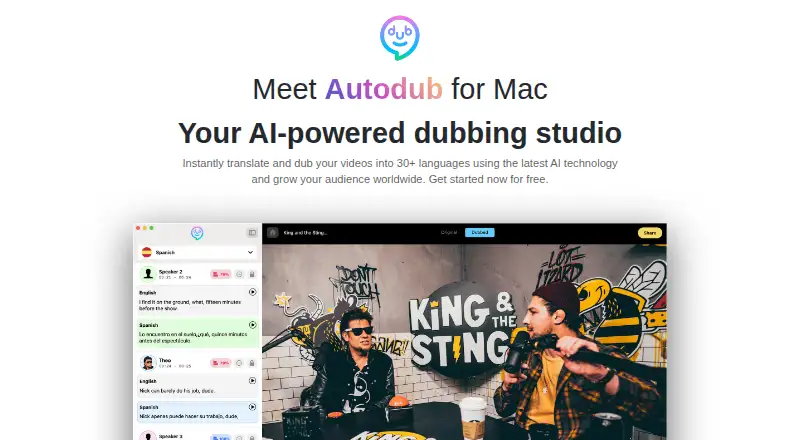
What AutoDub is
AutoDub is a dubbing studio for macOS that translates and dubs video and audio into 33 languages. Its voice cloning generates dubbed speech intended to retain the original speaker’s intonation and inflections. The maker says the AI, including its built-in translator, runs locally and offline on Mac, so video content stays on the computer during processing. Multi-speaker diarization detects speakers and labels them in the transcript, and the Voice Library offers professional voices searchable by accent, gender, and age. For video publishing, AutoDub can export audio-only tracks for adding language audio to YouTube videos. Projects can also be exported in .dub format to share with team members or translators. Lip syncing is listed as coming soon; lip synchronization and speaker matching are not available. The maker says it is working on adding languages. The pay-as-you-go plan costs $0.29, paid once, billed per minute. Support is available in English and Spanish, with an online translator used for replies in other languages. The privacy policy describes secure UK servers, SSL encryption, and access safeguards, while noting that internet transmissions cannot be guaranteed secure.
Who it suits
AutoDub suits Mac users who need to translate and dub video or audio, including workflows involving multiple speakers or shared projects. It may also fit creators preparing separate language audio tracks for YouTube; those who need lip synchronization or speaker matching should look elsewhere.
What it does well
- Processes dubbing and translation locally and offline on Mac, according to the maker.
- Voice cloning aims to retain the original speaker’s intonation and inflections.
- Diarization detects speakers and labels them in the transcript.
- Voice Library search includes accent, gender, and age.
- Exports audio-only tracks for YouTube and projects in .dub format.
What to know first
- Available for macOS only.
- Lip synchronization and speaker matching are unavailable.
- Pay-as-you-go billing is per minute.
Limits
The listed pay-as-you-go plan costs $0.29, paid once and is billed per minute. Lip synchronization and speaker matching are unavailable.
Plans
| Plan | Billed and limits | Price |
|---|---|---|
| Pay as you go | per minute · No long subscription contracts or pricing tiers stated | $0.29, paid once |
As autodub.com lists them, read 8 Oct 2026. The maker's own page has the final word.
Getting started
- Visit https://autodub.com/ to find AutoDub for Mac.
- Use the pay-as-you-go plan, billed per minute.
- Process video or audio locally with the built-in translator.
- Choose a voice or use voice cloning, then export the result or share the project.
Verdict
Choose AutoDub if you need Mac-based multilingual dubbing with local offline processing, voice cloning, and tools for organizing or sharing projects. Look elsewhere if lip synchronization or speaker matching is essential, as neither is available.
Questions
How much does AutoDub cost?
The pay-as-you-go plan is $0.29, paid once, billed per minute.
Is there a free plan?
Yes, a free plan is listed.
Which platform does AutoDub support?
AutoDub is available for macOS.
How many output languages does it support?
The listed output-language count is 33; the maker says it is working on adding more.
Can AutoDub sync dubbed speech to lip movements?
No. Lip synchronization is listed as coming soon, and speaker matching is unavailable.
How are refunds handled?
Purchases and returns for the apps are handled by Apple. The support center directs customers to submit an App Store question or problem report for a refund.
Facts from AutoDub's own pages
- Headquarters
- London, United Kingdom · autodub.com, 28 Sept 2026
- Lip sync
- AI lip syncing is listed as coming soon. · autodub.com, 8 Oct 2026
- Offline processing
- The maker says its AI, including the built-in translator, runs locally and offline on Mac, so video content stays on the computer. · autodub.com, 8 Oct 2026
- Product
- AutoDub is an AI-powered dubbing studio for Mac that translates and dubs videos and audio into 30+ languages. · autodub.com, 8 Oct 2026
- Project sharing
- Projects can be exported and shared in the .dub format for collaboration with team members or translators. · autodub.com, 8 Oct 2026
- Refunds
- The support center says purchases and returns for its apps are handled by Apple and directs users to submit an App Store question or problem report for a refund. · autodub.com, 8 Oct 2026
- Security and privacy
- The privacy policy says personal information is stored on secure servers in the UK, describes SSL encryption and access safeguards, and notes that internet transmissions cannot be guaranteed secure. · autodub.com, 8 Oct 2026
- Speaker diarization
- Multi-speaker diarization detects speakers and provides labels to organize the transcript. · autodub.com, 8 Oct 2026
- Support
- Support is available in English and Spanish; the maker says it uses an online translator for replies in other languages. · autodub.com, 8 Oct 2026
- Supported languages
- The maker lists 32 target languages and says it is working on adding more. · autodub.com, 8 Oct 2026
- Support guidance
- The support center explains editing background tracks and word timestamps, choosing alternate takes when audio is trimmed, and exporting audio for YouTube. · autodub.com, 8 Oct 2026
- Voice cloning
- AutoDub generates dubbed speech using voice cloning intended to reproduce the original speaker’s intonation and inflections. · autodub.com, 8 Oct 2026
- Voice library
- The Voice Library offers professional voices searchable by accent, gender, and age. · autodub.com, 8 Oct 2026
- YouTube export
- The app supports audio-only export for uploading language audio tracks to YouTube videos. · autodub.com, 8 Oct 2026
Where AutoDub stands on Freedom251
- AI Dubbing Software#5 of 26