Freedom251 › Video Editing Software

AquaSoft Video Vision
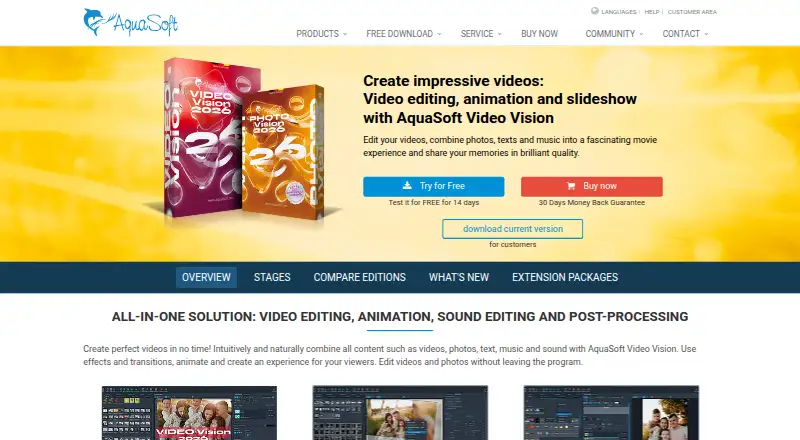
What AquaSoft Video Vision is
AquaSoft Video Vision is a Windows desktop application for creating videos and slideshows from clips, photos, text, and music. It combines video editing, animation, sound editing, and post-processing, with 4K export. Editing includes splitting, cropping, trimming, speed changes, and non-destructive image corrections. Images, text, and video can move along paths, with camera pans, particle effects, and picture-in-picture collages. Color tools include 15 grading styles, LUT support, transitions, layout effects, and configurable motion blur. Projects can be used in Adobe Premiere Pro and through an OpenFX plug-in for DaVinci Resolve, Vegas, and Natron. Export formats include MP4, M2TS, MOV, MKV, WMV, AVI, WebM, animated GIF, and image sequences, plus YouTube and Vimeo uploads. Projects have no stated maximum image count or duration. The app requires 64-bit Windows 11 version 23H2 or later or Windows 10 version 21H2 or later; ARM64 has export and player limitations. A 14-day trial is offered, but no free plan exists.
Who it suits
Video Vision suits Windows users making videos or slideshows with editing, animation, audio, text, effects, and 4K output. It also fits workflows that exchange projects with listed editing applications.
What it does well
- Combines editing, animation, sound, and post-processing
- Supports 4K export
- Offers many video and image export formats
- Projects have no maximum image count or duration
- Includes a 14-day trial
What to know first
- No free plan
- Windows-only desktop application
- ARM64 systems have export and player limitations
- Subscription and single-payment prices differ
Plans
| Plan | Billed and limits | Price |
|---|---|---|
| Video Vision 2026 | Single payment · Video editing · Animations and effects · 4K export · Audio and text tools | $129.90 a month |
| Video Vision subscription | Monthly subscription · Video editing · Animations and effects · 4K export · Audio and text tools | $9.99 a month |
| Video Vision 2026 — single payment | Single payment · All features of Photo Vision plus advanced video editing, 3D positioning, motion blur, H.265 and AV1 export, custom templates | $129.90, paid once |
| Video Vision 2026 — subscription | $59.88 / year; equals $4.99 / month · All features of Photo Vision plus advanced video editing, 3D positioning, motion blur, H.265 and AV1 export, custom templates | $59.88 a year |
| Video Vision 2026 — subscription | $9.99 / month · All features of Photo Vision plus advanced video editing, 3D positioning, motion blur, H.265 and AV1 export, custom templates | $9.99 a month |
As aquasoft.net lists them, read 22 Sept 2026. The maker's own page has the final word.
Verdict
Video Vision brings broad editing, animation, effects, and export tools into a Windows desktop workflow. A trial is available, but buyers should check Windows requirements and choose between monthly subscription and single-payment terms.
Facts from AquaSoft Video Vision's own pages
- Animation
- Users can animate images, text, and videos along paths and create camera pans, particle effects, and picture-in-picture collages. · aquasoft.net, 12 Oct 2026
- Desktop app
- Yes · aquasoft.net, 22 Sept 2026
- Editing
- It supports video splitting, cropping and trimming, speed changes, and non-destructive image corrections. · aquasoft.net, 12 Oct 2026
- Effects
- The product includes color grading with 15 styles, LUT support, layout effects, transitions, and configurable motion blur. · aquasoft.net, 12 Oct 2026
- Export
- The page lists video export in MP4, M2TS, MOV, MKV, WMV, AVI, and WebM, as well as animated GIF and image sequences; it also describes YouTube and Vimeo uploads. · aquasoft.net, 12 Oct 2026
- Extension packages
- Extension packages add themed graphics, backgrounds, animations, effects, sounds, and templates, and require an internet connection to download automatically. · aquasoft.net, 12 Oct 2026
- Founded
- 1999 · aquasoft.net, 19 Oct 2026
- 4K export
- Yes · aquasoft.net, 22 Sept 2026
- Free plan
- No · aquasoft.net, 22 Sept 2026
- Headquarters
- Potsdam, Germany · aquasoft.net, 19 Oct 2026
- Integrations
- Vision projects can be used in Adobe Premiere Pro and through an OpenFX plug-in in programs such as DaVinci Resolve, Vegas, and Natron. · aquasoft.net, 12 Oct 2026
- Payment handling
- AquaSoft says its online shop is managed by Cleverbridge, which handles orders financially and technically. · aquasoft.net, 12 Oct 2026
- Platform requirements
- The stated operating systems are 64-bit Windows 11 version 23H2 or later and Windows 10 version 21H2 or later; ARM64 has export and player limitations. · aquasoft.net, 12 Oct 2026
- Project limits
- AquaSoft says projects have no maximum number of images or maximum duration. · aquasoft.net, 12 Oct 2026
- Purchase terms
- The product page advertises a 30-day money-back guarantee, free updates within the main version, and a lifetime download guarantee. · aquasoft.net, 12 Oct 2026
- Purpose
- Video Vision combines video editing, animation, sound editing, and post-processing to create videos and slideshows from videos, photos, text, and music. · aquasoft.net, 12 Oct 2026
- Paid from
- 4.99 · aquasoft.net, 22 Sept 2026
- Support
- The edition page lists free email support, and the product page links to tutorials, manuals, FAQs, and contact support. · aquasoft.net, 12 Oct 2026
Where AquaSoft Video Vision stands on Freedom251
- Video Editing Software#133 of 153