Freedom251 › Reverse Engineering Tools
Apktool
What Apktool is
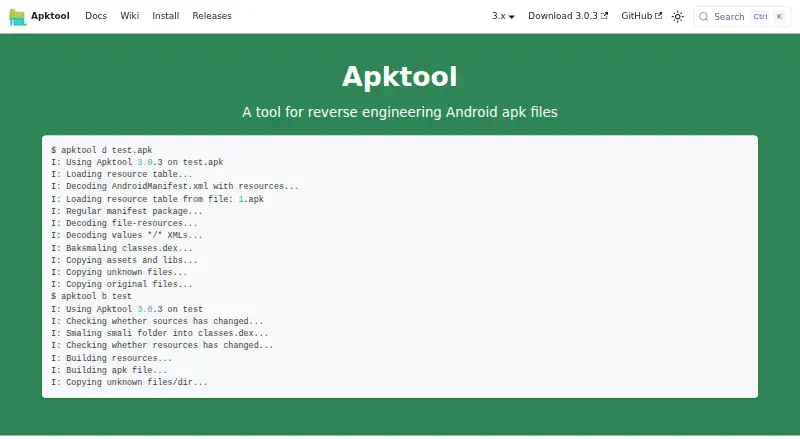
Apktool is a free command-line tool for reverse engineering Android APK files. It can disassemble an APK’s resources into a form close to their original structure, then rebuild an app after changes such as translation or permission edits. Its analysis mode attempts to extract resources and the manifest for inspection without rebuilding. Apktool runs on Windows, Linux, and macOS, and its official installation guide provides wrapper-script steps for each platform. Running it requires Java 8 or later. Decode settings include choosing resource-resolution behavior, skipping resource or source disassembly, and setting a framework directory. When building, users can specify an aapt2 binary, add a generic Network Security Configuration file, or disable APK repacking. The Apache-licensed tool may be redistributed, modified, or integrated into another project. There are compatibility limits: Android devices are not officially supported, and some APKs modified with OEM-specific tools may not decode or build. Builds are unsigned; copying the original signature preserves only the original APK signature v1 scheme. Community support is available through GitHub Discussions, Stack Overflow, and IRC.
Who it suits
Apktool suits developers and other users who need to inspect or modify Android APK resources on Windows, Linux, or macOS. Its command-line workflow and Java requirement fit users comfortable installing and running software that way.
What it does well
- Disassembles resources close to their original form.
- Can rebuild apps after translation or permission changes.
- Analysis mode extracts resources and the manifest for inspection.
- Decode and build settings allow workflow choices.
- Apache license permits redistribution, modification, and integration.
What to know first
- Requires Java 8 or later.
- Android devices are not officially supported.
- Some OEM-modified “Magic APKs” may not decode or build.
- Builds are unsigned; signature copying supports only original v1 signatures.
Plans
| Plan | Billed and limits | Price |
|---|---|---|
| Apktool | No pricing tiers stated; requires Java 8 or later | Free |
As apktool.org lists them, read 8 Oct 2026. The maker's own page has the final word.
Getting started
- Open https://apktool.org/.
- Choose the wrapper-script installation steps for Windows, Linux, or macOS.
- Install Java 8 or later.
- Use the command-line tool to disassemble or analyze an APK.
- Rebuild the APK after making changes, if needed.
Verdict
Choose Apktool if you need a free command-line tool to inspect, disassemble, or rebuild Android APKs on a desktop operating system. Look elsewhere if you need official Android-device support or rely on modified OEM APKs that Apktool may not handle.
Questions
How much does Apktool cost?
Apktool is free. No paid plans or trial are listed.
Which platforms does Apktool support?
It supports Windows, Linux, and macOS. Android devices are not officially supported.
What does Apktool do with APK files?
It can disassemble resources, attempt to extract resources and the manifest for analysis, and rebuild apps after modifications.
Does Apktool produce signed APKs?
Builds are unsigned. The copy-original option can retain signatures only for the original APK signature v1 scheme.
Can Apktool be integrated into another project?
Yes. Its Apache license allows it to be redistributed, modified, and integrated into another project.
Where can users get community support?
The official site points users to GitHub Discussions, Stack Overflow, and IRC.
Facts from Apktool's own pages
- Analyze
- Its analysis mode attempts to extract resources and the manifest for inspection without rebuilding. · apktool.org, 8 Oct 2026
- Android device limitation
- The FAQ says Android devices are not officially supported because of aapt incompatibilities and issues with java.nio on older Android builds. · apktool.org, 8 Oct 2026
- APK compatibility
- The FAQ says APKs built with modified tools for specific OEMs, called “Magic APKs,” may not be decodable or buildable with Apktool. · apktool.org, 8 Oct 2026
- Assemble
- It can rebuild apps after modifications such as translation or permission changes. · apktool.org, 8 Oct 2026
- Build options
- Build options include using a specified aapt2 binary, adding a generic Network Security Configuration file, and disabling APK repacking. · apktool.org, 8 Oct 2026
- Command line
- The official install guide provides wrapper-script installation steps for Windows, Linux, and Mac, and requires Java 8 or later. · apktool.org, 8 Oct 2026
- Decode options
- Decode options include selecting resource-resolution behavior, skipping resources or source disassembly, and setting a framework directory. · apktool.org, 8 Oct 2026
- Disassemble
- It can disassemble resources to nearly their original form. · apktool.org, 8 Oct 2026
- Integration
- The FAQ says Apktool can be redistributed, modified, and integrated into another project under its Apache license. · apktool.org, 8 Oct 2026
- Pricing
- The official site and documentation pages opened describe no paid plans or trial. · apktool.org, 8 Oct 2026
- Purpose
- Apktool is a tool for reverse engineering Android APK files. · apktool.org, 8 Oct 2026
- Signing limitation
- Apktool builds unsigned APKs, and its copy-original option can retain signatures only for the original APK signature v1 scheme. · apktool.org, 8 Oct 2026
- Support
- The official site points users to GitHub Discussions, Stack Overflow, and IRC for community support. · apktool.org, 8 Oct 2026
Where Apktool stands on Freedom251
- Reverse Engineering Tools#9 of 73