Freedom251 › Process Monitoring Software

Ambih Monitor
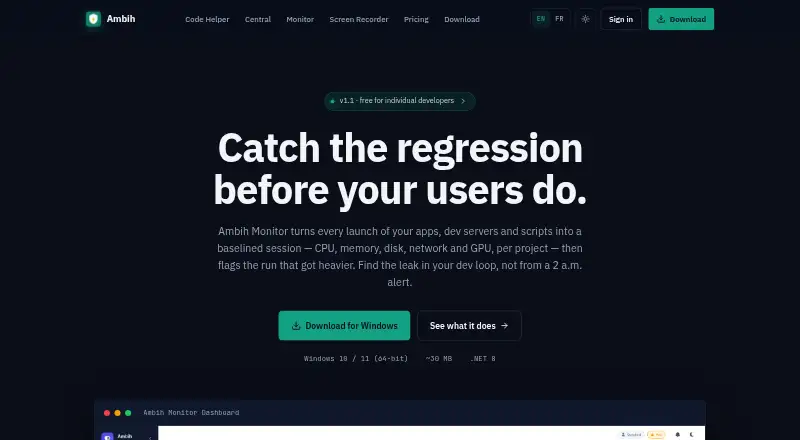
What Ambih Monitor is
Ambih Monitor records each app, development server, or script launch as a session and tracks CPU, memory, disk, and network use by project. GPU utilization and dedicated or shared VRAM tracking can be enabled per project. It builds resource baselines across launches so a run can be compared with earlier runs, and users can compare two or more past sessions side by side. The Pro plan adds anomaly detection and regression scoring, with runs labeled Stable, Watch, or Regression. Its bundled ambih CLI can launch and compare runs, output JSON, and use ambih verify to gate CI against regressions or resource budgets. The maker describes monitoring as language-agnostic and lists stacks including Electron, Tauri, .NET, Node.js, Python, Go, Rust, Java, PHP, and Flutter. The available download is for Windows 10 or 11, 64-bit, and includes the .NET 8 Desktop Runtime. The Free plan includes live monitoring and a five-session history per project. Pro costs $10.00/mo, billed annually; paid access is listed from $5.42/mo (annual).
Who it suits
Ambih Monitor is presented for individual developers working on dev servers, desktop apps, games, ML workloads, or GPU-accelerated apps. Its CLI and CI-gating features may suit developers who want to compare runs as part of their build process.
What it does well
- Tracks CPU, memory, disk, and network by project.
- GPU and VRAM tracking can be enabled per project.
- Compares multiple past runs side by side.
- CLI can output JSON and gate CI.
- Free plan includes live monitoring.
What to know first
- Available download supports Windows 10 or 11, 64-bit.
- Free plan retains five sessions per project.
- macOS and Linux are still in development.
- Live temperature and power sensors require admin rights.
Limits
The free plan retains five sessions per project. Pro is listed at $10 a month billed annually and includes unlimited session history, anomaly detection, regression scoring, baseline health, and session deep-dive.
Plans
| Plan | Billed and limits | Price |
|---|---|---|
| Free | forever · 1 project · full feature set · Free history keeps most recent 5 sessions | Free |
| Lifetime | one-time · Every Pro feature in current version · offline use · no expiry · bug-fix updates included | $199, paid once |
| Team | per seat yearly · 2 to 25 seats · first year renews at $65/seat/year · Full licence per seat · email invitations · pro-rata seat additions | $55 a year |
| Pro Annual | yearly · $5.42/month equivalent · first year renews at $75/year · Unlimited projects · all Free features | $65 a year |
| Pro | monthly · Unlimited projects · all Free features · first year renews at $75/year | $8 a month |
As ambih.com lists them, read 15 Oct 2026. The maker's own page has the final word.
Getting started
- Open the Ambih Monitor website.
- Download the 64-bit version for Windows 10 or 11; the .NET 8 Desktop Runtime is included.
- Use the free plan for live monitoring and core features, or choose Pro for unlimited session history and regression features.
- Launch an app, development server, or script to record a session.
- Use the app or bundled ambih CLI to compare runs; use ambih verify to gate CI.
Verdict
Ambih Monitor focuses on per-project resource tracking across runs, with CLI support for comparisons and CI checks. It is currently a Windows download; the free tier also limits stored history to five sessions per project.
Questions
Is Ambih Monitor free?
Yes. Its free plan is listed as free and includes live monitoring, core monitoring features, and a five-session history per project.
How much does Pro cost?
Pro is listed at $10 a month, billed annually. The pricing note says paid plans start at $5.42/mo (annual).
Which platforms does it support?
The available download is for 64-bit Windows 10 or 11. macOS and Linux are listed as in development.
What can it monitor?
It tracks CPU, memory, disk, and network per project. GPU utilization and dedicated or shared VRAM monitoring can also be enabled per project.
Can it be used in CI?
Yes. The bundled ambih CLI can launch and compare runs, output JSON, and use ambih verify to gate CI on regressions or resource budgets.
Does monitoring require administrator rights?
Normal monitoring does not require admin rights. Live temperature and power sensors and the gaming-overlay FPS counter do.
Facts from Ambih Monitor's own pages
- Baselines
- It learns per-project resource baselines across launches so users can compare a run with earlier runs. · ambih.com, 7 Oct 2026
- CI integration
- ambih verify returns non-zero on regression and supports max-memory, max-cpu and max-duration budgets for CI. · ambih.com, 15 Oct 2026
- CLI
- The bundled ambih command-line tool launches, monitors, compares and queries projects and supports JSON output. · ambih.com, 15 Oct 2026
- CLI and CI
- The bundled ambih CLI can launch and compare runs, output JSON, and use ambih verify to gate CI on regressions or resource budgets. · ambih.com, 7 Oct 2026
- Cross-session regression method
- Cross-session analysis uses a Theil-Sen trend and robust z-score with Bonferroni capping, requiring at least five sessions. · ambih.com, 15 Oct 2026
- Data and telemetry statement
- Ambih states that it has no analytics beacons and does not inject into processes, install persistence, download remote code or read browser credential stores. · ambih.com, 15 Oct 2026
- Documentation depth
- The site links separate Docs and Changelog resources, while the Monitor pages document CLI commands, statistical methods, system requirements and security behavior. · ambih.com, 15 Oct 2026
- Downgrade behavior
- When a subscription is downgraded, extra projects are locked rather than deleted and become available again after resubscription. · ambih.com, 15 Oct 2026
- Gaming overlay
- An always-on-top overlay displays CPU, RAM, GPU and FPS, while a system-information page shows hardware details. · ambih.com, 15 Oct 2026
- Git integration
- The project overview can show Git branch, dirty state, recent commits and ahead/behind status when local Git is installed. · ambih.com, 15 Oct 2026
- GPU and VRAM
- GPU utilization plus dedicated and shared VRAM can be enabled per project and included in baselines and regression analysis. · ambih.com, 15 Oct 2026
- GPU monitoring
- GPU utilization and dedicated or shared VRAM tracking can be enabled per project. · ambih.com, 7 Oct 2026
- Hardware requirements
- The stated minimum is 4 GB RAM, 8 GB recommended, and about 150 MB disk space after installation. · ambih.com, 15 Oct 2026
- Intended users
- The maker presents Monitor for individual developers working on dev servers, desktop apps, games, ML workloads, and GPU-accelerated apps. · ambih.com, 7 Oct 2026
- Launch-phase analysis
- A launch segmenter separates startup transients from steady-state measurements so startup behavior does not distort the baseline. · ambih.com, 15 Oct 2026
- Licence model
- The published plans describe proprietary paid licences and a lifetime licence for the current version; no open-source licence is stated. · ambih.com, 15 Oct 2026
- Live charts
- Live views show CPU, RAM, network and disk with minimum, average and maximum values. · ambih.com, 15 Oct 2026
- Maker
- The website presents Ambih as a desktop-tools maker whose products are designed and shipped by the site owner; no legal entity, headquarters or founding year is stated on the opened pages. · ambih.com, 15 Oct 2026
- Memory drift detection
- Memory drift uses a one-sided CUSUM detector with Welford warm-up. · ambih.com, 15 Oct 2026
- Monitoring overhead
- The maker says the sampler runs at 1 Hz on a background thread and adds no measurable overhead when no resource cap is set. · ambih.com, 7 Oct 2026
- Other platforms
- The site says macOS and Linux are coming soon and lists both as in development. · ambih.com, 7 Oct 2026
- Payment provider
- Payments are described as handled by Paddle, with cards, PayPal, Apple Pay, Google Pay and some local methods supported. · ambih.com, 15 Oct 2026
- Permissions
- Normal monitoring runs without administrator rights, but FPS and live temperature or power sensors require elevation. · ambih.com, 15 Oct 2026
- Platform limitation
- Windows is the available download; macOS and Linux builds are described as coming soon and still require packaging and signing. · ambih.com, 15 Oct 2026
Where Ambih Monitor stands on Freedom251
- Process Monitoring Software#5 of 26