Freedom251 › Augmented Analytics Software

Alteryx Designer
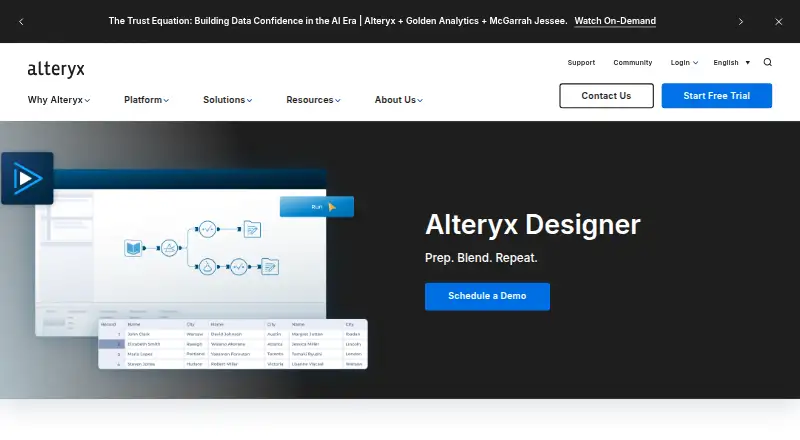
What Alteryx Designer is
Alteryx Designer combines data preparation, blending and predictive, statistical and spatial analytics in a single interface. It is aimed at analysts and operations teams connecting data, applying business logic and automating insights. Users create visual workflows by arranging drag-and-drop tools on a canvas that documents analysis steps; Alteryx describes more than 300 analytics automation tools.
The product supports low-code and no-code spatial and prescriptive analytics, and can extract insights from PDFs, text files and images. Ask Alteryx can use natural-language requests to build workflows, while the AI Tool Palette can bring large language models into workflows. Alteryx describes connections to more than 80 data sources and outputs to over 70 tools, including native cloud connectors such as Snowflake and Databricks. SDKs let users add custom tools and formulas using a variety of programming languages. Designer Desktop requires Windows; macOS use is through virtual-machine installation. A separate Designer Cloud runs in a browser and supports the latest Chrome, Edge or Firefox. Starter Edition costs $250 a month, billed annually, and is cloud-only for 1–10 seats with CSV, XLSX and JSON file sources. A 30-day trial is available, but there is no free plan.
Who it suits
Designer suits analysts and operations teams who want to connect data, apply business logic and automate workflow-based analysis. It also fits users needing predictive, spatial or prescriptive analytics, with deployment options varying by edition.
What it does well
- Visual workflows document each analysis step.
- More than 300 drag-and-drop analytics automation tools.
- Extracts insights from PDFs, text files and images.
- Connects to over 80 data sources and outputs to over 70 tools.
- SDKs support adding custom tools and formulas.
What to know first
- No free plan is available.
- Starter Edition is $250 a month, billed annually.
- Designer Desktop requires Windows.
- Starter Edition is cloud-only and limited to 1–10 seats.
Limits
Starter Edition costs $250 a month, billed annually, and covers 1–10 seats, cloud-only deployment and CSV, XLSX and JSON file sources.
Plans
| Plan | Billed and limits | Price |
|---|---|---|
| Starter Edition | annually · 1–10 seats · cloud only · file sources (.csv, .xlsx, json) | $250 a month |
| Professional Edition | 1+ users · cloud and desktop applications · 100+ data sources | On request |
| Enterprise Edition | 10+ seats · advanced scheduling and monitoring · enterprise governance · free viewer licenses | On request |
As alteryx.com lists them, read 8 Oct 2026. The maker's own page has the final word.
Getting started
- Open the Alteryx Designer product website.
- Start the 30-day trial.
- Choose an edition; Starter is cloud-only and billed annually.
- For Designer Desktop, use Windows; macOS use is through virtual-machine installation.
- For the separate Designer Cloud, open it in the latest Chrome, Edge or Firefox.
Verdict
Choose Alteryx Designer if your team needs visual data workflows with preparation, blending and analytics in one interface. Look elsewhere if you need a free plan, or if Starter’s annual billing, cloud-only deployment or Windows desktop requirement does not fit your setup.
Questions
Does Alteryx Designer have a free plan?
No. A 30-day trial is available.
How much does Starter Edition cost?
It is $250 a month, billed annually. The plan is for 1–10 seats and cloud-only deployment, with CSV, XLSX and JSON file sources.
Which platforms can I use?
The listed platforms are API, macOS, web and Windows. Designer Desktop requires Windows; macOS use is through virtual-machine installation, while Designer Cloud runs in a browser.
Which browsers does Designer Cloud support?
It supports the latest Chrome, Edge or Firefox.
What data connections are described?
Designer integrates with more than 80 data sources and outputs to over 70 tools, including native cloud connectors such as Snowflake and Databricks.
Facts from Alteryx Designer's own pages
- Audience
- Alteryx describes its no-code platform as designed for analysts and operations teams to connect data, apply business logic, and automate insights. · alteryx.com, 8 Oct 2026
- Automation tools
- The product page describes 300+ drag-and-drop analytics automation tools for building workflows. · alteryx.com, 8 Oct 2026
- Browser option
- The separate Designer Cloud version runs in a browser without installation and supports the latest Chrome, Edge, or Firefox. · knowledge.alteryx.com, 8 Oct 2026
- Company history and headquarters
- Alteryx says it was founded in 1997 and is headquartered in Irvine, California. · alteryx.com, 8 Oct 2026
- Custom tools
- Alteryx SDKs let users add custom tools and formulas to the tool palette using a variety of programming languages. · alteryx.com, 8 Oct 2026
- Data science
- Designer supports low-code and no-code spatial and prescriptive analytics and can extract insights from PDFs, text files, and images. · alteryx.com, 8 Oct 2026
- Desktop requirements
- Designer Desktop requires Windows; Alteryx's data sheet lists macOS use through a virtual machine installation. · knowledge.alteryx.com, 8 Oct 2026
- Free plan
- No · alteryx.com, 20 Sept 2026
- Generative AI
- Ask Alteryx can use natural language to build workflows, and the AI Tool Palette can bring LLMs into workflows. · alteryx.com, 8 Oct 2026
- Integrations
- The product page says Designer integrates with 80+ data sources and outputs to over 70 tools, with native cloud connectors such as Snowflake and Databricks. · alteryx.com, 8 Oct 2026
- Purpose
- Designer combines data preparation, blending, and predictive, statistical, and spatial analytics in one interface. · help.alteryx.com, 8 Oct 2026
- Security
- Alteryx's Trust Center lists ISO 27001:2022, SOC 2 Type II, ISO 22301:2019, CSA STAR 1, and HIPAA among its certifications and reports. · trust.alteryx.com, 8 Oct 2026
- Support and learning
- Alteryx provides free tutorials and training through Alteryx Academy and links users to product documentation and its community. · knowledge.alteryx.com, 8 Oct 2026
- Visual workflows
- Users build workflows with drag-and-drop tools on a visual canvas that documents each analysis step. · alteryx.com, 8 Oct 2026
Where Alteryx Designer stands on Freedom251
- Augmented Analytics Software#8 of 32
- Data Preparation Software#13 of 28
- Business Intelligence Tools#43 of 89
- Data Transformation Tools#28 of 37