Freedom251 › Malware removal tools

Advanced Policy Firewall
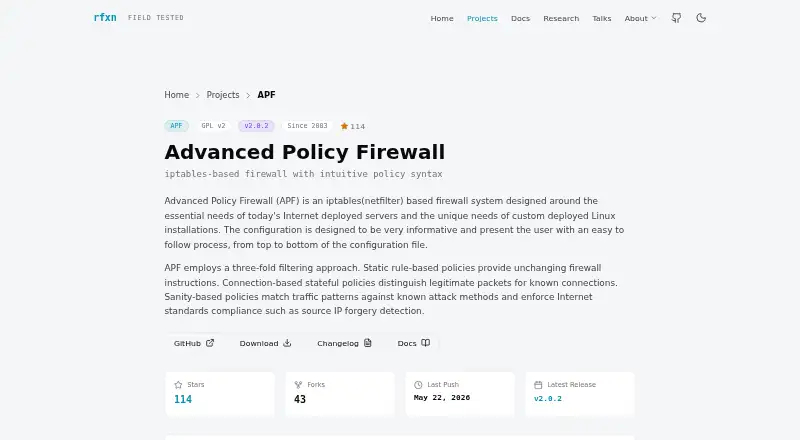
What Advanced Policy Firewall is
Advanced Policy Firewall (APF) is a firewall system for Internet-deployed Linux servers, built on iptables/netfilter. It combines static rules, connection-based stateful policies, and checks for attack patterns and forged source IP addresses. Administrators can configure inbound and outbound filtering, including user- and application-based outbound rules. Other features include reactive address blocking, GeoIP country filtering, and Spamhaus and DShield block lists. APF supports IPv6 dual-stack filtering with automatic ip6tables rules. Its documentation describes fast-load snapshots that can load more than 1,000 rules in under one second and integrations with BFD, cron, systemd, Docker/Kubernetes, and logrotate. It requires Linux, iptables/netfilter, and Bash, with support for legacy and nft iptables backends. Documented systems include RHEL/Rocky/AlmaLinux 8 and 9, CentOS 6 and 7, Debian 12, and Ubuntu 12.04, 20.04, and 24.04. APF is distributed under GNU GPL, and its maker says there are no paid tiers or enterprise editions. By default, only SSH port 22 is open, while outbound filtering, reactive blocking, and virtual network policies are disabled. Development mode is enabled by default and flushes the firewall every five minutes to help prevent lockout during initial setup.
Who it suits
APF suits administrators managing Linux servers who need configurable inbound and outbound firewall rules. It requires Linux with iptables/netfilter and Bash, so it is intended for that environment.
What it does well
- Supports inbound and outbound filtering.
- Includes user- and application-based outbound rules.
- Supports IPv6 dual-stack filtering.
- Distributed under GNU GPL with no paid tiers.
- Integrates with systemd, Docker/Kubernetes, and logrotate.
What to know first
- Only SSH port 22 is open by default.
- Outbound filtering is disabled by default.
- Reactive blocking is disabled by default.
- Requires Linux, iptables/netfilter, and Bash.
Limits
The free GNU GPL plan costs nothing and has no paid tiers or enterprise editions. Its default configuration opens only SSH port 22; outbound filtering, reactive address blocking, and virtual network policies are disabled, while development mode flushes the firewall every five minutes.
Plans
| Plan | Billed and limits | Price |
|---|---|---|
| Advanced Policy Firewall | GNU GPL v2 · no paid tiers or enterprise editions | Free |
As rfxn.com lists them, read 8 Oct 2026. The maker's own page has the final word.
Getting started
- Open the APF project website.
- Use a Linux system with iptables/netfilter and Bash.
- Check that the system matches a listed supported distribution.
- Configure the firewall, accounting for the default SSH-only access and development mode.
Advanced Policy Firewall is a free, GPL-licensed firewall for administrators protecting Internet-facing Linux servers. It suits people who need precise control of both incoming and outgoing traffic and are comfortable maintaining server-level firewall policy. Its broad rule set and IPv6 support are strong reasons to consider it, but the Linux-only scope and deliberately cautious setup require disciplined administration.
Overview
APF uses the Linux iptables/netfilter stack to combine static rules, connection-state policies, and sanity checks for attack patterns and forged source addresses. It is focused on self-hosted servers rather than desktop protection, giving administrators a framework for controlling exposed services and limiting egress.
The project is distributed under GNU GPL v2, with unrestricted use and redistribution. R-fx Networks says there are no paid tiers or enterprise editions. Support is handled through the source repository and issue tracker, while vulnerability reports are requested privately with acknowledgement within 48 hours.
Key features
Filtering works in both directions, with application and user-based outbound rules in addition to granular inbound controls. This is useful when a server must restrict which processes or accounts can reach the network, not merely which ports are open. The trade-off is administrative effort: policy design, testing and ongoing maintenance remain with the operator.
Reactive address blocking can respond to hostile sources, while GeoIP filtering and Spamhaus and DShield block lists provide additional source-screening options. These controls can reduce unwanted traffic, but they should be aligned with the services and geographies your server genuinely needs.
APF supports IPv6 dual-stack filtering and automatically creates ip6tables rules, helping keep IPv6 from becoming an unprotected parallel path. Its documentation also describes integration with BFD, cron, systemd, Docker, Kubernetes and logrotate. Fast-load snapshots are documented as loading more than 1,000 rules in under one second, a useful property for rule-heavy hosts.
Only SSH port 22 is open in the default configuration. Outbound filtering, reactive blocking and virtual network policies start disabled, so a new installation is not a finished security policy. Development mode is enabled by default and flushes the firewall every five minutes, a lockout-prevention measure during initial configuration that should be treated as temporary operating protection.
Pricing
| Plan | Price | Includes |
|---|---|---|
| Advanced Policy Firewall | free | Full APF firewall under GNU GPL v2; no paid tiers or enterprise editions |
There is no free-trial period because the complete product is free. The licence permits use and redistribution without paid upgrades, seat charges or renewal terms.
Platforms
APF runs on Linux systems with iptables/netfilter and Bash, supporting both legacy and nft iptables backends. Documented systems include RHEL, Rocky Linux and AlmaLinux 8 and 9; CentOS 6 and 7; Debian 12; and Ubuntu 12.04, 20.04 and 24.04. It is self-hosted, so deployment and compatibility depend on the server environment.
Who it's for
Choose APF when you administer Internet-facing Linux servers and need detailed ingress and egress policy, IPv6 coverage, source-blocking options and integrations with common service tooling. It is a particularly good fit for operators who can review firewall behavior and recover from configuration mistakes.
It is not the natural choice for Windows or macOS endpoints, or for users seeking a graphical, desktop-oriented security product. Teams wanting a ready-made policy with minimal server administration should look elsewhere.
Pros and cons
Pros
- Bidirectional, application-aware rules: supports granular inbound and outbound control, including user and application criteria.
- IPv6 included: automatic ip6tables rules help apply policy across both address families.
- Useful blocking sources: reactive blocking, GeoIP, Spamhaus and DShield options broaden source filtering.
- Open licensing: GPL v2 distribution has no paid tiers or redistribution restrictions.
- Server-tool integration: documented links with BFD, schedulers, containers and log rotation suit managed hosts.
Cons
- Linux and self-hosted only: excludes desktop platforms and hosted, managed deployment models.
- Important controls are off by default: outbound filtering and reactive blocking require deliberate configuration.
- Lockout risk during setup: the five-minute development-mode flush is a safeguard, not a substitute for a finished policy.
- Administrator-heavy operation: the breadth of controls brings corresponding design and maintenance responsibility.
Alternatives
BitNinja is a freemium, multi-platform option with a free VPS plan capped at two vCPUs, 2 GB RAM and 10 hosted users; choose it when those limits and broader platform access fit better than a Linux-only firewall.
ClamAV is a free GPL antivirus engine for Linux, macOS, Windows, self-hosted and API use, making it the better match for malware scanning rather than network policy enforcement.
Comodo Internet Security targets Windows with antivirus and firewall features, including a paid Pro tier; pick it for Windows endpoint protection.
Microsoft Quick Assist is a free Windows Store support utility with macOS and web support interactions, not a server firewall.
Certo AntiSpy provides freemium spyware detection and privacy tools across Android, iOS, macOS and Windows.
Dr.Web LiveDisk offers free Linux and Windows recovery from DVD or USB, while Adlice Protect focuses on Windows malware removal with free and $15-per-year plans.
Dr.Web CureIt! provides free one-time Windows scans; Malware Removal Software is a broader category starting point.
Verdict
Advanced Policy Firewall is a strong choice for Linux server administrators who need free, deeply configurable inbound and outbound controls with IPv6 and operational integrations. Choose it for policy breadth and GPL freedom; look elsewhere if you need cross-platform endpoint security, managed deployment or minimal configuration work.
Verdict
APF provides a broad set of firewall controls for Linux servers under a GPL license, with no paid editions. Review its default settings and configure the rules and policies needed for your environment.
Questions
How much does APF cost?
The listed plan is free. APF is distributed under GNU GPL, and the maker says it has no paid tiers or enterprise editions.
Which platforms does it support?
APF runs on Linux with iptables/netfilter and Bash. Listed systems include RHEL/Rocky/AlmaLinux 8 and 9, CentOS 6 and 7, Debian 12, and Ubuntu 12.04, 20.04, and 24.04.
Does APF support IPv6?
Yes. It supports IPv6 dual-stack filtering with automatic ip6tables rules.
What integrations are described?
The documentation describes integration with BFD, cron, systemd, Docker/Kubernetes, and logrotate.
Where can users get support or report a vulnerability?
The maker points users to the APF source repository and issue tracker for bug reports and feature requests. Vulnerability reports should be sent privately; the maker says it will acknowledge receipt within 48 hours.
Facts from Advanced Policy Firewall's own pages
- Application rules
- Yes · rfxn.com, 22 Sept 2026
- Blocking
- Features include reactive address blocking, GeoIP country filtering, and Spamhaus and DShield block lists. · rfxn.com, 8 Oct 2026
- Configuration limit
- Only SSH port 22 is open by default, while outbound filtering, reactive address blocking, and virtual network policies are disabled by default. · rfxn.com, 8 Oct 2026
- Filtering
- Its filtering combines static rules, connection-based stateful policies, and sanity checks for attack patterns and source IP forgery. · rfxn.com, 8 Oct 2026
- Founded
- 2002 · rfxn.com, 28 Sept 2026
- Free plan
- Yes · rfxn.com, 22 Sept 2026
- Integrations
- The documentation describes integration with BFD, cron, systemd, Docker/Kubernetes, and logrotate. · rfxn.com, 8 Oct 2026
- IPv6
- APF supports IPv6 dual-stack filtering with automatic ip6tables rules. · rfxn.com, 8 Oct 2026
- License and price
- APF is distributed under GNU GPL without restrictions on use or redistribution, and R-fx Networks says its projects have no paid tiers or enterprise editions. · rfxn.com, 8 Oct 2026
- Outbound control
- advanced · rfxn.com, 22 Sept 2026
- Performance
- The documentation says fast-load snapshots can load more than 1,000 rules in under one second. · rfxn.com, 8 Oct 2026
- Supported platforms
- Linux · rfxn.com, 22 Sept 2026
- Purpose
- APF is an iptables/netfilter-based firewall system designed for Internet-deployed Linux servers. · rfxn.com, 8 Oct 2026
- Requirements
- APF requires a Linux system with iptables/netfilter and Bash; the documentation supports both legacy and nft iptables backends. · rfxn.com, 8 Oct 2026
- Rule direction
- both · rfxn.com, 22 Sept 2026
- Safety behavior
- Development mode is enabled by default and flushes the firewall every five minutes to help prevent lockout during initial configuration. · rfxn.com, 8 Oct 2026
- Security reporting
- R-fx Networks asks for vulnerability reports to be sent privately and says it will acknowledge receipt within 48 hours. · rfxn.com, 8 Oct 2026
- Support
- The maker directs users to the APF source repository and invites bug reports and feature requests through its issue tracker. · rfxn.com, 8 Oct 2026
- Supported systems
- The documentation lists RHEL/Rocky/AlmaLinux 8 and 9, CentOS 7 and 6, Debian 12, and Ubuntu 20.04, 24.04, and 12.04. · rfxn.com, 8 Oct 2026
- Traffic controls
- It supports granular inbound and outbound filtering, including user- and application-based outbound rules. · rfxn.com, 8 Oct 2026
Where Advanced Policy Firewall stands on Freedom251
- Malware removal tools#7 of 31
- Firewall Software#31 of 81