Freedom251 › Webinar Marketing Software

Adobe Connect
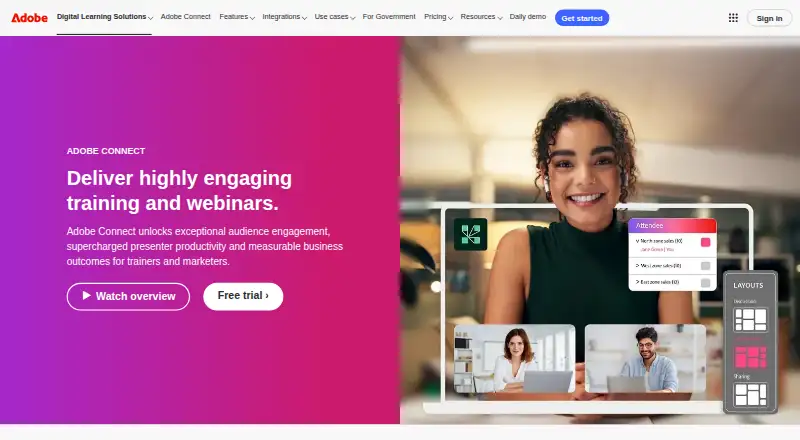
What Adobe Connect is
Adobe Connect is a paid meeting platform from Adobe Connect, a maker founded in 1982 and headquartered in San Jose, California, USA. It supports web, Windows, macOS, Linux, iOS, Android, and self-hosted deployments. Meeting features include screen sharing, recording, and breakout rooms. The stated maximum is 1,500 participants; plan details also list room capacities, which differ by plan.
Standard provides room capacity for 100 people, 1–5 host licenses, and 5 GB of cloud storage. Premium also lists 100-person room capacity, with 6–49 host licenses and 10 GB of cloud storage. Enterprise lists capacity for 300 people, 25 or more host licenses, and unlimited cloud storage. The listed plan prices are not provided. Adobe Connect offers a 30-day trial and has no free plan.
Integrations include Canvas, Moodle, Sakai, SAP Enterprise Learning, SumTotal, Eloqua MeetingSync, and Microsoft Outlook. These connections and its range of supported platforms make Adobe Connect an option for organizations arranging meetings that involve learning systems or Outlook. The 1,500-participant maximum is stated separately from the room capacities listed for the individual plans, so buyers should consider both figures when choosing a plan.
Who it suits
Adobe Connect suits organizations that need online meetings with screen sharing, recording, and breakout rooms, including those using the listed learning systems or Microsoft Outlook. The different room capacities, host-license ranges, and storage allowances can help organizations assess which listed plan fits their needs.
What it does well
- Supports meetings with up to 1,500 participants.
- Includes screen sharing, meeting recording, and breakout rooms.
- Available on web, desktop, mobile, and self-hosted deployments.
- Integrates with Canvas, Moodle, Sakai, and other listed systems.
- Enterprise lists unlimited cloud storage.
What to know first
- There is no free plan.
- The product is paid, and listed plan prices are not provided.
- The Standard and Premium plans list 100-person room capacity.
- The 30-day trial is time-limited.
Limits
There is no free plan. The listed Standard and Premium plans each have 100-person room capacity; Enterprise lists 300. Standard includes 5 GB of cloud storage, Premium 10 GB, and Enterprise unlimited storage.
Plans
| Plan | Billed and limits | Price |
|---|---|---|
| Standard | 100 room capacity · 1–5 host licenses · 5 GB cloud storage | On request |
| Standard | 100 room capacity · 1–5 host licenses · 5 GB cloud storage | On request |
| Premium | 100 room capacity · 6–49 host licenses · 10 GB cloud storage | On request |
| Premium | 100 room capacity · 6–49 host licenses · 10 GB cloud storage | On request |
| Enterprise | 300 room capacity · 25+ host licenses · Unlimited cloud storage | On request |
| Enterprise | 300 room capacity · 25+ host licenses · Unlimited cloud storage | On request |
As adobe.com lists them, read 22 Sept 2026. The maker's own page has the final word.
Getting started
- Visit the Adobe Connect website.
- Start the 30-day trial.
- Choose among the Standard, Premium, or Enterprise plan options.
- Use the supported web, desktop, mobile, or self-hosted platform route.
- Connect with a listed integration such as Canvas, Moodle, or Microsoft Outlook if needed.
Verdict
Choose Adobe Connect if you need its meeting tools, supported platform range, or listed learning-system integrations. Look elsewhere if you need a free plan or need a published price before evaluating the paid plans.
Questions
Does Adobe Connect have a free plan?
No. Adobe Connect is listed as paid and does not have a free plan.
Is there a trial?
Yes. Adobe Connect offers a 30-day trial.
How many people can participate?
The stated maximum is 1,500 participants. Plan details separately list room capacity of 100 for Standard and Premium and 300 for Enterprise.
Which platforms does Adobe Connect support?
It supports web, Windows, macOS, Linux, iOS, Android, and self-hosted deployments.
What integrations are listed?
Integrations include Canvas, Moodle, Sakai, SAP Enterprise Learning, SumTotal, Eloqua MeetingSync, and Microsoft Outlook.
What storage and host licenses come with each plan?
Standard lists 1–5 host licenses and 5 GB of cloud storage. Premium lists 6–49 host licenses and 10 GB; Enterprise lists 25 or more host licenses and unlimited storage.
Facts from Adobe Connect's own pages
- Breakout rooms
- Yes · adobe.com, 22 Sept 2026
- Founded
- 1982 · adobe.com, 23 Sept 2026
- Free plan
- No · adobe.com, 22 Sept 2026
- Headquarters
- San Jose, California, USA · adobe.com, 23 Sept 2026
- Key integrations
- Canvas,Moodle,Sakai,SAP Enterprise Learning,SumTotal,Eloqua MeetingSync,Microsoft Outlook · adobe.com, 22 Sept 2026
- Max participants
- 1500 · adobe.com, 22 Sept 2026
- Supported platforms
- web,Windows,macOS,Linux,iOS,Android,self-hosted · adobe.com, 22 Sept 2026
- Meeting recording
- Yes · adobe.com, 22 Sept 2026
- Screen sharing
- Yes · adobe.com, 22 Sept 2026
Where Adobe Connect stands on Freedom251
- Webinar Marketing Software#4 of 15
- Video Communications Software#13 of 24
- Virtual Town Hall Software#21 of 35
- Virtual Classroom Software#21 of 30
- Video conferencing apps#34 of 46
- Video Conferencing Software#34 of 43
- Web Conferencing Software#18 of 22
- Web and Video Conferencing - Enterprise Software#20 of 22
- Secure Video Conferencing Software#26 of 28