Freedom251 › Active Directory Management Software
AD Reports
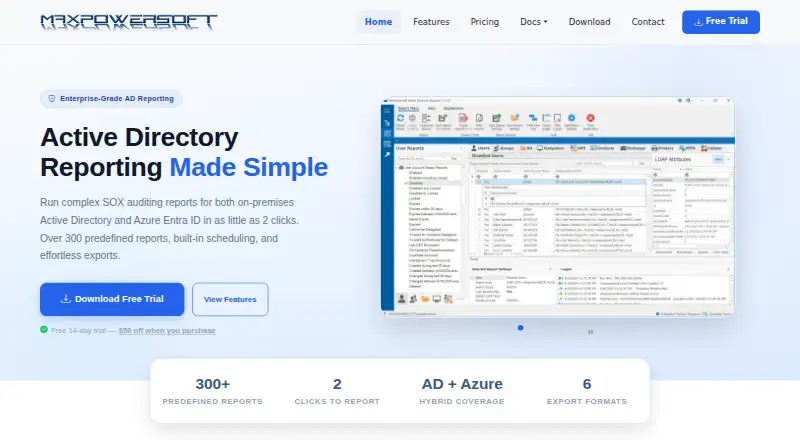
What AD Reports is
AD Reports is a Windows application for producing reports on on-premises Active Directory and Azure Entra ID, including SOX auditing reports. Its library contains more than 400 predefined reports covering users, groups, computers, Group Policy Objects, Exchange, printers, and NTFS permissions. Azure Entra ID reporting uses Microsoft Graph API and supports custom OData filters and selectable directory properties. For hybrid identity environments, Hybrid Identity Gap Analysis compares on-premises Active Directory users with an Entra ID tenant to identify mismatches such as synchronization gaps and UPN suffix differences.
Reports can be scheduled for unattended generation and delivery, and the scheduler can run as a Windows service. The audit module includes nine built-in profiles, such as PCI-DSS Quarterly and SOC 2 Annual, and can run up to four reports in parallel. Export formats include PDF, CSV, TXT, XLS, RTF, and HTML. NTFS permission reports scan local or UNC paths and check for orphaned SIDs, open access, broken inheritance, and folder owners. Seventeen Azure security and activity reports require Entra ID P1 or P2 licensing; Azure device and stale guest user reports are identified as free-tier reports. The product is intended for IT administrators, security teams, compliance officers, and managed service providers. A one-year Professional license costs $299 a year per license.
Who it suits
AD Reports is suited to IT administrators, security teams, compliance officers, and managed service providers working with on-premises Active Directory or Azure Entra ID. Its hybrid identity and NTFS reports may also help teams checking directory mismatches and permissions.
What it does well
- Provides over 400 predefined reports across Active Directory areas.
- Schedules unattended report generation and delivery.
- Includes nine audit profiles, including PCI-DSS Quarterly and SOC 2 Annual.
- Exports reports to PDF, CSV, TXT, XLS, RTF, and HTML.
- Scans local or UNC paths for NTFS permission issues.
What to know first
- The product is available on Windows.
- Seventeen Azure security and activity reports require Entra ID P1 or P2.
- A purchased registration key can be used on only one machine.
Limits
The free trial lasts 14 days. Seventeen Azure security and activity reports require Entra ID P1 or P2 licensing, and a purchased registration key may be used on only one machine.
Plans
| Plan | Billed and limits | Price |
|---|---|---|
| AD Reports Professional — 1-year license | per license · license quantity selected at checkout · registration key for one machine | $299 a year |
As maxpowersoft.com lists them, read 7 Oct 2026. The maker's own page has the final word.
Getting started
- Visit https://www.maxpowersoft.com/.
- Download the Windows application and begin the free 14-day trial.
- Use the trial with unlimited Active Directory objects.
- Purchase the Professional one-year license for $299 a year per license.
- Use the purchased registration key on one machine.
Verdict
Choose AD Reports if you need a Windows tool for Active Directory, Entra ID, or hybrid identity reporting and scheduled audits. Its one-year license is $299 a year per license; teams needing the 17 specified Azure security and activity reports also need Entra ID P1 or P2 licensing.
Questions
Is there a free plan?
No. AD Reports offers a free 14-day trial with unlimited Active Directory objects.
How much does AD Reports cost?
The Professional one-year license costs $299 a year per license.
Which platform does it support?
AD Reports is available for Windows and is deployed on premises.
Do Azure reports require a Microsoft license?
Seventeen Azure security and activity reports require Entra ID P1 or P2 licensing. Azure device reports and stale guest user reports are identified as free-tier reports.
What are its export formats?
Reports can be exported as PDF, CSV, TXT, XLS, RTF, or HTML.
Can one license key be used on multiple machines?
No. A purchased registration key may be used on only one machine.
Facts from AD Reports's own pages
- Audit profiles
- The audit module includes nine built-in profiles, including PCI-DSS Quarterly and SOC 2 Annual, and can run up to four reports in parallel. · maxpowersoft.com, 7 Oct 2026
- Azure integration
- Azure Entra ID reports use Microsoft Graph API and support custom OData filters and selectable directory properties. · maxpowersoft.com, 7 Oct 2026
- Azure licensing limit
- Seventeen Azure security and activity reports require Entra ID P1 or P2 licensing, while the page identifies Azure device reports and stale guest user reports as free-tier reports. · maxpowersoft.com, 7 Oct 2026
- Exports
- The product supports report exports including PDF, CSV, TXT, XLS, RTF, and HTML. · maxpowersoft.com, 7 Oct 2026
- Hybrid identity
- Hybrid Identity Gap Analysis compares on-premises Active Directory users with an Entra ID tenant and identifies mismatches such as sync gaps and UPN suffix mismatches. · maxpowersoft.com, 7 Oct 2026
- Intended users
- The maker describes the product as serving IT administrators, security teams, compliance officers, and managed service providers. · maxpowersoft.com, 7 Oct 2026
- License limit
- The EULA says a purchased registration key may be used on only one machine. · maxpowersoft.com, 7 Oct 2026
- NTFS reporting
- NTFS permission reports can scan local or UNC paths and include checks for orphaned SIDs, open access, broken inheritance, and folder owners. · maxpowersoft.com, 7 Oct 2026
- Privacy and data handling
- The privacy policy says Gmail OAuth tokens are stored encrypted on the local device and that Gmail message data is not sent to MaxPowerSoft servers. · maxpowersoft.com, 7 Oct 2026
- Purpose
- AD Reports provides reporting for on-premises Active Directory and Azure Entra ID, including SOX auditing reports. · maxpowersoft.com, 7 Oct 2026
- Report library
- The features page says the product includes over 400 predefined reports across Active Directory areas including users, groups, computers, GPOs, Exchange, printers, and NTFS permissions. · maxpowersoft.com, 7 Oct 2026
- Scheduling
- Reports can be scheduled for unattended generation and delivery, and the scheduler can run as a Windows service. · maxpowersoft.com, 7 Oct 2026
- Support
- MaxPowerSoft says it typically responds to support inquiries within 24 hours on business days. · maxpowersoft.com, 7 Oct 2026
- Trial
- The Windows download page offers a free 14-day trial with unlimited Active Directory objects. · maxpowersoft.com, 7 Oct 2026