Freedom251 › AI Short Video Music Generators

AceStep AI Music Remixer
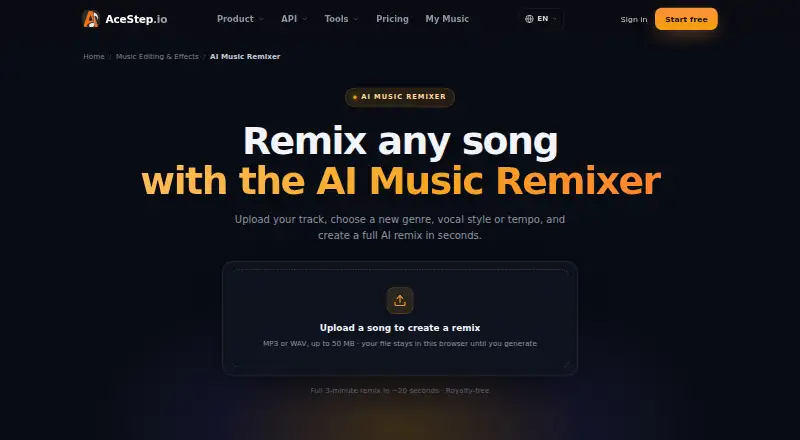
What AceStep AI Music Remixer is
AceStep AI Music Remixer creates song arrangements from a prompt, with drums, bass, harmonies and vocals in a chosen genre, key and tempo. You can set BPM and energy, then select male, female or duet vocals. The remixer can organize a track into an intro, build, drop, breakdown, climax and outro. It accepts MP3 or WAV uploads up to 50 MB; the page says files remain in the browser until generation. MP3 and WAV downloads are available, and the stereo mix is described as royalty-free. Lyrics and vocals are supported in English, Spanish, Japanese, Korean and Chinese. A 2–3 minute remix typically renders in roughly 20 seconds, depending on duration and quality settings. Free use provides 10 credits per day for personal projects, with a 120-second limit. Paid plans start at $9/mo; Pro / Artist adds DSP distribution rights, while Studio includes client and agency work. Stem upload, mashup mode and stem export are listed as coming soon.
Who it suits
It suits DJs, producers, content creators, editors, podcasters, indie artists, brands and remix fans who want to create or adapt song arrangements. People choosing a plan should note that free generations are for personal projects only; paid tiers specify monetization, client work and distribution rights.
What it does well
- Set genre, key, BPM and energy.
- Choose male, female or duet vocals.
- Accepts MP3 and WAV uploads up to 50 MB.
- Downloads available in MP3 and WAV.
- Supports five named lyric and vocal languages.
What to know first
- Free generations are limited to personal projects.
- Free plan limits tracks to 120 seconds.
- Stem upload, mashup and stem export are coming soon.
Limits
The free plan provides 10 credits per day, allows tracks up to 120 seconds and is limited to personal projects. Creator, Pro / Artist and Studio plans allow tracks up to 4 minutes; other plan limits include credit allowances, concurrent generations and usage rights.
Plans
| Plan | Billed and limits | Price |
|---|---|---|
| Free | 10 credits/day · generations up to 120 seconds · personal use only | Free |
| Pro / Artist | monthly · 300 credits/month · about 120 standard song versions · DSP distribution rights · batch up to 5 · 4 concurrent generations | $19 a month |
| Studio | monthly · 900 credits/month · about 360 standard song versions · client and agency work · 3 team seats · dedicated support and API · 8 concurrent generations | $49 a month |
| 50 Credits | One-time payment · 50 credits · credits never expire | $7, paid once |
| Credit pack | one-time payment · 50 credits · advertised as about 10 more songs · no subscription | $7, paid once |
| Creator | monthly · 100 credits/month · about 40 standard song versions · up to 4 minutes · social monetization · 2 concurrent generations | $9 a month |
As acestep.io lists them, read 14 Oct 2026. The maker's own page has the final word.
Getting started
- Open the AceStep AI Music Remixer website.
- Upload an MP3 or WAV file up to 50 MB, if you want to work from an upload.
- Set the genre, key, BPM and energy, then choose male, female or duet vocals.
- Use the free plan or choose a paid option based on your credit and usage needs.
- Generate the remix and download it as MP3 or WAV.
Overview
AceStep AI Music Remixer turns an uploaded track and musical direction into a newly arranged song, with drums, bass, harmonies and vocals. It suits creators who want to guide a remix by genre, tempo and vocal style rather than assemble it section by section. Its focused arrangement controls are appealing, but the right plan matters if the track is for commercial use.
Key features
Set genre, key, BPM and energy, then choose male, female or duet vocals. The generated structure can move through an intro, build, drop, breakdown, climax and outro. That gives creators useful control over a track’s progression, although it does not extend to individual stem editing: stem uploads, mashup mode and stem exports are coming soon.
Uploads can be MP3 or WAV files up to 50 MB, and the remixer says the file stays in the browser until generation. A typical 2–3 minute remix is said to render in roughly 20 seconds, depending on duration and quality settings. Downloads are MP3 or WAV, and the stereo mix is described as royalty-free. Lyrics and vocals are supported in English, Spanish, Japanese, Korean and Chinese.
The FAQ describes remixes as original and royalty-free for personal and commercial projects, including ads, videos and releases. Free generations, however, are limited to personal projects and exclude monetization, client work, DSP distribution and Content ID registration. Pro / Artist includes distribution rights for Spotify, Apple Music, YouTube Music and SoundCloud; Studio covers client and agency work.
Pricing
The free plan costs nothing and provides 10 credits per day, supports tracks up to 120 seconds and is for personal use only. It is a way to explore the workflow, not a suitable tier for monetized publishing or client deliverables.
The 50 Credits plan costs $7, paid once, billed as a one-time payment; its credits never expire. It avoids a monthly commitment, but the plan description does not give a track-length allowance or commercial rights, so it is not a substitute for a paid monthly plan when those terms matter.
Creator costs $9 a month, billed $9 / month, and includes 100 credits, tracks up to 4 minutes, social monetization and two concurrent generations. It fits creators publishing monetized social content, but does not include the named DSP distribution rights or client-project use. Pro / Artist costs $19 a month, billed $19 / month, for 300 credits, tracks up to 4 minutes, WAV export, four concurrent generations, priority support and DSP distribution rights. It is the relevant step up for releases to streaming services.
Studio costs $49 a month, billed $49 / month, and includes 900 credits, tracks up to 4 minutes, client and agency work, three team seats, eight concurrent generations, dedicated support and API access. It is the clearest fit for collaborative commercial production. The page also shows $12 for Creator, $24 for Pro / Artist and $62 for Studio; the pricing terms provided do not explain the difference between those displayed figures and the billed monthly prices.
Platforms
AceStep is available on web and through an API. Both routes suit browser-based creation or integration into a workflow, while the API is included with Studio.
Who it's for
The remixer is aimed at DJs, producers, content creators, TikTok and Reels editors, podcasters, indie artists, brands and remix fans. Its prompt-based controls and section-aware arrangements favor people who want a shaped song quickly; producers who need mashups or stem-level control should look elsewhere for now.
Pros and cons
- Pros: Genre, key, BPM, energy and vocal choices make the prompt more musically directed than a bare genre request.
- Pros: The arrangement can include distinct build, drop and breakdown sections, useful for edits that need a sense of progression.
- Pros: A one-time credit pack offers an option for occasional use without monthly billing.
- Cons: Free use excludes monetization, client work, DSP distribution and Content ID, despite broader commercial-use language for remixes.
- Cons: No stem upload, mashup mode or stem export limits its usefulness for detailed production and track-combining workflows.
- Cons: Creator is capped at two concurrent generations and does not include the listed distribution rights; those require Pro / Artist.
Alternatives
AI Music Remixing Tools is the broader directory list for comparing remixing options. Choose Fadr if you want its listed vocals, melodies, drums and bass tools, MP3 downloads, MIDI detection and Remix Maker, or need its iOS, macOS or Windows platforms alongside web and API. Its free Basic tier costs nothing.
StemForge is the alternative to consider if local, open-source operation matters: it runs on your own hardware, with no subscriptions or per-track fees. AetherWave Music Studio is another web and API option; its free tier includes one station and one band, but 0 monthly credits, 100 MB of gallery storage and 30-day file retention.
AI Remix Music Generator offers a web-only free tier with 10 sign-up credits, one job at a time and a cost of two credits per run. MeloLab AI Remix may suit a small personal trial: its free tier has eight lifetime credits, one concurrent generation, seven-day song storage and personal-use-only terms.
MusicWave.ai provides a web free tier with 10 credits on signup, two song generations, streaming only and personal use only. RiffGen Remixer AI has a web free tier of five generations per month. Loudly is a web alternative with a 30-second limit on free generated tracks.
Verdict
AceStep AI Music Remixer is a strong fit for creators who want prompt-led remixes with defined sections, vocal options and a fast stated render time. Choose Creator for social monetization, Pro / Artist for DSP releases, or Studio for client work and team use. Look elsewhere if you need mashups or stem-level production, and do not rely on the free tier for commercial projects.
Verdict
AceStep AI Music Remixer offers prompt-based arrangement controls, vocal choices and two download formats. Check the plan terms for your use: free generations exclude monetization, client work, DSP distribution and Content ID registration.
Questions
Is there a free plan?
Yes. Free includes 10 credits per day and tracks up to 120 seconds, for personal projects only.
How much do the plans cost?
The listed options are Free, 50 Credits at $7, paid once, Creator at $9 a month, Pro / Artist at $19 a month and Studio at $49 a month.
Can I use a free remix commercially?
Free use is limited to personal projects and excludes monetization, client work, DSP distribution and Content ID registration. Paid plans list social monetization, distribution rights or client and agency work according to plan.
What platforms and file formats are supported?
The remixer is listed for web and API use. It accepts MP3 and WAV uploads and offers MP3 and WAV downloads.
Which languages can it use for lyrics and vocals?
English, Spanish, Japanese, Korean and Chinese are supported.
Does it support mashups or stem export?
Mashup mode, stem upload and stem export are listed as coming soon.
Facts from AceStep AI Music Remixer's own pages
- API access restriction
- API-key creation and live calls require an active Studio subscription priced at $49 per month on the API page. · acestep.io, 14 Oct 2026
- API capabilities
- The API page lists endpoints for generation, extension, section replacement, adding stems, cover creation and lyric generation. · acestep.io, 14 Oct 2026
- Arrangement
- It can generate a remix structure with an intro, build, drop, breakdown, climax and outro. · acestep.io, 3 Oct 2026
- Browser multitrack editor
- Studio layers generated songs, user uploads and separated stems on a timeline with trimming, clip movement, volume, panning and stereo export. · acestep.io, 14 Oct 2026
- Commercial use
- The remixer FAQ says generated remixes are original and royalty-free for personal and commercial projects, including ads, videos and releases. · acestep.io, 3 Oct 2026
- Content restrictions
- The acceptable-use policy prohibits copyright infringement, deceptive deepfakes, hate speech, explicit sexual content and graphic violence. · acestep.io, 14 Oct 2026
- Developer documentation
- The repository provides guides for Gradio, Python, REST API, CLI, installation, GPU compatibility, troubleshooting, benchmarking and LoRA training. · github.com, 14 Oct 2026
- Exports
- The remixer page lists MP3 and WAV downloads and describes the stereo mix as royalty-free. · acestep.io, 3 Oct 2026
- Flow editing
- Studio can retake verses, swap hooks and extend outros without regenerating the entire song. · acestep.io, 14 Oct 2026
- Free use limit
- The pricing page limits free generations to personal projects and excludes monetization, client work, DSP distribution and Content ID registration. · acestep.io, 3 Oct 2026
- Generation speed
- The product advertises a full three-minute remix in about 20 seconds. · acestep.io, 14 Oct 2026
- Genre and language coverage
- The service claims more than 15 genres and vocals in at least 10 languages, including English, Spanish, Japanese and Chinese. · acestep.io, 14 Oct 2026
- Independent paper date
- The ACE-Step 1.5 technical paper was submitted to arXiv on January 31, 2026 and revised on February 6, 2026. · arxiv.org, 14 Oct 2026
- Independent research result
- The ACE-Step 1.5 arXiv paper reports generation under two seconds on an A100, under ten seconds on an RTX 3090, operation below 4 GB VRAM and LoRA personalization from a few songs. · arxiv.org, 14 Oct 2026
- Input-rights limitation
- Terms place responsibility on users to have rights or permissions for uploaded audio, lyrics, prompts and other source materials. · acestep.io, 14 Oct 2026
- Integrations and destinations
- Paid plans list distribution destinations including Spotify, Apple Music, YouTube Music and SoundCloud; the site also advertises TikTok and other social publishing use. · acestep.io, 14 Oct 2026
- Integrations and distribution
- The pricing page lists Spotify, Apple Music, YouTube Music and SoundCloud distribution rights with Pro / Artist, and client project uses with Studio. · acestep.io, 3 Oct 2026
- Intended users
- The page names DJs, producers, content creators, TikTok and Reels editors, podcasters, indie artists, brands and remix fans. · acestep.io, 3 Oct 2026
- Languages
- The model supports lyrics and vocals in English, Spanish, Japanese, Korean and Chinese, with more languages planned. · acestep.io, 3 Oct 2026
- Limitations
- Stem upload, mashup mode and stem export are listed as coming soon. · acestep.io, 3 Oct 2026
- Limit: audio artifacts
- The same independent reviewer reported noticeable vocal artifacts and weaker compositional moments in personal tests compared with leading proprietary tools. · linkedin.com, 14 Oct 2026
- Limit: cloud concurrency
- A July 8, 2026 podcast report said its tests saw four concurrent requests succeed, half of eight succeed and all sixteen fail with HTTP 504 errors. · podcasts.apple.com, 14 Oct 2026
- Limit: fine-grained control
- The reviewer said musicians and prosumers still need much more precise hands-on control over generation. · linkedin.com, 14 Oct 2026
- Local model limits
- The repository says 2B models need roughly 4.7 GB for weights, while XL models need at least 12 GB VRAM with offload or 20 GB without it. · github.com, 14 Oct 2026
Where AceStep AI Music Remixer stands on Freedom251
- AI Short Video Music Generators#1 of 27
- AI Cinematic Music Generators#1 of 25
- AI Music Remixing Tools#1 of 22