Freedom251 › 3D Asset Libraries
3D Warehouse
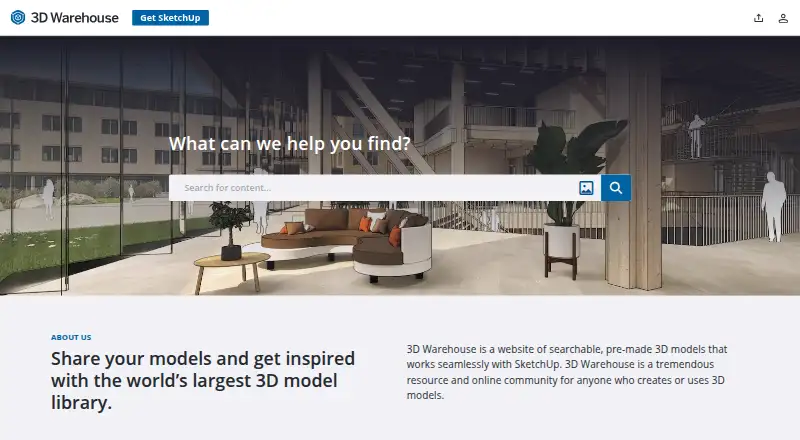
What 3D Warehouse is
3D Warehouse is a searchable library of ready-made 3D models and materials for SketchUp. Search by keyword, phrase, or image, then narrow results using criteria such as file size, polygon count, and file type. Anyone can browse and open models without an account. Signing in enables uploading and liking content, creating collections, and maintaining a library of uploads, saved items, collections, and an analytics dashboard.
The library is accessible through SketchUp for Desktop, SketchUp for Web, SketchUp for iPad, and a web browser. Model downloads are maintained in the current SketchUp version, the two preceding versions, and the version used for the original upload; older SketchUp versions can download COLLADA files. Materials can be brought into a SketchUp model or downloaded as standalone .skm files. Models below 10 MB or 200,000 polygons can be converted to USD or GLB and shared for augmented reality viewing on Android or iOS using a QR code. Models, materials, and environments in the SketchUp Content Library are free to all 3D Warehouse users.
Who it suits
3D Warehouse suits SketchUp users looking for models, materials, or environments, as well as people who want to share and organize their own assets. It also serves users who want to view eligible models in augmented reality on Android or iOS.
What it does well
- Search models and materials by keyword, phrase, or image.
- Filter results by file size, polygon count, and file type.
- Browse and open models without signing in.
- Share uploads publicly or keep them private.
- Eligible models can be prepared for AR viewing on Android or iOS.
- Materials are available as in-model downloads or standalone .skm files.
What to know first
- Uploading and library management require signing in.
- AR conversion applies only to models under 10 MB or 200,000 polygons.
- Older SketchUp versions use COLLADA downloads.
Limits
AR conversion is available for models under 10 MB or 200,000 polygons. Download options for older SketchUp versions use COLLADA files.
Getting started
- Open 3D Warehouse in a web browser or through SketchUp for Desktop, Web, or iPad.
- Search by keyword, phrase, or image and refine results with filters.
- Open or download a model or material.
- Sign in to upload, like, create collections, or manage a content library.
- For eligible models, convert to USD or GLB and share the QR code for AR viewing.
Verdict
Choose 3D Warehouse if you need a free library of SketchUp-ready models and materials, or want to share and organize your own content. It also offers an AR route for models within its size or polygon limits. Uploading, liking, and maintaining a library require an account.
Questions
Does 3D Warehouse have a free plan?
Yes. The SketchUp Content Library's models, materials, and environments are free to all 3D Warehouse users.
Do I need an account to use it?
Anyone can search and open models without signing in. Uploading, liking, creating collections, and maintaining a content library require sign-in.
Where can I access 3D Warehouse?
It is available in SketchUp for Desktop, SketchUp for Web, SketchUp for iPad, and a web browser. Browser requirements list current versions of Chrome, Firefox, Safari, and Microsoft Edge.
Which file formats are available?
SketchUp files are maintained for the current version, the previous two versions, and the version in which a model was uploaded. Older SketchUp versions can download COLLADA files; materials can also be downloaded as standalone .skm files.
Can I view models in augmented reality?
Models under 10 MB or 200,000 polygons can be converted to USD or GLB and shared for AR viewing on Android or iOS through a QR code.
Facts from 3D Warehouse's own pages
- Account requirement
- Anyone can search for and open models, while uploading, liking, creating collections, and maintaining a content library require signing in. · help.sketchup.com, 4 Oct 2026
- Augmented reality
- Models under 10 MB or 200,000 polygons can be converted to USD or GLB and shared for AR viewing through a QR code on Android or iOS. · help.sketchup.com, 4 Oct 2026
- Browser support
- The system requirements page lists current versions of Chrome, Firefox, Safari, and Microsoft Edge for browser access. · help.sketchup.com, 4 Oct 2026
- Collections and library
- A user's content library includes uploaded models and materials, collections, saved content, and an analytics dashboard. · help.sketchup.com, 4 Oct 2026
- Content sharing
- Users can upload models and materials, share them publicly or keep them private, and manage their content. · help.sketchup.com, 4 Oct 2026
- Downloads
- 3D Warehouse maintains SketchUp files in the current version, the previous two versions, and the version in which a model was uploaded; older SketchUp versions can download COLLADA files. · help.sketchup.com, 4 Oct 2026
- Free content
- The SketchUp Content Library's models, materials, and environments are available to all 3D Warehouse users free of charge. · help.sketchup.com, 4 Oct 2026
- Materials
- Materials can be downloaded into a SketchUp model or as standalone .skm files. · help.sketchup.com, 4 Oct 2026
- Purpose
- 3D Warehouse is a searchable library of pre-made 3D models that work with SketchUp. · help.sketchup.com, 4 Oct 2026
- Search
- Users can search for models and materials by keyword, phrase, or image, and filter results by file size, polygon count, file type, and other criteria. · help.sketchup.com, 4 Oct 2026
- Security and compliance
- Trimble's Trust Portal provides security, privacy, and compliance information, including controls and certifications. · trust.trimble.com, 4 Oct 2026
- SketchUp integration
- 3D Warehouse is accessible in SketchUp for Desktop, SketchUp for Web, SketchUp for iPad, and directly in a web browser. · help.sketchup.com, 4 Oct 2026
- Support and terms
- The Getting Started page links users to system requirements, access instructions, profile and content-library guidance, terms of use, and file-format help. · help.sketchup.com, 4 Oct 2026
Where 3D Warehouse stands on Freedom251
- 3D Asset Libraries#5 of 31