The Tool Desk
Outbyte Driver Updater FREEFix the driver behind crashes, sound loss and screen glitchesFind Drivers →Outbyte PC Repair FREERepair Windows errors before they cause bigger problemsFix Now →A Gantt chart is a project schedule displayed as horizontal bars on a time scale. Each row names a task, while the bar’s position and length show its planned start, duration, and finish. Because rows share one calendar, you can see sequence, overlap, deadlines, and overall timing in a single view.
Depending on how it is built, a Gantt chart can also show dependencies, milestones, owners, completion percentage, actual dates, and a baseline for comparing the current schedule with the original plan. It is a readable timeline—not proof that the estimates or assumptions behind the timeline are accurate.
How to read a Gantt chart
Start with the task list, then move horizontally across the calendar or other time scale to locate each task’s bar. A bar that starts farther left is scheduled earlier; a longer bar represents a longer planned duration. Overlapping bars indicate work scheduled at the same time. This basic interpretation is consistent across standard Gantt-chart formats.[Gantt.com]
| Chart feature | What it tells you |
|---|---|
| Task row | The activity or deliverable being scheduled. |
| Horizontal bar | The planned start, duration, and finish of that activity. |
| Time scale | The calendar units used to position work, such as days, weeks, or months. |
| Overlapping bars | Tasks planned to run concurrently. |
| Dependency link or arrow | A sequencing or relationship constraint between tasks, when the chart includes links. |
| Milestone marker | A significant point or deadline, when milestones are displayed. |
| Progress shading | Reported completion or current status, when progress is tracked. |
| Baseline bar | The original approved schedule used for comparison with updated or actual dates. |
Not every chart includes every feature. A simple timeline may contain only task names, bars, and dates; a project-control chart may add links, owners, milestones, progress, and baseline information.[Association for Project Management]
#1 Best Overall

- Size: A5 (5.8 x 8.3 inches (14.8 x 21 cm)
- Contents: Gantt chart monthly (1 month opening), 24 months, 12 pages of grid notes
- 64 pages
- FSC Forest Certificate Paper Only
What are Gantt charts used for?
Planning a project
Teams place activities on a shared time scale to turn a list of work into a schedule. Grouping tasks under summary headings can make a large plan easier to scan, while chronological ordering shows when each activity is expected to occur.
Communicating dates and overlap
A Gantt chart gives stakeholders a common visual reference for planned start and finish dates. Concurrent bars make overlapping work visible without requiring readers to reconstruct the schedule from prose or a spreadsheet.
Rank #2

- PROJECTS VISUAL COMMUNICATION: Getting a glance of your multiple projects progress. Tracking the status, timeline and goals of each project, To make team watch and know the project's information
- SIMPLIFY GANTT CHART PLANNER FOR TEAM: 12 lines for tracking tasks of three projects. Managing and guiding projects to completion on time. Making everyone in team know easily and quickly with chart on wall
- SURFACE EASY TO ERASE: The surface of project management board is laminated by erasable non-porous film. It's easier to clean than traditional whiteboard, reusable for years too
- EASY TO MOUNT: The size of our gantt chart board is 36 X 45 inch, made of thicker construction paper, much lighter than traditional whiteboard, we can put it up on wall easily without damaging
- COMPLETE PACKAGE INCLUDED: Our huge project management planner comes rolled-up in the paper tube with mounting tapes, an eraser and monthly calendar for convenient setup and immediate use
Monitoring progress against the plan
When a chart preserves the original baseline, updated or actual task bars can be compared with that baseline to show where work is ahead of, on, or behind the original schedule. Keeping the baseline intact is essential if the goal is to understand how the schedule changed.[Project Management Institute]
What information can a Gantt chart contain?
The format is flexible. A project team may add:
- Tasks and summary tasks: individual activities and higher-level groupings.
- Dates and durations: planned starts, finishes, and the time allocated to each task.
- Dependencies: links showing that one activity follows, precedes, or otherwise relates to another.
- Milestones and deadlines: notable points that do not necessarily require a long-duration bar.
- Owners or resources: the person, team, or resource responsible for an activity.
- Progress and actual dates: status information that distinguishes current performance from the plan.
- Baselines: a preserved reference schedule for variance analysis.
These additions improve coordination, but they also increase visual density. A chart should show the information its audience needs without becoming too crowded to read.
Do these 3 things before closing this tab:
1Scan for outdated or missing drivers - takes under a minute2Repair Windows errors before they cause bigger problems3Fix the driver behind crashes, sound loss and screen glitchesRank #3

- ✔ Ultimate Gantt Chart Project Management Board Kit. Build project timelines, identify critical paths, and manage project risks effortlessly and everything visually. Simplify complex project activities and enhance project management with the power of visualization. Comprehensive project management set with 668 magnetic pieces, risk magnets, markers, cleaning tools, and an easel.
- ✔ Effective Overall Project Management. Color-coded project magnets highlight risks on specific tasks, making them easily visible. Special color-coded magnets allow risk assessment for project timelines, budgets, and resources. Do you need overall 1 month project timeline overview, or 5+ years? No problem, you can customize the board with three-row project timeline columns to suit your needs.
- ✔ Ensures Simplified Communication, Fewer Misunderstandings with this Project Board. Visualize project information with color codes on the well-designed Gantt chart board. Keep the board updated, and it will communicate project details effectively on its own.
- ✔ Facilitate Collaboration. Bring stakeholders and your team together for ultimate alignment and clarity on your projects. Review timelines, assess risks, define mitigation plans, and align on project priorities on this project board. Enhance clarity in project communication with easy-to-understand visuals.
- ✔ Premium Project Management Board Kit. Experience premium quality with the PMXBoard brand. Frameless, double-layer magnetic Gantt chart board for durability and strength. Wide variety of project magnets, unique magnetic properties, and a wear-resistant board surface for a superior project management experience. Ultimate Gantt Chart Board Planner
How to make a useful Gantt chart
- Define the scope and deliverables. List the work that must be completed and group related activities under clear summary headings.
- Estimate each task’s duration. Record the assumptions behind the estimate; a bar communicates a schedule, not the certainty of that estimate.
- Place tasks on a common time scale. Set planned start and finish points so the sequence and overlap are visible.
- Add relationships and milestones where they matter. Link tasks that genuinely constrain one another and mark important decision points or deadlines.
- Assign ownership and status fields if the chart will be used for coordination. Include only details that help readers act on the schedule.
- Save the initial baseline. Preserve the approved starting plan before updating dates or progress, so later variance can be seen.
- Update the chart at an agreed cadence. Record actual starts, finishes, and progress consistently; otherwise the visual status will quickly become stale.
When a Gantt chart helps—and when it does not
It is a strong fit when the main question is “when?”
Use a Gantt chart when readers need a timeline, an overview of overlapping work, a communication aid for dates, or a straightforward way to compare current status with a baseline. It is especially useful when a project can be summarized without displaying every underlying constraint.
It needs support on complex work
Large projects can produce charts so long or detailed that the overview becomes unwieldy. A summary chart may hide important task-level detail, while substantial schedule changes may require extensive redrawing or rework in some charting approaches.[PMI, “Tools for Managing Projects”]
Rank #4

- Complete Project Kit – Board, 6 markers, eraser, wall hardware, tray, and 4 rolls of color-coded tape to plan timelines and track task status.
- Instant Project Visibility – Use tape for timelines and status, so teams see progress, deadlines, and delays at a glance.
- Built for Business Use – Magnetic backing, aluminum frame, and smooth dry erase surface designed for daily office use.
- Large Format for Teams – 40"x24" size gives clear visibility in meetings, offices, and project rooms.
- Professional Management Tool – Ideal for business planning, team collaboration, and project management professionals.
Highly interconnected work may be better understood with a network diagram, PERT analysis, or critical-path method alongside the Gantt view. These methods expose relationships and sequencing logic that a bar timeline can make difficult to inspect. There is no universal rule for choosing one view; the right combination depends on whether readability, relationship analysis, or change control is the primary need.
It can imply false precision
Project software can calculate exact-looking dates even when the underlying estimates are uncertain. Agile guidance from PMI cautions that this presentation can suggest more planning precision than the team actually has.[PMI Disciplined Agile] Treat dates as estimates tied to assumptions, and revise them when evidence changes.
Best Value
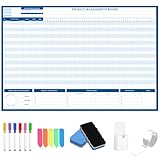
- Packages Includes: you will receive 1 magnetic Gantt Chart Whiteboard with a size of 24 x 36 in, a Flannel blue and yellow wave eraser, 100 pages of arrow sticky notes, 1 Magnetic pen holder, a roll of Nano traceless double-sided tape and 6 colored erasable whiteboard pens
- Reusable and Quality: the task tracking whiteboard planner is made of magnetic material; With dry-erase design, write and wipe with ease, We can erase easily even months later and use this work schedule board over and over again
- Productive Project Management Tools: ensures Simplified Communication, Fewer Misunderstandings with this Gantt Chart Project Board; Visualize project information with color codes on the well-designed Gantt chart board; Keep the board updated, and it will communicate project details effectively on its own
- Mounting is a Breeze: this vision board is lightweight and can be attached magnetically or with nano-traceless double-sided tape; ; You can mount this Board or take it down easily without tools; Notice: before use, please place heavy objects at the four corners of the poster and let it sit for 12-24 hours until the poster is flat again
- Practical and Versatile: it's easy to use for products development, marketing strategic projects or as a sales goal whiteboard for daily use in office, home or family; Whatever for entrepreneurs, managers or person working at home, buy the office white board for wall for try
Gantt chart versus a network schedule
| Question | Gantt chart | Network diagram or critical-path view |
|---|---|---|
| Primary emphasis | When activities occur and how long they are scheduled to last. | How activities depend on one another and which relationships control the finish. |
| Ease of communicating a calendar | Usually strong because dates are plotted directly against a time scale. | Usually requires readers to interpret the network before relating it to calendar dates. |
| Handling a large number of relationships | Can become visually crowded as links and tasks accumulate. | Designed to expose sequencing and interconnection more explicitly. |
| Best use | Timeline communication, overlap, milestones, and baseline tracking. | Detailed dependency analysis and critical-path control. |
Many teams use both: the Gantt chart for the schedule conversation and a network-based analysis for complex logic.
What is the history of the Gantt chart?
Karol Adamiecki, a Polish engineer, is credited with devising an earlier time-based chart in the mid-1890s. Henry Gantt later developed his own version roughly 15 years afterward. Gantt’s version became widely known in Western countries, which is why his name became attached to the format, even though related work came earlier.[Gantt.com]
Microsoft’s history of project management describes Gantt’s task bars and milestone markers and notes that Microsoft Project added link lines to task bars in the early 1990s.[Microsoft Support]
Common mistakes to avoid
- Treating the bar as a guarantee: A scheduled duration is an estimate, not evidence that the work will take exactly that long.
- Overloading one view: Split a large plan into summary and detail views when the full chart becomes unreadable.
- Removing the baseline: Without the original plan, you cannot reliably tell how dates moved.
- Showing links without maintaining them: Out-of-date dependencies can mislead readers about sequence and impact.
- Using exact dates without explaining uncertainty: State the assumptions and confidence behind estimates, especially in adaptive or changing work.
Optional historical reading
The Gantt Chart: A Working Tool of Management by Henry Wallace Clark is referenced by PMI in discussion of chart templates and project-management materials. Current edition, availability, and inventory are not established here, so it is optional historical reading rather than a required tool.[PMI]
Outdated Drivers Are Slowing You Down
One free scan finds every outdated or missing driver and matches the right update for your exact hardware.Free scan · exact hardware matchWindows Errors? Fix Them Before They Spread
Repair common Windows errors and clear accumulated junk for a smoother, more stable PC - no reinstall needed.Free scan · no reinstallThe Bottom Line
A Gantt chart is best understood as a time-based project schedule: bars show when tasks are planned, optional annotations show how they relate and progress, and a preserved baseline shows how reality diverges from the plan. Use it for a clear timeline, and pair it with dependency-focused methods when the work is too complex for one visual overview.
Quick Recap
Product prices and availability are accurate as of the date/time indicated and are subject to change. Any price and availability information displayed on Amazon at the time of purchase will apply.




