Windows Errors? Fix Them Before They Spread
Repair common Windows errors and clear accumulated junk for a smoother, more stable PC - no reinstall needed.Free scan · no reinstallOutdated Drivers Are Slowing You Down
One free scan finds every outdated or missing driver and matches the right update for your exact hardware.Free scan · exact hardware matchTo monitor construction and real estate websites, automate a browser to capture the same URL and page area on a schedule, save each image with a timestamp, and compare it with earlier captures. Playwright provides the browser screenshot primitives; you supply the schedule, storage, comparison and review process. These captures document what a website displayed—not what happened at a physical construction site.
What website screenshot monitoring can—and cannot—tell you
A dated screenshot is a visual record of a page at a particular time. It can help track listing presentation, project-page updates, public planning information, or other relevant web content. By itself, however, it does not explain why a page changed or prove that a construction milestone occurred. A difference may come from new content, a layout adjustment, a page that had not finished loading, or dynamic material such as rotating promotions.
Choose the monitored page and capture area according to the question you need to answer. For example, a property listing team may care about the price and availability section, while a construction project website may require a full-page record of its public updates. Keep the target URL, capture scope, browser settings, and timing consistent so that comparisons are more useful.
Choose what part of the page to capture
Playwright documents three useful scopes: the visible browser viewport, a selected element, and the entire scrollable page. Its screenshot API also exposes options including image format, clipping, scale, and quality. See the Playwright screenshot documentation and Page API reference for the current details.
Recommended Free Tools
#1 Best Overall
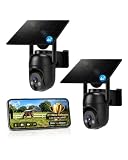
- 【4G LTE Network & No WiFi Needed】Cellular security camera include a pre-installed SIM card with 7-day unlimited trial data; auto-connects to the strongest U.S. network (Verizon/T-Mobile/AT&T). After the 7-day trial ends, subscribe to unlimited data for $19.90/month or $169.90/year via the UBox app to maintain remote access. Note: Each device requires a separate data plan subscription and cannot be shared. 100% wireless & no wifi needed—ideal for ranches, construction sites, vacation homes, or home security. (SIM card is non-replaceable)
- 【High-capacity Battery & Non-stop Solar Powered】 No wifi security camera that works without WiFi comes with a rechargeable battery and a 6W solar panel; the high-capacity battery and solar panel together provide continuous power for 365 days of uninterrupted operation, so you don't need to worry about it running out of power. Plus, with an IP65 weatherproof rating, this solar outdoor camera withstands rain, dust, heat, and cold, delivering reliable performance in harsh outdoor environments year-round. (Do not support WiFi)
- 【2K Color Night Vision & 360° Wide View】 This jobsite camera offers a 360° wide view and 4X digital zoom. You can remotely pan 355° and tilt 100° via the UBox App, which increases the flexibility of the 360 camera to get the broadest view without blind spots. By adopting color 2K HD night vision mode, the non wifi security camera could capture colorful footage up to 65ft. Even in the dark, the full-color night vision lets you always keep an eye on your assets. (Do not support auto-tracking)
- 【Smart Motion Detection & Real-Time Alerts】 Solar security cameras wireless outdoor features an advanced PIR motion sensor that detects movement and immediately sends an alarm notification to your mobile phone when humans or animals are detected. Built-in microphone and speaker let you listen and speak through the app to deter intruders. If you turn on white light alarm & siren alarm, solar camera will also emit dazzling lights and sirens, and you can customize detection zones and sensitivity to reduce unnecessary notifications.
- 【Flexible Dual Storage Options & Multi-Sharing】 Enjoy 30-day free trial cloud storage with easy playback anytime via the app— subscription is required after the 30-day trial ends. For added flexibility and data security, the 4g camera also supports local storage with a TF card up to 128GB (not included). Easily share cellular camera access with family members through the app, allowing remote property monitoring anytime, anywhere, even when abroad. (TF Card not included)
| Capture scope | Useful when | Trade-off |
|---|---|---|
| Viewport | You need a consistent view of the section visible without scrolling, such as a page header or listing summary. | Content outside the viewport is omitted. |
| Selected element | A particular card, price panel, project update, or other identifiable region matters more than the rest of the page. | The capture depends on a selector that continues to identify the intended element. |
| Full page | You need a record of all scrollable page content. | Long or dynamic pages may produce large images, and content that changes while the page is loading can complicate comparisons. |
Use the smallest scope that answers the monitoring question. A stable element capture can reduce irrelevant visual noise, while a full-page capture is more comprehensive when page-wide context matters. If the target page is responsive, settle on a viewport size and keep it fixed between runs.
Build a repeatable capture workflow with Playwright
The capture API is one part of the system. The official Playwright documentation describes browser screenshots, but the cited pages do not provide an end-to-end hosted scheduler, image archive, diff-review service, or alerting workflow. Those are responsibilities of the surrounding process you build.
- Define targets and scope. Record each URL, the desired viewport or selector, and any relevant page-specific expectations.
- Load pages consistently. Use a browser automation script, with repeatable browser and viewport settings. Allow the page to reach a suitable state before capture.
- Capture the chosen area. Take a viewport, element, or full-page screenshot as appropriate.
- Save a traceable file. Include a property or project identifier and timestamp in the filename or storage metadata.
- Run captures on your chosen schedule. Use a scheduler or job runner you operate; Playwright’s screenshot API does not itself establish the recurring schedule.
- Compare and review. Compare each capture with the appropriate earlier image, then inspect meaningful differences in page context before acting on them.
Minimal runnable Node.js example
Install Playwright and its browser in your project using the installation instructions for your environment, then save this script as capture.mjs. It captures the full scrollable page at the supplied URL and writes a timestamped PNG. The script handles one capture; use your own scheduler or job runner to repeat it.
import { chromium } from 'playwright';
import { mkdir } from 'node:fs/promises';

const url = process.argv[2];
if (!url) {
  throw new Error('Usage: node capture.mjs https://example.com');
}

const browser = await chromium.launch({ headless: true });
try {
  const page = await browser.newPage({ viewport: { width: 1440, height: 1000 } });
  await page.goto(url, { waitUntil: 'networkidle', timeout: 60_000 });
  await mkdir('captures', { recursive: true });
  const stamp = new Date().toISOString().replaceAll(':', '-');
  await page.screenshot({ path: `captures/page-${stamp}.png`, fullPage: true });
} finally {
  await browser.close();
}
Run it with node capture.mjs https://example.com, replacing the example with a page you are authorized to capture. The fixed viewport and full-page setting make the capture choice explicit. For a viewport-only capture, remove fullPage: true. To capture a selected element instead, locate it and use the element’s screenshot method, following the Playwright screenshot documentation.
Free tools Windows power users keep installed
One-click scans. No signup required.
Rank #2

- 【No WiFi & No Electrical Power Needed】If you need an outdoor security camera for a place with no Wi-Fi or wired power, the 4G LTE solar security camera is a wise choice! This cellular security wireless camera can work anywhere with 4G LTE coverage. No need to worry about Wi-Fi or power at locations such as barns, farms, ranches, construction sites, vacation homes, warehouses, and RVs (The 4G camera doesn't support Wi-Fi connection).
- 【Built-in SIM & Compatible with Major U.S. Carriers】Includes an EIOTCLUB 4G LTE SIM card (U.S. only; compatible with AT&T, T-Mobile, Verizon) with a 7-day unlimited trial. Only the built-in SIM supports operation; after the trial, a subscription must be made ($19.9/month–$169.9/year) to continue cellular service. Please ensure the installation site has 4G coverage. A 30-day cloud storage trial is also included.
- 【Solar Powered & True Wireless】Our 4G lte security camera achieves true wireless connectivity, totally cordless. With a built-in large capacity battery and a 6W solar panel, the camera keeps working as long as there is sunlight. The camera must be fully charged using the power cable for the initial charge before powering on; thereafter, the solar panel may be used for long-term power.
- 【2K Color Night Vision & 360° View】Via the Ubox App, this cellular camera offers 2K high resolution with 4X digital zoom. The wide-angle lens supports both horizontal and vertical rotation, providing a broader and more flexible viewing angle. Even in the dark, the full-color night vision allows you to keep an eye on your assets at all times. (The spotlight needs to be manually enabled in the App.)
- 【PIR Detection & Two-Way Talk】With the sensitive PIR motion sensor, this cellular game camera can quickly and accurately detect any movement of people or animals, then immediately push an alarm notification to your mobile phone. (You can set the sensitivity of this function in the Ubox app) The built-in two-way talk function allows you to communicate through the camera anytime, anywhere.
Timing and dynamic pages
The example waits for the network to become idle, but that is not a guarantee that every page is visually settled: some sites keep network activity open, render content later, or update sections dynamically. If a capture is incomplete, wait for a page-specific element or use an appropriate explicit delay rather than assuming that one generic load event works for every site. Keep the same waiting strategy between captures, and record failures so a missing or partial image is not mistaken for a real page change.
Organize captures so comparisons remain useful
Good filenames and consistent storage prevent a collection of images from becoming an opaque folder. A practical naming pattern includes a stable identifier, date, time, and capture scope—for example, property-4821_2026-09-29T14-30-00Z_full.png. Store the original URL and any capture settings alongside the image, such as in a small metadata record.
- Keep captures for each target together and sort or index them by capture time.
- Preserve the scope and viewport settings in metadata, especially if you monitor several page types.
- Choose an archive and retention period that fit your team’s operational and compliance needs; the Playwright screenshot API does not prescribe either.
- Track capture errors separately from successful screenshots, and avoid treating a failed load as evidence that a page became blank.
- Review image differences with the page and capture conditions in mind; a visual comparison identifies changed pixels, not the cause or significance of the change.
When changes matter operationally, define who reviews them and what constitutes a meaningful change. For instance, a price change may warrant follow-up, while a rotating hero image may be expected. A screenshot alone cannot make that distinction reliably.
Website captures are not physical jobsite cameras
Browser automation records the rendered contents of a website. It does not monitor a building site, provide a live camera feed, or independently verify physical progress. If you need images of work happening on site, you need a physical jobsite camera system rather than a website screenshot workflow.
What’s actually slowing this PC down?
Pick the symptom - the matching free tool is one click away.
Rank #3

- 【Built-in SIM Card & Data Service】Comes with a pre-installed & pre-activated 4G LTE SIM card with a 7-day free data trial. Multiple flexible plan options are available, including unlimited data plans with both monthly and annual billing cycles. (For US use only)
- 【Wireless Solar-Powered & 4G LTE Network】: Forget about messy wires! This wireless camera no internet needed is completely wire-free in design, no need power or wifi connection, this Cell camera is powered by solar panel and rechargeable battery, connected to internet via its own SIM card, 100% wire-free, very easy to install.
- 【PTZ & 2K HD Color Night Vision】: This non wifi camera supports 270° pan, 90° tilt and 4x digital zoom, fully cover all around, the cellular camera has 2K HD image sensor and 4pcs spotlight, which can offer stunning clear color pictures for day and night.
- 【Human Motion Detection & Phone Notification】: The 4G camera is built-in sensitive PIR sensor, that can detect moving people, vehicles and animals, once it is triggered, the no wifi security camera outdoor will push instant alerts to your mobile phone. 4G Security camera no WIFI needed, allows you to leave one eye on what you care.
- 【Remote Playback & Two-Way Audio】: Ubox camera can save events to the local micro SD card (excluded) and free cloud storage(Need to apply), allows playback on the free Ubox phone app. Built-in speaker and microphone help you to talk to visitors under the LTE security camera through your mobile phone.
EarthCam describes its ConstructionCam as supporting regular image capture, live streaming, panoramas, and automated time-lapse, with options such as solar power or battery backup described on its ConstructionCam product page. Its Control Center combines camera feeds and archived visual data with analytics and integrations, according to the Control Center page. These are vendor-described capabilities, not an independent comparison of jobsite camera providers.
EarthCam also describes a Procore integration that aligns visual data with scheduled activities to compare planned and actual progress. That capability belongs to physical site monitoring, not website screenshot capture; details are on the EarthCam Procore integration page. In a vendor release, Quandel Construction field superintendent Ron Rizzardi said EarthCam images could be added to Procore daily reports with one click, replacing what he described as four or five phone photos. That is an attributed user statement in a vendor release, not a measured performance result: EarthCam’s release.
For a physical jobsite system, assess camera coverage and live viewing, archive and time-lapse functions, power and connectivity, and integration with project schedules. These are separate requirements from choosing a browser capture scope.
Independent reader supportYour contribution helps us test, update, and keep practical guides available for everyone.Or skip the browser setup
ScreenshotNeo is a website screenshot API and MCP server for developers. A single request can capture a URL as an image or PDF; its API also supports choices such as full-page or element capture and viewport settings. The following cURL example saves a WebP image. See the ScreenshotNeo API documentation for the available parameters.
Rank #4

- Stunning 4K Imaging: The 4K solar-powered cellular camera delivers exceptional detail in every shot. Experience true color and clarity—even in pitch darkness.
- 4G LTE & Truly Wireless: Powered by continuous solar energy and connected via 4G LTE, it operates anywhere with cellular coverage. No wiring, no Wi-Fi, no hassle. Ideal for remote cabins, job sites, and outdoor installations.
- Flexible Cellular Connectivity: The included Reolink SIM card works nationwide on AT&T and T-Mobile networks, automatically switching to the strongest signal. Easily manage activation, refills, and usage through the intuitive Reolink app.
- See Everything with Precision Control: The 355° horizontal and 140° vertical range ensures no blind spots. Adjust pan/tilt speed and save up to 32 preset positions to focus on what matters most.
- Smart Detection & Customize Zones: Intelligently distinguish between people, vehicles, and animals with advanced AI analysis. Customize motion detection zones for targeted surveillance and receive instant, accurate alerts when activity is detected.
curl -G "https://api.screenshotneo.com/v1/shot"
  -d access_key=YOUR_API_KEY
  --data-urlencode url=https://example.com
  -o shot.webp
ScreenshotNeo removes cookie and consent banners, newsletter popups, and chat widgets before capture; those cleanup steps can be turned off. Bot checks, blank pages, timeouts, failed loads, and cache hits are not billed, and response headers report the page verdict and billing status. Its MCP server offers take_screenshot, get_page_info, and capture_pdf tools for AI agents and MCP clients. The Free plan includes 1,000 screenshots per month with no card; paid plans start at $5 for 3,000 screenshots.
Sign up for ScreenshotNeo’s free plan to get 1,000 screenshots a month without a credit card.
Common problems and practical fixes
The capture is blank or incomplete
Check that navigation reached the intended URL and that the page finished rendering the relevant content before capture. Some pages load sections after the initial navigation or require a particular selector to appear. Add a page-specific wait and preserve failure information rather than storing an empty image as if it were a valid baseline.
Network-idle waiting never completes
Some pages maintain background requests, so an idle-network condition may not arrive within your timeout. Use a relevant locator or a deliberate bounded delay for that page, and keep the chosen rule consistent for later runs.
Images differ on every run
First check for changing page content, rotating assets, responsive layout changes, and inconsistent viewport or timing settings. Narrow the screenshot to the meaningful element when appropriate, and review the actual page before treating visual differences as a meaningful event.
Best Value

- 4G LTE outdoor security camera with included SIM card, ideal for construction sites, and storage areas where Wi-Fi is not available.
- Wireless surveillance powered by a frameless solar panel and high-capacity battery, delivering up to 6 months of autonomy with no external power.
- Detects motion up to 100 ft and sends instant photo alerts or 15-second video clips on demand, giving real-time visibility of your tools, equipment, and site.
- Integrated deterrent light signals the camera’s presence and repels intruders, protecting valuable materials, trailers, and storage containers.
- Rugged antenna, IP65 weather resistance, and durable solar design ensure continuous operation in rain, snow, dust, and harsh jobsite conditions.
An element capture fails after a site redesign
The selector may no longer match or may identify a different element. Inspect the current page, update the selector, and verify the resulting capture before returning the target to automated monitoring.
A scheduled run produces no usable record
Distinguish automation failures from valid page states. Log navigation errors, timeouts, and capture outcomes, and alert the responsible operator through the job runner or monitoring system you use. The screenshot API itself does not provide the schedule or alert process described here.
FAQ
Can a screenshot prove a construction milestone happened?
No. A website image records what the page displayed at capture time; it does not establish that work occurred on site.
Quick wins for a faster PC:
Clear out junk files and repair common Windows errorsFree Scan →Fix the driver behind crashes, sound loss and screen glitchesFind Drivers →Does taking full-page screenshots automatically create a change alert?
No. Capturing images and comparing or alerting on them are separate workflow steps that you must arrange.
Is EarthCam a website screenshot tool?
No. EarthCam’s cited ConstructionCam material describes cameras and visual tools for physical jobsites, a different use from capturing web pages.
Quick Recap
Product prices and availability are accurate as of the date/time indicated and are subject to change. Any price and availability information displayed on Amazon at the time of purchase will apply.




