Recommended Free Tools
There is no single best host for every SaaS application. Choose by matching the platform to your framework and runtime, how your team deploys, the backend and data services you need, and how much control you require over regions and resources. The available official documentation supports a useful comparison of five platforms—not a defensible nine-provider ranking—so this guide names the five it can substantiate.
How to choose a SaaS hosting platform
Start with the shape of the application, not a platform’s broad “supports apps” claim. A static frontend, server-rendered web app, API, background worker, and database can have different runtime, networking, scaling, and deployment needs. Verify that the platform supports your specific framework and rendering model, and decide whether you want those components together or managed separately.
- Framework and runtime: Confirm support for your framework, server-side rendering pattern, runtime, and any long-running processes.
- Deployment workflow: Decide whether your team prefers deployments from a connected Git repository, pull-request previews, a container registry or CI pipeline, or a CLI from a project directory.
- Backend and data: Check how APIs, workers, and databases will run and communicate. Include backups, persistent storage, and database charges in the design.
- Environments and domains: Determine whether you need branch previews, custom domains, protected previews, or wildcard subdomains for tenant experiences.
- Scaling and geography: Check the currently available regions, compute controls, and scaling behavior against your latency and availability requirements.
- Cost model: Estimate the application and its supporting services together. Compute, database, storage, network transfer, and team features can all affect the bill.
The platform descriptions below are based on vendor documentation, not independent performance benchmarks. They establish capabilities and workflow examples, not that one host is universally faster or cheaper.
Five developer-friendly platforms to consider
1. Vercel: Git-connected deployments and SaaS previews
Vercel’s documentation explicitly includes multi-tenant SaaS among supported application types. A connected Git repository can deploy on pushes and create preview environments, making it a candidate when framework integration and reviewing changes before production are central to the team’s workflow. See the Vercel documentation, which reports an update on March 13, 2026.
The Tool Desk
Outbyte Driver Updater FREEFix the driver behind crashes, sound loss and screen glitchesFind Drivers →Outbyte PC Repair FREEClear out junk files and repair common Windows errorsFree Scan →#1 Best Overall

- Ultimate Freshness & Flavor: The condiment caddy’s lower compartment ingeniously holds ice cubes or crushed ice, actively keeping vegetables, sauces, or fruits succulent and fresh for hours. Each top compartment features a removable lid for easy access
- Safe, Stylish & Complete with Accessories: Crafted from sturdy, BPA-free PET plastic, our condiment organizer offers food safety and elegant aesthetics. The set includes 2 metal clips and 5 metal spoons for grabbing and scooping fruits, vegetables, and sauces. The crystal-clear design provides a seamless view of contents, perfect for beautifully presenting fruits, salads, or any treats. (Note: Avoid direct contact with hot food.)
- Modular Capacity for Every Need: Each individual lidded compartment 5.7"(14.4cm) × 3.8"(9.7cm) × 2.4"(6.2cm) holds 2.5 cups, ideal for single servings. The complete set includes 5 removable compartments fitting perfectly into the main tray 15.7"(40.6cm) × 6.2"(15.8cm) × 5.1"(13cm), offering ample total capacity
- Effortless Cleaning & Clear View: Constructed from transparent plastic, this garnish tray offers a clear view of stored food and ice. After use, it conveniently rinses clean with water. For thorough hygiene and longevity, HAND WASHING is highly recommended. (Important: Not dishwasher safe.)
- Versatility for Every Celebration: This fruit tray transforms into your go-to server for family gatherings, picnics, BBQs, and indoor/outdoor parties! Use it as a convenient hot dog/pizza toppings station, stylish bar garnish caddy, vegetable/fruit tray, or a complete taco bar serving set
Do not infer from support for multi-tenant SaaS that every backend workload is a fit. Check the documentation for your framework, rendering approach, database connection pattern, and any background or long-running services before committing.
2. AWS Amplify Hosting: managed web hosting with branch and pull-request workflows
AWS describes Amplify Hosting as managed hosting and CI/CD for static and dynamic web applications. Its listed capabilities include feature-branch deployments, pull-request previews, custom domains, and wildcard subdomains—useful properties to evaluate if tenant-specific subdomains or review environments matter to your product. AWS describes the service as pay-as-you-go; it does not establish one universal monthly price. Verify framework support for your rendering pattern and estimate usage with the live service details at AWS Amplify Hosting.
3. Render: applications, datastores, and multi-service architectures
Render’s documentation covers application deployment and scaling, datastores, regions, and configuring multi-service architectures. That breadth makes it worth evaluating when a SaaS app consists of more than a frontend alone. Map each component—web service, API, worker, and datastore—to the relevant platform features and region requirements using Render’s documentation.
Rank #2

- Adjustable Depth: 23-40'' adjustable depth is used for servers and network equipment, ensuring enough space for AV equipment, components, and cabling, while allowing you to access ports and equipment from multiple sides.
- Strong Load Capacity: Ground-Mounted Load Capacity: 500 lbs, Wall-Mounted Load Capacity: 150 lbs. The av rack is made of carbon steel for better weldability performance and can help save space while meeting your need to place multiple devices.
- User-friendly Design: Ergonomic design makes the open frame av rack easier to use. The additional top panel is able to place other items with more available space. Roller design moves anywhere and anytime, is convenient, and is more energy-saving.
- Complete Accessories: We provide the accessories you need, including 2 x Pallets, 145 x M5*10 Cross Head Screws, 4 x Casters, 4 x M10*50 Expansion Screws,10 x M6*12 Cage Nuts, 1 x Grounding Wire, 1 x User Manual.
- Wide Application: The server rack wall mount maximizes the use of available space, suitable for retail venues, classrooms, offices, and other places where space is limited.
Render explicitly says its free services are for testing, hobby projects, or previews and advises against using them for production applications. Treat the free tier accordingly; do not build production cost assumptions around it.
Free tools Windows power users keep installed
One-click scans. No signup required.
4. DigitalOcean App Platform: managed apps with several deployment routes
DigitalOcean describes App Platform as a managed service for web apps, APIs, and static sites. You can deploy through GitHub, GitLab, or Bitbucket, a container registry, or a CI workflow such as GitHub Actions. The product page characterizes pricing as predictable and monthly, but that description is not a workload-specific quote. Check the components and current plan details for your application on the DigitalOcean App Platform page.
5. Fly.io: CLI-led deployment with an app-and-Postgres workflow
Fly.io documents a workflow that starts in a project directory: its CLI detects the app, proposes a region and machine size, can provision Managed Postgres, attaches a DATABASE_URL secret, and deploys the application. This is a candidate for developers who want to work through an app-and-database deployment flow from the CLI. Follow the vendor’s web app with Postgres guide and check current region and application requirements.
Rank #3
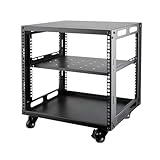
- SIZE: Width 15.75" (400 mm), Depth 19.49" (95 mm), Height 20.55" (522 mm). Additional heights of 6U and 12U are also available. The portable rolling network rack series is designed for versatility.
- STURDY: Featuring a robust 4-post construction, this 9U rack is manufactured using stringent sheet metal processes and high-quality spray treatments, making it resistant to scratches and rust.
- VERSATILE: This exceptional rack series is perfect for housing various electronics and equipment such as AV systems, TVs, NAS devices, data servers, internet routers, amplifiers, hard recorders, computers, and gaming consoles like the Xbox.
- INSTALLATION: Assembly is straightforward with clear instructions provided. The universal wheels equipped with brakes offer enhanced stability to ensure an uninterrupted online gaming experience and enjoyable entertainment moments.
- ACCESSORIES: The product will be delivered in a single box containing the 6U network rack along with essential accessories including screws & cage nuts and casters.
Fly.io billing depends on provisioned resources and can include persistent volumes, snapshots, outbound transfer, and optional services. Managed Postgres plan and storage prices can change, so model expected usage using Fly.io’s resource pricing documentation rather than assuming a flat total.
Compare the deployment models before deciding
| Platform | Documented deployment or product fit | Previews and domains | Cost model or caveat |
|---|---|---|---|
| Vercel | Multi-tenant SaaS; repository-connected deployments | Automatic preview environments; confirm specific domain needs in current documentation | Not stated in the cited source |
| AWS Amplify Hosting | Managed hosting and CI/CD for static and dynamic web apps | Feature branches, pull-request previews, custom domains, wildcard subdomains | Pay-as-you-go; calculate usage for the app |
| Render | Applications, datastores, and multi-service architectures | Regions are covered in the documentation; specific preview and domain details are not established here | Free services are for testing, hobby use, or previews—not production |
| DigitalOcean App Platform | Web apps, APIs, and static sites; Git, registry, or CI deployment | Not stated in the cited product page | Described as predictable monthly pricing; exact workload total is not established |
| Fly.io | CLI deployment; documented app plus Managed Postgres flow | CLI proposes a region; confirm the required region and controls in current docs | Resource-based, with possible storage, snapshot, transfer, and optional-service charges |
Use the comparison to narrow candidates, then test the actual deployment path with your application. A preview feature is valuable only if it fits your team’s review process; a database option is useful only if its networking, backup, region, and scaling characteristics fit the product.
A practical selection process
- List the components. Write down the frontend, server-rendered routes, API, background jobs, database, storage, and any scheduled tasks. Mark which components need persistent processes or storage.
- Choose the deployment workflow. If each pull request needs an isolated review environment, begin with the documented Git-preview workflows at Vercel or Amplify. If your team prefers registry or CI deployment, evaluate DigitalOcean App Platform. If you want to provision from a local project using a CLI, examine Fly.io’s documented flow.
- Validate the backend and database. Confirm that the platform can run each required service and that the application can securely connect to its database. Fly.io documents one integrated app-and-Managed-Postgres path; for the others, verify the specific data architecture you plan to use instead of assuming a product-page category guarantees it.
- Check domain and tenant needs. Amplify documents wildcard subdomains; Vercel documents multi-tenant SaaS support. Confirm the exact routing, DNS, TLS, and isolation behavior your app requires before choosing either for tenant domains.
- Estimate the whole bill. Include production and nonproduction environments, database, storage, backups, and network transfer. AWS is pay-as-you-go, Fly.io is resource-based, and DigitalOcean describes monthly pricing as predictable; compare your expected usage with current vendor pricing rather than comparing labels alone.
- Run a representative deployment. Deploy the real framework and rendering mode, exercise a database migration and background task if relevant, and test a preview or rollback workflow. Record operational friction and the services that actually appear on the bill.
Common selection mistakes
- Choosing on frontend fit alone: A framework integration does not prove that the platform suits your API, worker, persistent storage, or database requirements.
- Treating preview environments as production environments: Preview workflows help review changes, but production isolation, secrets, data handling, and scaling still need separate evaluation.
- Using free services for a production system: Render specifically says not to use its free services for production applications.
- Comparing headline billing descriptions as final prices: Pay-as-you-go, monthly, and resource-based describe billing approaches, not the total cost of your architecture.
- Assuming one provider is best for every region: Verify the regions and controls currently available for the exact services you plan to use.
Or skip the browser setup
If deploying your SaaS includes automating website screenshots—for release checks, documentation, or previews—you can use ScreenshotNeo rather than building and maintaining a browser-capture setup. One GET request returns an image or PDF; for example, this cURL request saves a WebP screenshot:
Rank #4

- Adjustable Depth: Depth adjustable from 23" to 40", this open frame server rack accommodates servers and network equipment while providing ample space for A/V gears and cable management. Enjoy easy access to ports and devices from multiple angles.
- High Weight Capacity: Supports up to 300 lbs on the floor (200 lbs when adjusted to maximum depth) and 200 lbs when wall-mounted (depth cannot be adjusted in wall-mounted mode). Made from carbon steel for superior welding performance and durability, this open frame rack is designed to save space while accommodating multiple devices.
- User-Friendly Design: Designed with your convenience in mind, this open frame server rack features an top shelf for extra storage and improved space utilization. The rolling casters let you move it effortlessly wherever you need it, making setup and movement a breeze.
- Widely Applicable: Maximize your space with this adaptable open frame server rack, designed to make the most of every inch. Ideal for retail spots, classrooms, offices, and any area where space is at a premium, it delivers practical solutions for your storage needs.
- Everything You Need: Our open-frame rack comes with fully equipped accessory kit for easy setup and secure installation: 2 x Trays, 4 x Casters, 1 x set of Screws, 16 x M6*12 Cage Nuts, 1 x Grounding Wire, 1 x Internal & External Hex Wrenches, and 1 x User Manual.
curl -G "https://api.screenshotneo.com/v1/shot" -d access_key=YOUR_API_KEY --data-urlencode url=https://stripe.com -o shot.webpSee the ScreenshotNeo API documentation for request options. Cookie banners and consent prompts are accepted or removed before capture, and the service removes more than 60 known consent platforms, newsletter popups, and chat widgets; these steps can be turned off. Bot checks or CAPTCHAs, blank pages, timeouts, failed loads, and cache hits cost nothing, with response headers identifying the page verdict and billing status. An MCP server provides take_screenshot, get_page_info, and capture_pdf tools for Claude, Cursor, and other MCP clients. The free plan includes 1,000 screenshots per month without a card; paid plans start at $5 for 3,000.
Sign up for ScreenshotNeo’s free plan to try it without a card.
About the nine-platform title
The title’s requested nine providers cannot be completed responsibly from the available evidence: official details establish five named services, but do not establish which four additional platforms belong in a defensible shortlist. This comparison therefore covers those five without inventing a nine-way ranking. The sources also do not provide independent benchmark results or a like-for-like price test, so the recommendation is to match documented workflows to your architecture and confirm current vendor details before deployment.
Quick Recap
Product prices and availability are accurate as of the date/time indicated and are subject to change. Any price and availability information displayed on Amazon at the time of purchase will apply.




