Freedom251 › Augmented Reality Learning Apps

zSpace
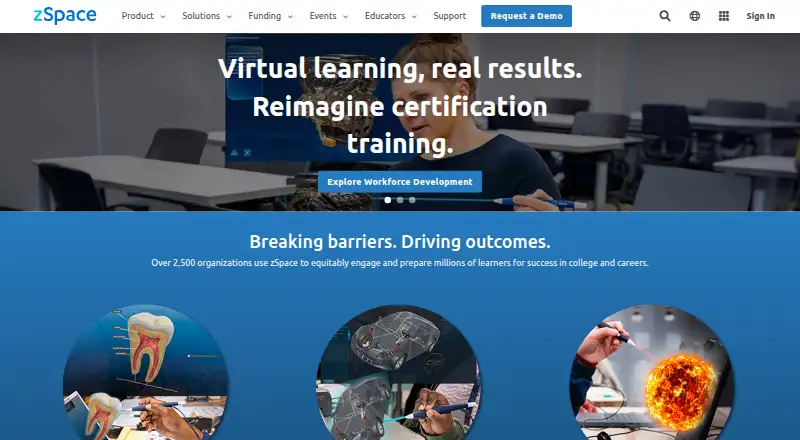
What zSpace is
zSpace provides immersive AR/VR learning experiences for workforce development, career and technical education, and STEM. Learners use a device and stylus to grab, rotate, and manipulate virtual objects, without a head-mounted display. The zSpace Learning Applications package covers science, engineering, math, and other subjects, while zCentral gives users a place to search lessons, applications, and collections through classes and apps sections.
The Inspire and Inspire Pro run Windows 11 Pro 64-bit and pair a spatial 3D display with stylus interaction. zSpace describes LMS integration, including using an LMS worksheet alongside a zSpace lesson. The product supports lesson authoring, authoring tools, collaborative learning, and mixed delivery. Its solutions span elementary and middle grades, high school, postsecondary education, and career and technical education programs. zSpace is paid, with pricing and availability handled by sales. The company offers onboarding and installation support, professional development, online resources, and IT support.
Who it suits
zSpace suits learners in elementary and middle grades, high school, postsecondary education, and career and technical education programs seeking immersive learning for STEM, career and technical education, or workforce development. Its stated audiences range from elementary and middle grades through high school and postsecondary education.
What it does well
- Learners manipulate virtual objects with a device and stylus.
- No head-mounted display is required.
- Learning applications cover science, engineering, math, and other subjects.
- zCentral organizes lessons, applications, and collections.
- Offers LMS integration and collaborative learning.
- Provides onboarding, professional development, and IT support.
What to know first
- Pricing and availability require contacting sales.
- The Inspire and Inspire Pro run Windows 11 Pro 64-bit.
Plans
| Plan | Billed and limits | Price |
|---|---|---|
| Custom zSpace solutions | Pricing and availability provided by sales; purchasable direct, through convenience contracts and RFPs, or sales partners | On request |
As zspace.com lists them, read 8 Oct 2026. The maker's own page has the final word.
Getting started
- Contact sales for product pricing and availability.
- Purchasing options include direct, convenience contracts, RFPs, or sales partners.
- Use zSpace onboarding and installation support.
- Search lessons, applications, and collections in zCentral.
Verdict
Choose zSpace if your learning program needs interactive, glasses-free AR/VR content with lesson authoring and collaborative learning. Pricing and availability are provided by sales.
Questions
How much does zSpace cost?
zSpace is paid, with pricing and availability provided by sales.
What platforms does zSpace support?
The listed platforms are web and Windows. Inspire and Inspire Pro run Windows 11 Pro 64-bit.
Does zSpace require a headset?
No. Its AR/VR systems do not require a head-mounted display.
Can educators create lessons and collaborate?
Yes. zSpace lists lesson authoring, authoring tools, and collaborative learning.
Does zSpace work with learning management systems?
zSpace describes LMS integration, including using an LMS worksheet alongside a zSpace lesson.
What support does zSpace offer?
Support includes onboarding and installation, professional development, online resources, and IT support.
Facts from zSpace's own pages
- Accessibility
- zSpace states that its website conforms fully to WCAG 2.2 Level AA. · blog.zspace.com, 8 Oct 2026
- Audience
- zSpace describes its solutions for elementary and middle grades, high school, postsecondary education, and career and technical education programs. · cdn.zspace.com, 8 Oct 2026
- Company
- zSpace, Inc. says it is located in San Jose, California. · investor.zspace.com, 8 Oct 2026
- Content portal
- zCentral lets users search lessons, applications, and collections, and includes classes and apps sections. · go.zspace.com, 8 Oct 2026
- Display
- Its technology delivers AR/VR experiences without a head-mounted display. · zspace.com, 8 Oct 2026
- Hardware
- The zSpace Inspire and Inspire Pro run Windows 11 Pro 64-bit and include a spatial 3D display and stylus interaction. · cdn.zspace.com, 8 Oct 2026
- Headquarters
- San Jose, California, United States · zspace.com, 28 Sept 2026
- Integrations
- zSpace describes integration with learning management systems and gives examples of using an LMS worksheet alongside a zSpace lesson. · cdn.zspace.com, 8 Oct 2026
- Interaction
- Learners can grab, rotate, and manipulate virtual objects using a device and stylus. · zspace.com, 8 Oct 2026
- Learning applications
- The zSpace Learning Applications package includes applications for science, engineering, math, and other subjects. · cdn.zspace.com, 8 Oct 2026
- Product
- zSpace provides immersive, interactive AR/VR learning experiences for workforce development, career and technical education, and STEM education. · zspace.com, 8 Oct 2026
- Purchasing
- The company directs buyers to contact sales for product pricing and availability. · zspace.com, 8 Oct 2026
- Security updates
- The support guide recommends updating zSpace software with App Manager and then installing Windows updates to keep systems current for features, stability, and security. · support.zspace.com, 8 Oct 2026
- Support
- zSpace offers onboarding and installation support, professional development, online resources, and IT support. · cdn.zspace.com, 8 Oct 2026
Where zSpace stands on Freedom251
- Augmented Reality Learning Apps#25 of 25
- Virtual Reality Learning Platforms#24 of 24